


Vdo
As soon as we get final version of a device carrying the new OS onboard, we will patch up this review right away – basically, the same thing happened to the article on Windows Mobile 5.0. As of today, not all functions are operating properly and some of them don’t start up at all. Though, it’s almost for sure now that new features are not going to be implemented, since the manufacturers are getting RTM edition in November, 2006.
Like we mentioned above, the codename for the new Windows Mobile version is Crossbow. Now let us reminisce and find out what codenames were given to the previous versions of mobile Windows platform and their announcement dates.
* Windows Mobile 6.0 – Crossbow – not announced;
* Windows Mobile 5.0 – Magneto – May 10, 2005;
* Windows Mobile 2003 Second Edition – Ozone Update –March 24, 2005;
* Windows Mobile 2003 – Ozone – June 23, 2003;
* Pocket PC 2002 – Merlin – October 4, 2001;
* Pocket PC 2000 (Palm-size PC v2) – Rapier – April 19 2000;
* Palm PC v1.0/1.2 – Gryphon/Wyvern – January 8, 1998 (3 moths later Palm PC was renamed to Palm-size PC).
General changes
On the first start-up the device requires you to set password (simple four-digit sequence or more reliable, secret question can be also submitted). After doing that you will be offered to set up mail by going through a wizard (which made its first appearance in WM 5.0 AKU 3.0), which is really handy for an inexperienced user, as all important variables and options, including security (which is left out by many) and mail can be adjusted right away.
Each and every system sound notification and default ring tones have been totally re-mastered, so that there are no old tunes left (such beloved tone as Old Phone, used as a ring tone by many, has gone missing as well).
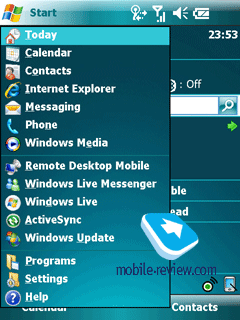
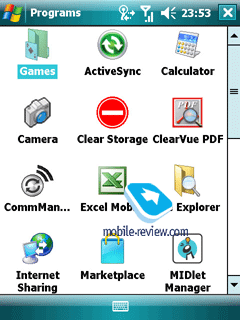
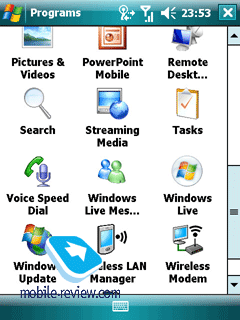
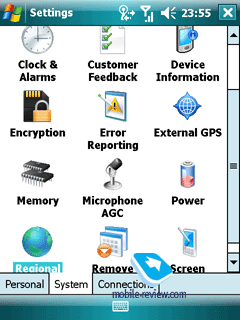
The interface itself has undergone some face-lifts – applications’ icons have been re-worked, so now they look like 3D thumbnails. But at the end of the day, all these changes aren’t significant at all, as they don’t exert any influence upon the device’s ergonomics. Light refreshing updates, new bits for smoother looks, but nothing more.
The cross-shaped button in the top right corner still has nothing to do with closing an application – it only minimizes it. The very concept of this operating system relies on the fact that the OS decides which programs are called for by user and which should be terminated as not wanted, on its own (Smart Minimizing concept). To make the “cross” shut down a program, you will have to get an extra tool. The start-up screen looks and feels the same and provides the same set of functions as before.
The top left corner houses “Start” button, the status bar located on the right has been left untouched – connection indicator (GPRS, Wi-Fi, Active Sync), network signal, volume and time.
Plz go 2 dis site 4 more info i knw notin Abt dis
As soon as we get final version of a device carrying the new OS onboard, we will patch up this review right away – basically, the same thing happened to the article on Windows Mobile 5.0. As of today, not all functions are operating properly and some of them don’t start up at all. Though, it’s almost for sure now that new features are not going to be implemented, since the manufacturers are getting RTM edition in November, 2006.
Like we mentioned above, the codename for the new Windows Mobile version is Crossbow. Now let us reminisce and find out what codenames were given to the previous versions of mobile Windows platform and their announcement dates.
* Windows Mobile 6.0 – Crossbow – not announced;
* Windows Mobile 5.0 – Magneto – May 10, 2005;
* Windows Mobile 2003 Second Edition – Ozone Update –March 24, 2005;
* Windows Mobile 2003 – Ozone – June 23, 2003;
* Pocket PC 2002 – Merlin – October 4, 2001;
* Pocket PC 2000 (Palm-size PC v2) – Rapier – April 19 2000;
* Palm PC v1.0/1.2 – Gryphon/Wyvern – January 8, 1998 (3 moths later Palm PC was renamed to Palm-size PC).
General changes
On the first start-up the device requires you to set password (simple four-digit sequence or more reliable, secret question can be also submitted). After doing that you will be offered to set up mail by going through a wizard (which made its first appearance in WM 5.0 AKU 3.0), which is really handy for an inexperienced user, as all important variables and options, including security (which is left out by many) and mail can be adjusted right away.
Each and every system sound notification and default ring tones have been totally re-mastered, so that there are no old tunes left (such beloved tone as Old Phone, used as a ring tone by many, has gone missing as well).
The interface itself has undergone some face-lifts – applications’ icons have been re-worked, so now they look like 3D thumbnails. But at the end of the day, all these changes aren’t significant at all, as they don’t exert any influence upon the device’s ergonomics. Light refreshing updates, new bits for smoother looks, but nothing more.
The cross-shaped button in the top right corner still has nothing to do with closing an application – it only minimizes it. The very concept of this operating system relies on the fact that the OS decides which programs are called for by user and which should be terminated as not wanted, on its own (Smart Minimizing concept). To make the “cross” shut down a program, you will have to get an extra tool. The start-up screen looks and feels the same and provides the same set of functions as before.
The top left corner houses “Start” button, the status bar located on the right has been left untouched – connection indicator (GPRS, Wi-Fi, Active Sync), network signal, volume and time.
Plz go 2 dis site 4 more info i knw notin Abt dis


