ANDROID වැඩකාරයෝ

Status
Not open for further replies.

Kasunrock619

Well-known member
  • May 18, 2009
    16,839
    1,459
    113
    Colombo
    චිරි චිරි වැස්ස;12177156 said:
    36704419.jpg


    ඔයගොල්ලො මොකද හිතන්නෙ යාළුවනේ මේ ගැන ????

    smiley_sad_tumb_down.JPG


    මට මේ එකට ගොඩක් හොද Comments ලැබුන,,, ඒත් සහෝ... මෙච්චර කට්ටියක් මේ Thread එක එක්ක එකතු වෙලා ඉදලත්... එ අයට ප්‍රයෝජනයක් ලබාගෙනත්... REP + කරල තියෙන්නෙ කීයෙන් කී දෙනෙක්ද බලන්න..
    :sorry: :sorry: :sorry: :sorry: :sorry:


    කොහොම වුනත් මචන්ලා..... උබල මට REP + නොදුන්න කියල මං බොලාල එක්ක කිසිම තරහක් නැහැ..... මං කොහොමත් මට පුළුවන් කාලයක් මේ Thread එක දිගටම කරගෙන යනව... මොකද මා එක්ක මේ
    Thread එක කරගෙන යන්න සහෝදරයෝ කීපදෙනෙක්ම ඉන්න හින්දත්.... මේ Thread එකෙන් ගොඩක් අයට ලොකු ප්‍රයෝජනයක් වෙනව කියල දන්න නිසාත් මං මේ Thread එක ගෙනියනව... REP + නැතත් තරහ නැහැ,,, :no: :no: :no: :no: REP + දුන්නත් තරහත් නැහැ.... ;) ;) ;) ;) මොකද මචන්ලා,,, උබලම දන්නවනෙ REP + එකක් ආවම හිතට එන එක.... එහෙම වුනාම අලුත් අලුත් ඒව ගේන්න හිතෙනවනේ.... කොහොම වුනත් අපි වැඩේ දිගටම ගෙනියමුකෝ....

    jbQh3eUdovmJ9dskgMLI0u4alZjd-QyWwVKROct0Xp7qudpi_jJBHuUOC4iqyxnolAh_1fHuD6M6R3ydN74ngoGCmA=s512


    ඔවා ගනන් ගන්න එපා බං උබ පුරුදු විදිහට වැඩෙ කරපන් කටිටිය එයි තාම තර්ඩ් එක දැම්ම විතරයි නැ මිටි ඉස්සෙල්ලාත එලකිරි android market කියලා තර්ඩ් එකක් තිබ්බා නියම් තර්ඩ් එකක්;)එක පොඩි කෙස් එකක් නිසා එක කරපු එකා එලකිරි එක දාල ගියා:( උබත් මෙ තර්ඩ් දාල යන්න ද හදන්නෙ:frown: දිගටම් හිටපන් අපි පුලුවන් තරම් සප් එක දෙන්නම්:yes::cool:
     

    GingerBread

    Member
    May 16, 2011
    1,207
    88
    0
    AOSP Repository
    Maxxa.....

    MX Video Player Pro 1.5a

    20110807055135946.jpg


    images


    MX-VideoPlayer-Pro-2.jpg


    D1t0VxR96_4MVvd4hKMgMavZLwpcnCk1tBtRbNZaE0lbKBQt0E1eO4bfNr1_-zeAfmg=w705


    Requirements: Android 2.1+ and Rooted
    Overview: MX Video Player - The best way to enjoy your movies.
    THIS IS THE AD-FREE VERSION OF MX VIDEO PLAYER.
    MX Video Player - The best way to enjoy your movies.
    a) MULTI-CORE DECODING - MX Video Player is the first Android video player that performs multi-core decoding. According to the test results on dual-core devices, it shows up to 70% performance improvement than single-core devices.
    b) CPU OPTIMIZATION - Provides highly optimized CODECs and Rendering Engines for the processors including ARM® NEON™ and NVIDIA® Tegra™ 2.
    c) PINCH ZOOM - Easily zoom in and out by pinching and swiping across screen.
    d) SUBTITLE SCROLL - Scroll on subtitle text and playback position will be adjusted to match previous or next subtitle timing.
    e) BETTER SUBTITLE READABILITY - Increased subtitle readability with thicker border and shadow around text.
    f) ANDROID 4.0 - Fully supports Android 4.0 Ice Cream Sandwich.

    - SubRip(.srt)
    - Sub Station Alpha(.ssa/.ass)
    - MicroDVD(.sub/.txt)
    - SubViewer2.0(.sub)
    - SAMI(.smi/.sami)
    - MPL2(.mpl/.txt)
    - PowerDivX(.psb/.txt)
    - TMPlayer(.txt)
    - Matroska (.mkv) Subtitle Track. (text, ass/ssa only)
    ******
    Sometimes license checking could fail on the first run.
    It typically happens when current time or time zone settings are incorrect, or Internet connection is unavailable. Please check the time setting and Internet connectivity.

    What's in this version:
    Improved license checking mechanism.
    Improved SAMI subtitle parser.
    Reduced main storage usage when installed on SD card.
    Added option to select full screen view.
    Changed user interface for Android 3.x and 4.0 devices. Menu become accessible on Galaxy Nexus.
    Changed subtitle sync adjust time unit to 0.1 second.
    Block home button when input is locked. (Also added "System tools" permission for this) (May not work on some devices)


    1. Install MX Video Player Pro, Don't run
    2. Install LuckyPatcher
    3. Run the LuckyPatcher you need Root your phone, long press MX Video Player Pro, choose Lucky Google Market Patch
    4. Enjoy


    Android Market eken gannawanam..... :shocked: :shocked: :shocked:


    Root Version :

    MX Video Player 1.5
    ARM v7 neon codec
    ARM v6.1.5 codec
    ARM v5 codec
    ARM v7 nvidea 3d 16 codec

    Unroot Version :
    MX Video Player pro


    avast! Mobile Security

    avast! Mobile Security

    sI3RuHbvJl5JpIIcmHniriMQHnpQfTte2c39fWGJtwDJvBuxudcV1Qx4ymoVVUpJNGM=w705


    Description :
    Full-featured Antivirus and Anti-Theft security for your Android phone.
    Protect personal data with automatic virus scans and infected-URL alerts. Stop hackers by adding a firewall (rooted phones). Control anti-theft features with remote SMS commands for: history wipe, phone lock, siren activation, GPS tracking, audio monitoring, and many other useful tools. Your ‘invisible’ app hides itself, making it extremely hard for thieves to find and disable. A standalone yet tightly integrated component of avast! Mobile Security, avast! Anti-Theft is the slyest component on the market. Formerly known as Theft Aware, the Anti-Theft portion of avast! Mobile Security has been recommended by leading industry experts that include T-Mobile, N-TV, AndroidPIT, and Android Police.
     
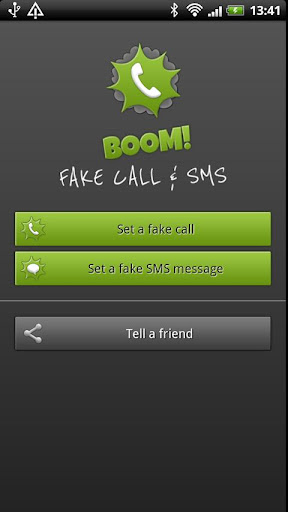
    BOOM! Fake call and SMS v1.2

    BOOM! Fake call and SMS v1.2

    Zwci6u8gQXGAQajx_yzVTrycJcsjXJqgxzYEkaWcVIp-M98zQE1PW-xcC_Ox9w_QFqY


    2wd8yISBjiohaYTV9jG27HtQLg2nrTSAGkkWENWGU94oSXed2E7XNRTXeCl9lXSppUw


    Requirements: Android 2.1+
    Overview: BOOM! get ready for the best fake call and SMS app in the market!

    BOOM! get ready for the best fake call and SMS app in the market!
    Why download two different apps when you can have it all in one?
    Whenever you want to get out of a boring meeting, horrible date or just mess with your friends, “BOOM! Fake call and SMS” is your answer.
    The app lets you fake calls and SMS messages from anyone you want, including everyone in your contact list.
    The app has a widget!
    *********** Why get the Pro version? ***********
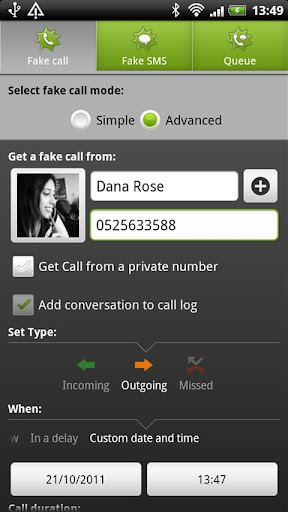
    The pro version gives you full control! You can choose a specific date for fake calls and SMS messages, even from the past.
    You can set incoming/outgoing or missed calls that will register in your phone’s log.
    Also, you can fake incoming/outgoing SMS messages, therefore fake an entire conversion.
    Finally, using the pro version gives you a larger variety of photos to choose from the photo gallery.
    *********** Key features ***********
    -Set incoming/outgoing/missed calls that can register in the phone’s log.
    -Fake incoming/outgoing SMS messages that enter the phone’s log.
    -Select any time you want for fake calls and SMS messages, even from the past!
    -Choose a contact from your own contact list.
    -Fake call widget.
    -Shake device to get a random fake call
    -Choose contact photo from a gallery.
    -Queue of all future fake calls and SMS messages.
    -Get a call from a private number.


    What's in this version:


    1. Shake device to get a random fake call
    2. Brand new tutorial screens
    3. fixed small bugs
    Download


    App 2 SD Pro v2.44 (Move Apps to SD)

    App 2 SD Pro v2.44 (Move Apps to SD)
    TT6yovOmwm4cYRZnFWUCPMh3pjZIB5kUwYpnxsp-hyTYlSRgmjvWn_f1PY2Igo8Cc0Y=w705


    Xflitbr6QbL02RJe3yu_G8YR_GiD6oNyBJo1iwEAzLKAGODfLBHpyd6W411HFudpAA


    App 2 SD helps you to get more free internal phone storage space

    Are you running out of application storage?

    Do you hate having to check each and every app if it supports moving to the SD card?

    Do you want an app that automatically does this for you and can notify you when an app can be moved?

    App 2 SD streamlines the movement of applications to on your device's external or internal storage through your device's Settings. With this handy app, you'll have more control over your ever expanding collection of apps. This app is crucial to anyone who has memory management issues.

    ★ View all SD card capable apps and move them seamlessly
    ★ notify if movable apps installed
    ★ 1-tap to clear all app cache
    ★ export the app list to SD card
    ★ install apps from the exported app list
    ★ home screen widget shows cache and available size
    ★ show app cache/data/code/total size
    ★ keep track of total and available storage space
    ★ sort through apps stored on phone and SD card
    ★ add movable apps to the ignore list
    ★ move apps back to the internal storage
    ★ view app on Market
    ★ uninstall app
    ★ open app
    ★ show app details page
    ★ support "Move2SD Enabler"
    ★ customizable notification sound, vibrate and light

    Download
     
    SwiftKey X Keyboard

    SwiftKey X Keyboard
    Updated: February 17, 2012
    Current Version: 2.2.0.159
    Requires Android: 2.1 and up
    Category: Productivity
    ss-480-0-6

    Description
    Android typing has never been this easy.

    SwiftKey X Keyboard makes typing much easier on your phone, replacing your touchscreen keyboard with one powered by smarter natural language technology.

    SwiftKey X understands how words work together, giving much more accurate corrections and predictions than other keyboards. Very sloppy typing will magically make sense, and SwiftKey X also powerfully predicts the word you may want next.

    SwiftKey X learns as you use it to make typing easier and even more accurate over time, and you can also personalize it using your Gmail, Facebook, Twitter or blog posts.

    This app is among Android's best selling apps for a reason -- it genuinely transforms your keyboard, making typing a breeze and saving you hassle every day.

    LANGUAGES SUPPORTED:

    (enable up to three at once if you're multi-lingual)

    English (US)
    English (UK)
    Afrikaans
    Arabic
    Basque
    Bulgarian
    Catalan
    Croatian
    Czech
    Danish
    Dutch
    Finnish
    French (FR)
    French (CA)
    Galician
    German
    Greek
    Hebrew
    Hungarian
    Indonesian
    Italian
    Kazakh
    Norwegian
    Polish
    Portuguese (PT)
    Portuguese (BR)
    Romanian
    Russian
    Slovak
    Slovenian
    Spanish (ES)
    Spanish (US)
    Swedish
    Turkish
    Ukranian

    Support for QWERTY, QWERTZ, QZERTY, AZERTY, DVORAK, COLEMAK, Arabic, Bulgarian, Greek, Hebrew, Scandinavian, Russian and Ukrainian layouts.

    ~~~

    Sometimes during upgrade Android will disable the keyboard. If this happens to you go to your phone settings and choose Language & Keyboard, and make sure there is a tick in the checkbox by SwiftKey X. Then access SwiftKey X settings to re-select it as default.


    WwW.lk

    Well-known member
  • Nov 4, 2009
    11,387
    762
    113
    kurunegala
    machan android 1 thiyana phone ekakata aluthma eka android danna bari y? danaganna ahanne danne nathi nisa
     
    ezPDF Reader v1.7.6.1

    ezPDF Reader v1.7.6.1
    Updated: February 13, 2012
    Current Version: 1.7.6.1
    Requires Android: 2.1 and up
    Category: Productivity
    ss-480-2-5


    Description
    Audio & Video Multimedia PDF Reader
    Annotate, Listen, and Fill out PDF Form

    ezPDF Reader is the Best Selling and the Best Rated (4.63 out of 5.00) Multimedia PDF viewer, annotator, and PDF form filler in Android. (Supports OS 2.1 and up)

    Customized Viewing

    Clearly presented without the fluff, documents appear as they would on your PC, but customized to fit your mobile device's screen. Scanned and text based PDFs are all supported, including JPEG2000 and JBIG2 compression. Select Text Reflow, Fit to Text Column, Copy and paste text in PDF view and bookmark as you go or Change Reading Direction to ease reading

    PDF Form Filler

    Good for application forms, school tests, and contracts. Fill out your Tax Form with ezPDF Reader.
    Fill out the contract form, sign at the bottom, and send via email from the file manager (My docs).

    Multimedia PDF Viewer - Audio, Video, and TTS (using built-in Text-to-Speech feature)

    Get convenient, hassle-free PDFs directly to your Android device with ezPDF Reader. ezPDF Reader is designed specifically for PDF documents and contents, but also able to play multimedia files embedded into PDF. Perfect solution for PDF based audio/video-enabled Ebooks, such as children's books and instructional books. (Multimedia file format must be compatible to your Android device, However, no support for Flash) Use Voice Reading feature to have documents read to you with the continuous automatic page-turning feature. (It uses TTS feature of the hardware settings)

    Annotation Features on PDF - No need to print for marking

    Useful tool to add text in text box and sticky notes; highlight, underline, or cross out texts; draw rectangles, ovals and freehand drawings. Add memo, change color / thickness, resize and move them around as you like. All these comments are compatible with Adobe® Acrobat®. (PC or Mac version)

    More Features

    - Read text based PDF file (using built-in Text-to-Speech function (TTS)), Compatible with SVOX
    - Play Embedded Video & Audio (Android device supported format)
    - Text View with reflow function. Option for Night / Day Mode, Able to change font size and color (text and background)
    - Thumbnail image view
    - Support for landscape view
    - Search (Options for case sensitive, whole word or part, exact word, and/or operator) and highlighted result
    - Auto Fit Zoom for multi-column article or removing white margin
    - Scroll lock / unlock
    - Able to select text in PDF, save to clipboard, web search, share with other apps
    - Support hyperlinks (Go to page within the PDF, URL links to webpage)
    - Open Standard Password-protected PDF (Important! If the file is protected with the DRM applied to PDF file, this would not open the file.)
    - Intuitive bookmarking & viewing bookmarks with its description and ribbon & thumbnail image
    - Auto Page Turn (in secs) or Auto Scroll (up a screen full)
    - Table of Contents
    - Zoom in & out (Pinch or double tap)
    - Page navigation with thumbnail scroll images
    - Jump to a specific page by its Page Number
    - Able to change reading direction - Good for Arabic, Chinese, Japanese & Hebrew documents
    - Undo & Redo button
    - Support Trackball
    - Page Turning Effect (Flip)
    - FREE PDF Conversion Program for PC (link to download)
    - 4-point-tap toggles Notification Bar On or Off
    - 3-point-tap toggles PDF view or Text Reflow view
    - 2-point-tap reduces the page to fit the width when enlarged
    - 1-point-tap toggles Menu On or Off

    ezPDF Reader is updated regularly in order to add new features or to improve upon existing ones.

     
    • Like
    Reactions: samithasd
    CamScanner -Phone PDF Creator

    CamScanner -Phone PDF Creator

    Updated: August 23, 2011
    Current Version: 1.2.2.20110823
    Requires Android: 2.0 and up
    Category: Productivity

    ss-480-0-7


    Description
    Turn phone to document scanner

    CamScanner is the greatest invention in 21th century.— Jose Michael

    I scan newspapers articles to keep as file and share it on the internet and scan personal docs to my own records. It as simplify my everyday tasks!— Zed Ruger

    CamScanner turns Phone into Scanner. With CamScanner, you are able to digitize any paper documents by photo shooting. Simply take a picture of any paper documents such as receipts, whiteboards, notes, agreement and so forth, and CamScanner can auto-crop image, enhance image quality and to create an industry standard PDF file. Then you can easily upload documents to cloud like Dropbox, Google Doc, Box.net, and manage by tagging or searching.

    With CamScanner You Can Scan
    * Receipt, Bill, Tax Roll
    * Business Card, Membership Card, VIP card
    * Agreement, PPT and Whiteboard
    * Note, Memo, Script, Letter
    * Books, Magazines, Newspaper, Poster, Coupon
    * Courier Sheet, Resumes,
    …… Any other use cases, please share with us at [email protected].

    Version Difference:
    CamScanner Free: With advertisements, PDF files created with watermark, limitation of 50 documents, 10 pages per document, and up to 3 scans in batch mode.
    CamScanner Full:No advertisements, PDF files created is clean without any watermark, no limitation on number of documents, pages, and scans in batch mode.

    Key Features:
    * Batch Scan Multi-Page Documents
    CamScanner can take pictures of multi-page documents in a row and do batch scanning fast.

    * Auto-crop and Auto-enhance Image
    What makes CamScanner different from camera is its smart image processing technology. CamScanner can auto-detect edges of images, auto-crop and auto-enhance images. Options to choose multi modes of color enhancement.

    * Create and Share Multi-size PDF Files
    With CamScanner, you can create PDF files in more than 10 different sizes and formats including Letter, A4, B5, user-defined, or Auto-fit to get the most proper size. All PDF files can be shared via email, uploaded to Dropbox, Box.net, Google Docs.

    * Back-up documents
    CamScanner can backup and restore all files in your SD card.

    * Smart Manage Scanned Files
    With CamScanner, you can easily view all files in list or thumbnail view, Tag, merge or delete files or pages.


    WwW.lk

    Well-known member
  • Nov 4, 2009
    11,387
    762
    113
    kurunegala
    na machan 1.2wagee thiyenam ehema phone ekata 2 or up wagee android version ekak danna bari y kiyala?hardware suppert karanne nathda?
     
    Status
    Not open for further replies.