ANDROID වැඩකාරයෝ

Status
Not open for further replies.

Thilinacba

Well-known member
  • Sep 7, 2006
    13,526
    2,752
    113
    ekawa contact karanne mokatada bun unma bootloader eka unlock karana hati kiyala denawa :P

    http://unlockbootloader.sonymobile.com/

    karana widiya therune naththam kiyahan mama tutorial ekak daannam hawasata :D ;)

    Code:
    http://forum.xda-developers.com/showthread.php?t=1294564


    boot loader unlock karanna manufacturer wama contact karanna onada machan?:P:P:P>nathnam eta wada lasi step 1k thiyanwada?
    :rolleyes::rolleyes::rolleyes:
    oya widihata unlock karanna epoo,drm keys nati wenawa.Sony services like track id,face book like in music player wada karanne na :P
    Also officially pc companion eken ICS update eka ganna ba :no:
    Use SETool2 paid method or s1tool method :yes: I can confirm with SETool2 paid method okkoma wada including pc companion,track id etc :cool:

    to unlock boot loader with SEtool2 paid method contact Jinx13 in here http://phoneunlockserver.com/forum/
    15 UK pounds the prize

    anyway if u wanna just root then downgrade to 0.42 fw with flash tool ;)
     
    Last edited:

    vpsupun

    Well-known member
  • Dec 5, 2006
    982
    650
    93
    40
    මේකේ තියෙන්නේ odin වලින් දාන හැටි. CWM එකට official ROM වල තියෙන format එක හරියන්නේ නෑ. ඒවා එන්නේ .img හැටියට හොදට මට දුන්න ලින්ක් එක අයෙ කියවල බලන්න. ROM manager එක තියෙන්නේ CUSTOM ROM බාලා install කරන්න official rom support කරන්නේ නෑ.

    අනේ මචෝ උඔට ඇස් නොපෙනේ ද ? :rofl: :rofl: මම දාපු ලින්ක් එකේ Mobile Odin සහ CWM දෙකෙන්ම Stock ROM ගහන විදිය තියනවා. මම කරල බලපු නිසයි කියන්නනේ. ඔය මම දීපු ලින්ක් එකේ (මෙන්න ලින්ක් එක ආයිත්) යටට වෙන්න තියනවා Mobile odin වලින් කරන විදියයි, CWM වලින් කරන විදියයි. Mobile Odin එකට යටින් තියෙන්නේ. කියවන්න කම්මැලි නම් "CWM recovery" Search කරල බලපන් මචෝ.
    වැඩිය නෙමේ, මේ දවස් දෙක තුනට සෑහෙන්න දේවල් ටිකක් ඉගෙන ගත්තා බං. මම කරල බලපු නිසයි කිව්වේ. :yes:
     

    navodwickra

    Well-known member
  • Jan 17, 2007
    11,424
    2,140
    113
    Leeds, UK
    අනේ මචෝ උඔට ඇස් නොපෙනේ ද ? :rofl: :rofl: මම දාපු ලින්ක් එකේ Mobile Odin සහ CWM දෙකෙන්ම Stock ROM ගහන විදිය තියනවා. මම කරල බලපු නිසයි කියන්නනේ. ඔය මම දීපු ලින්ක් එකේ (මෙන්න ලින්ක් එක ආයිත්) යටට වෙන්න තියනවා Mobile odin වලින් කරන විදියයි, CWM වලින් කරන විදියයි. Mobile Odin එකට යටින් තියෙන්නේ. කියවන්න කම්මැලි නම් "CWM recovery" Search කරල බලපන් මචෝ.
    වැඩිය නෙමේ, මේ දවස් දෙක තුනට සෑහෙන්න දේවල් ටිකක් ඉගෙන ගත්තා බං. මම කරල බලපු නිසයි කිව්වේ. :yes:

    Cwm eka nathi hinda nennam kiwwe eke okkoma screens daala thiyenne odin. Mata poddak umba oya flash karai kiwwa stock rom eka mona format ekeda thiyenne kiyapan puluwan nam link ekak diyan balanna.
    Anik eka machan stock firmware aragena root kala kiyala eka official wenne na. Umba ewada flash kale?
     

    navodwickra

    Well-known member
  • Jan 17, 2007
    11,424
    2,140
    113
    Leeds, UK
    අනේ මචෝ උඔට ඇස් නොපෙනේ ද ? :rofl: :rofl: මම දාපු ලින්ක් එකේ Mobile Odin සහ CWM දෙකෙන්ම Stock ROM ගහන විදිය තියනවා. මම කරල බලපු නිසයි කියන්නනේ. ඔය මම දීපු ලින්ක් එකේ (මෙන්න ලින්ක් එක ආයිත්) යටට වෙන්න තියනවා Mobile odin වලින් කරන විදියයි, CWM වලින් කරන විදියයි. Mobile Odin එකට යටින් තියෙන්නේ. කියවන්න කම්මැලි නම් "CWM recovery" Search කරල බලපන් මචෝ.
    වැඩිය නෙමේ, මේ දවස් දෙක තුනට සෑහෙන්න දේවල් ටිකක් ඉගෙන ගත්තා බං. මම කරල බලපු නිසයි කිව්වේ. :yes:

    Hari dan dakka me CWM manager app ekane ban. Hitapan mama phone eke inne kiyawala aye reply karannam
     

    navodwickra

    Well-known member
  • Jan 17, 2007
    11,424
    2,140
    113
    Leeds, UK
    අනේ මචෝ උඔට ඇස් නොපෙනේ ද ? :rofl: :rofl: මම දාපු ලින්ක් එකේ Mobile Odin සහ CWM දෙකෙන්ම Stock ROM ගහන විදිය තියනවා. මම කරල බලපු නිසයි කියන්නනේ. ඔය මම දීපු ලින්ක් එකේ (මෙන්න ලින්ක් එක ආයිත්) යටට වෙන්න තියනවා Mobile odin වලින් කරන විදියයි, CWM වලින් කරන විදියයි. Mobile Odin එකට යටින් තියෙන්නේ. කියවන්න කම්මැලි නම් "CWM recovery" Search කරල බලපන් මචෝ.
    වැඩිය නෙමේ, මේ දවස් දෙක තුනට සෑහෙන්න දේවල් ටිකක් ඉගෙන ගත්තා බං. මම කරල බලපු නිසයි කිව්වේ. :yes:

    Hari macho umba hari mama jeewitheta meka use karala na recovery mode ekata gihilla thama wade karaganne. App eka use karala na. Mobile odin ekai me app ekai dekama eka developer ge. Thankx machan mamath meka danagena hitiye na. :)
     

    N4you25

    Member
    Dec 14, 2009
    2,019
    179
    0
    චිරි චිරි වැස්ස;12277293 said:
    bolaage version eka mokadda??? :confused: :confused: :confused:

    4.0.2.A.62 Ver 1 chiri chiri aiye :frown::frown::frown:meka mona magulenwath root karanna bane:no::no::no:.kocharawath update msg 1 apu nesa mamath 4n1nam update kala.dan thamai therenne.:baffled::baffled::baffled:godak pin meka root karanna kiyala dannako:yes::yes::yes:
     

    vpsupun

    Well-known member
  • Dec 5, 2006
    982
    650
    93
    40
    Cwm eka nathi hinda nennam kiwwe eke okkoma screens daala thiyenne odin. Mata poddak umba oya flash karai kiwwa stock rom eka mona format ekeda thiyenne kiyapan puluwan nam link ekak diyan balanna.
    Anik eka machan stock firmware aragena root kala kiyala eka official wenne na. Umba ewada flash kale?

    බුදු අම්මෝ මේක කියෙව්වම නම් හිතුනේ උඹේ ඇස් හොඳටම නරක් වෙලා කියල :lol:.

    Hari dan dakka me CWM manager app ekane ban. Hitapan mama phone eke inne kiyawala aye reply karannam

    ඔන්න දැං තමයි දැකල තියෙන්නේ :yes:...

    Hari macho umba hari mama jeewitheta meka use karala na recovery mode ekata gihilla thama wade karaganne. App eka use karala na. Mobile odin ekai me app ekai dekama eka developer ge. Thankx machan mamath meka danagena hitiye na. :)

    Welcome මචෝ. ඒකනේ මචෝ කිවුවේ ;) . CWM එකෙන්ම දැං වැඩේ ගොඩ දා ගන්න පුළුවන්. පොඩ්ඩක් බලපන් අනිත් ෆෝන් එක්කත් ඔය වැඩේ කරන්න පුළුවන්ද කියල.
    අනික ඕකෙන් backup ගන්නත් අමාරුවක් නෑ. One Click වැඩේ කර ගන්න පුළුවන්. Auto restart වෙලා, recovery mode ගිහිල්ලා, backup එකත් වදිනවා. chairfire බුවා නම් සිරාම බුවෙක් තමයි :cool:.
     

    N4you25

    Member
    Dec 14, 2009
    2,019
    179
    0
    චිරි චිරි වැස්ස;12278206 said:
    Downgrade karala beluwoth mokada :confused: :confused:

    :dull::dull::dull:chiri chiri aiye ekath karala balamu:oo::oo::oo:.hohmada aiye eka karanne? :rofl::rofl::rofl:me google daiyoth ekata hariyata answer 1k danne nathi patai.:rolleyes::rolleyes::rolleyes:balamu sabama android wadakarayek edida kiya:yes::yes::yes:
     

    navodwickra

    Well-known member
  • Jan 17, 2007
    11,424
    2,140
    113
    Leeds, UK
    බුදු අම්මෝ මේක කියෙව්වම නම් හිතුනේ උඹේ ඇස් හොඳටම නරක් වෙලා කියල :lol:.


    ඔන්න දැං තමයි දැකල තියෙන්නේ :yes:...


    Welcome මචෝ. ඒකනේ මචෝ කිවුවේ ;) . CWM එකෙන්ම දැං වැඩේ ගොඩ දා ගන්න පුළුවන්. පොඩ්ඩක් බලපන් අනිත් ෆෝන් එක්කත් ඔය වැඩේ කරන්න පුළුවන්ද කියල.
    අනික ඕකෙන් backup ගන්නත් අමාරුවක් නෑ. One Click වැඩේ කර ගන්න පුළුවන්. Auto restart වෙලා, recovery mode ගිහිල්ලා, backup එකත් වදිනවා. chairfire බුවා නම් සිරාම බුවෙක් තමයි :cool:.

    na ban mama cwm app eka dakala thibbata use karala na mona iti gediyatawath :) dan thiyenawa machan full touch support CWM version ekak mama dagena inne eka vol button eka kadena kan gahanna one na :lol:
     
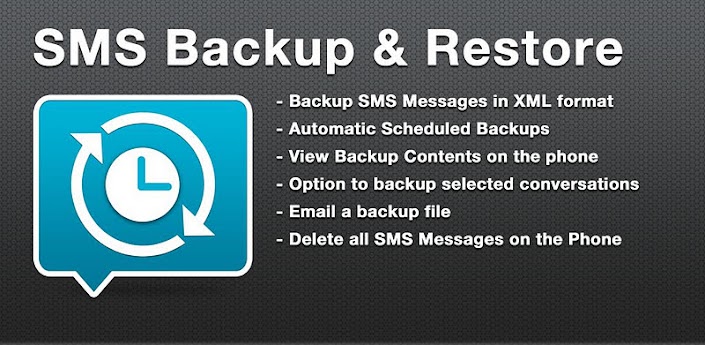
    SMS Backup & Restore Pro v5.4

    SMS Backup & Restore Pro v5.4

    Requirements: for all Android versions, supports App2SD
    Overview: A simple App to Backup and Restore SMS Messages. This is a Paid No-Ads version of the Ad-Supported Free App.
    nEvUDX9WrGZhdI1nsKXKo9ok5SrJjLSfO_kdkQ1sZXTaSaJslKS7okSGCEZdypMyZA=w705


    iGCAjzx9N_1QeMlqbOPN9s_3vtlNEwcrb2BTp8sqqx1NgNBHJf-Jwh9td-LMc323l8ic
    fwP5W0t4fOXlR32UL93gQaEDsbXC-ZMCd2FQeJbYe2X2Rpp8S9V9Wg0AkiYaBN6OEg

    7Z67H2vtO4QJV-QjeGOzGIoqxFprgxQ4K6-Mvb8a6tmERH5z8PwdkG4VmgPxdOTur6PD
    dUqddqGpqhE4C6v9-2XDsVvjBA2r6MJeFZ0lOJtNKRuTpSqSKMeO3N5Xhst8RNcNxA


    * Automatic Scheduled Backups.
    * View Backup Contents.
    * Backups created in XML Format on the SD Card.
    * Option to backup selected conversations only.
    * MMS not supported yet.
    * FAQs at http://bit.ly/d9t7Jk

    NOTE: There is a known problem with some firmware versions of the Droid X and Droid 2 phones that the restored messages do not get the correct time stamps.


    This App needs the following permissions to work:
    * Storage - modify/delete SD card contents (android.permission.WRITE_EXTERNAL_STORAGE): To create the xml file on the SD card.
    * Your messages - edit SMS or MMS, read SMS or MMS (android.permission.READ_SMS, android.permission.WRITE_SMS): Needed to read SMS during backups and write them during restore.
    * Your personal information - read contact data (android.permission.READ_CONTACTS): To display and store the contact names in the backup file.
    * System tools - prevent phone from sleeping (android.permission.WAKE_LOCK): To prevent the phone from going to sleep/suspended state while a backup or restore operation is in progress.
    * Hardware controls - control vibrator (android.permission.VIBRATE): To vibrate the phone when the backup or restore operation is completed.

    Translations:
    - Finnish - Thanks to Juhana H.
    - Russian - Thanks to Pavel (Павел Миронов)
    - Spanish - Thanks to Miguel A. Alvarez
    - French - Thanks to Julien Benoist

    What's in this version:


    1. Note: If you intend to do a factory reset on the phone, please make sure you save/email a copy of the backup outside the phone before doing the reset.
    2. v5.4:
    3. Added Option to remove a conversation from a backup. Long press on a conversation when viewing the backup and select "Remove this Conversation"
    4. Fixed a bug where some invalid characters could make the backup corrupted. Thanks for Claus for helping with this one.
    5. Added Greek Translation - Thanks to Michael and Dimitrios
     

    Thilinacba

    Well-known member
  • Sep 7, 2006
    13,526
    2,752
    113
    පිස්සු පුසා;12278024 said:
    hay this is for A.0.42 we asked about A.0.62:oo:

    omg dude,I posted how to downgrade to 0.42 and root
    why u want 0.62 fw so much? few lng labels are changed for middle east countries and thats all fixed in that update.If you want the latest then you should move to 0.69 fw :P which fixed lng id Gmail in German language
     
    Status
    Not open for further replies.