ANDROID වැඩකාරයෝ

Status
Not open for further replies.
mchanla. sinhala sub thiyena film ekak balanna puluwanda ban phone eken. sub eka srt walin thiyena ekak. unicode ekak daganna ona neda. nikamma penne na. nikan kotu kotu watenne. unicode ekak danawa nam kohomada danne. nathtam wena vidihak thiyenawada wada karawanna srt eka. danna kenek help ekak dennooo


phone ekata sinhala font dalada thiyenne :confused: :confused:
 
Machan mata loku udawwak one.mekata adam uttarayak one

Tab akak tyenawa WonderMedia WM8650=RS 8000 ganna buluwan

Huawei U8180=10000 kata ganna puluwan me deken wadiya hod aka mokadda ban bola gannawanam ganne mokadda dekama use karala


mulin kiyapan bro uba ganna hadanne entertainment walatada:confused: :confused: nethnam custom rom, mod wage sellan dannada
:confused: :confused:
 

Kasunrock619

Well-known member
  • May 18, 2009
    16,840
    1,459
    113
    Colombo
    machanla mata 4n eka run wena apps auto kill karna apps ekak hoyaka diynko 4n eka slow wala :sorry::sorry:manual running program stop karala ati wela thiyanna:eek:
     

    Max_r

    Well-known member
  • May 10, 2007
    12,865
    1
    15,579
    113
    භාවිතා කරන ලද NEO V or NEO ජංගම දුරකතනයක් අවශ්‍යයි​

    64685_209006042540105_100002921321139_381758_358584792_n.jpg


    මිල ගනන් PM කරන්න මචංලා :) ;)

    NEO හරි ගිඟයි වගෙ :confused::confused:
     

    LC1989

    Well-known member
  • Sep 18, 2011
    2,095
    682
    113
    Machan mata loku udawwak one.mekata adam uttarayak one


    Tab akak tyenawa WonderMedia WM8650=RS 8000 ganna buluwan

    Huawei U8180=10000 kata ganna puluwan me deken wadiya hod aka mokadda ban bola gannawanam ganne mokadda dekama use karala


    dcpad12824jpg450.jpg


    dcpad128211jpg450.jpg


    huaweiideosx1.jpg


    udaw karapallako matat
     

    LC1989

    Well-known member
  • Sep 18, 2011
    2,095
    682
    113
    චිරි චිරි වැස්ස;12295185 said:

    mulin kiyapan bro uba ganna hadanne entertainment walatada:confused: :confused: nethnam custom rom, mod wage sellan dannada
    :confused: :confused:


    rom, mod wage sellam danna ban
     

    LC1989

    Well-known member
  • Sep 18, 2011
    2,095
    682
    113
    චිරි චිරි වැස්ස;12295185 said:

    mulin kiyapan bro uba ganna hadanne entertainment walatada:confused: :confused: nethnam custom rom, mod wage sellan dannada
    :confused: :confused:


    Saho me dekama me pries akata labada
    wadiyen laba mokadda
    fon 1 machan 2 masayak wage aragena
     
    machanla mata 4n eka run wena apps auto kill karna apps ekak hoyaka diynko 4n eka slow wala :sorry::sorry:manual running program stop karala ati wela thiyanna:eek:


    Advanced Task Killer Pro

    kecBl_CQjFEoTXtR7aE2eaowWXMVZ2Yl0J7Tx6DLUTwg0QXKfBgaVa8YRgpk2aj7BbQ=w124


    fgt5HTTr5m77xGyJmFo-1oKtZ5dA4OuwprD5ByowAtO-hNdyj8U7Hfih5pwzAEhLPw
    672O-aPBRxl8YMo6gOs1RbT0QZc-vgwdQsx-w-xE4Cd2M-7RB4yx16_2k4Nc7rDXHVc


    Advanced Task Killer is also known as ATK. It is a tool to kill applications running. This version is pro version which doesn't contain ads.

    Requirements: Android OS 1.5 +


    TK is often used to kill apps and clean memory. We do suggest people use ATK manually kill apps instead of auto killing apps.

    -Ignore List
    -One tap widget
    -Auto kill
    -Customize item height

    1. How to use it (for new users to quick start)?
    It is pretty simple. Open this tool and take a look at the running applications list? Uncheck some apps you don't want to kill (such as Advanced Task Killer and some system apps) Tap the button 'Kill selected apps', it will kill all applications checked.

    2. How to use it (for new users to do more)?
    If you don't want to kill any application, you can tap it on the running applications list. Then it's checking box will turn to gray.

    3. Why there are programs running that I haven't used or even opened?
    Some applications will start up once you turn on your phone or be invoked by some evens.

    4. What is ignore list/ignore?
    Ignore list is for you to ignore some applications you don't want to kill. If you long press on the application listed on the main screen of ATK, the menu will pop up, then you can select 'Ignore', the application would be moved to ignore list. When you tap 'Kill selected apps', it won't be killed any more.

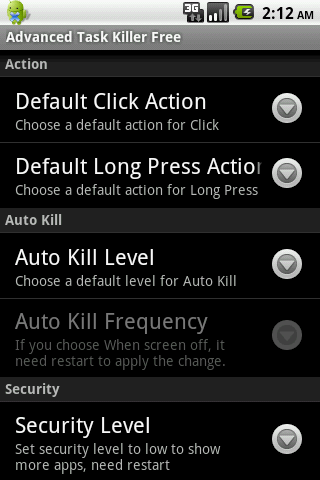
    5. What is default action for long press?
    You can set your default action for long press and click on the settings. The system default action for long press is pop-menu. That means you when you long press on the application(displays on the running applications list), a pop-menu would shows up. For example, if you want to switch to the application after you long press on it, you can set the default action of long press to 'Switch to'.

    6. Why I lost my network connection after I tap 'kill selected apps'?
    This is because some apps related with network connection are killed. Such as 'voicemail'. You can ignore it instead of killing it.

    7. Why my Home reloaded?
    This is because some apps related with Home are killed. Such as 'HTC Sense', 'Mail'(if it is integrated with Home). You can ignore it instead of killing it.

    8. Why I cannot receive notification of Email?
    This is because you killed 'Email'. Instead of killing it, you need to ignore it.

    9. What is Auto Kill?
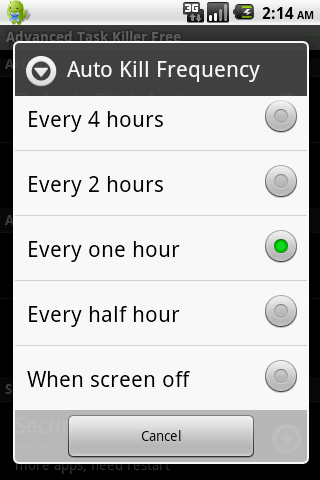
    If you want to kill apps automatically you need to choose one of auto-kill level
    - Safe: Only kill the apps aren't running but still consume memory.
    - Aggressive: Kill the apps running background and apps aren't running.
    - Crazy: All apps except for apps you are using with.

    You should be able to see Auto Kill information shows on the title, like 'Auto-Kill: 12:20'. That means auto kill will start at 12:20, you can also change the frequency to impact the auto kill start time.
    KW: taskiller taskkiller task killer taskmanager manager panel taskpanel process app

    What's in this version:
    Change auto kill to execute only when device is awake
    Add an option to ignore service and front app for Android 2.2 and later version
    Fix 'Force stop/detail' issue for Android 2.3
    Add move buttons option
    Compiled under 3.1 platform


    chirichiri.jpg

     
    • Like
    Reactions: Kasunrock619

    Kasunrock619

    Well-known member
  • May 18, 2009
    16,840
    1,459
    113
    Colombo
    චිරි චිරි වැස්ස;12295343 said:
    Advanced Task Killer Pro

    kecBl_CQjFEoTXtR7aE2eaowWXMVZ2Yl0J7Tx6DLUTwg0QXKfBgaVa8YRgpk2aj7BbQ=w124


    fgt5HTTr5m77xGyJmFo-1oKtZ5dA4OuwprD5ByowAtO-hNdyj8U7Hfih5pwzAEhLPw
    672O-aPBRxl8YMo6gOs1RbT0QZc-vgwdQsx-w-xE4Cd2M-7RB4yx16_2k4Nc7rDXHVc


    Advanced Task Killer is also known as ATK. It is a tool to kill applications running. This version is pro version which doesn't contain ads.

    Requirements: Android OS 1.5 +


    TK is often used to kill apps and clean memory. We do suggest people use ATK manually kill apps instead of auto killing apps.

    -Ignore List
    -One tap widget
    -Auto kill
    -Customize item height

    1. How to use it (for new users to quick start)?
    It is pretty simple. Open this tool and take a look at the running applications list? Uncheck some apps you don't want to kill (such as Advanced Task Killer and some system apps) Tap the button 'Kill selected apps', it will kill all applications checked.

    2. How to use it (for new users to do more)?
    If you don't want to kill any application, you can tap it on the running applications list. Then it's checking box will turn to gray.

    3. Why there are programs running that I haven't used or even opened?
    Some applications will start up once you turn on your phone or be invoked by some evens.

    4. What is ignore list/ignore?
    Ignore list is for you to ignore some applications you don't want to kill. If you long press on the application listed on the main screen of ATK, the menu will pop up, then you can select 'Ignore', the application would be moved to ignore list. When you tap 'Kill selected apps', it won't be killed any more.

    5. What is default action for long press?
    You can set your default action for long press and click on the settings. The system default action for long press is pop-menu. That means you when you long press on the application(displays on the running applications list), a pop-menu would shows up. For example, if you want to switch to the application after you long press on it, you can set the default action of long press to 'Switch to'.

    6. Why I lost my network connection after I tap 'kill selected apps'?
    This is because some apps related with network connection are killed. Such as 'voicemail'. You can ignore it instead of killing it.

    7. Why my Home reloaded?
    This is because some apps related with Home are killed. Such as 'HTC Sense', 'Mail'(if it is integrated with Home). You can ignore it instead of killing it.

    8. Why I cannot receive notification of Email?
    This is because you killed 'Email'. Instead of killing it, you need to ignore it.

    9. What is Auto Kill?
    If you want to kill apps automatically you need to choose one of auto-kill level
    - Safe: Only kill the apps aren't running but still consume memory.
    - Aggressive: Kill the apps running background and apps aren't running.
    - Crazy: All apps except for apps you are using with.

    You should be able to see Auto Kill information shows on the title, like 'Auto-Kill: 12:20'. That means auto kill will start at 12:20, you can also change the frequency to impact the auto kill start time.
    KW: taskiller taskkiller task killer taskmanager manager panel taskpanel process app

    What's in this version:
    Change auto kill to execute only when device is awake
    Add an option to ignore service and front app for Android 2.2 and later version
    Fix 'Force stop/detail' issue for Android 2.3
    Add move buttons option
    Compiled under 3.1 platform


    chirichiri.jpg

    Thx machan
    Rep++
     

    LC1989

    Well-known member
  • Sep 18, 2011
    2,095
    682
    113
    චිරි චිරි වැස්ස;12295402 said:
    prices baladdinam 8 kata tab eka wasi,, u8180 display eka 2.8 inches hinda touch amarui bro,,

    Ganna hoda mokadda saho mata hitaganna ba ban udaw karapan ban
    tab akata internet yanna dongle akak gahanna ona ban me tab ake GPS tiyeda ban
     

    Kasunrock619

    Well-known member
  • May 18, 2009
    16,840
    1,459
    113
    Colombo
    චිරි චිරි වැස්ස;12295402 said:
    prices baladdinam 8 kata tab eka wasi,, u8180 display eka 2.8 inches hinda touch amarui bro,,
    huaweiideosx1.jpg

    ma 4n ekak mamat use kara android walata thiyna aswa nati wenwa ma 4n eka use karai passa:rofl::rofl::rofl:
     
    Status
    Not open for further replies.