

Latest ads
-
 Colombo Red Hat Certified System Administrator (RHCSA) - RHEL 10
- Sanjeewani95
- Updated:
-
 NURSING , CAREGIVER , HOTEL & BEAUTY COURSES
- IVA Para Medical Campus
- Updated:
-
 Handmade Character Soft Toys Peppa Pig Family
- anil1961
- Updated:
-
Video Content Creator
- pramukag
- Updated:
-
QA Engineer Intern
- pramukag
- Updated:
You are using an out of date browser. It may not display this or other websites correctly.
You should upgrade or use an alternative browser.
You should upgrade or use an alternative browser.
- Status
- Not open for further replies.


.මේක ANDROID වලටම අදාල ප්රශ්නයක් නම් නෙමෙයිනමුත් කට්ටිය හෙල්ප් කරයි කියලා හිතනවා මේකයි ගැටලුව මට තියෙන්න
SLT ADSL connection එකක් 1 port router එකකුයි PEO TV ගන්න කොට ලැබුන 4 port router එකකුයි තියනවා ඉතින් මට ඔන
අලුත් wifi router එකකට වියදම් කරන්නෙ නැතිව wifi එකක් හදාගන්න විදියක් තියනවාද කියලා දැනගන්න.
elamakiri machan...........
matath oya prob 1 kama thiyanawa
..........

චිරි චිරි වැස්ස;12414091 said:ඔය තියෙන්නෙ මං කිවුව post එක,, (Page 69)
machan chiri chiri ubanam deyyek nemei dewalayak


ela ela machan thanks slt ekan dena wifi router ekak gannawa ehanam.
mama hithuwe rj45 port ekata set karanna puluwan gadget ekak tiyanawa kiyala
Android වල එහෙම කරන්න බෑ මචන් එහෙම කරන්න පුළුවන් hardware තියෙන ෆෝන් එකක්වත් මම දැකල නෑ. හැබැයි ඔයාට පුළුවන් මෙහෙම එකක් කරන්න Internet BOX අහල තියෙනවද? අන්න එකක් ගන්න Android දාපු එකක් ඒකෙන පුළුවන් ඔය වැඩේ කරන්න මම ඕන නම් හොයල කියන්නම්

Perfect App Protector Pro v5.0.3
Perfect App Protector Pro
Requirements: Android 2.1+
Overview: Perfect App Protector Pro
Google Market Top20 Application.


Requirements: Android 2.1+
Overview: Perfect App Protector Pro
Google Market Top20 Application.


Perfect App Protector Pro
Google Market Top20 Application.
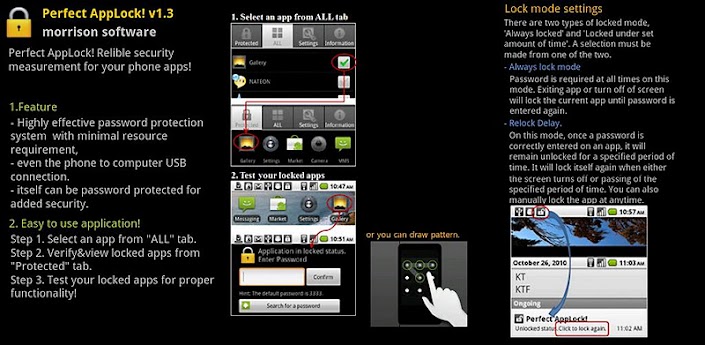
"Perfect AppLock!"
Relible security measurement for your phone apps!
Perfect AppLock! lets you protect any applications you want with a passcode: SMS, Email, Pictures, Camera, USB Connect, Calendar,Messanger...any apps you choose
# Feautures
1. Lock Apps
2. Screen Filter supports
3. Rotation Lock supports
4. USB lock supports
5. Pattern Password supports
* Service restart is required after the upgrade.
* Perfect Applock don't support small screen size phone like HTC wildfire.
* In order to bulk purchasing,contact developer by email.
* "outgoing call"permission is needed for Stealth Mode
What's in this version:
5.0.3 : Hot fix - Fixed a bug asking password Frequently(2012.3.30)


Google Market Top20 Application.
"Perfect AppLock!"
Relible security measurement for your phone apps!
Perfect AppLock! lets you protect any applications you want with a passcode: SMS, Email, Pictures, Camera, USB Connect, Calendar,Messanger...any apps you choose
# Feautures
1. Lock Apps
2. Screen Filter supports
3. Rotation Lock supports
4. USB lock supports
5. Pattern Password supports
* Service restart is required after the upgrade.
* Perfect Applock don't support small screen size phone like HTC wildfire.
* In order to bulk purchasing,contact developer by email.
* "outgoing call"permission is needed for Stealth Mode
What's in this version:
5.0.3 : Hot fix - Fixed a bug asking password Frequently(2012.3.30)


JDownloaderRcPro
JDownloaderRc Pro
Requirements: Android 1.6+
Overview: Full control on JDlownloader from your android phone.


Overview: Full control on JDlownloader from your android phone.


JDownloader Remote Client Pro.
Full control on JDlownloader from your android phone:
- Current downloads.
- Links with full text parsing.
- Stop/Start/Restart/Shutdown.
- Set speed limit / max downloads.
- Premium's accounts.
- Integration with navigator for sharing links.
- Compatibility with nightly build.
- Rss reader & link checker.
Pro Version is free Ads and got priority for updates.
Thanks for supporting us.
Before using :
- Activate JDownloader remote control plug-in.
- Be sure your ip is public and port open.
What's in this version:
1.2.6 :
Fix : adding background links when app not launched
1.2.5 :
Fix : 2 launch App.
1.2.4 :
Add links in background : Share link and select "JDownloaderRCPro Background Link". Link will be added without launching JDownloaderRC, allow you to continue your navigation
Full control on JDlownloader from your android phone:
- Current downloads.
- Links with full text parsing.
- Stop/Start/Restart/Shutdown.
- Set speed limit / max downloads.
- Premium's accounts.
- Integration with navigator for sharing links.
- Compatibility with nightly build.
- Rss reader & link checker.
Pro Version is free Ads and got priority for updates.
Thanks for supporting us.
Before using :
- Activate JDownloader remote control plug-in.
- Be sure your ip is public and port open.
What's in this version:
1.2.6 :
Fix : adding background links when app not launched
1.2.5 :
Fix : 2 launch App.
1.2.4 :
Add links in background : Share link and select "JDownloaderRCPro Background Link". Link will be added without launching JDownloaderRC, allow you to continue your navigation

mama android walata thiyena hodama web browser eka ada thama install kare.. e thama google chrome.. me web browser eka nnam supiri. meken bookmark sybc karanath puluwan. athama kiwwoth mama me post eka danneth chrome brower ekn. but meka support karanne ics walata witharai lu.. ics thiyena ayata dagena balanna ko..


onna mage home screenshot eka kuth thiyenawa

download
https://play.google.com/store/apps/details?id=com.android.chrome
market eken download karanna denne nathnam mediafire links thiyenawa net eke..
e thama google chrome.. me web browser eka nnam supiri. meken bookmark sybc karanath puluwan. athama kiwwoth mama me post eka danneth chrome brower ekn. but meka support karanne ics walata witharai lu.. ics thiyena ayata dagena balanna ko..


onna mage home screenshot eka kuth thiyenawa

download
https://play.google.com/store/apps/details?id=com.android.chrome
market eken download karanna denne nathnam mediafire links thiyenawa net eke..
mama android walata thiyena hodama web browser eka ada thama install kare..
onna mage home screenshot eka kuth thiyenawa
download
https://play.google.com/store/apps/details?id=com.android.chrome
market eken download karanna denne nathnam mediafire links thiyenawa net eke..

mama android walata thiyena hodama web browser eka ada thama install kare..
market eken download karanna denne nathnam mediafire links thiyenawa net eke..
මම ට්රයි කළා මචන් ඕක අපු ගමන් වගේ නුලකුත් දැම්ම ඕකට මම එත් අල්ලලා දැම්ම මොකද Flash Supoort කරන්නේ නැති හින්ද

BTW Shaviha34 මචෝ අන්න CM9 එකේ camera recoding වැඩ

How to root the HTC One S
---------
Rooting your phone will void your manufacturer’s warranty. We will not be held liable for any damage that may occur on your device. Use these instructions at your own risk.
--------------------------------------------------------------------------------------------------
Requirements
----------------
☻ HTC One S
☻ Fully charged battery or at least 70% battery left.
☻ Enable USB Debugging on your phone by heading to Settings > Applications > Development > USB Debugging. Make sure that there is a check mark beside that option.
☻ Temporarily disable all antivirus applications and firewall tools on your computer as they tend to interrupt the rooting process.
======================================================
Instructions
--------------
1. Download the Superboot r1 package from here
2. Extract the contents of the ZIP file using any extraction software such as WinZIP or 7-zip. Place the extracted files in a single folder without renaming or modifying any of the files.
3. Switch off your HTC One S.
4. Reboot the phone into bootloader mode. You can do this by pressing and holding down the Volume Down and Power buttons until you get to the bootloader (HBOOT) screen.
5. Connect your HTC One S to your computer via USB cable.
6. Depending on your PC’s operating system follow the appropriate instructions.
☻ Mac users
♦ Launch a terminal window and go to the directory that contains the extracted files.
♦ Enter this command at the terminal (without the quotes): “./install-superboot-mac.sh”
☻ Linux users
♦ Launch a terminal window and go to the directory that contains the extracted files.
♦ Enter this command at the terminal (without the quotes): “./install-superboot-linux.sh”
☻ Windows Users
♦ Double-click on install-superboot-windows.bat to run the installation script.
7. Disconnect your phone from your PC after the script is finished rooting your phone.
======================================================
Congratulations! You have successfully rooted your HTC One S using the Superboot method. Enjoy the many benefits of having a rooted device. You can now flash custom ROMs, scripts, and kernels, as well as install applications that require root access.


☜☆☞ How to root the HTC One S ☜☆☞
=========================================================
Caution---------
Rooting your phone will void your manufacturer’s warranty. We will not be held liable for any damage that may occur on your device. Use these instructions at your own risk.
--------------------------------------------------------------------------------------------------
Requirements
----------------
☻ HTC One S
☻ Fully charged battery or at least 70% battery left.
☻ Enable USB Debugging on your phone by heading to Settings > Applications > Development > USB Debugging. Make sure that there is a check mark beside that option.
☻ Temporarily disable all antivirus applications and firewall tools on your computer as they tend to interrupt the rooting process.
======================================================
Instructions
--------------
1. Download the Superboot r1 package from here
2. Extract the contents of the ZIP file using any extraction software such as WinZIP or 7-zip. Place the extracted files in a single folder without renaming or modifying any of the files.
3. Switch off your HTC One S.
4. Reboot the phone into bootloader mode. You can do this by pressing and holding down the Volume Down and Power buttons until you get to the bootloader (HBOOT) screen.
5. Connect your HTC One S to your computer via USB cable.
6. Depending on your PC’s operating system follow the appropriate instructions.
☻ Mac users
♦ Launch a terminal window and go to the directory that contains the extracted files.
♦ Enter this command at the terminal (without the quotes): “./install-superboot-mac.sh”
☻ Linux users
♦ Launch a terminal window and go to the directory that contains the extracted files.
♦ Enter this command at the terminal (without the quotes): “./install-superboot-linux.sh”
☻ Windows Users
♦ Double-click on install-superboot-windows.bat to run the installation script.
7. Disconnect your phone from your PC after the script is finished rooting your phone.
======================================================
Congratulations! You have successfully rooted your HTC One S using the Superboot method. Enjoy the many benefits of having a rooted device. You can now flash custom ROMs, scripts, and kernels, as well as install applications that require root access.

Last edited:

ලබන සතියේ මම සැම්සුන්ග් ගැලැක්සි එස් 2 එක සාක්කුවටම බාර දීලා නෝට් එකක් ගන්නවෝ.එදාට ආයෙත් චිරියට හා නවෝද අයියට වද දීමේ පරම පිවිතුරු චේතනාවෙන් කලින් දැනුවත් කිරීමකි මේ
.එදාට ආයෙත් චිරියට හා නවෝද අයියට වද දීමේ පරම පිවිතුරු චේතනාවෙන් කලින් දැනුවත් කිරීමකි මේ
මචන්ස් අනේ කවුරුහරි ඉන්නවනම් Samsung Galaxy Ace එකක් තියෙන කෙනෙක් මට කියල දෙන්න ඉන්ටර්නෙට් යනකොට 3G කියල පෙන්නන්නෙ නෑ. 
customer care කෝල් කරල settings හැදුව.
මම ඉන්න තැනට 3G signal තියෙනවා.
මගෙ Ace එකත් 3G සපෝට් කරනවා.
දැනට මම ඉන්ටනෙට් යනකොට පේන්නෙ E කියල.
Dialog,Mobitel ජාති දෙකෙන් එකකට හරියටම 3G
හදා ගන්න විදිය කියල දෙන්න.
customer care කෝල් කරල settings හැදුව.
මම ඉන්න තැනට 3G signal තියෙනවා.
මගෙ Ace එකත් 3G සපෝට් කරනවා.
දැනට මම ඉන්ටනෙට් යනකොට පේන්නෙ E කියල.
Dialog,Mobitel ජාති දෙකෙන් එකකට හරියටම 3G
හදා ගන්න විදිය කියල දෙන්න.
මම ට්රයි කළා මචන් ඕක අපු ගමන් වගේ නුලකුත් දැම්ම ඕකට මම එත් අල්ලලා දැම්ම මොකද Flash Supoort කරන්නේ නැති හින්ද
BTW Shaviha34 මචෝ අන්න CM9 එකේ camera recoding වැඩ
 පට්ට පට පට නේ......
මචන්ස් අනේ කවුරුහරි ඉන්නවනම් Samsung Galaxy Ace එකක් තියෙන කෙනෙක් මට කියල දෙන්න ඉන්ටර්නෙට් යනකොට 3G කියල පෙන්නන්නෙ නෑ.
customer care කෝල් කරල settings හැදුව.
මම ඉන්න තැනට 3G signal තියෙනවා.
මගෙ Ace එකත් 3G සපෝට් කරනවා.
දැනට මම ඉන්ටනෙට් යනකොට පේන්නෙ E කියල.
Dialog,Mobitel ජාති දෙකෙන් එකකට හරියටම 3G
හදා ගන්න විදිය කියල දෙන්න.
මචං E කියන්නෙ EDGE ඒ කියන්නෙ 2G signal. 3G enable කරන්න එකට "Settings>Wireless & networks" ගිහින් WCDMA prefer හො Only WCDMA කියන එක select කරගන්න.


චිරි චිරි වැස්ස;12412742 said:ඔන්න අද දෙන Gameloft Game එක
========================
Assassin's Creed HD


Samsung Galaxy S I/ S II

PowerVR SD DATA

=====================================================
Sony Ericsson Xperia Arc
Andreno SD DATA
=====================================================
Sony Ericsson Xperia Neo
Andreno SD DATA


Ela,gonna try machan
මට ඔන වෙලා තියෙන්නෙ ගෙදර net cconnection එකම phone එකටත් සෙට් කරගන්න.
ඒ කියන්නේ wifi router එකක් ගන්නම වෙනවා අනේමන්දා මෙච්චර router කන්නද කියලා
Reverse usb tethering
 xda eke search karala balanna,usb connection eken pc eke net connection eka use karanna can
Onna ICS delayed for Sony Ericsson 2011 Xperia's

For Arc S,Neo V,Ray mid april
Anikwa okkotama(Xperia arc, Xperia PLAY, Xperia neo, Xperia mini, Xperia mini pro, Xperia pro, Xperia active and Sony Ericsson Live with Walkman) early June
http://blogs.sonymobile.com/product...11-xperia-smartphones-starting-from-mid-april
Last edited:
චිරි චිරි වැස්ස;12412742 said:ඔන්න අද දෙන Gameloft Game එක
========================
Assassin's Creed HD
Samsung Galaxy S I/ S II
PowerVR SD DATA
=====================================================
Sony Ericsson Xperia Arc
Andreno SD DATA
=====================================================
Sony Ericsson Xperia Neo
Andreno SD DATA
Machan kohomada meke data zip files open karanne ? format is unknown or damaged kiyanawa ne
downloaded both Arc and Neo files
ස්තූතියි මචංමචං E කියන්නෙ EDGE ඒ කියන්නෙ 2G signal. 3G enable කරන්න එකට "Settings>Wireless & networks" ගිහින් WCDMA prefer හො Only WCDMA කියන එක select කරගන්න.
ඒත් එහෙම කරහම සිග්නල් නැති වෙලා කතිරයක් වැටෙනව.
Galaxy Ace එකක් තියෙන කෙනෙකුගෙ settings හදපු විදිය පුළුවන්නම් දාන්න.
- Status
- Not open for further replies.
Similar threads


- Replies
- 17
- Views
- 604

- Replies
- 1
- Views
- 137


