
Latest ads
-
 Bodim.lk out now !
- Manoj Suranga Bandara
- Updated:
-
 Power Lifting Lever Belt
- SkullVamp
- Updated:
-
port.lk Domain for sale
- Lankan-Tech
- Updated:
-
 Colombo Kaduwela - Two Storey House for Sale
- dilrasan
- Updated:
-
Wechat qr verification
- Pawan2005
- Updated:
Rapidshare Premium A/C 1 month
- Thread starter RapidDark
- Start date
You are using an out of date browser. It may not display this or other websites correctly.
You should upgrade or use an alternative browser.
You should upgrade or use an alternative browser.

got one thanks RapidDark


Thanks machan Screen Shot ekka Mage weda walata Help Karanawata thank u so much


machan rapidshare manager eken DL kalaata awlak nae neda??
Main program window
The main window shows a list of downloaded files. This list includes additional information about downloaded files like file size, download status, estimated time to complete, current download speed and download description. You can sort the list by any column by clicking on a column header.

Click on Tell a Friend button to tell your friends about Internet Download Manager!
You can add a new file to download with Add URL button. You can either enter new URL in the text box or select URL from existing ones. You can also specify login information if the server demands authorization by checking "Use authorization" box.

If you want to start downloading immediately, press on Start/Resume Download. That will bring file IDM file download dialog. The dialog let you get an additional control over the download. It also shows download progress, average download speed, estimated time to complete, current download state, whether resume is supported by the server, etc. The dialog also has a chart to display download progress for each downloaded file segment.
You can press Pause button to postpone downloading, or Cancel to stop download and to close the dialog. You can always resume download at any time. Note that Resume button restarts download from the last saved position only if remote server supports this function.
Stop button stops downloads for selected files. You can also stop download by pushing Cancel button in File Download dialog or by closing the dialog. Stop All button stops all downloads in progress.
Delete button deletes selected files from the download list. It's enabled only for complete or paused file downloads. If file download is not complete, IDM will ask for the confirmation to delete it from the list.
Delete Completed button (available only in registered versions) deletes all complete downloads from the list.
Scheduler button starts Scheduler dialog window where you can set timer to execute download tasks. Q column shows whether the file is in download queue. You can add/delete file from the queue by right clicking on file name and picking "Add to Queue" and "Delete from Queue" menu items.
All main controls are also available in File menu as well as in Popup menu with the right mouse click on a file in the Download List.
You can pick Properties item in popup menu to see/edit properties of the selected file. You can change the location to save file, add description, change URL or server login information (username and password).
Categories
In the left side of the main part of the window is a tree of download categories. Internet Download Manager offers the categories feature to organize and manage your files. If you don't need it, you may simply close Categories window and don't select any categories when downloading files. Every download category has a name, a default download directory and a list of associated file types. IDM has several predefined categories like Music, Video, Programs, Documents, etc. You may delete, edit them, or add your own categories.
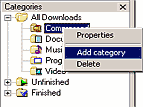
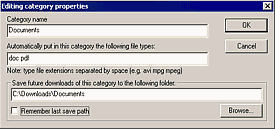
IDM will suggest the category and the folder automatically when you download or save files that match the list of file types. If you disable save file dialogs in IDM options, IDM will place downloads to their designated folders automatically.
mage acc eka wada.. e-mail-pass change kara gaththa...
Rs. 100 Mobitel card = RS account..
Elakiri Mahcan...


boru wadak machan ganne epa.amila_mp kiyala ekek 50 oya accounts ma denewa.Thawa virtual Hacker kiyala ekek free accounts denewa.Mugen ganne epa/Wanchakareyek.Isera mu dunne rapidshare phish krapu accounts;Mu amila_mp kiyala eketa banela thiyenewa u rapidshare accounts labeta denewa kiyala.Mugen ganne epa.me dawasawala rapidshare wala promotion ekek thiyenewa/10000 points one ne accounts hadanne/2000 walin hadanne puluwan./rapiddark kareya karanne u hack karapu accounts aregena ewaye rapid points dala accounts hadala original kiyala wikunanawa.Phish krPu ACCOUNTS rapidshare eken hoya gatte data ubalge accounts walata kela wenawa/danne kiyane hemotama kiyanne mugen ganne epa kiyala.Elakiri eke witharak newai.Meka hena sites godaka oya PHISHED karapu accounts wikunaNE DALA thiyenewa. Balagena!!!!!!!!!!!!!!!!!!!!!
boru wadak machan ganne epa.amila_mp kiyala ekek 50 oya accounts ma denewa.Thawa virtual Hacker kiyala ekek free accounts denewa.Mugen ganne epa/Wanchakareyek.Isera mu dunne rapidshare phish krapu accounts;Mu amila_mp kiyala eketa banela thiyenewa u rapidshare accounts labeta denewa kiyala.Mugen ganne epa.me dawasawala rapidshare wala promotion ekek thiyenewa/10000 points one ne accounts hadanne/2000 walin hadanne puluwan./rapiddark kareya karanne u hack karapu accounts aregena ewaye rapid points dala accounts hadala original kiyala wikunanawa.Phish krPu ACCOUNTS rapidshare eken hoya gatte data ubalge accounts walata kela wenawa/danne kiyane hemotama kiyanne mugen ganne epa kiyala.Elakiri eke witharak newai.Meka hena sites godaka oya PHISHED karapu accounts wikunaNE DALA thiyenewa. Balagena!!!!!!!!!!!!!!!!!!!!!
Twister123 Aluth Member Kenek wage .. Mama Parana Member kenek .. Magen Account Gatta aya Ona taram innawa ada wenakan account hoda na kiyala naha....
RapidShare eken Free dena point walata Ubata Tiyena Puke Amaruwa Mokakda ..
Mekath Mataka tiya ganin .. Ubata Puluwannam Anith ewnta RapidShare Eken Account Aran Deepan .. Ubata Na kiyala mama dannawa .. Uba awlla Po**yek ...
Po***yek Una paliyata Po**a weda karanna epa.. h***nno

Similar threads

- Replies
- 13
- Views
- 1K


