


Brorsoft MTS/M2TS Converter for Mac not only gives you a great way to convert MTS/M2TS to any
other popular video/audio formats on Mac without losing quality, but also let you easily do many
editing jobs like trim, crop, effect, deinterlace, rotate, etc. Just like a magic. Now let’s process it.
Following is the guide to Edit AVCHD(MTS/M2TS)Video Files on Mac
Step 1:Free download Mac
MTS/M2TS video converter ,istall and run it.
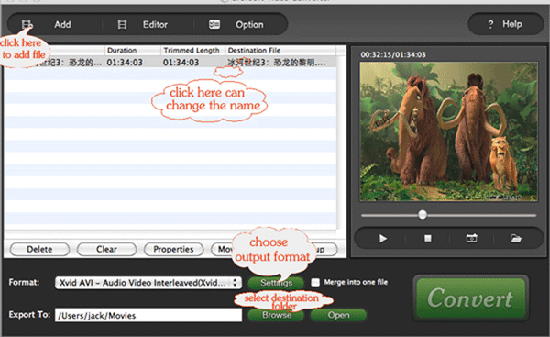
Step 2:Click the “Add” button to import the FLV file you want to convert.
Step 3:Set the output format and destination folder.
Choose the output format from the Format drop list.
Choose the output destinaton by clicking “Browse…”
Tips:
1:Click the "merge into one file",you can join several files into one.
2:Click the “Snapshot” button to capture picture or image you like and the picture or image
will be saved to the “File” button next to the “Snapshot” button. Or you can set the
destination folder of the pinture by clicking the “Option” button.
Optional functions:
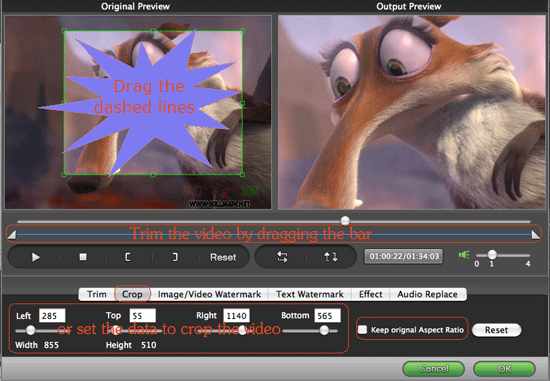
1.Trim
Click the “Trim” bar to split the current title or chapter by dragging the Start Time slider to
set the start time, and dragging the End Time slider to set the finish time. Then you can rip any
segment from the FLV video on Mac as you like.
2.Crop
Click the "crop" bar ,you can easily and fastly to crop the unwanted parts via two ways dragging
the frame around the video or setting the crop values: Top, Bottom, Left and Right..
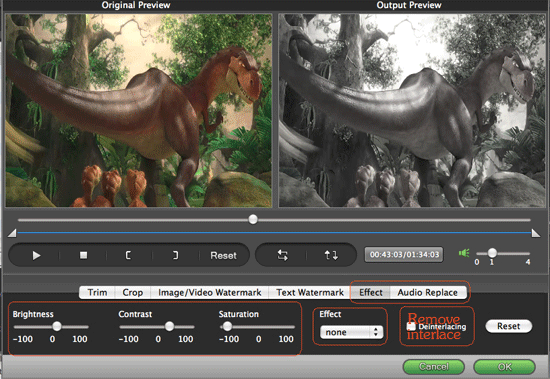
3.Effect:
You can watch the video at “Preview Pane” and then set brightness, contrast,
saturation and adjust the volume to perfect the effect of the original video.
4:Watermark
You can add text, image or video on the video.
Step 4 Click "convert" to begin your conversion.
OK, from now on, you needn’t worry about enjoying or sharing online videos!
TOD Converter for Mac
HD Video Converter for Mac
Mod Converter for Mac
other popular video/audio formats on Mac without losing quality, but also let you easily do many
editing jobs like trim, crop, effect, deinterlace, rotate, etc. Just like a magic. Now let’s process it.
Following is the guide to Edit AVCHD(MTS/M2TS)Video Files on Mac
Step 1:Free download Mac
MTS/M2TS video converter ,istall and run it.
Step 2:Click the “Add” button to import the FLV file you want to convert.
Step 3:Set the output format and destination folder.
Choose the output format from the Format drop list.
Choose the output destinaton by clicking “Browse…”
Tips:
1:Click the "merge into one file",you can join several files into one.
2:Click the “Snapshot” button to capture picture or image you like and the picture or image
will be saved to the “File” button next to the “Snapshot” button. Or you can set the
destination folder of the pinture by clicking the “Option” button.
Optional functions:
1.Trim
Click the “Trim” bar to split the current title or chapter by dragging the Start Time slider to
set the start time, and dragging the End Time slider to set the finish time. Then you can rip any
segment from the FLV video on Mac as you like.
2.Crop
Click the "crop" bar ,you can easily and fastly to crop the unwanted parts via two ways dragging
the frame around the video or setting the crop values: Top, Bottom, Left and Right..
3.Effect:
You can watch the video at “Preview Pane” and then set brightness, contrast,
saturation and adjust the volume to perfect the effect of the original video.
4:Watermark
You can add text, image or video on the video.
Step 4 Click "convert" to begin your conversion.
OK, from now on, you needn’t worry about enjoying or sharing online videos!
TOD Converter for Mac
HD Video Converter for Mac
Mod Converter for Mac


