ANDROID වැඩකාරයෝ

Status
Not open for further replies.

U-tag

Well-known member
  • Nov 18, 2011
    12,732
    14,353
    113
    acer liqvid ekata application danne kohomada? android marcket giyama '' divece not found" kiyala enawane.. help me..:(

    මචං මම අහල තියනව සමහර middle east countries වල android market එකෙ වැඩ නෑකියල එකද දන්නෙ නෑ.

    මචං ඉසරලම phone එකෙ android market app එකෙන් log වෙන්න එතකොට Google account එක ඔනෙනෙ වෙනව. market app එකෙනුත් apps download කරන්න පුලුවන් එවගෙම Desktop computer එකකින් remotely apps download කරන්න පුලුවන්. desktop web broser එකෙන් apps dowload කරන්නනම් phone එකෙ data connection එක enable කරල ඉන්න. ඒ use කරපු Google account එකෙන්ම desktop වෙබ් browser එකකින් ගහින් apps download කරන්න පුලුවන්. එත් එක computer එකට නෙවෙ download වෙන්නෙ. "Install" button එක click කරාම remotely phone එකට download වෙලා install වෙනව. :)
    http://phandroid.com/2011/02/04/sol...-android-phones-associated-with-this-account/
     
    Last edited:

    U-tag

    Well-known member
  • Nov 18, 2011
    12,732
    14,353
    113
    අළුතින් ගත්ත acer liquid android ‍ෆෝන් එකේ තියෙන මුස්ලිම් ඇප්ලිකේෂන් ටික අයින් කරන්න බෑනේ......... කොහොමද ඒක කරගන්නේ..... help help help:(:(:(:(:(:(:(:(:(:(:(:(:(:(
    මචං උබට ඉස්සර්ලම phone එකෙ root කරන්න ඔනෙ . Root කරොත් warranty එක නැතිවෙනව. එත් සමහර රටවල එහෙම නෑ. එකරල පල්ලෙහා විදිහට වැඩෙක් කරන්න. :)


    Fire_Bird

    Well-known member
  • Feb 13, 2009
    8,839
    1
    1,046
    113
    I need a help with upgrading from GB to ICS I have a ARC S and I recently upgraded to a ICS one which hv autoflash.bat inside it I haven;t had any problem during installing it.

    http://forum.xda-developers.com/showthread.php?t=1526717 but when I install this one ( installed the kernel and then installed ZIP in the memory card via recovery mod) it goes until XPERIA boot screen and then it will restart again what should I do please help me with this.

    matamai wenne mona magulakda manda bun podi help ekak deehanko :)
     
    Last edited:

    Dr. NAC

    Well-known member
  • Nov 6, 2011
    5,394
    808
    113
    8° 21′ 0″ N, 80° 23′ 0″ E
    චිරි චිරි වැස්ස;12217699 said:
    apps/games upload karanna honda fast connection ekak oonane,,,,,;) ;) ;) ;) e hinda allapu gedara ekkenatath pinak wenna kiyala hithan eka allagaththa,,,;) ;) ;)

    36_9_4.gif


    Ade macho..., wifi hack karana widiyath methanama kiyala diyanko.
    Apitath lesiyenma wedak ganna puluwan ethakota.
     

    Dr. NAC

    Well-known member
  • Nov 6, 2011
    5,394
    808
    113
    8° 21′ 0″ N, 80° 23′ 0″ E
    චිරි චිරි වැස්ස;12218009 said:
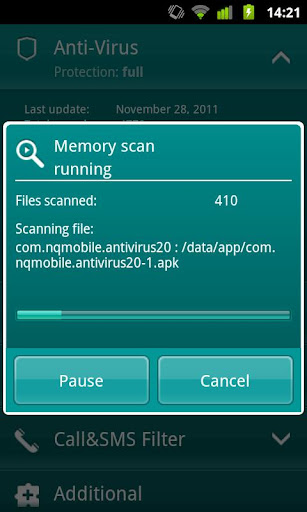
    Kaspersky Mobile Security v9.10.108

    SvjMq6Pt-E4UmXWGjhCgIW0xjo8oeVRk0y7gBcrq1YHgTxPqd3jQrfs2PERy5UD4HDzS=w705


    Requirements: Android 1.5+
    Overview: Robust anti-theft, anti-malware, privacy protection and call/SMS filter

    gBy-ThWkaR1qt5BScpRLi0ZQBddy79MdVle-IFmVFnZRcndd4_AvipWUoyb17KmpJLI


    Gpzpp2_i8h0QP3QwvSFSusrVxZmy7N-4q9B2NRHg1D44ILtERxxMNuisFoU4d40P13K_


    Protect your smartphone like the mini-PC that it is. Kaspersky Mobile Security delivers real-time protection from viruses, spam, malicious programs, and unwanted calls and SMS texts, plus an instant, cloud-based scanning of downloaded apps. Our unique privacy mode allows you to control access to your contacts and communications. And, advanced anti-theft protection remotely disables, cleans, and finds your missing phone via Google Maps – even if your SIM card has been replaced.

    ANTI-THEFT PROTECTION: Block, clean or find your missing phone even if your SIM card has been replaced

    ANTI-VIRUS PROTECTION:

    • The latest technologies prevent viruses and spam from infecting your phone while you’re surfing the Internet
    • Automatic, cloud-based scanning of downloaded apps
    • On-demand and scheduled scans allow you to set up antivirus scanning when it’s most convenient for you

    CALL & SMS FILTER: Blocks unwanted calls and SMS texts

    PRIVACY PROTECTION:

    • Control what others can see and access when they pick up your phone
    • Keep designated incoming calls and SMS texts completely hidden until you’re ready to view them
    • Activate “Private” mode manually, automatically, or remotely


    SUPPORTED LANGUAGES
    Danish, Dutch, English, Finnish, French, German, Italian, Korean, Norwegian, Polish, Portuguese (Brazil), Russian, Spanish, Swedish

    SYSTEM RQUIREMENTS
    Android 1.6 – 2.3

    ANTI-THEFT PROTECTION: Block, clean or find your missing phone even if your SIM card has been replaced

    ANTI-VIRUS PROTECTION:
    • The latest technologies prevent viruses and spam from infecting your phone while you’re surfing the Internet
    • On-demand and scheduled scans allow you to set up antivirus scanning when it’s most convenient for you

    CALL & SMS FILTER: Blocks unwanted calls and SMS texts

    PRIVACY PROTECTION:

    • Control what others can see and access when they pick up your phone
    • Keep designated incoming calls and SMS texts completely hidden until you’re ready to view them
    • Activate “Private” mode manually, automatically, or remotely

    Languages supported:
    Danish, Dutch, English, Finnish, French, German, Italian, Korean, Norwegian, Polish, Portuguese (Brazil), Russian, Spanish, Swedish


    What's in this version:


    1. korean language support added
    2. improved Anti-theft

    Meke key ekak thiyenawada machan. mama net ekama peerala 90 days key ekak hoyagaththa.
    eth ekath last wk iwara una....,
    :(:(:(:(
     
    matamai wenne mona magulakda manda bun podi help ekak deehanko :)


    මට පේන්නෙ උඔ අපිටත් හපන් වගේ,, :shocked: :shocked: :shocked: අපි කරන්නෙ Phone එක උයාගෙන කන්නෙ නැති ටික විතරනෙ,,, :eek: :eek: :eek: එවුනාට උඔ ඒකත් කරනව වගේ නේද,,, :baffled: :baffled: :baffled:
     
    acer liqvid ekata application danne kohomada? android marcket giyama '' divece not found" kiyala enawane.. help me..:(

    මචං මම අහල තියනව සමහර middle east countries වල android market එකෙ වැඩ නෑකියල එකද දන්නෙ නෑ.

    මචං ඉසරලම phone එකෙ android market app එකෙන් log වෙන්න එතකොට Google account එක ඔනෙනෙ වෙනව. market app එකෙනුත් apps download කරන්න පුලුවන් එවගෙම Desktop computer එකකින් remotely apps download කරන්න පුලුවන්. desktop web broser එකෙන් apps dowload කරන්නනම් phone එකෙ data connection එක enable කරල ඉන්න. ඒ use කරපු Google account එකෙන්ම desktop වෙබ් browser එකකින් ගහින් apps download කරන්න පුලුවන්. එත් එක computer එකට නෙවෙ download වෙන්නෙ. "Install" button එක click කරාම remotely phone එකට download වෙලා install වෙනව. :)
    http://phandroid.com/2011/02/04/sol...-android-phones-associated-with-this-account/


    Android Market Unlocker එකක් දෙන්නද ?? :confused: :confused: :confused: U-tag කියන කේස් එකනම් Market Unlocker එකෙන් FIX කරගන්න පුලුවන් :yes: :yes: :yes:
     

    Dr. NAC

    Well-known member
  • Nov 6, 2011
    5,394
    808
    113
    8° 21′ 0″ N, 80° 23′ 0″ E
    චිරි චිරි වැස්ස;12224816 said:
    SLT eka hack karanna amarui bn, :no: :no: :no: mehe thiyanawa speed touch & thomson kiyala network dekak ewa hack karaganna widiha thama man hoyagaththe bn,,,,, :nerd: :nerd: :nerd: :nerd:

    :(:(:(:(:(:(

    ISP nam mokakda kiyala man danne ne. Meka ape campus eke Wifi network eka machan.
    ekata connect wenna be, security key ekak illanawa.
     
    Last edited:

    perusinghe

    Junior member
  • Jun 4, 2008
    192
    15
    18
    චිරි චිරි වැස්ස;12224869 said:
    Android Market Unlocker එකක් දෙන්නද ?? :confused: :confused: :confused: U-tag කියන කේස් එකනම් Market Unlocker එකෙන් FIX කරගන්න පුලුවන් :yes: :yes: :yes:

    ඔව් දෙන්න බලන්න... ට්‍රයි කරල බලල කියන්නම්....... තෑන්ක්ස්..
     

    U-tag

    Well-known member
  • Nov 18, 2011
    12,732
    14,353
    113
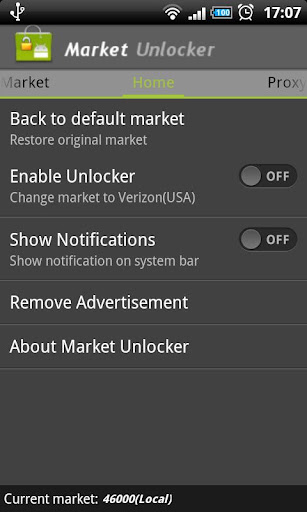
    Market Unlocker Pro v3.2.5.1

    Market Unlocker Pro v3.2.5.1

    GGQA6wPkcSGk6wmzjWbjLvqCw5G0fto2ui5ZnGrsZ5Wak_BLCsdof9D6qxHL7_UNqWc


    Requirements: Android version 2.1 and higher
    Overview: Market Unlocker lets you access paid or restricted apps in Android Market 2.x and 3.x and Amazon Appstore in one click. It's safe, stable, simple and free.


    For some apps are just enabled for some specific countries and not available to the other countries,so it is very difficult to download many high quality software. Market Unlocker lets you access paid apps from countries where paid apps are not yet available.

    Require:
    ***Get Root permission
    ***Have installed Android market
    ***Have installed Amazon appstore (optional)


    Features:
    ***Change provider in one click
    ***Change provider automatically on boot or switch to flightmode
    ***Proxy support for market 3.x. It support HTTP, Socks4, Socks5 proxy and user authentication.
    ***Support Amazon Appstore outside USA.

    Basic Usage:
    Click any list item in "Market" tab to enable Market Unocket. That's all. And you can switch to Home and Proxy table for more functions.

    It is not permanent, will be original after reboot or flight mode! So if you want to back to default market,just reboot or reset flight mode, but you can check "Auto Unlock" to fake it automatically. This option is checked by default.

    +++++ IMPORTANT UPDATE +++++
    You can keep proxy disabled for your market 2.x, only check "Market Unlocker" to enable the function.

    To work with new market 3.x,
    1. Configure a USA (surely you can use other countries ip if they also support to show paid/restriced apps) proxy server and fill into market unlocker.
    2. Enable proxy
    3. Choose provider (optional. by default verizon is selected)
    4. Check "Market Unlocker" to enable function.
    That's all. Open Android market again, paid apps now are back to you. Good luck!

    +++++ New update since version 3.0.8 +++++
    Amazon Appstore is supported.

    Basically Amazon appstore does not allow users to buy paid apps from outside USA, even if users have been registered use US credit card and US address.

    Market Unlocker can also set a USA proxy for Amazon appstore to help you buy daily free apps as well as paid apps.

    To achieve this:
    First install Appstore app, otherwise the function checkbox will not be visible.
    1. Go to Proxy tab
    2. Configure Proxy Type, Proxy Host, Proxy Port. Please make sure you're using an effect USA proxy server first.
    3. Check "Involve Amazon Appstore" button
    4. Enable "Enable Proxy" to "ON"
    Then open Appstore again, it should now work for you.

    Note: There's no need to enable "Enable Unlocker" for Amazon Appstore.


    Q&A:

    Q:where I can find free USA proxies? and why don't you provide proxies in this app?
    A:search google. one example, http://proxy-ip-list.com/free-usa-proxy-ip.html. As they maybe frequently expire or be blocked, it does not make sense, even if leeching them automatcally somewhere.

    Q:why I need use an USA proxy?
    A:market 3.x is checking your ip address country. fake provider does not work any more. we need make it looks like a us user as well(from usa).

    Q:why I can not connect to Market after enable proxy?
    A
    icon_razz.gif
    roxy server is broken or not supporting your request. try another proxy or disable proxy for free apps installation.

    Q:why I enabled proxy, but still no paid apps visible to me?
    A:you might have used a non-us proxy.

    Q:How can I get a working US Amazon account?
    A:Get a US billing adress and creditcard. If you don't have that you should generate the info from a site like this: Fake Name Generator(http://www.fakenamegenerator.com/
    ). Keep in mind though that you won't be able to buy anything with it, but you can download the free apps of the day.

    What's in this version:

    Fixed no proxy found error on motorola milestone
    Added support page on about dialog
    Added share button on about dialog
    Note: Unable to download daily free app, please find help at http://support.evanhe.com/2012/02/08...ee-apps-daily/

    Note:

    Modified to pro version. You will get Market Unlocker without any advertisement permanently. And unlimited times to fetch an USA proxy automatically.


    PhotoVault 4.0.1

    PhotoVault 4.0.1
    LLDdcalxkjqVTOO5vTxG7w-rLas9F5bLDUW.png

    oGkkvVuHBd6vyl1OtLRBugIpRkSRUy6M-FJ.jpg


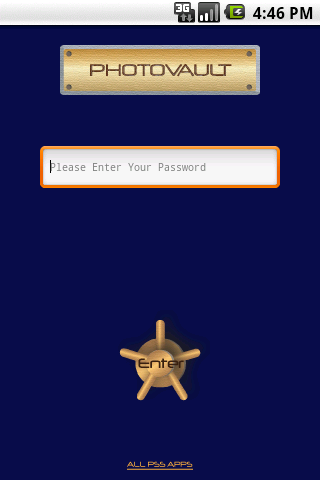
    Overview: Hide pictures behind a password. Nobody can see the pictures you hide.
    Requirements: Android OS 1.5+


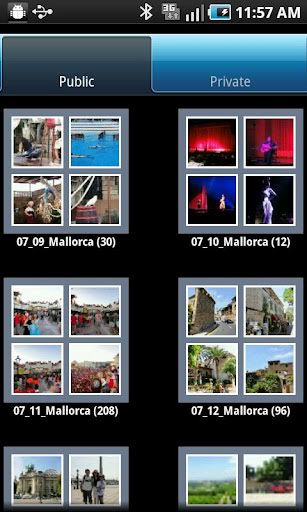
    With PhotoVault, privacy is no longer an issue. You can show your photo gallery to all the friends, family, and strangers on the bus that you want because the embarrassing, the secret, the private photos are all hidden from view, tucked away in your Private gallery. In fact, when in Public mode, those hidden photos aren't even part of your photo gallery--their very existence is hidden. And more than just hidden from other people, they're hidden from other apps.

    You can even set PhotoVault itself to open in Public mode, so it appears just like a standard photo gallery to any who might pick up your Android or be looking over your shoulder. Until, that is, you enter the password.

    You, of course, have complete access to the photos in your Private gallery. You can manipulate them; share them via e-mail, messaging, Facebook, and other social networks; give a slide show; and more. You can do anything with them that you can with those in the Public gallery. The photos are easily transferred from Public gallery to Private gallery and back again with just a long-click on the photo's thumbnail.

    If you ever have any questions on how it all works, there are instructions in the app and links to online support and FAQs. Best yet, the developer is actively working on PhotoVault, adding new features and taking requests.

    Never be nervous about the privacy of the photos on your Android again with PhotoVault installed.

    It is best in this category. The key features are:

    - Simple hide/unhide one picture at a time by long hold on the picture thumbnail.
    - Multi-select to hide/unhide group of pictures
    - Multi-select to delete group of pictures
    - Simple hide/unhide a whole folder of pictures by long hold on the folder
    - View single picture in full size on both public and private side.
    - Slideshows on both public and private side
    - Share picture on both public and private side
    - Organize private pictures into different folders.
    - Create your own private folders.
    - Set app into Public mode, which disguise the app as a regular gallery, no private pictures showing. And no password is asked till click on menu->"Change Mode" to enter password to enable all features

    There is no other app on the Market can do all of these.

    What's in this version:
    4.0.1
    Fixed on some phones, update 4.0.0 won't be able to hide
    Please upgrade database to migrate all your private pictures. Otherwise, they will remain hidden
    Contact us if you have any questions. We can't respond to problem through the market reviews.
    4.0.0
    Update to a new database. Ready for newer features
    Added support for a couple new devices. PhotoVault should support all android based devices on the market.
    Contact us if you have any questions. We can't respond to problem through the market reviews.
    3.1.19
    Added slideshow speed control. The setting is under menu->Tools->Settings
    3.1.14
    Double tap on picture to max zoom the picture, then double tab again to restore to original size.
    Pinch and zoom are supported.


    Anti-Virus Pro

    Anti-Virus Pro 2.10.1
    Overview: AVG Antivirus Pro for Smartphones/Tablets protects you from harmful apps & SMS
    Requirements: Android 1.5 or up
    Q-zDzVF_VeasBd0iyQ7wrEq8_6apuV4L-hK.jpg


    zNJY8n-yB2ODNh5ta9SMUfZ7bCbZvRBNVU_.jpg

    qTLxdtAuV19bheK_UqUm5ZFIq4_DHtoRtQc.jpg


    AVG Mobilation™ Antivirus Pro for Smartphones/Tablets protects you from harmful apps & SMS
    AVG Mobilation™ Antivirus Pro is a mobile security solution that not only helps protect your phone from viruses, malware, spyware & online exploitation in real-time, but also offers a suite of features to help keep your privacy, personal data and online identity safe.
    Download the AVG Mobilation Antivirus Pro app to:
    √ Scan apps, settings, files, and media for viruses and malware in real time
    √ Find/locate your lost or stolen phone via Google Maps™
    √ In case of theft, lock and wipe your device to keep private data safe
    √ Kill tasks that slow your phone down
    √ Browse the web safely and securely
    AVG Mobilation™ focuses specifically on the mobile environment and is a part of the trusted family of AVG® branded security technologies that caters to over 100 million active users worldwide.
    With the AVG Mobilation Antivirus Pro app, you’ll receive effective, easy-to-use virus and malware protection, as well as a real-time scanner, phone locator, task killer, app locker and local device wipe through the remote management service.
    An in-depth look at the AVG Mobilation Antivirus Pro features that help:
    √ Give you peace of mind no matter how you download your apps or games
    √ Protect against malicious apps from viruses, malware and spyware
    √ Identify unsecure device settings and advises on how to fix them.
    √ Ensure contacts, bookmarks and text messages are secure and safe
    √ Check media files for malicious software and mobile security threats
    √ Protect you from phishing attacks
    √ Run daily, weekly, or on demand scans

    Anti-theft protection and Phone Locator:

    √ Ability to locate your lost or stolen mobile phone and get help with finding it via Google Maps™
    √ Ability turn your phone GPS on remotely and have the device send its location using GPS
    √ Lock your phone remotely via our online remote management account or by sending SMS to your phone to protect your data and privacy
    √ Set a lock screen message to help the locator find you
    √ Make your device ring even if your phone is on silent mode
    Safe Web Surfing:
    √ Search, shop and social network with peace of mind knowing your identity, and personal data are secure from phishing and malware while surfing the web
    √ Scans the web site addresses to see if they are harmful sites. If it detects something suspicious, it will redirect you to AVG Mobilation’s “Safe Page” should it find the URL address to be untrustworthy

    Task killer:
    √ Kill tasks that slow down or freeze up your device
    App locker and mobile privacy:
    √ Lock apps to protect your privacy and safety or lock your device setting to secure your device configuration
    Local wipe:
    √ Ability to completely wipe contacts, text messages, photos, browser history, calendar, format SD Card, and restore mobile device to factory settings
    √Manually select specific data and information from your mobile device that you want deleted, such as synced email accounts, apps, and specific files, using the Local Wipe advanced feature

    Tune-up (beta version) Battery & Storage optimization:

    √ Battery power saver notifies you when your battery is below the level you indicated and lets you turn-off functions not in use in order to save power.
    √ Storage optimization indicates internal and SD card usage and helps optimize storage space on your phone. This lets you move apps between the SD Card and internal storage with the help of a list of apps sorted by size and location.

    Languages supported:
    English, German, Spanish, French, Japanese, Korean, Chinese, Portuguese, Russian, Arabic, Italian, Polish, Hebrew, Czech, and Dutch.


    chanakamanjula

    Well-known member
  • Aug 21, 2007
    22,239
    4,387
    113
    ඇයි එන්නද
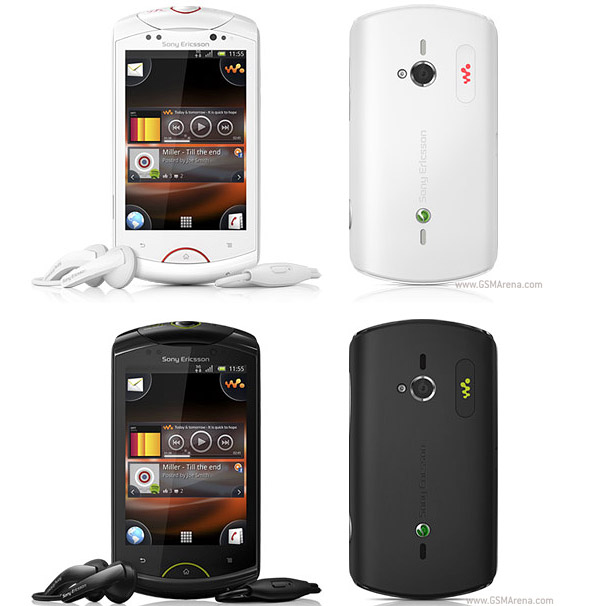
    මචන්ලා මම android phone එකක් ගන්න හිතුවා. මම apple වල නම් osගහල, jailbreak කරලා. unlock කරලා දැන් apple නම් nothing. but මම android ගැන නම් මෙලෝ හසරක් දන්නේ නැ. එක නිසා මම හිතුවා android phone එකක් ගන්න. මම Sony Ericsson live with Walkman එකක් බැලුවා ගන්න ඉසෙල්ලා මට මේ ටික දැන ගන්න ඕනෑ.

    sony-ericsson-live-with-walkman.jpg


    1. මේකට custom rom උපරිම එන version එක මොකද්ද.
    2. phone එක හොදයි ද.
    3. මේක ලේසියෙන් root කරන්න පුළුවන්ද.
    4. මේක කියක් වෙනවද


    දන්නා කෙනක් ඉන්නවා නම් මට මේ ටික කියල දෙනවද.
     
    Last edited:

    Fire_Bird

    Well-known member
  • Feb 13, 2009
    8,839
    1
    1,046
    113
    චිරි චිරි වැස්ස;12224826 said:
    මට පේන්නෙ උඔ අපිටත් හපන් වගේ,, :shocked: :shocked: :shocked: අපි කරන්නෙ Phone එක උයාගෙන කන්නෙ නැති ටික විතරනෙ,,, :eek: :eek: :eek: එවුනාට උඔ ඒකත් කරනව වගේ නේද,,, :baffled: :baffled: :baffled:

    mama custom rom daanna gaththe me thread eka dakala bun ekane melo magulak danne naththe.
     

    Fire_Bird

    Well-known member
  • Feb 13, 2009
    8,839
    1
    1,046
    113
    mama eka parak post kale machan how to go back to gingerbread rom
    e widihatama karanna

    ane manda uba nam mara leda tama da ganne :P :rolleyes:

    machan seen eka kiyanne meka ftf file ekak newei meka ZIP ekak hoda eka wage solution ekak deehanko :love::love:

    recovery mod eken zip eka install karapuwahama XPERIA boot screen eka enawa awilla aye restart wenawa :(
     
    Status
    Not open for further replies.