ANDROID වැඩකාරයෝ

Status
Not open for further replies.
ade mage wadeeta moka wenneee


මං නම් උබේ වැඩේ ගැන හරියටම දන්නෙ නෑ සහෝ,, :no: :no: :no: ඒත් මට හම්බවුනා hard reset කරන විදිහක්, :dull: :dull: :dull: ඒත් ඕකට වැඩ කරයිද කියලනම් මම දන්නෙ නෑ,,,, :no: :no: :no: උඔට ඕනනම් ඒක මං දෙන්නම් කරල බලපන්,, :rolleyes: :rolleyes: :rolleyes:

හැබැයි,,,,,, මේ Thread එකේ කිසිම කෙනෙක්ට ඒකෙ Risk ගන්න බැහැ සහෝ,,,,:yes: :yes: :yes:
 

DJAT

Well-known member
  • Sep 1, 2006
    9,908
    1,409
    113
    Live in EARTH
    :D ඕක කරපන් මචන් මුලින්ම ඊට පස්සේ බැරියෑ S-OFF කොරන්ට

    machan eke htc evo 3d kiyala 3k tiyanawa

    HTC EVO 3D (Sprint) - Meka nemai kiyala dannawa :P
    HTC EVO 3D (Rogers)
    HTC EVO 3D (EMEA)

    oken mokakda hari eka. my one htc evo 3d gsm (unlock)
     

    navodwickra

    Well-known member
  • Jan 17, 2007
    11,424
    2,140
    113
    Leeds, UK
    machan eke htc evo 3d kiyala 3k tiyanawa

    HTC EVO 3D (Sprint) - Meka nemai kiyala dannawa :P
    HTC EVO 3D (Rogers)
    HTC EVO 3D (EMEA)

    oken mokakda hari eka. my one htc evo 3d gsm (unlock)

    දන්නා තරමින් Rogers කියන්නේ Canadian උඹ කොයිබෙන්ද ඕක ගත්තේ
     

    vpsupun

    Well-known member
  • Dec 5, 2006
    982
    650
    93
    40

    Thanx for the info මචෝ. මමත් දැක්ක ඔය Q2 වෙනකල් කල් යන seen එක :(. මම නම් දැං ඕක එනකල් බලන් ඉන්න එක අතෑරල දාල බං ඉන්නේ :angry:. මෙච්චර custom ROMs තියෙද්දි අර මොකාද දිය හිඳෙන කල් බලන් හිටිය වගේ ඕක එනකල් බලන් ඉන්නේ මොකටද :P?
    දැනට custom ROM වල ලොකු අවුලකට තියෙන්නේ, video save වෙන්නේ නැති එකයි, radio එක නැති එකයි විතරයි :D.
     
    Last edited:

    DJAT

    Well-known member
  • Sep 1, 2006
    9,908
    1,409
    113
    Live in EARTH
    HTC dev eke widihata hariyanne na machan.mokada eke tiyanawa cmd eken submit karana key ekak. but eka enne na. balamu mama unge customer care eka contact karaaa. mokada kiyanne balamu
     

    ALii

    Member
    Nov 6, 2009
    1,554
    69
    0
    HTC dev eke widihata hariyanne na machan.mokada eke tiyanawa cmd eken submit karana key ekak. but eka enne na. balamu mama unge customer care eka contact karaaa. mokada kiyanne balamu

    Adb hariyata set up kara gaththada... Instruction anuwa hariyata kalaa nam waradinna widihak nehe
     

    DJAT

    Well-known member
  • Sep 1, 2006
    9,908
    1,409
    113
    Live in EARTH
    Android sdk eka daala adb wadada kiyala baluwada?

    :confused::confused::confused::confused: a mokakda ban a ?

    mama kale menna ma tika. oke 3rd step eke tiyanawa Fastboot select karanna kiyala oken passe restart karanawada mokakda kiyala na(mama restart kala)

    then anik step a widihatama kala kisima awulak na.

    but 8th step eke eka kalahama kisima deyak enne na cmd eke.:frown::frown::frown:


    1. Step 1

      Remove and reinsert the battery.
    2. Unlock_2.png
      Step 2

      Press Volume Down and Power to start the device into Bootloader mode.
    3. Unlock_3b.png
      Step 3

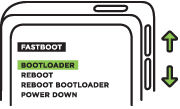
      Use the Volume buttons to select up or down. Highlight Fastboot and press the Power button.
    4. Unlock_4.png
      Step 4

      Connect the device to the computer via a usb cable
      Proceed To Step 5


    1. Step 5

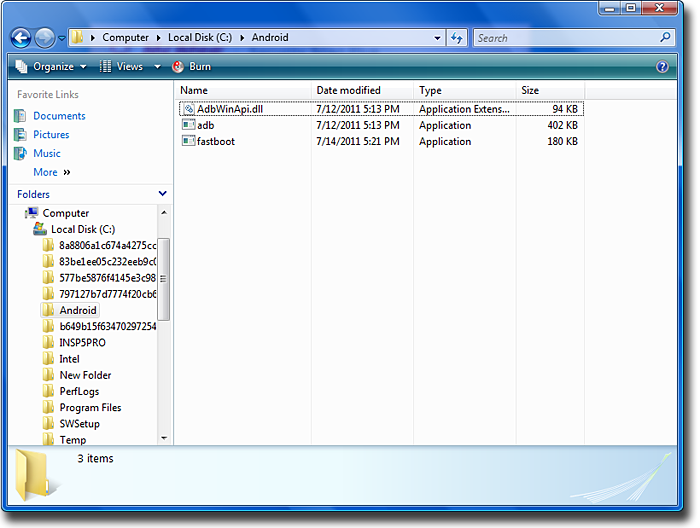
      On your computer create a new folder (For Example: C:\Android) where we will be putting the following 3 files in this new folder:
      • adb.exe
      • AdbWinApi.dll
      • fastboot.exe

      Note: for Mac OS X and Linux you will only need adb and fastboot.
      step5.png
      To find these files:

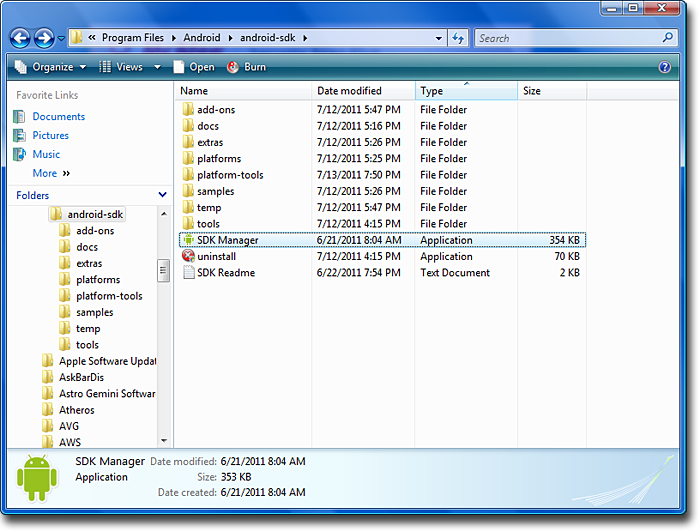
      1. a. Run the “SDK Manager.exe” which is found in \android-sdk-windows\
        step5a.png
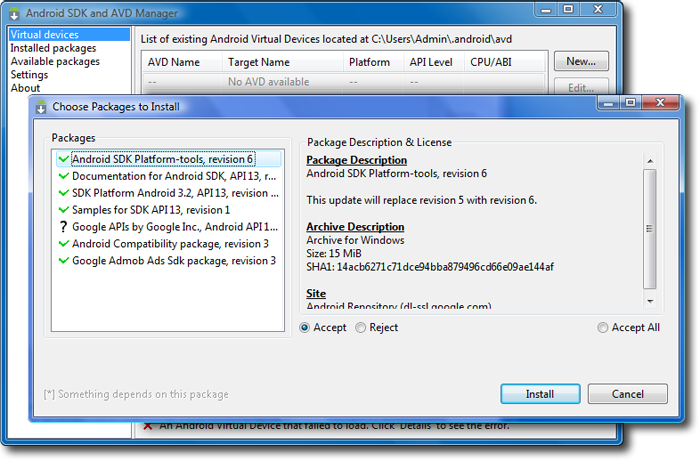
      2. b. Wait about 3 minutes. You will see there are many packages you can update. Please install Android SDK Platform Tools and Android SDK Tools (Please update it if your SDK version is r11).
        step5b2.png
      3. c. After you have installed this, you will be able to find the files in the following locations.
        1. 1. To find adb.exe, AdbWinApi.dll, look in \android-sdk-windows\platform-tools
        2. 2. To find fastboot.exe look in \android-sdk-windows\tools

          Note: fastboot.exe may be unavailable in the latest Windows Android Tools release. You can extract it from a previous release available here: android-sdk_r13-windows.zip
        3. 3. Mac OS X or Linux users can download the fastboot binary using the following links:
          Platform Download Size (bytes) Checksum Fastboot binary, OS X
          (Unzip the file before executing) fastboot-mac 59071 ed784e50cfcaba3c60380c5f448aa354 Fastboot binary, Linux
          (Unzip the file before executing) fastboot 61887 9851bb6ad29cd4b60c9ba9d011ba9efd
    2. Step 6

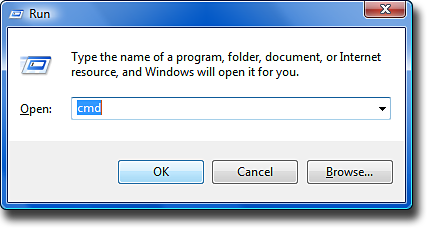
      Open up command prompt. ( Start > Run > Type CMD,). The window that appears is called Command Prompt.
      step6.png
    3. Step 7

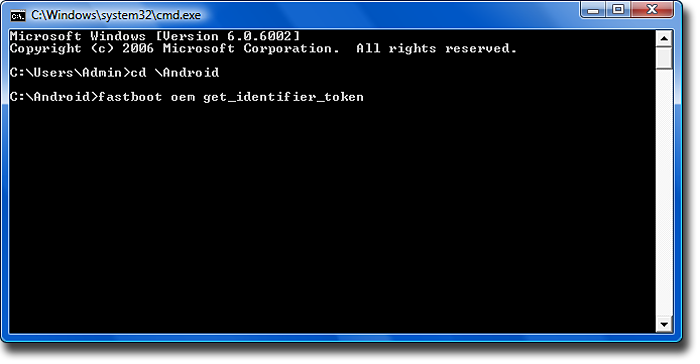
      Navigate to where you unzipped the ZIP file and go to the folder you just created (For Example: If you created the folder in C:\Android, then you would type in Command Prompt: cd c:\Android).
      Proceed To Step 8


    1. Step 8

      Type in Command Prompt: fastboot oem get_identifier_token.
      step8.png

    1. Step 11

      You will receive an email with the attachment: Unlock_code.bin. Save this file in the same folder as your fastboot files (For Example: C:\Android).
      If, after a short period of time, you have not yet received the mail, or you have received an email from HTC, but does not contain an attached file, it is possible that more stringent spam filters and anti-virus programs will block this mail or attachment.
      In order to ensure that you receive the email with the attachment, we suggest you consider using a non-corporate email server as corporate servers tend to have more stringent attachment policies. If you have not received the email at all, please check your spam folder in your email client to check if the email was filtered out.
    2. Step 12

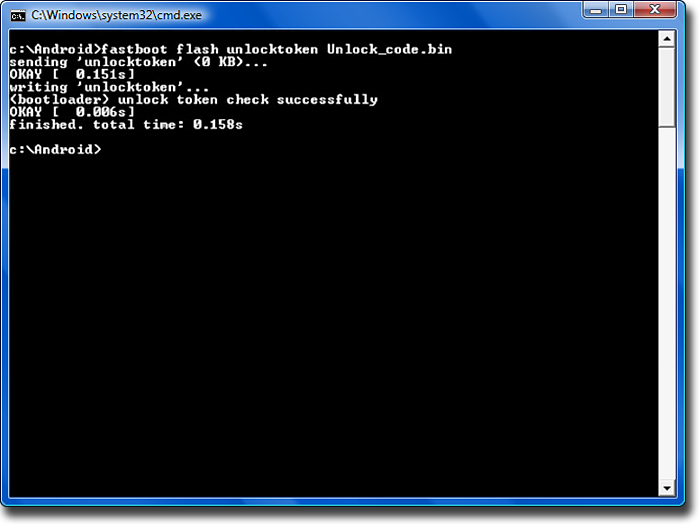
      In the command prompt type: fastboot flash unlocktoken Unlock_code.bin. In the command prompt you will see the following message:
      step12.png
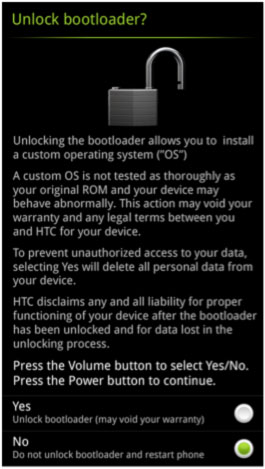
    3. step13.jpg
      Step 13

      On your phone you will now see the disclaimer. Please read this carefully as this action may void your warranty. Use the Volume buttons to highlight your choice, and the Power button to make your selection. If you select Yes, your phone will be reset to its’ factory default settings, and your bootloader will be unlocked. If you select No, your phone will reboot and no modifications will have been made.
    4. Step 14

      To re-lock your bootloader, in the command prompt, type: fastboot oem lock.
      Note: This will not restore the factory default lock, but will simply re-lock the bootloader so no further changes can be made. Furthermore, if you want to unlock your bootloader again, simply repeat step 12 with your original unlock key file to unlock your phone again.
     
    Last edited:

    DJAT

    Well-known member
  • Sep 1, 2006
    9,908
    1,409
    113
    Live in EARTH
    hari machan oya code eka awa (eka karanna ona CMD eke idala tamai Fastboot kiyana eka select karanna ona)

    Token Submitted Successfully!

    You've been sent an email with your unlock key as a file attachment. Please review this email for further instructions and a link to complete the Bootloader process.

    ut dan a code eka dammahama eka waradilu
     

    dinumadushan

    Well-known member
  • Oct 5, 2009
    3,417
    964
    113
    Katunayaka
    Android Phone එක Root කරලා තියනේ මෙහෙම වෙනේ Why Sinhala Font දන්නා යනකොට

    mount -o rw,remount -t yaffs2 /dev/block/mtdblock4 /system
    cd /system/fonts
    chmod 4755 DroidSansFallback.ttf
    මේක Type karapu ගහපු ගමන් එනවා
    Unable to chmod DroidSansFallback.ttf Read only File System
     

    ALii

    Member
    Nov 6, 2009
    1,554
    69
    0
    Android Phone එක Root කරලා තියනේ මෙහෙම වෙනේ Why Sinhala Font දන්නා යනකොට

    mount -o rw,remount -t yaffs2 /dev/block/mtdblock4 /system
    cd /system/fonts
    chmod 4755 DroidSansFallback.ttf
    මේක Type karapu ගහපු ගමන් එනවා
    Unable to chmod DroidSansFallback.ttf Read only File System

    lesima de root explorer walin font eka copy paste karana eka
    http://www.apktops.com/root-explorer-2-16.html
     
    Last edited:
    Status
    Not open for further replies.