

අපහු thanks මචො, එත් +rep බැරියො "You must spread some Reputation around before giving it to navodwickra again."


අපහු thanks මචො, එත් +rep බැරියො "You must spread some Reputation around before giving it to navodwickra again."


චිරි චිරි වැස්ස;12413220 said:SD Card eke
Android/data
kiyana path ekata dapan
දැන් 100% හරි.ඒක අවුලක් නෑ මචන් උඹේ ප්රශ්නෙට උතර හම්බ උනා නේද


චිරි චිරි වැස්ස;12413303 said:Launcher 7
Requirements: Android 2.1+
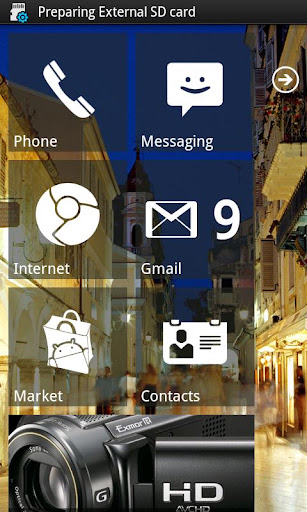
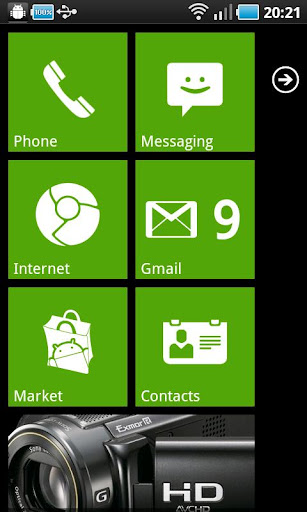
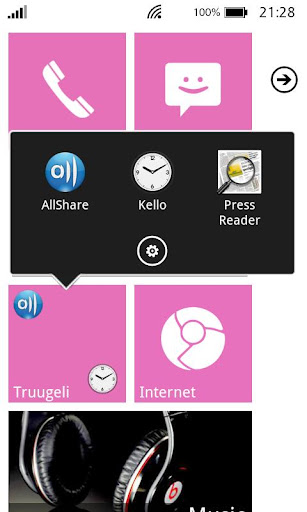
Overview: A Windows Phone 7 style launcher for Android.
Ad-free version of Launcher 7.
The Winphone 7 lookalike launcher, almost like the real thing and in some ways even better!
Version 1.0.1.24 notification: if you find rendering error, email me with screenshot and I will try to fix the issue ASAP.
Features:
- 1x1, 2x1 and 1x2 tiles with configurable colors
- Widgets in a tile! (provided that widget fits)
- Almost real like tile animation
- Almost real like tile re-arrange mode
- Almost real like status bar
- Animated contacts tile (supports G+ synced contacts)
- Pinnable contact-tile which animates like the real phone
- Folder tiles
- Webpage tiles
- Filterable application list
- Stock wp7-like colors and color selection
FAQ:
- Initial setup may be broken depending on your phone manufacturer, you probably need to replace the tiles
- To add new application to main screen, long press on an application in application drawer and select "pin to home screen"
- Filtered apps can be restored from the launcher settings fitered apps page
- Tiles can be made transparent by adjusting the alpha value from the horizontal bar on the color selector
- All bitmaps must fit inside 48 megabyte heap (high-end phones, lower-end phones even less than that), so don't try to use too many 25 megabyte bitmaps on your tiles or you will see FC.
- Gmail tile will not work anymore, use Mail tile instead
- By default WP7 statusbar shows icons only if you touch it. You can adjust the functionality from statusbar options
- "Smaller tiles" will make 1x1 tile to 172x172 pixels in HDPI resolution. I managed to measure the tiles wrong when I started developing L7 and tiles have been too big ever since. 172x172 tiles seem to be faster too, so I suggest you to try them!
TODO-list:
- folder of contacts tile
- revamp the application icon addition (allow text color selection etc)
- App integration (Twitter, Facebook etc.)
- two-sided tiles
- cropping tool to make custom bitmap selection easier
Changelog:
Version 1.1.4
- rotating tiles have made an epic return
- orientation lock on the first page will enable / disable real landscape mode, the rotating tiles is back in animation options and will have function ONLY and ONLY if you lock the orientation to portrait
- sluggish ICS scrolling fixed [really, this time I actually activated the APK ]
- fixed issue where async loader no longer delivered new contact images to contact tiles
- fixed issue where multiple contact tiles wasted extra memory
Version 1.1
- landscape mode added, landscape mode has its own set of tiles
- rotating tiles are gone
- new initial configuration, should popup if homescreen is empty, but can be accessed from settings too
- and lots of other adjustments
Version 1.0.1.26
- popular crashes fixed
- it is now possible to specify text color for most of the tiles
Versions 1.0.1.24-25
- .24.1: few fixes added
- major change: tile size is now determined from your screen resolution
- MDPI devices should experience better performance as tiles are now correct size instead of downscaled HDPI tiles
- qHD and HD devices should now draw screen correctly
- ICS support (also runs in HC now)
- Smaller/faster 172 pixel tiles now available. I measured the tile sizes wrong initially, 172 is the correct value, 184 is too big. Changing tile size requires launcher restart.
Mail me if you wish to learn more about the folder themes, how to make one and how to improve them in the future
Permissions:
android.permission.READ_SMS - SMS tile
READ_CONTACTS - contacts tile
INTERNET - ads <3
GET_ACCOUNTS - calendar tile
READ_GMAIL - gmail tile (2.2+2.1)
READ_CALENDAR - calendar tile
WRITE_EXTERNAL_STORAGE - backup/restore
CHANGE_NETWORK_STATE - statusbar
READ_PHONE_STATE - statusbar
ACCESS_NETWORK_STATE - statusbar
ACCESS_WIFI_STATE - statusbar
EXPAND_STATUS_BAR -statusbar
What's in this version:
application caching added
1.1.6.1 - uninstall crash fixed
1.1.6.2 - stock accent no longer messes up global theme color
1.1.6.4 - some tuning to cache process, attempts to avoid duplicate entries
1.1.6.5 - more tweaks for duplicates while caching


Meka apk file 1k nawaine. Kohomada meka setup karanne?
ඔන්න අපේ නවෝද් කොලුවටයි චිරි චිරි කොලුවටයි පින් සිද්ද වෙන්න මගේ Galaxy i9000 එක root කරගත්ත....දැන් ඉතින් කට්ටියගෙන් පොඩි උදවුවක් ඕන...මට හොද custom rom එකක් හොයල දෙන්න පුලුවන්ද??? හොද අලුත් rom එකක් දාපු කෙනෙක් ඉන්නවා නම් කියනවද????


 නමුත් කට්ටිය හෙල්ප් කරයි කියලා හිතනවා මේකයි ගැටලුව මට තියෙන්න
මේක ANDROID වලටම අදාල ප්රශ්නයක් නම් නෙමෙයි
SLT ADSL connection එකක් 1 port router එකකුයි PEO TV ගන්න කොට ලැබුන 4 port router එකකුයි තියනවා ඉතින් මට ඔන
අලුත් wifi router එකකට වියදම් කරන්නෙ නැතිව wifi එකක් හදාගන්න විදියක් තියනවාද කියලා දැනගන්න.
එහෙම කරන්න බෑ මචන් උඹට ඕනා නම් උඹේ ෆෝන් එකේ තියෙන mobile internet ඒක යොදාගෙන phone එක wireless router එකක් කරන්න පුළුවන්


machan com. file 1k nemei ne...
eke thiyenne
AssassinsCreed_Samsung_i9101_Ver101_PVRT kiyana file 1k
1ke athule thiyenne ' ]' kiyala file 1k ne bro..
 අන්න ඒ Application එකෙන් ඔය .jar File එක Extract කරල තමා මචෝ SD එකට කොපි කරන්න ඕන
machan com. file 1k nemei ne...
eke thiyenne
AssassinsCreed_Samsung_i9101_Ver101_PVRT kiyana file 1k
1ke athule thiyenne ' ]' kiyala file 1k ne bro..
චිරි චිරි වැස්ස;12214314 said:ඔන්න චිරි චිරිය අද කියන්න යන්නෙ Games ගහන Android වැඩකාරයන්ට වටිනා දෙයක්
ඒ තමා gameloft එකේ games වල SDCard Data වහෙන් ඔරෝ නැතුව කෙලින්ම PC එකෙන්ම Download කරගන්නෙ කොහොමද කියල
මුලින්ම මේ Software කෑල්ල බාගන්ඩලකෝ
ඔන්න ලෝභ නැතුව අලුත්ම version එක දුන්න
1. එහෙනම් දැන් download කරගත්තු එක Extract කරගන්නකො..
ඊට පස්සෙ ඕක කෙරුවම මෙහෙම එකක් එයි

2. දැන් View infos කියන එක press කරන්න
එතකොට මෙහෙම එකක් එයි

3. ඊට පස්සේ,,,, SD Data ටික Download කරගන්න ඕන Game එක Select කරල Open කරන්න

ATC for Adreno
PVRT for PowerVR
DXT for Terga
4. දැන් තමාගෙ Phone එකට ගැලපෙන Link එක Copy කරගන්න

5. ඊට පස්සෙ Copy කරගත්තු Link එක Web Browser එකේ හරි Download manager එකේ හරි Past කරල Download කරගන්න...

6. Download වෙලා ඉවර වුනාම කලින් Software එකේ Unpack කියන එක press කරන්න

7. Download කරපු File එක Select කරල Open කරන්න


8. දැන් sdfiles කියන Folder එක Download කරපු Game එකේ නමින් Rename කරන්න


9.වැඩේ ඉවරයි,, දැන් ඒ Folder එක sdcard/gameloft/games/ එකට දාල වැස්සෙ තෙමි තෙමි ගහන්ඩයි තියෙන්නෙ......

මට ඔන වෙලා තියෙන්නෙ ගෙදර net cconnection එකම phone එකටත් සෙට් කරගන්න.
ඒ කියන්නේ wifi router එකක් ගන්නම වෙනවා අනේමන්දා මෙච්චර router කන්නද කියලා

maka maga 4n ekata wada karann na ne banචිරි චිරි වැස්ස;12413303 said:Launcher 7
Requirements: Android 2.1+
Overview: A Windows Phone 7 style launcher for Android.
Ad-free version of Launcher 7.
The Winphone 7 lookalike launcher, almost like the real thing and in some ways even better!
Version 1.0.1.24 notification: if you find rendering error, email me with screenshot and I will try to fix the issue ASAP.
Features:
- 1x1, 2x1 and 1x2 tiles with configurable colors
- Widgets in a tile! (provided that widget fits)
- Almost real like tile animation
- Almost real like tile re-arrange mode
- Almost real like status bar
- Animated contacts tile (supports G+ synced contacts)
- Pinnable contact-tile which animates like the real phone
- Folder tiles
- Webpage tiles
- Filterable application list
- Stock wp7-like colors and color selection
FAQ:
- Initial setup may be broken depending on your phone manufacturer, you probably need to replace the tiles
- To add new application to main screen, long press on an application in application drawer and select "pin to home screen"
- Filtered apps can be restored from the launcher settings fitered apps page
- Tiles can be made transparent by adjusting the alpha value from the horizontal bar on the color selector
- All bitmaps must fit inside 48 megabyte heap (high-end phones, lower-end phones even less than that), so don't try to use too many 25 megabyte bitmaps on your tiles or you will see FC.
- Gmail tile will not work anymore, use Mail tile instead
- By default WP7 statusbar shows icons only if you touch it. You can adjust the functionality from statusbar options
- "Smaller tiles" will make 1x1 tile to 172x172 pixels in HDPI resolution. I managed to measure the tiles wrong when I started developing L7 and tiles have been too big ever since. 172x172 tiles seem to be faster too, so I suggest you to try them!
TODO-list:
- folder of contacts tile
- revamp the application icon addition (allow text color selection etc)
- App integration (Twitter, Facebook etc.)
- two-sided tiles
- cropping tool to make custom bitmap selection easier
Changelog:
Version 1.1.4
- rotating tiles have made an epic return
- orientation lock on the first page will enable / disable real landscape mode, the rotating tiles is back in animation options and will have function ONLY and ONLY if you lock the orientation to portrait
- sluggish ICS scrolling fixed [really, this time I actually activated the APK ]
- fixed issue where async loader no longer delivered new contact images to contact tiles
- fixed issue where multiple contact tiles wasted extra memory
Version 1.1
- landscape mode added, landscape mode has its own set of tiles
- rotating tiles are gone
- new initial configuration, should popup if homescreen is empty, but can be accessed from settings too
- and lots of other adjustments
Version 1.0.1.26
- popular crashes fixed
- it is now possible to specify text color for most of the tiles
Versions 1.0.1.24-25
- .24.1: few fixes added
- major change: tile size is now determined from your screen resolution
- MDPI devices should experience better performance as tiles are now correct size instead of downscaled HDPI tiles
- qHD and HD devices should now draw screen correctly
- ICS support (also runs in HC now)
- Smaller/faster 172 pixel tiles now available. I measured the tile sizes wrong initially, 172 is the correct value, 184 is too big. Changing tile size requires launcher restart.
Mail me if you wish to learn more about the folder themes, how to make one and how to improve them in the future
Permissions:
android.permission.READ_SMS - SMS tile
READ_CONTACTS - contacts tile
INTERNET - ads <3
GET_ACCOUNTS - calendar tile
READ_GMAIL - gmail tile (2.2+2.1)
READ_CALENDAR - calendar tile
WRITE_EXTERNAL_STORAGE - backup/restore
CHANGE_NETWORK_STATE - statusbar
READ_PHONE_STATE - statusbar
ACCESS_NETWORK_STATE - statusbar
ACCESS_WIFI_STATE - statusbar
EXPAND_STATUS_BAR -statusbar
What's in this version:
application caching added
1.1.6.1 - uninstall crash fixed
1.1.6.2 - stock accent no longer messes up global theme color
1.1.6.4 - some tuning to cache process, attempts to avoid duplicate entries
1.1.6.5 - more tweaks for duplicates while caching

maka maga 4n ekata wada karann na ne ban
 හිටහන් මං දාල බලන්නම්
උඹත් මාර කතා බන් කියන්නේ.. උඹේ router එකේ wireless module එකක් නැත්නම් ඕක විකුණලා දාල wireless එකක් ගන්න තියෙන්නේ
Meka apk file 1k nawaine. Kohomada meka setup karanne?
maka maga 4n ekata wada karann na ne ban
බොලාලට තියන පුරස්නෙ Application එක යන තැනක් හොයාගන්න බැරි එකද
maga 4n eka penan na black screen ekak banචිරි චිරි වැස්ස;12414200 said:Application එක වහිද්දි අකුණු ගහනව වගේ වැඩකරනව,,,,
maga 4n eka penan na black screen ekak ban


