ANDROID වැඩකාරයෝ

Status
Not open for further replies.

krishan003

Active member
  • Mar 26, 2008
    315
    125
    43
    මහ පොලොවේ.....
    navodwickra sahodarayata tnx karannai mama me post eka danne.eyage help eken mama mage 4n ekata (i9001) custom rom ekak damma.me thread eka karagena yana yaluwo okkotama suba patanawa nodanna dewal gana kiyala dena ekata. thank u sooooo much
    :D:D:D:D:D:D:D:D:D:D:D

    eimplu.gif
     

    navodwickra

    Well-known member
  • Jan 17, 2007
    11,424
    2,140
    113
    Leeds, UK
    නෑ මචං මේක කොහොමවත් OC කරපු එකක් නෙමේ. ප්‍රොසෙසර් එක එක කෙලින්ම 1.4 manufactured එකක්. දෙකේම තියෙන්නේ එකම නම නිසා ගොඩක් අය ඔය කතාව කියනවා. ගන්න කලින් පොඩි research පාරක් දාල තමා හොයාගත්තේ මේක genuine 1.4 එකක් කියල. Note එක S2 එකකට වඩා OC කරන්න පුළුවන් ඒකයි :) .
    Q2 වල තමා ICS GNote වලට දෙන්නේ කියල අර උඹ දාපු video එකේ තිබ්බා. එතකල් ඉතිං leak version එහෙම එනකල් බලන් ඉන්න තමා තියෙන්නේ :(

    දන්නේ නෑ මචෝ මට හම්බ උන විස්තර වල හැටියට දෙකම ඒක prosa මොකද දෙකම පුළුවන් 1.6 වෙනකන් OC කරන්න මම කලේ නෑ බැටරි ඒක බලන් ඉන්නකොට බහින හින්ද :yes: තියෙනවා නම් මට ලින්ක් එකක් එවපන් මචන් ඔය දෙකේ වෙනස තියෙන උඹට හම්බ උනා නම්.

    මචන් ටික කාලයක් ඉන්න වෙනවා තමා මොකද මචෝ ඕක Official එලියට එනකන් ඉන්න වෙනවා kernel source code release වෙන්න.
     

    navodwickra

    Well-known member
  • Jan 17, 2007
    11,424
    2,140
    113
    Leeds, UK
    navodwickra sahodarayata tnx karannai mama me post eka danne.eyage help eken mama mage 4n ekata (i9001) custom rom ekak damma.me thread eka karagena yana yaluwo okkotama suba patanawa nodanna dewal gana kiyala dena ekata. thank u sooooo much
    :D:D:D:D:D:D:D:D:D:D:D

    eimplu.gif

    You are walcome ;) ඕන වෙලාවක අපි ඉන්නවා :yes:
     

    navodwickra

    Well-known member
  • Jan 17, 2007
    11,424
    2,140
    113
    Leeds, UK
    Machan Navoda!!! mama Ua kuwwa widiyata FoXHound okkoma tika download karagatta!!! dan dala widiya kiyapanko!!!

    Setp by step! :yes::yes:

    එල මම දැන් ඇහැරුනේ බන් කන්තෝරුවට ගිහිල්ල සෙට් වෙමු ඊට කලින් හොද එක වගේ අර ෆෝන් එකේ information page එක අයෙමත් දාපන් උඹට හරියන kernel එක හොයා ගන්න
     

    shameera_ru

    Junior member
  • Jun 2, 2010
    61
    10
    8

    උඹේ ADB Drivers වල අවුලක් ද දන්නේ නෑ. මචං උඹේ ෆෝන් එක දැනට ගන්නේ Storage Media විදියටද නැත්නම් ADB Device එකක් විදියටද ?

    Machan Mage phone eka ganne Media Device ekak vidiyata
     

    vpsupun

    Well-known member
  • Dec 5, 2006
    982
    650
    93
    40
    Machan Mage phone eka ganne Media Device ekak vidiyata

    මේක try කරල බලපන්.
    1. Turn on USB debug mode in my phone
    2. Connect the phone to computer via USB
    3. Allow Windows to load drivers
    4. Disconnect phone from USB
    5. Turn off phone's USB debug mode
    6. Reconnect USB between phone and computer
    7. Successfully connect with Kies via the USB
    වැඩ කලේ නැත්නම් කියපන්කෝ....
     

    navodwickra

    Well-known member
  • Jan 17, 2007
    11,424
    2,140
    113
    Leeds, UK
    machn mage phone ekata screenshot gahanna app ekak dennako meke thiyenne 2.2
    mama software ekak bewa ethakota kiyanawa root karanna ona kiyala?? eth root karanna soft ekak nene
    ඔක්කොම තියෙනවා එත් phone එක මොකක්ද :confused:
     

    Ela Madda

    Well-known member
  • Aug 29, 2011
    1,373
    203
    63
    ඇයි ගේමද ;)
    චිරි චිරි වැස්ස;12426070 said:
    Talking Pierre the Parrot

    ZCsMlcGziei_ApRb0UlCteUmML3So-LDvOiLYpW9LhtP7VGrbFBV4ISgLcdc2iCtiIg=w705


    p7zQNCrilNnzPQP5O0Jf2TSBu48OUwej40hHeFOsXvaqQPKINbpciMt1ooNqz0Z9Cw
    gXZu5yIqpHaWQv9HJcB-XENdirLK8nGpF8IkSJxavSqoy7CD7eevc9-IPcY0f2qLcUk


    0oQGjVFEw6Bc_635Esyn9i-XI5rHlrrqWl3aL5HkP1N99a7YyrHqdroKGMpCUfSO7S8
    FjlRZlbkLlmd0VJm2qaCVEF-Pj3svnoKRaP9pJ-ofHcvvetEc163nfJUwbEP49fCAQ
    V5Mz_0fuT_O6ZXQPFf0U03eoFTu9GGBVlysxIr5IUcHpfqHFP01ZvazriuE03ZmFx7M


    Talk to Pierre, his responses are always unexpected and extremely hilarious.​
    Talking Pierre is a very energetic and lively parrot, who lives in Talking Tom's kitchen. He's still a teenager and he likes to cause as much noise and destruction as possible. ;-)
    PLEASE NOTE: When running the app for the first time you will be required to download additional 4-28 MB to get the best graphics quality for your device.
    When you talk to Pierre, he doesn't just repeat your words ... being a parrot, he remembers what you said previously and repeats it later at random.
    Thus he combines different parts of your sentences to create new funny ones. Sometimes he repeats just a part more than once and then adds something completely different at the end.
    Try talking to Pierre, his responses are always unexpected and extremely hilarious.
    ★★★ HOW TO PLAY ★★★
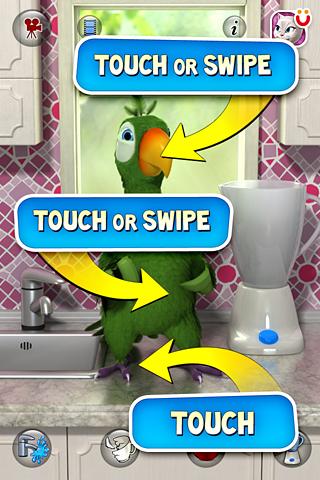
    ✔ Talk to Pierre and he will repeat with a twist. ;-)
    ✔ Poke him in the head or belly and see what his reaction is.
    ✔ Poke him in the feet and enjoy his little cowboy dance.
    ✔ Tickle his head or body to make him happy.
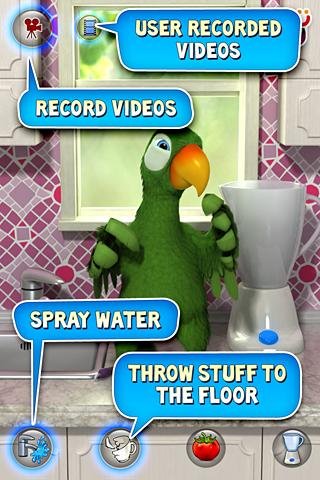
    ✔ Press the Blender button to switch the blender on. Once the blender is making noise, Pierre cannot hear you anymore.
    ✔ Press the Tomato button to throw tomatoes at him.
    ✔ Press the Cracked Teacup button to see him throw stuff to the floor making lovely noise.
    ✔ Press the Water Faucet button to see Pierre start sprinkling water around the kitchen.
    ✔ Record videos and upload them to YouTube & Facebook or send them by email or MMS.
    ★★★ PAID FEATURES ★★★
    You have to purchase the paid app:
    ✔ If you want for a tomato to actually hit Pierre (in the free app he just keeps dodging them).
    ✔ If you want to see Pierre throw more stuff to the floor.
    ✔ If you want to see Pierre sprinkling water around the kitchen.
    ✔ Switch Child Friendly Mode ON in the settings and remove all the places your toddler can get lost in (video recording, info screen etc.)



    niyamai digatama yan chiri chiri ayye rep+5
     
    Smart Screen Off PRO

    Smart Screen Off PRO
    Requirements: Android 1.0+
    Overview: Smart Screen Off it's a simple and light app which uses the Proximity Sensor built in your Android smartphone to turn the screen off and on automatically

    7OHPuvpGc2E31cCuhFIJsICik8YDSbacE_nCzaALvcJTlVI_LUqCB9hnq7fv0ReYTcg=w705


    OraVbM0fvl0-EUEM9sQNhbAOI6HJlQ1JET3hEYlVHKsn4YQPYJ6tufm_yd9P63BYD8w
    _vHLujY77Nd9rZBIdY1Zww5r9U5owO-D93djYOs6WH14l_efS1Pky2SVuNW6TI7A6v4V
    XkL-vWBR-XslzLIZYPgBrBiM9HvwE1v6JeNz-YWm2TuzB1egrsHYlzYLmWvpn5suuAA
    isv2NCBp9NNtK5yUPpaPWjupxrJXVomec6jlRiJzUUBEwlBMen1nMw4Y-ehFtz5cYA4Z


    Q6MlpVmmpVhPYb6W1q3DN-sLGLaRDZQ2Pap2_0tHsLa-bmfjJrzCNQgsmVpFXe-wsps
    Z2qtJ_o54oVXRNv3STHSdv9Ji6bFHT7PlhlVkrhfQcsQn9houxSI9ML0HmhYofi2r5qk
    ZoCtRV1SjJbOZmgGgfG0Efpvxzf3nNiL6AWrTQExrOUwd6fSUGCv0Y61rRPzNBUdQoA
    hNTR5_1elbuj6Z2IH5k_1a9cQd1fcVwoctHpGSnR4c3T-gGWkRC_T2MPWKj4xoWeewg


    ************** REASON ****************
    I decided to code this app when I bought my Galaxy Nexus: this device doesn't have any physical button on the front screen. Being a quite huge phone, it's quite difficult to press the "turn off" button every time I wanted to turn it off and on. So I needed a way to turn the screen off every time I put it into the pockets and off when removed.
    **************************************

    ************ HOW IT WORKS *************

    The app itself is a toggle button, to switch it on just press the App Icon. Then every time you put the phone into your pockets the screen turns off.

    If you put the smartphone upside down on the table, the screen turns automatically off.
    NOTE: It doesn't lock the screen (just like in a call)
    **************************************

    ************ REQUIREMENTS *************
    In order to use Smart Screen Off, you need to have a phone with Proximity Sensor (nowadays every smartphone incorporates one).
    **************************************


    - Is not possible to introduce a Timer (impossible to calculate how long the sensor has been covered in order to screen off after a user defined amount of time)!
    - Is not possible to change the sensibility of the sensor due to the Hardware and SDK limitations (at least without root)!
    - If you use Task Killers or Memory Cleaner, remember to add Smart Screen Off to exceptions!

    ************ PRO FEATURES *************

    At the moment the PRO version includes these features:
    - Start on Boot
    - Disable when in LandScape mode
    - Vibrate when screen is turned OFF
    - Vibrate when screen is turned ON
    - Hide Icon
    - Hide Notification Messages
    - Enable/Disable on shake
    - Don't screen on after screen Off

    Future features:
    - Light sensor combo
    - Tell me your suggestion

    What's in this version:
    [1.9]
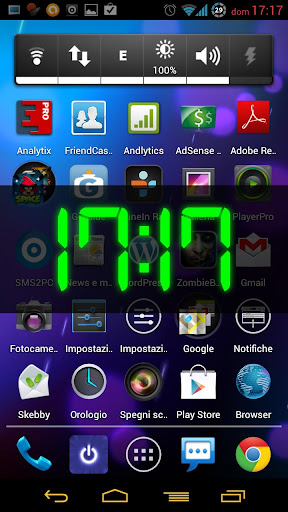
    Added "Show Digital Clock on screen on"
    Minor Bug fixes
    Now is faster when enabling/disabling it from app icon


    U-tag

    Well-known member
  • Nov 18, 2011
    12,732
    14,353
    113
    මචං මගෙ ගාව තිබ්බෙ Xperia mini එකක්. මෙකෙ heating issue එකක් නිසා මට වෙන phone එකකට replace කරන්න පුලුවන්. ඉතින් මෙ phone වලින් කොකද හොද? xperia neo v, play, ray, or neo?

    edit:- මොනව උනත් මට තව 14,000ක් තමයි දාන්න පුලුවන්. එත් අම්මගෙන් ඉලගෙන. මගෙ ඔකොම සල්ලි ඉවරයි.
     
    Last edited:
    මචං මගෙ ගාව තිබ්බෙ Xperia mini එකක්. මෙකෙ heating issue එකක් නිසා මට වෙන phone එකකට replace කරන්න පුලුවන්. ඉතින් මෙ phone වලින් කොකද හොද? xperia neo v, play, ray, or neo?


    මටනම් හිතෙන්නෙ Ray එක හොදයි වගේ :rolleyes::rolleyes:
     

    Thilinacba

    Well-known member
  • Sep 7, 2006
    13,526
    2,752
    113
    APN Backup & Restore

    A simple App to backup and restore APNs (Settings to connect to the internet with the mobile connection). The backup is stored in the /sdcard/APNBackupRestore folder.

    NOTE: Starting with Android 4.0/ICS, 3rd Party apps don't have access to write APN settings, hence this app no longer works for restoring APN backups. Some users have reported that it can be used on ICS if its set to run as a System app (using Titanium for example)


    8TLag.jpg


    Thilinacba

    Well-known member
  • Sep 7, 2006
    13,526
    2,752
    113
    මචං මගෙ ගාව තිබ්බෙ Xperia mini එකක්. මෙකෙ heating issue එකක් නිසා මට වෙන phone එකකට replace කරන්න පුලුවන්. ඉතින් මෙ phone වලින් කොකද හොද? xperia neo v, play, ray, or neo?

    Neo is the best out of all,then Neo V then Play and last Ray.With comparing specifications,available devs for modding,issues etc
    btw issellama ICS enne NEo V and Ray in 2 weeks :P
     
    • Like
    Reactions: U-tag

    Thilinacba

    Well-known member
  • Sep 7, 2006
    13,526
    2,752
    113
    SetCPU for Root Users

    SetCPU is a tool for changing the CPU settings (capable of overclock and underclock) on a rooted Android phone, including the Galaxy Nexus, Nexus S, Motorola Droid, Nexus One, G1, G2, Samsung Galaxy S II, myTouch 4G, Motorola Xoom, or one of many other devices to improve performance or save battery.

    SetCPU also allows you to set up powerful profiles to change the CPU speed under certain conditions, such as when the phone is asleep or charging, when the battery level drops below a certain point, when the phone's temperature is too high, or during certain times of day. See the screenshots for examples of how you might set up profiles.

    SetCPU's wide feature set make it useful to beginners and enthusiasts alike. Accelerate your processor to unleash your phone's multitasking potential, or dial your CPU's speed down to save battery.

    SetCPU also includes a "voltage control" menu, available to certain devices with custom kernels that support it, to control undervolting to save even more battery. Keep in mind that undervolting is only available for certain kernels.

    Have an HTC Sense device with a stock ROM or kernel? If you are having trouble getting your settings to "stick," press Menu > Disable Perflock. You still have to be rooted.

    Galaxy S devices: conservative scaling is recommended where it is used by default (ondemand on the Nexus S and Galaxy S II). There are issues with Galaxy S kernels that may result in crashes if some other scaling governors are used, or if the sleep profile "max" value is set too low.

    Getting a lot of Superuser notifications? It's a known issue with some multicore systems and will be fixed. For now, update Superuser on the Market and turn off notifications in the settings.

    Recent Changes:
    2.3.0: All new interface featuring a new frequency slider. Tap or slide your finger across the slider to quickly switch CPU speeds. Added an Action Bar and implemented View Pager navigation, revamping the entire interface around the new Android design guidelines. Dropped the dual pane info menu and added simpler Action Bar-based navigation. Changed all references to "scaling" to "governor." Added a new governor menu (previously "Advanced") that supports more governors and supports persisting when switching profiles. Improved support for some multicore systems and tablets. Dropped support for Android SDK versions Android 2.0.1 and below. Removed jargon from some descriptions and explanations. Numerous minor bug fixes and interface enhancements. Perflock disabler update coming soon.

    2.3.0.1: Fixed an issue with custom frequencies. Sorry about that!

    2.2.4 - Improved support for the new MSM 8x60 devices (such as the HTC EVO 3D and Sensation).

    2.2.3 - Fixed an issue where the voltage menu displayed frequencies backwards on certain devices capable of voltage control. Added support for additional CPU temperature sensors.

    Permissions:
    Root: SetCPU needs root permissions to modify the CPU speed and settings.

    Start at boot: SetCPU will start a profiles service at boot, if enabled. It also sets default boot settings, if enabled. SetCPU does not run in the background if profiles are not enabled, and becomes inactive after settings, if any, are applied.

    Wake lock: This prevents the phone from sleeping while stress testing and benchmarking.

    Vibrate: The device will vibrate if profile temperature warnings are enabled.

    Write external storage: SetCPU needs to read from and write to the SD card or internal storage to back up profile settings. It accesses the root directory only, and does not touch other files. SetCPU also has a "safe mode" feature that writes a special update.zip file to your storage that enables "safe mode."

    Read phone state: The "in call" profile needs this to determine if the user is making a phone call or not, and trigger the profile if the user wants to. SetCPU never reads or transmits any personally identifiable information from the phone.


    aNeKP.jpg


    Metalingus

    Well-known member
  • Dec 2, 2011
    3,227
    627
    113
    මචං මගෙ ගාව තිබ්බෙ Xperia mini එකක්. මෙකෙ heating issue එකක් නිසා මට වෙන phone එකකට replace කරන්න පුලුවන්. ඉතින් මෙ phone වලින් කොකද හොද? xperia neo v, play, ray, or neo?

    ray එක හොන්දයි නමුත් ස්ක්‍රීන් එක පොඩි වැඩියි ඒක නිසා පුලුවන්නම් නියෝ එකකට පලයන්
     
    Status
    Not open for further replies.