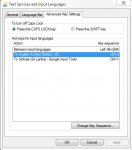
මේක හුග දෙනෙක් දන්නවා ඇති. අපි type කරන කොට සමහර වචන english වලිනුත් සමහර ඒවා සිංහලෙනුත් ලියන්න වෙනවා. google toolbar පාවිච්චි කරන අයට language මාරුකරන්න ලේසි විදියක් මෙන්න
මම ctrl+1 ගැහුවම සිංහලත්, ctrl + 2 ගැහුවම english වලින් ලියන්න පුළුවන්. මාර ලේසියි.
මෙන්න කරන විදිය
source :google.com/inputtools/windows/configuration.html
Input Tools Shortcut
A shortcut key sequence can be applied to input tools, which can be used to quickly enable them for any in-focus application. To set up a shortcut, follow these steps:
Windows 7/Vista
මම ctrl+1 ගැහුවම සිංහලත්, ctrl + 2 ගැහුවම english වලින් ලියන්න පුළුවන්. මාර ලේසියි.
මෙන්න කරන විදිය
source :google.com/inputtools/windows/configuration.html
Input Tools Shortcut
A shortcut key sequence can be applied to input tools, which can be used to quickly enable them for any in-focus application. To set up a shortcut, follow these steps:
Windows 7/Vista
- Control Panel → Regional and Language Options → Keyboard and Languages tab
- Click on Change keyboards… button to open Text services and input languages dialog
- Navigate to General tab
- If Google [Language] Input is not listed in Installed Services box, then click Add; in the Add Input language dialog box, go to the language for which you want to enable the input tools in the languages tree and expand it. Check the checkbox next to Google [Language] Input in the list.
- Navigate to Advanced key settings tab
- In Hot keys for input languages, select To [Language] - Google Input Tools
- Press Change Key Sequence
- Select Enable Key Sequence
- Select a key sequence, such as Left ALT + SHIFT + Key 1
- Apply all changes
- Test the changes - open an application and press Left ALT + SHIFT + Key 1 (or your custom shortcut) and the input tool should open.