...::ALL about BLOGS and BLOGGING (from A to Z)::...

migaramk

Well-known member
  • Jul 4, 2007
    22,458
    3,276
    113
    https://www.facebook.com/Migaramk.Exclusive
    Meta Tag

    ela ela godak watina dewal tiyenawa... Meta tag eka dane hetith kiyala danne ko halo...Ay ochchara ganan????:lol::lol:

    onna...

    Meta Tag(as a request)

    Now that we have altered the settings for the Blog, we can add a further meta tag into our template to tell search engines not to index the site. Click Template ->Edit HTML and you can see the source code. Somewhere at the top, just below <head>, insert this line (shown in red):-

    <head>
    <meta name="robots" content="noindex,nofollow" />


    Leave this tag there. Search engine robots which visit your site will not index the Blog pages and contents.


    ~~!! Don't You Think That I Deserve The Reps !!~~
     

    lasankandy

    Well-known member
  • Jul 18, 2009
    32,780
    34,251
    113
    KY
    onna...

    Meta Tag(as a request)


    Now that we have altered the settings for the Blog, we can add a further meta tag into our template to tell search engines not to index the site. Click Template ->Edit HTML and you can see the source code. Somewhere at the top, just below <head>, insert this line (shown in red):-


    Leave this tag there. Search engine robots which visit your site will not index the Blog pages and contents.


    ~~!! Don't You Think That I Deserve The Reps !!~~

    Weda na kollo weda na Keywords danne nadda???:no::no::no:
     

    migaramk

    Well-known member
  • Jul 4, 2007
    22,458
    3,276
    113
    https://www.facebook.com/Migaramk.Exclusive
    Adding meta tags to blogger

    Weda na kollo weda na Keywords danne nadda???:no::no::no:

    Adding meta tags to blogger

    If you don't know what meta tags are,Meta tags are the tags which describes your site and tells the search engines what your site is all about.Adding meta tags is an important factor in SEO.(Search Engine Optimisation).Meta tags allows search engines to index your web pages more accurately. In other words,Meta tags communicate with the search engines and tells more information about your site and make it index correctly and accurately.

    Click on the 'Edit html' tab


    Here is the code you have to add

    <meta content='DESCRIPTION HERE' name='description'/>
    <meta content='KEYWORDS HERE' name='keywords'/>
    <meta content='AUTHOR NAME HERE' name='author'/>

    DESCRIPTION HERE:Write your blog description
    KEYWORDS:Write the keywords of your blog
    AUTHOR NAME:Write the author's name(Your name)

    3.Add the above code just after this [Look at the below screenshot]

    <b:include data='blog' name='all-head-content'/>
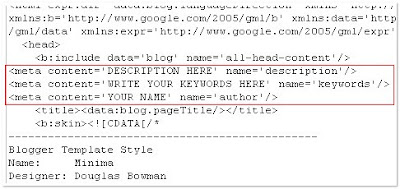
    how-add_met1a.jpg


    Don't forget to add description and keywords.
    and save the changes.


    IMPORTANT:

    Several people were filling with just the keywords in the description.DON'T DO THAT.Google and other search engines will ban your site from the search engines list if you did so.And also,don't repeat the keyword more than 3 times.

    That's it!You have sucessfully added the metatags to your blogger(blogpsot) blog.If you want to check whether you added the meta tags correctly or not,just type 'meta tags analyzer tool' in the google and you will find so many sites which can check whether you have added the tags correctly or not.


    ~~!! Don't You Think That I Deserve The Reps !!~~
     

    lasankandy

    Well-known member
  • Jul 18, 2009
    32,780
    34,251
    113
    KY
    Adding meta tags to blogger


    If you don't know what meta tags are,Meta tags are the tags which describes your site and tells the search engines what your site is all about.Adding meta tags is an important factor in SEO.(Search Engine Optimisation).Meta tags allows search engines to index your web pages more accurately. In other words,Meta tags communicate with the search engines and tells more information about your site and make it index correctly and accurately.

    Click on the 'Edit html' tab


    Here is the code you have to add


    DESCRIPTION HERE:Write your blog description
    KEYWORDS:Write the keywords of your blog
    AUTHOR NAME:Write the author's name(Your name)

    3.Add the above code just after this [Look at the below screenshot]


    how-add_met1a.jpg


    Don't forget to add description and keywords.
    and save the changes.


    IMPORTANT:

    Several people were filling with just the keywords in the description.DON'T DO THAT.Google and other search engines will ban your site from the search engines list if you did so.And also,don't repeat the keyword more than 3 times.

    That's it!You have sucessfully added the metatags to your blogger(blogpsot) blog.If you want to check whether you added the meta tags correctly or not,just type 'meta tags analyzer tool' in the google and you will find so many sites which can check whether you have added the tags correctly or not.


    ~~!! Don't You Think That I Deserve The Reps !!~~

    bloger ekata ganne na banz dala balapnkooooo add wenne na
     

    thelaa rox

    Well-known member
  • Feb 23, 2009
    15,405
    431
    83
    37
    lonley planet
    bloger ekata ganne na banz dala balapnkooooo add wenne na

    machang how to ad a meta tag in xml kiyala google karapan
    code eke ending tag eke problem ekak tiyenne

    (man blog walata meta dala tiyenawa) :)

    try this

    Code:
    <META content='content eka danna' name='name eka danna'></META>
     
    Last edited:

    *danushka*

    Well-known member
  • Oct 15, 2007
    13,922
    1,098
    113
    Hali-ela
    ane mata apa wela inne ban.mama bolg gana mel odeyak danna.ahen mehen hoyagena yantham akak haduwa.anthimata aka google adsense walin reject una...........
     

    anumax

    Member
    Apr 19, 2009
    503
    6
    0
    Colombo
    machan mama configure blog posts ekata gihilla save karankota error message ekak enawa
    Please correct the errors on this form.

    save karanna baha machan


    help!

    bba.jpg


    migaramk

    Well-known member
  • Jul 4, 2007
    22,458
    3,276
    113
    https://www.facebook.com/Migaramk.Exclusive
    Customize Blogger “Read More” / “Jump Breaks” Links With image Buttons,

    Customize Blogger “Read More” / “Jump Breaks” Links With image Buttons, Text And Alignment.​

    4rda86.jpg

    adding a read more button will make your page views to a higher value..
    and it's good for adsence too
    after reading this tutorial you’ll be able to Customize you read more links in those ways:

    * Change the text ” read more ” to another words.
    * Add An Image / Button To Your “Read More / Jump Breaks ” In Blogger Links Instead Of Plain Text
    * choose your read more link / button to be displayed on left side, right side or center it.

    First Step, You Must Do This Step

    this code should be included in your blogger template,

    <b:if cond='data:post.hasJumpLink'>
    <div class='jump-link'>
    <a expr:href='data:post.url + "#more"'>Read More </a>
    </div>
    </b:if >

    i’ll tell you where to add it, but before you add it, make sure that it’s not already included in your template.
    Go to you blogger dashboard >> Layout >> Edit HTML and Check on Expand Widget Templates use your internet browser to search for the code,

    if you found the code in your template, ok you have to skip this step
    but before you skip it,
    make sure that the third line in the code looks like this


    <a expr:href='data:post.url + "#more"'>Read More </a>
    And not

    <a expr:href='data:post.url + "#more"'><data:post.jumpText/></a>

    if you found it like the second one, please replace it with the first one

    if it’s not in your template you’ll have to add it, and i’ll tell you where you should add it.

    Go to you blogger dashboard >> Layout >> Edit HTML and Check on Expand Widget Templates use your internet browser to search for this code,


    <data:post.body/>

    and just after it, add the next code,

    <b:if cond='data:post.hasJumpLink'>
    <div class='jump-link'>
    <a expr:href='data:post.url + "#more"'>Read More </a>
    </div>
    </b:if >

    Now we finished adding the require code for customizing this trick.

    1.Change the text ” read more ” to another words.

    after applying the first step to your template, you should have this code added to your template :

    <b:if cond='data:post.hasJumpLink'>
    <div class='jump-link'>
    <a expr:href='data:post.url + "#more"'>Read More</a>
    </div>
    </b:if >

    This code will display your read more link in this format : Read More

    and to change it to another word, simply, change the word Read More in the code in your template to what ever you want, Example? Keep reading, continue reading, read the rest, and more.

    After changing it, click Save template and check out your blog.


    2.Add An Image / Button Instead Of Plain Text

    you must have this code added to your template

    <b:if cond='data:post.hasJumpLink'>
    <div class='jump-link'>
    <a expr:href='data:post.url + "#more"'>Read More</a>
    </div>
    </b:if >

    This code will display your read more link in this format : Read More

    and to change the text to image / button , we should replace the word Read More in the code with the following

    <img border="0" src="Paste here the button Image URL"/>

    so you should have some thing like this

    <img border="0" src="http://www.allblogtools.com/image-url.jpg"/>

    After changing it, click Save template and check out your blog.

    And here is some good samples for read more buttons :

    Button_ReadMore_Reflective.jpg


    readmore.gif


    readMore.png


    but_moreinfo.gif


    readmore.jpg


    readmore.jpg
