filesonic premium accounts NEED???

shehan12345

Well-known member
  • Jan 31, 2008
    1,940
    113
    63
    Colombo
    pj8610t3p3rtq3vndf5i52ptt5
    c1tl0ljqck63hg6tc62aqife00
    cf7h37eqn4d3jd8sq241mp4uf6
    ncp367e25fl6gb5jttpb9sv6l1


    madida madinam kiyapan thawa dennam.... hikz
     

    nismok

    Well-known member
  • Jun 27, 2008
    9,391
    673
    113
    machan meka kohomada use keranne....man me kramaya danne na

    Method 1:


    Tools Required :


    1. Mozilla Firefox Browser : Mozilla Firefox

    2.Cookie Editor (Add N Edit Cookies) Plugin for Firefox : https://addons.mozilla.org/en-US/firefox/addon/add-n-edit-cookies/

    3.And you need a cookie such of hotfile.com or someother site for that matter.I'm using a hotfile cookie (00c8a3d907c96ebdd20ebfb9b079814f9f10dfde725893b503981ee9d74cf587) in this article

    The Working:

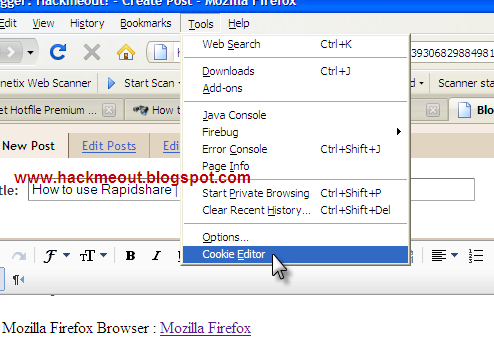
    1. Start Firefox.Go to Tools > Cookie Editor


    2. Once you go there you'll get a dialog box like this.Click on "Add".
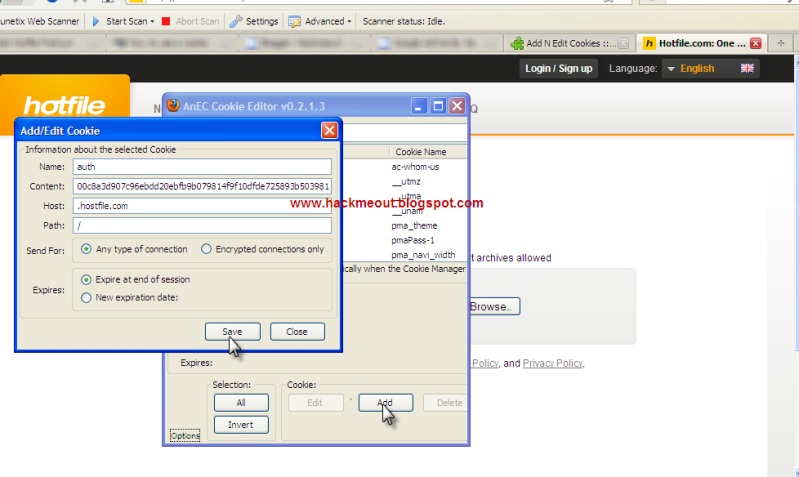


    3. And enter these details as in the picture above. NOTE: The details entered above are just for hotfile.com and not all sites such as rapidshare,megaupload etc..

    Name: auth
    Content: 00c8a3d907c96ebdd20ebfb9b079814f9f10dfde725893b503981ee9d74cf587 (Your Cookie)
    Host: .hotfile.com
    Path: /

    After you have enetered these details check once again to make sure you haven't made any mistake.Then click on "Save" and "Close" the Cookie Editor dialog box.

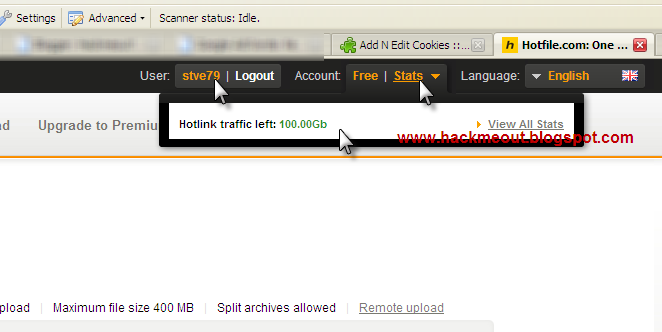
    4.Once you have completed all the 4 above steps now just refresh the page ie.Refresh "http://hotfile.com" and you'll find that you have succesfully logged into your victim's account.If you still didn't get logged in,then refresh the page for about more times and then it will be fine.

    This is what it should look like once it's done.

    Note: The above cookie details which i provided is JUST for Hotfile premium cookies.I'll tell you the details for other sites such as rapidshare,megauplad and fileserve below.


    Details to be entered for various sites:

    Hotfile.com :

    Name: auth
    Content: (Your Cookie)
    Host: .hotfile.com
    Path: /

    Fileserve.com :

    Name: cookie
    Content: (Your Cookie)
    Host: .fileserve.com
    Path: /

    Filesonic.com :

    Name: PHPSESSID
    Content: (Your Cookie)
    Host: .fileserve.com
    Path: /

    Rapidshare.com :

    Name: enc
    Content: (Your Cookie)
    Host: .rapidshare.com
    Path: /

    Megaupload.com :

    Name: user
    Content: (Your Cookie)
    Host: .megaupload.com
    Path: /

    Method 2:


    Tools Required :

    1. Google Chrome Browser: Download

    2.Cookie Plugin for Chrome: Premium Cookie Injector 1.1


    The Working:

    This plugin works only for

    Fileserve.com
    Hotfile.com
    Rapidshare.com
    Megaupload-Megavideo


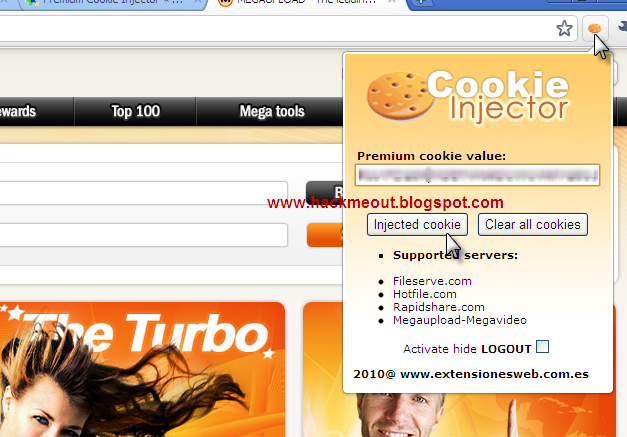
    This is much easier than the first method as tis doesn't involve much of manual working.

    1. Get a premium cookie for the above listed servers.Go to your server site.
    2. Enter it in the space provided.
    3. And then click "Inject Cookie".
    4. The page will be automatically refreshed and the cookie will be injected.
     

    shehan12345

    Well-known member
  • Jan 31, 2008
    1,940
    113
    63
    Colombo
    Method 1:


    Tools Required :


    1. Mozilla Firefox Browser : Mozilla Firefox

    2.Cookie Editor (Add N Edit Cookies) Plugin for Firefox : https://addons.mozilla.org/en-US/firefox/addon/add-n-edit-cookies/

    3.And you need a cookie such of hotfile.com or someother site for that matter.I'm using a hotfile cookie (00c8a3d907c96ebdd20ebfb9b079814f9f10dfde725893b503981ee9d74cf587) in this article

    The Working:

    1. Start Firefox.Go to Tools > Cookie Editor


    2. Once you go there you'll get a dialog box like this.Click on "Add".


    3. And enter these details as in the picture above. NOTE: The details entered above are just for hotfile.com and not all sites such as rapidshare,megaupload etc..

    Name: auth
    Content: 00c8a3d907c96ebdd20ebfb9b079814f9f10dfde725893b503981ee9d74cf587 (Your Cookie)
    Host: .hotfile.com
    Path: /

    After you have enetered these details check once again to make sure you haven't made any mistake.Then click on "Save" and "Close" the Cookie Editor dialog box.

    4.Once you have completed all the 4 above steps now just refresh the page ie.Refresh "http://hotfile.com" and you'll find that you have succesfully logged into your victim's account.If you still didn't get logged in,then refresh the page for about more times and then it will be fine.

    This is what it should look like once it's done.


    Note: The above cookie details which i provided is JUST for Hotfile premium cookies.I'll tell you the details for other sites such as rapidshare,megauplad and fileserve below.


    Details to be entered for various sites:

    Hotfile.com :

    Name: auth
    Content: (Your Cookie)
    Host: .hotfile.com
    Path: /

    Fileserve.com :

    Name: cookie
    Content: (Your Cookie)
    Host: .fileserve.com
    Path: /

    Filesonic.com :

    Name: PHPSESSID
    Content: (Your Cookie)
    Host: .fileserve.com
    Path: /

    Rapidshare.com :

    Name: enc
    Content: (Your Cookie)
    Host: .rapidshare.com
    Path: /

    Megaupload.com :

    Name: user
    Content: (Your Cookie)
    Host: .megaupload.com
    Path: /

    Method 2:


    Tools Required :

    1. Google Chrome Browser: Download

    2.Cookie Plugin for Chrome: Premium Cookie Injector 1.1


    The Working:

    This plugin works only for

    Fileserve.com
    Hotfile.com
    Rapidshare.com
    Megaupload-Megavideo


    This is much easier than the first method as tis doesn't involve much of manual working.

    1. Get a premium cookie for the above listed servers.Go to your server site.
    2. Enter it in the space provided.
    3. And then click "Inject Cookie".
    4. The page will be automatically refreshed and the cookie will be injected.

    me thiyenne hodatama pahadili karala ...:yes::yes::yes::yes::yes::yes::yes::yes::yes:;););););)