ANE PODI HELP 1 DENNA....

alpha-echo

Active member
  • May 3, 2010
    153
    52
    28
    :confused::confused::confused::confused:
    machanz mama mage PC 1 ta danna yanne windows7. mama gawa teyanawa
    win7 Ultimate 32 bit & 64 bit


    * koi eka da godak hoda 1:confused::confused::confused::confused::confused:
    * 64 bit eka dapuwama samahara
    software wada na neda?
    * 32 bit eka win XP wala wada karana
    onema 1 run kara ganna puluwan
    wenawa neda?


    ane machan ekmanata help 1 deyan ko mama format karanna balagana inne?
     

    JAASBandara

    Well-known member
  • Sep 20, 2008
    10,564
    281
    83
    Windows 7 dannana nam aduma RAM eka 512mb wenda ona.....
    Anika Processor eka 64bit eka dannda puluwan wei ett processor eka 64bit newei nam 64bit dala wadak naaaa....mokada speed eke wenasak penne naa....

    Software nam 64bit walata wenama download karanda wei.......32bit ekata nam one naaaaa....habai samahara software wala old version wada karanne naaa... ewat alut version ekak download karanda wei....
     

    Godage

    Member
    Jun 3, 2009
    4,658
    795
    0
    Searching...
    මගේ අදහසනම් 32 bit දානවා නම් හොදයි කියන එකයි. :yes: ඔයාගේ motherboard එක 64 bit වලට support කරනවද ? කරනවනම් අවුලක් නැ. නැත්නම් ඔයාට 64 bit install කරන්න බෑ. :no:
     

    Randir

    Well-known member
  • Sep 5, 2006
    17,944
    2,471
    113
    Earth
    i have win7 64 bit originally came with notebook. its good. better than xp. faster than xp, more functions and looks better.
     

    alpha-echo

    Active member
  • May 3, 2010
    153
    52
    28
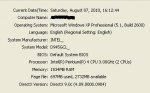
    machanz la me mage SYSTEM INFORMATION

    my infor.JPG


    mage motherboard & processor 64 bit support karanawa...

    32bit 1 dapuwama XP wala wadakarana software awlak nathuwa run wena nesa... mama 32 bit thora gaththa machan'' awlak naha ne?
     
    Last edited:

    flag au:

    Well-known member
  • Jun 5, 2010
    5,872
    1,350
    113
    ram madi ,2GB tiynawa nam 64 bit wada....a unth kiyana ba...hodama da tamai 32bit tiya gana
     

    Tom Riddle

    Member
    Aug 31, 2007
    1,833
    196
    0
    මේ ප්‍රශ්නෙට කෙලින් උත්තරයක් දෙන්න ගොඩක් වෙලාවට අමාරුයි. ඒ වුනාට උඹේ කේස් එකේදි නම් ගේමක් නැහැ.

    64 bit දාන්න එපා. අඩු තරමේ 4 GB වත් ඕනා වාසියක් දකින්න. Microsoft ලා කියන minimum requirement එකත් 2 GB (32 bit වලට නම් 1 GB).

    xp වල දුවන හැම software එකක්ම windows 7 32 bit වල දුවන්නේ නැහැ. ඒක software එකෙන් software එකට වෙනස් වෙනවා. සමහර ඒවා දුවනවා. සමහර ඒවා නැහැ
     

    alpha-echo

    Active member
  • May 3, 2010
    153
    52
    28
    :cool::cool::cool::cool:ubala okkotama thanX mata help karata... mage RAM 1.5GB nesa mama 64bit danne naha... 32 bit danawa....:cool::cool::cool::cool::cool:


    :confused::confused::confused::confused:eth mata podi prob 1 teyanawa... mokadda 32bit & 64bit atara
    differences 1?:confused::confused::confused:
     

    kosandpol

    Well-known member
  • Jun 10, 2008
    45,329
    1,492
    113
    :cool::cool::cool::cool:ubala okkotama thanX mata help karata... mage RAM 1.5GB nesa mama 64bit danne naha... 32 bit danawa....:cool::cool::cool::cool::cool:


    :confused::confused::confused::confused:eth mata podi prob 1 teyanawa... mokadda 32bit & 64bit atara
    differences 1?:confused::confused::confused:
    64bit systems can support an unlimited amount of memory where as 32bit can support only up to 4GB.
     

    lahirufx+

    Well-known member
  • Oct 13, 2008
    9,302
    3,097
    113
    6°54′N 79°54′E
    Windows 7: 64 bit vs 32 bit?

    Pros and Cons of a 64 bit system:

    • You can address much more than 4GB of memory, which is ideal for avid gamers, CAD, video editors and heavy multi-taskers. However, any 32 bit software you use will still be restricted to 4GB memory – you need a 64 bit CPU, OS and applications to take full advantage of the extra RAM.

    • 16 bit applications will no longer run. Although this is unlikely to be a problem, if you use very old software (from the Windows 3.1 days!) then it will not work under a 64 bit OS.

    • Existing 32 bit drivers no longer work.If you have older or poorly supported hardware you may find that it can no longer be used. Got a 7 year old scanner that just about works in Vista? You may not be able to get it working in 64 bit Windows 7.

    • Unsigned kernel-mode drivers no longer work. Along with the issue above, the inability to run unsigned kernel mode drivers will cause problems for old hardware. (There is reportedly a way to bypass this check).

    • Running some 32 bit applications on a 64 bit OS could actually be slower. The additional overheads in running 32 bit software in 64 bit mode could cause a slight degradation in performance. It will take some time for 64 bit software to become the norm.

    The conclusion? Well, it depends on what you use your system for. If you have a 64 bit capable CPU but use older hardware, it would be safe to stay with a 32 bit version for the time being to ensure that you don’t need extra upgrades.

    header.jpg

    http://www.w7forums.com/windows-7-64-bit-vs-32-bit-t484.html