...::: Applications Zone :::...

what do u think about this ...::: Applications Zone :::...


  • Total voters
    394

MaD-DoC

Member
Oct 27, 2007
6,337
22
0
SLIIT/Malabe
308iosh.png


Quote: Vista Manager is a system utility that helps you optimize, tweak, and clean up Windows Vista. It will increase your system speed, improve system security, and meet all of your expectations. It’s compatible with Windows Vista SP1 entirely!

Vista Manager is the powerful software tool to tweak and optimize your Windows Vista, it bundles more than 30 different utilities in one and help your system faster and more stable, secure and personal!

Code: Yamicsoft.Vista.Manager.v1.4.8.Incl.Keymaker-CORE

http://rapidshare.com/files/106378410/32bIt.rar

Yamicsoft.Vista.Manager.v1.4.8.Vista64.Incl.Keymaker-CORE

http://rapidshare.com/files/106378533/64b1t.rar
 

TDM

Well-known member
  • Jan 7, 2007
    2,347
    25
    48
    36
    Kandy
    machan mama uninstall karane nethiwa samahara programs wagayak delete kala..den ewa aye danda behe parana eka thiyenwa kiyanawa...me program eka add remove programm list eke thiyenawa,namuth uninstall karanna behe..ehema ewa makanda puluwan softwear ekak denna puluwanda.. Please
     

    MaD-DoC

    Member
    Oct 27, 2007
    6,337
    22
    0
    SLIIT/Malabe
    Advanced Uninstaller PRO 9.0

    291n9so.jpg


    09 April 2008

    Advanced Uninstaller PRO is the ultimate uninstaller for Windows. It is an easy to use suite for uninstalling applications and keeping your computer clean, fast and in it's best shape. All features of Advanced Uninstaller PRO are designed to be both safe and easy to use. You can now easily uninstall programs by selecting the application from a list, or by dragging and dropping a file or shortcut on the Advanced Uninstaller PRO desktop icon.

    The Startup Manager gives you control over the programs that are automatically started by Windows, and offers you detailed information about each one of them, including advice about what the program does and whether you should disable it or not. Advanced Uninstaller PRO includes a huge knowledge base containing startup program descriptions.

    This new release contains a powerful registry cleaner, defragmenter and optimizer which will help you keep your registry fast, clean and easily accessible by all programs. A registry backup utility is also included.

    The Quick Cleaner will allow you to perform a one step clean-up of your computer and to protect your privacy. It can safely delete the Internet visited pages history, the web addresses you typed, the Internet cookies and also the recently open files list for more than 100 applications, including Microsoft Office, Windows Media Player, ICQ, MSN, WinZip, RealPlayer, Kazaa, WinAmp, etc.

    Advanced Uninstaller PRO also enables you to remove all not working Start Menu shortcuts, to hide and show them at your will and to alphabetically sort the entire Start Menu. Some other important functions of Advanced Uninstaller PRO are: finding and deleting garbage and temporary files left behind by Windows, Internet Explorer and other applications, detailed Internet Explorer configuration by enabling or disabling it's toolbars, plug-ins and BHOs, a nice and powerful font manager, a Control Panel manager and many, many more.

    This program is designed to run on Microsoft Windows Vista / XP / 2003 / 2000.

    What's new in version 9:
    * Windows Vista support
    * Improved Installation Monitor
    * Communicate with other users through our online forum. Easily ask questions, get useful answers and share your experience with a large community of users.
    * The Mozilla Firefox tools have been added.
    * The Installation Monitor will make sure that no file or registry entry will be left behind after the uninstallation of a program. This tool can watch a program's installation, create an installation log containing information about everything that the setup of the program has done, and then later completely uninstall the program. You will be able to uninstall a program even better than by using it's own uninstaller. More than this, we designed this tool to be fast and reliable. We honestly believe it to be one of the fastest tools available of this kind.
    * As many of our users requested, the installation logs can now be printed.
    * When you spend days in from of your computer you save a lot of information for later use. You save documents, Internet pages, images, movies, and many more. The problem is that after some time you might end up saving the same file several times. The Duplicate Files tool allows you to scan your computer for duplicate files, zero-sized files and empty folders. This is a safe tool that makes sure that you do not delete all copies of the same file.
    * The Services Manager tool allows you to easily take control of programs that are automatically started each time you use your computer. Services are important programs that are started before any other Windows program. They usually take care of networking, web publishing, firewalls, etc. We created a profiles list that contains the most important configurations that can be found today. When you first run the Services manager tool your initial configuration is added to this list so that in case you will make a mistake you will be able to restore your services' settings to their initial state.
    * We improved the Registry Cleaner. It will now perform a deeper search for more invalid registry entries and will do an even better job removing junk items and speeding up your computer.
    * The ActiveX tool gives you control over the ActiveX programs (also called ActiveX web controls) that are downloaded by Internet Explorer from the web.
    * Many applications you install on your computer can add menus that will appear when you right click a link, image or page in Internet Explorer. The only problem is that after installing a lot of programs you might end up with a cluttered right-clock menu that will make Internet Explorer difficult to use and run slower. You can now take care of this problem by using Advanced Uninstaller PRO!

    * The Reports tool allows you to print detailed reports containing:
    o the list of installed programs
    o the list of services
    o the list of startup applications
    o the list of system fonts

    * The scheduler will allow you to choose what tool will be automatically started each day of the week.
    * In case you don't want to use Advanced Uninstaller's own skins, you are now able to set it to use the same theme as Windows XP.
    * The Quick Cleaner tool now contains information about how to delete the logs and history files for more than 50 new applications. Amongst them we would like to mention the following:
    o Mozilla Firefox
    o latest version of Photoshop
    o latest version of Paint Shop Pro
    o latest version of RealPlayer
    o latest version of Adobe Acrobat
    o latest version of Zone Alarm
    o etc.
    * The main Advanced Uninstaller PRO window now saves it's desktop position and size, making it more easy to customize.
    * An improved help file.


    Quote: INSTALLATION

    1. Install the software. Don't run the program.
    2. Run patch.
    3. Enjoy.


    Checked with Kaspersky No Infection.

    Provided bY :4kusN!ck[Revenge]

    Download.gif

    downloadgif.gif

    8e0xl01.gif

    Code: http://rapidshare.com/files/106134219/AdvUniPr9.0.rar
     

    MaD-DoC

    Member
    Oct 27, 2007
    6,337
    22
    0
    SLIIT/Malabe
    TDM said:
    machan mama uninstall karane nethiwa samahara programs wagayak delete kala..den ewa aye danda behe parana eka thiyenwa kiyanawa...me program eka add remove programm list eke thiyenawa,namuth uninstall karanna behe..ehema ewa makanda puluwan softwear ekak denna puluwanda.. Please


    Your Uninstaller! 2008 v6.1.1231

    fp6kg1.png


    NFO:

    Quote: Your Uninstaller! uninstaller program is the industry's leading
    uninstaller program. World's the 1st smart Drag&Uninstall
    uninstaller program under the Windows platform. Using Your
    Uninstaller! is as easy as using the recycle bin. Imagine! Just a
    drag-drop and the program you don't want will disappear from your
    computer-- as well as everything the unwanted program brings!
    Your Uninstaller! is a user-friendly way of removing unneeded
    applications on your computer. It can even remove some
    annoying spywares!

    How does it work?

    Perhaps you are wondering how Your Uninstaller! uninstaller
    program completely removes applications so quickly. As you
    know, there are many installers in the world, such as
    InstallShield, Wise Installer, Microsoft Installer and many others.
    Most applications are built using these installers. Each installer
    has a unique install database, which makes it difficult to find all
    the changes programs' make to your computer. That's why other
    uninstallers can only uninstall part of an application-leaving some
    files and registry keys. To solve this problem, Your Uninstaller!
    uses it's unique technique: SmartUninstall. SmartUninstall has a
    database containing information about all installers on the
    market; so when it uninstalls a program, it automatically detects
    which installer the application used, then it simply uninstalls the
    application properly. That's the reason Your Uninstaller! can
    detect and completely remove all the programs and icons on your
    computer.

    Sounds complex? It's not! All the steps used by Your
    Uninstaller! are done with simple clicks. You won't even notice
    the analysis process.

    Completely Uninstall

    Your Uninstaller! uninstaller program completely takes the place
    of Windows Add/Remove program, while offering you many more
    features. Your Uninstaller can list "hidden" programs that you
    can't view using the Windows Add/Remove program. The standard
    Add/Remove program often can't uninstall applications
    completely-leaving broken registry keys and unused files on the
    hard disk. Big registries and large numbers of unnecessary files
    make system slow. Your Uninstaller! clears broken keys and files
    in seconds using SmartUninstall!

    Fast and User-Friendly

    Your Uninstaller! uninstaller program starts 500-1000% times
    faster than Windows Add/Remove program. It also appropriately
    loads all applications and icons, so you can easily find the
    programs you wish to uninstall. Your Uninstaller! also contains a
    handy search function.

    Easy to use

    Your Uninstaller! automatically detects broken registry keys from
    you Add/Remove list, and clears them entirely with your
    permission. Your Uninstaller! can also detect unused files left by
    previous uninstalls-it will prompt you before it completely the
    deletes these files. Even a single drag-drop performs an uninstall
    process! All Your Uninstaller! processes come with step-by-step
    instructions and can be performed with a few simple clicks or
    drag-drops.

    Get rid of spywares

    Your Uninstaller! also contains an internal Startup Organizer that
    safely removes or hides unwanted auto-run applications. This
    program is very useful for finding spy programs. The Startup
    Organizer can also search all possible startup locations; it then
    lists these applications and their details for you. You can even
    add your own auto-runners into startup folders, your registry, etc.

    Remember to use Your Uninstaller! weekly to Make your PC Fast
    and Clean!

    DownloaD:

    Code: http://rapidshare.com/files/104156394/Your.Uninstaller_.2008.v6.1.1231.READNFO_KEYGEN-FFF.rar

    pass:

    Code: www.thegreekisland.net
     

    MaD-DoC

    Member
    Oct 27, 2007
    6,337
    22
    0
    SLIIT/Malabe
    5v3f3k.png
    Keep your Windows clean! It’s quick, it’s easy and it works.
    Don’t you hate it that Windows gets slower and slower the longer you use it? One of the main reasons for this is that software is almost never uninstalled completely. Most application programs don’t provide enough information for the Windows Add/Remove Programs tool to be able to uninstall them properly. So every time you test a program and then remove it you have a little more junk left over clogging up your computer. After a while your Windows operating system is like a back yard full of rusty bicycles, old beer cans and broken bathtubs.

    Ashampoo UnInstaller 3 removes programs from your system without a trace, allowing you to test software with confidence because you know it’s not going to “dirty” your computer. It makes this easy, monitoring the installation of new programs automatically and enabling you to remove them completely with a couple of clicks.
    But that’s not all – the new version also comes with over a dozen equally easy-to-use tools to help you keep your Windows system as snappy and streamlined as the first day you installed it.

    New user interface – easier to use than ever before
    The brand-new Ashampoo UnInstaller 3 is packed with new modules and features, but the most striking change is the completely new user interface. It’s attractive and modern and it makes the program faster, easier and more fun to use than ever before. Everything is easy to find and he program guides you through all operations, with clear explanations on every step of the way.
    Most users will never have to consult the help – all the information you need is displayed in the program itself where you need it and when you need it.

    Four new Windows maintenance tools. In addition to uninstalling programs, Ashampoo UnInstaller 3 now comes with over a dozen easy-to-use tools for keeping your Windows system clean and snappy. The following four tools are new:
    • Manage Restore Points
    • Defragment Hard Drives
    • Registry Cleaner
    • Check Installed Programs Entries

    Other new functions and improvements. In addition to all the improvements in the main program functions several of the other tools have also been updated:
    • Internet Cleaner
    • No more Easy/Expert mode switch
    • Manage Fonts
    • Step-by-Step Assistant update

    Standard features and functions. Of course the new version also includes everything that has made Ashampoo UnInstaller so popular with savvy Windows users ever since the first version:
    • Installation Monitor
    • Reinstaller
    • Drag & Drop Desktop Uninstaller
    • Windows management tools
    • Monitor program activity

    Features at a glance
    What’s new:
    * Beautiful new design with scalable displays
    * Much more intuitive user interface
    * Improved interactive guides
    * Full Vista compatibility
    * Manage Restore Points
    * Hard Drive Defragmenter
    * Registry Cleaner
    * Check Installed Program Entries
    * More powerful Internet Cleaner with Firefox support
    * Manage Fonts tool included again

    Basic functions and features:
    * Monitor program installation automatically and manually
    * Uninstall programs completely, without a trace
    * Uninstall programs not monitored by Ashampoo UnInstaller
    * Reinstaller – reinstall programs you have uninstalled
    * Drag & Drop uninstaller
    * Find/Delete Duplicate Files
    * Find/Delete Temporary Files
    * Find/Delete Empty Folders
    * Start Menu Cleaner
    * Manage Windows Services
    * Manage Internet Explorer Add-Ons
    * File Backup

    Homepage - Code: http://www.ashampoo.com

    Size: 6.05 MB

    2llk2af.png

    Code:
    http://rapidshare.com/files/103959936/ashampoo_uninstaller300_sm._Herm_www.waz-warez.org.rar

    5mps1.png

    Code: www.waz-warez.org
     

    MaD-DoC

    Member
    Oct 27, 2007
    6,337
    22
    0
    SLIIT/Malabe
    Cleanse Uninstaller Pro 2008

    fml24h.jpg


    27, Mar/ 2008

    Cleanse Uninstaller description
    An application uninstaller that will find and remove even the most stubborn of programs
    Cleanse is an application uninstaller that will find and remove even the most stubborn of programs.

    Uninstall faster, easier and more completely than other programs do. Firstly Cleanse will try to use the original uninstaller that came with the application then Cleanse will do its own search of the system registry and local drives to find any left over files or registry entries that are often left behind to clog and slow your computer and remove them.

    Here are some key features of "Cleanse Uninstaller":

    · Easy to use wizard interface.
    · Scans registery to remove ALL traces of removed program.
    · Scan local drives to remove ALL redunant files.
    · The most complete removal of uninstalled programs.
    · Removes brocken uninstall links.
    · Much faster than windows Add/Remove applet.
    · Display detailed information about programs.
    · URLs to programs help pages.
    · Cleanse Uninstaller, fast easy and complete


    Requirements:

    · .NET Framework 2.0


    Limitations:

    · one month trial
    · splash screen at startup

    What's New in This Release:

    · Program update function improvements.
    · Junk file remover extended options.
    · New and broken entries color coded.
    · Other minor improvements.
    · Code optimization.
    · Minor bug fixes....


    Quote: INSTALLATION

    1. Install the software. Run the program.
    2. Use SR# .
    3. Enjoy.

    Checked with Kaspersky No Infection.

    Provided bY :4kusN!ck{Revenge}

    Download.gif

    downloadgif.gif

    8e0xl01.gif

    Code: http://rapidshare.com/files/103056035/ClnseUninPr2008.rar
     

    TDM

    Well-known member
  • Jan 7, 2007
    2,347
    25
    48
    36
    Kandy
    MaD-DoC said:
    Your Uninstaller! 2008 v6.1.1231

    fp6kg1.png


    NFO:

    Quote: Your Uninstaller! uninstaller program is the industry's leading
    uninstaller program. World's the 1st smart Drag&Uninstall
    uninstaller program under the Windows platform. Using Your
    Uninstaller! is as easy as using the recycle bin. Imagine! Just a
    drag-drop and the program you don't want will disappear from your
    computer-- as well as everything the unwanted program brings!
    Your Uninstaller! is a user-friendly way of removing unneeded
    applications on your computer. It can even remove some
    annoying spywares!

    How does it work?

    Perhaps you are wondering how Your Uninstaller! uninstaller
    program completely removes applications so quickly. As you
    know, there are many installers in the world, such as
    InstallShield, Wise Installer, Microsoft Installer and many others.
    Most applications are built using these installers. Each installer
    has a unique install database, which makes it difficult to find all
    the changes programs' make to your computer. That's why other
    uninstallers can only uninstall part of an application-leaving some
    files and registry keys. To solve this problem, Your Uninstaller!
    uses it's unique technique: SmartUninstall. SmartUninstall has a
    database containing information about all installers on the
    market; so when it uninstalls a program, it automatically detects
    which installer the application used, then it simply uninstalls the
    application properly. That's the reason Your Uninstaller! can
    detect and completely remove all the programs and icons on your
    computer.

    Sounds complex? It's not! All the steps used by Your
    Uninstaller! are done with simple clicks. You won't even notice
    the analysis process.

    Completely Uninstall

    Your Uninstaller! uninstaller program completely takes the place
    of Windows Add/Remove program, while offering you many more
    features. Your Uninstaller can list "hidden" programs that you
    can't view using the Windows Add/Remove program. The standard
    Add/Remove program often can't uninstall applications
    completely-leaving broken registry keys and unused files on the
    hard disk. Big registries and large numbers of unnecessary files
    make system slow. Your Uninstaller! clears broken keys and files
    in seconds using SmartUninstall!

    Fast and User-Friendly

    Your Uninstaller! uninstaller program starts 500-1000% times
    faster than Windows Add/Remove program. It also appropriately
    loads all applications and icons, so you can easily find the
    programs you wish to uninstall. Your Uninstaller! also contains a
    handy search function.

    Easy to use

    Your Uninstaller! automatically detects broken registry keys from
    you Add/Remove list, and clears them entirely with your
    permission. Your Uninstaller! can also detect unused files left by
    previous uninstalls-it will prompt you before it completely the
    deletes these files. Even a single drag-drop performs an uninstall
    process! All Your Uninstaller! processes come with step-by-step
    instructions and can be performed with a few simple clicks or
    drag-drops.

    Get rid of spywares

    Your Uninstaller! also contains an internal Startup Organizer that
    safely removes or hides unwanted auto-run applications. This
    program is very useful for finding spy programs. The Startup
    Organizer can also search all possible startup locations; it then
    lists these applications and their details for you. You can even
    add your own auto-runners into startup folders, your registry, etc.

    Remember to use Your Uninstaller! weekly to Make your PC Fast
    and Clean!

    DownloaD:

    Code: http://rapidshare.com/files/104156394/Your.Uninstaller_.2008.v6.1.1231.READNFO_KEYGEN-FFF.rar

    pass:

    Code: www.thegreekisland.net


    thanX buddy......... u are the best.....thanX :D:D:D
     

    MaD-DoC

    Member
    Oct 27, 2007
    6,337
    22
    0
    SLIIT/Malabe
    TDM said:
    thanX buddy......... u are the best.....thanX :D:D:D


    ur welcme...............

    wnt more here ...........


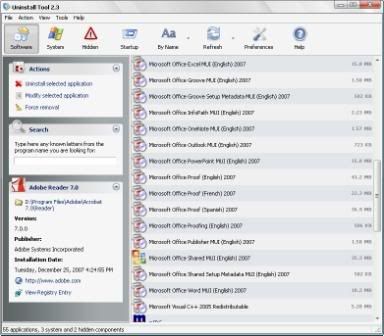
    Uninstall Tool is a great, powerful and reliable alternative to standard Windows Add/Remove program. It's fast, secure and convenient way to remove unneeded applications and to improve your computer efficiency.

    Multilanguage support:
    Armenian, Belarusian, Brazilian, Bulgarian, Chinese, English, French, German, Italian, Japanese, Latvian, Korean, Polish, Russian, Serbian, Slovak, Spanish, Swedish, Turkish, Ukrainian

    Supported operating systems:
    Windows 2000, XP, 2003, Vista (including 64-bit systems)


    Key Features:

    - 3 times faster than Add/Remove program!
    - 3 applications categories: Software, System, Hidden.
    - Remove programs that automatically run at system startup
    - 3 ways of sorting applications: by Name, by Occupied Size, by Installation Date.
    - Remove programs that could not be removed by Add/Remove program.
    - Force removal of uninstall related entries in the registry.
    - Highlighting of recently installed applications in the list
    - Fast search feature allows quick finding of any application you need.
    - Navigate to a selected program's Registry Entry, Installation Folder and its Web Site.
    - View detailed information of a certain application installed on your computer.
    - Easy to use and modern user interface allows to work comfortably with Uninstall Tool.
    - Multilingual interface!
    - Option to replace Add/Remove program.
    - Saving (exporting to HTML) detailed reports about currentlly installed applications
    - Running "Windows Components" and "Add/Remove Programs" programs
    - Much more...


    Code: http://rapidshare.com/files/102168705/CRYSTALIDEA.Uninstall.Tool.v2.3.2.2794.rar
    Pass : www.softarchive.net


    UninstallTool2.jpg


    Uninstall Tool is a small tool that replaces the standart unconvenient and heavy “Add and Remove Programs”. Uninstall Tool is a great, powerful and reliable alternative to standard Windows Add/Remove program. It’s fast, secure and convenient way to remove unneeded applications and to improve your computer efficiency.
    Code:
    Download:
    http://rapidshare.com/files/84924064/Uninstall_Tool_2.3.rar

    Mirror:
    http://w15.easy-share.com/15423351.html
     

    MaD-DoC

    Member
    Oct 27, 2007
    6,337
    22
    0
    SLIIT/Malabe
    ratedrkoman said:
    macho mata xp themes tikak ona including the media center theme !
    thnk u 4 dis awesome thread :)

    1.
    Vista Theme & UXTheme Multi-Patcher 5.5


    vq7e2ydtrma7h88m3nok.jpg


    INSTRUCTIONS:

    Copy to C:\WINDOWS\Resources\Themes


    downloadbutton.png

    Code: http://rapidshare.com/files/106271280/Vista_Theme___UXTheme_Multi-Patcher_5.5.rar

    2.
    How To Install :

    you need to download and install WindowBlinds 5 or higer first to apply this theme to your desktop. You can download it Below
    Screenshot:
    2001027350474069015_rs.jpg


    Download Theme:
    Code: http://rapidshare.com/files/80791753/Arzo_Vista_Theme_For_Xp__Wasime900_.zip

    3.
    dx0ps7.png


    Info

    Change you xp style and wallpapers in Windows Vista Black Theme...

    Size 2 MB

    Download
    Code: http://rapidshare.com/files/97781345/Windows_Vista_Black___Wallpapers.rar

    4.
    34fk51v.jpg


    Winstep Xtreme v7.1 xp theme 2008
    Safe & 100 % working Does not Sucks Pc
    Performance
    Download link :

    Code: http://rapidshare.com/files/105267752/Winstep_Xtreme_7.1.rar


    5.
    Midnight-Theme.jpg


    BEAUTIFUL THEME FOR YOUR COMPUTER YOU MUST HAVE WINDOWS BLINDS INSTALLED TO USE THIS THEME

    ENJOY!!!!

    Download: 4.18 MB
    Code: http://rapidshare.com/files/97600156/2495MT.rar
    Mirror1:
    Code: http://w14.easy-share.com/1699787314.html
    Mirror2:
    Code: http://www.megaupload.com/?d=UD93ZJIZ
    Mirror3:
    Code: http://www.mediafire.com/?ul2t1nhfltg
    Pass: Code: www.dl4all.com
     

    MaD-DoC

    Member
    Oct 27, 2007
    6,337
    22
    0
    SLIIT/Malabe
    ratedrkoman said:
    macho mata xp themes tikak ona including the media center theme !
    thnk u 4 dis awesome thread :)


    Media Center Theme for ALL WIN XP

    royale_media_center_theme_preview_windows_xp.png


    Code: http://www.megaupload.com/?d=SWE5E1S8

    or Code: www.bwmusic.uni.cc

    Media Center Theme For Vista & Windows

    upload2world_3e7af.jpg


    Download:
    Code: http://rapidshare.com/files/85155939/Media_Center_VS_for_Vista_-_dimalive.com.rar


    c831ec0d749f.jpg


    Media Center Theme For Windows Vista

    Only For Vista


    Download
    Code: http://rapidshare.com/files/104705525/Media_Center_Theme.rar
     

    MaD-DoC

    Member
    Oct 27, 2007
    6,337
    22
    0
    SLIIT/Malabe
    XlsToSql 1.0


    Need import Excel data to Sql Server?
    You just found it! XlsToSql let you do these easy ... and fast!
    XlsToSql is a tool to import Excel data to Sql Server database.
    Current Version: 1.0, Release Date: 04/08/2008
    Main features:
    • Import Excel data to Sql Server table.
    • Execute sql command, see importing results.
    • Support Unicode.
    • Support text(ntext), image type.
    System Requirements:
    • Win98/WinNT/WinME/Win2K/WinXP/Win2003/Vista
    • Processor: Pentium 133 or better
    • RAM : 32M RAM or more
    • Excel is required


    Size:1851KB

    http://rapidshare.com/files/106408967/X.l.s.T.o.S.q.l.1.0.rar
     

    MaD-DoC

    Member
    Oct 27, 2007
    6,337
    22
    0
    SLIIT/Malabe
    Ultra Recall Professional 3.2.6.6


    Ultra Recall is personal information / knowledge / document management software for Microsoft Windows.

    It helps you easily capture, organize, and recall all of your electronic documents and information across all the applications that you use.

    Click on the links to the left to learn more about how Ultra Recall can help you become more productive today

    Ultra Recall Benefits
    Stop Losing Information
    Because Ultra Recall can manage all your data regardless of its source, you don't have to wonder where your data is or how to retrieve it. From captured web pages to newsgroup posts and documents, you can store your data in Ultra Recall with the confidence that when you need it, you can recall it on demand.

    Consolidate Your Data
    The typical computer user has important data in many locations and in a variety of formats. Ultra Recall eases this daunting data management task with its comprehensive file and data format support, advanced organization capabilities, high performance, and dependability. Instead of maintaining parallel sets of information segregated by their type or source, you can organize notes and data by linking them all together logically in Ultra Recall.

    Organize Notes and Information the Way You Think
    Have you tried other PIM applications and information organizers only to be let down by being forced to layout your data in a way that is confusing or counter to your style? Given up trying to find a tool that makes sense to you? Ultra Recall enables you to organize notes, documents and information with an unprecedented flexibility. Give Ultra Recall a try and you'll find that instead of forcing you to change, it can adapt to you!

    Solve the Needle-in-a-Haystack Syndrome
    Many of us fall prey to the overflowing Inbox, the ever-expanding My Documents folder, or an overwhelming bookmark list because these methods of data organization are simply too limited, too confusing, or too inconvenient. Even the most dedicated organizers are frustrated by spending significant time storing their information, then struggling to retrieve it when it is needed. Leverage the advanced searching capabilities of Ultra Recall and experience the unexpected: data on demand!

    Secure your Sensitive Information
    Have information that you want to ensure stays private? Is Windows-based file/folder encryption either 1) not available, 2) too confusing, or 3) too difficult to manage? Ultra Recall is your solution! With its integral 256-bit encryption at your fingertips, this information organizer lets you secure your information with ease, knowing it is safe and available with a single password.
    Backup your data (and know it can be recovered!)
    We all know we should back up our data, but many of us either don't have the time or knowledge to successfully implement a backup strategy that ensures what is important will actually be protected. By placing your data, files and notes in Ultra Recall, you can safely and easily back up a single Ultra Recall database with complete confidence that in the event of computer failure, your data is safe.


    Size:7742KB
    http://rapidshare.com/files/106408970/U.l.t.r.a-R.e.c.a.l.l.Pro-3.2.6.6.rar
     

    MaD-DoC

    Member
    Oct 27, 2007
    6,337
    22
    0
    SLIIT/Malabe
    23st0jp.jpg


    MyLanViewer is a simple LAN scanner for your home network. It displays your network computers an easy to read, buddy-list style window that provides the machine names, IP addresses, MAC addresses, shared resources and other technical details for each computer. You can also view and access shared folders, terminate user sessions and disable shared resources. Easy to install and use, has friendly and beautiful interface.

    with crack


    s2uw55.jpg


    Code: http://rapidshare.com/files/106400875/MyLanViewer1.0.rar