
Latest ads
-
 RHCSA, RHCE, AWS, Docker, Kubernetes Training
- Sanjeewani95
- Updated:
-
 🛡️ Kaspersky Antivirus – 1 Year / 1 Device | Rs. 2,300 | Only 9 Left
- KSPathirana
- Updated:
-
Professional CCTV Installation Service
- Techguy231
- Updated:
-
I'll research & write an article - Rs. 2000 onwards
- Blogerwiki
- Updated:
-
 House Plan
- lenura
- Updated:
...::: Applications Zone :::...
- Thread starter MaD-DoC
- Start date
You are using an out of date browser. It may not display this or other websites correctly.
You should upgrade or use an alternative browser.
You should upgrade or use an alternative browser.


This Patch Supports The Following Sony Products:
1. Sony Vegas Professional 8.0 (Worth $550 Price Including Sony DVD Architect Pro) Recommended
2. Sony Vegas Platinum 8.0 (Worth $115)
3. Sony Vegas Movie Studio 8.0 (Worth $75)
4. Sony DVD Architect Professional 4.5 (Price passed to Sony Vegas Pro) Recommended
5. Sony DVD Architect Studio 4.5 (Worth $40)
6. Sony CD Architect 5.2 (Worth $115)
7. CineScore 1.0 (Worth $180) Recommended
8. Sony SoundForge Professional 9.0 (Worth $300) Recommended
9. Sony SoundForge Audio Studio 9.0 (Worth $55)
10. Sony ACID Professional 6.0 (Worth $300)
11. Sony ACID Music Studio 7.0 (Worth $55)
12. PhotoGO 1.0 (Worth $20)
13. Sony Noise Reduction Plugin 2.0 (Worth $280) Recommended
14. Dolby Digital AC-3 Professional Plugin 1.0 (Worth $355)
15. MainConcept MPEG Professional Plugin 2.0 (Worth $450)
Click Here For Short Details Of All of These
Download Software Trials:
1. Sony Vegas Professional 8.0b
Right Click and Select Save Target As
2. Sony Vegas Platinum 8.0d
Right Click and Select Save Target As
3. Sony Vegas Movie Studio 8.0c
Right Click and Select Save Target As
4. Sony DVD Architect Professional 4.5b
Right Click and Select Save Target As
5. Sony DVD Architect Studio 4.5c
Right Click and Select Save Target As
6. Sony CD Architect 5.2d
Right Click and Select Save Target As
7. CineScore 1.0c
Right Click and Select Save Target As
8. Sony SoundForge Professional 9.0e
Right Click and Select Save Target As
9. Sony SoundForge Audio Studio 9.0c
Right Click and Select Save Target As
10. Sony ACID Professional 6.0d
Right Click and Select Save Target As
11. Sony ACID Music Studio 7.0a
Right Click and Select Save Target As
12. PhotoGO 1.0b
Right Click and Select Save Target As
13. Sony Noise Reduction Plugin 2.0h
Right Click and Select Save Target As
14. Dolby Digital AC-3 Professional Plugin 1.0

15. MainConcept MPEG Professional Plugin 2.0
Keygen/Patch - (Rapidshare.com, Megaupload.com, DepositeFiles.com, ZShare.com and BadOnGo.com)
Click Here To Download
Just Follow These Steps To Register Your Software:
Note: If You Want To Register Your 8.0b/8.0c/8.0d/8.0e With It But It Has 8.0a/8.0b/8.0c On The List. Dont Worry, It Can Be Done. Choose The Closest Version.
Will add more softwares later
1. Sony Vegas Professional 8.0 (Worth $550 Price Including Sony DVD Architect Pro) Recommended
2. Sony Vegas Platinum 8.0 (Worth $115)
3. Sony Vegas Movie Studio 8.0 (Worth $75)
4. Sony DVD Architect Professional 4.5 (Price passed to Sony Vegas Pro) Recommended
5. Sony DVD Architect Studio 4.5 (Worth $40)
6. Sony CD Architect 5.2 (Worth $115)
7. CineScore 1.0 (Worth $180) Recommended
8. Sony SoundForge Professional 9.0 (Worth $300) Recommended
9. Sony SoundForge Audio Studio 9.0 (Worth $55)
10. Sony ACID Professional 6.0 (Worth $300)
11. Sony ACID Music Studio 7.0 (Worth $55)
12. PhotoGO 1.0 (Worth $20)
13. Sony Noise Reduction Plugin 2.0 (Worth $280) Recommended
14. Dolby Digital AC-3 Professional Plugin 1.0 (Worth $355)
15. MainConcept MPEG Professional Plugin 2.0 (Worth $450)
Code:
http://www.sonycreativesoftware.com/products/default.aspDownload Software Trials:
1. Sony Vegas Professional 8.0b
Code:
http://sony-417.vo.llnwd.net/dspcdn/current/vegaspro80b-trial_enu.exe2. Sony Vegas Platinum 8.0d
Code:
http://sony-434.vo.llnwd.net/dspcdn/current/moviestudiope80d-trial_enu.exe3. Sony Vegas Movie Studio 8.0c
Code:
http://sony-015.vo.llnwd.net/dspcdn/current/moviestudio80c-trial_enu.exe4. Sony DVD Architect Professional 4.5b
Code:
http://sony-615.vo.llnwd.net/dspcdn/current/dvdarchitectpro45b-trial_enu.exe5. Sony DVD Architect Studio 4.5c
Code:
http://sony-168.vo.llnwd.net/dspcdn/current/dvdarchitectstudio45c-trial_enu.exe6. Sony CD Architect 5.2d
Code:
http://sony-416.vo.llnwd.net/dspcdn/current/cdarchitect52d-trial_enu.exe7. CineScore 1.0c
Code:
http://sony-161.vo.llnwd.net/dspcdn/current/cinescore10c-trial_enu.exe8. Sony SoundForge Professional 9.0e
Code:
http://sony-296.vo.llnwd.net/dspcdn/current/soundforge90e-trial_enu.exe9. Sony SoundForge Audio Studio 9.0c
Code:
http://sony-981.vo.llnwd.net/dspcdn/current/audiostudio90c-trial_enu.exe10. Sony ACID Professional 6.0d
Code:
http://sony-467.vo.llnwd.net/dspcdn/current/acidpro60d-trial_enu.exe11. Sony ACID Music Studio 7.0a
Code:
http://sony-627.vo.llnwd.net/dspcdn/current/musicstudio70a-trial_enu.exe12. PhotoGO 1.0b
Code:
http://sony-925.vo.llnwd.net/dspcdn/current/photogo10b-trial_enu.exe13. Sony Noise Reduction Plugin 2.0h
Code:
http://sony-438.vo.llnwd.net/dspcdn/current/noisereduction20h.exe14. Dolby Digital AC-3 Professional Plugin 1.0

15. MainConcept MPEG Professional Plugin 2.0
Keygen/Patch - (Rapidshare.com, Megaupload.com, DepositeFiles.com, ZShare.com and BadOnGo.com)
Code:
http://www.uploadjockey.com/download/7125324/sony_keygen_by_arif.exeClick Here To Download
Just Follow These Steps To Register Your Software:
1. Download This Keygen and Your Favorite Software
2. Install The software
3. Copy The Patch To Installation Directory
4. Open The Patch (If you are using Vista right click on the keygen and select Run as Administrator), Select Your Software From The List
5. Click Generate for Serial no And Authentication Code
6. Press Patch Button, select the installation directory when it asks for and dont close the keygen till the end.
7. Open the installed software when patching is done
8. Enter the generated serial no from the keygen when needed
9. Select Register from another computer
10. Fill the registration form and save it anywhere
11. Enter the Authentication no from the keygen, when needed
12. Click Finish and your software is now registered, Enjoy!!!
Note: If You Want To Register Your 8.0b/8.0c/8.0d/8.0e With It But It Has 8.0a/8.0b/8.0c On The List. Dont Worry, It Can Be Done. Choose The Closest Version.
Will add more softwares later

Turn your pictures into movies.
Get started making fun, personal PhotoShows to share with your friends and family. Quickly turn your digital photos and videos into rich, entertaining experiences that combine broadcast quality credits, captions, transitions, special effects and animations with a great musical soundtrack. They are incredibly easy to create and can be viewed and enjoyed almost anywhere. And now, Nero PhotoShow Deluxe 5 brings it all together. One complete package includes all you need to manage, edit and share your digital photos and videos, and transform them into amazing musical PhotoShows.
Toss the shoe box. Then get the red out.
Nero PhotoShow Deluxe 5 automatically imports and organizes all your photos and videos into intuitive, searchable albums so you can always find any photo or video. Editing is a snap, too. With our full set of professional-quality editing tools, you can eliminate red-eye, crop, rotate, adjust levels, edit clips, and more. Quickly and easily.
LEARN MORE »
What's your story?
Transform your photos and videos into engaging, personal PhotoShows that everyone will enjoy. PhotoShows are so much more than conventional photo slide shows. Add music, animated clip art, effects and captions to tell your story in a unique and entertaining way. Nero PhotoShow Deluxe 5 includes over 400 songs and 225 clip art animations. And over 88 great One Click styles get you up and running in no time.
LEARN MORE »
One year FREE Premium personal web page to share memories.
What fun is capturing your memories if you don't share them? With Nero PhotoShow Deluxe 5, it's easy to share photos, videos and PhotoShows online. With Nero PhotoShow Deluxe 5, you get a free Premium PhotoShow web page for a year (a $50 value). PhotoShow.com is the fastest, easiest way to make PhotoShows online - from any PC or Macintosh. Express yourself by broadcasting your PhotoShows to popular social networking sites like MySpace. Or spruce up your Ebay auctions. Our new channel format makes it easy to find the shows you want to see and provides a great viewing experience.
LEARN MORE »
That's me on TV!
Enjoy those memories on TV again and again. Burn PhotoShows to DVD, watch them on TV, export as video files, and even back-up your photos on DVD. With Nero PhotoShow Deluxe 5, it's easy.
Code:
http://rapidshare.com/files/116702410/Nero.Photo.show.5.Deluxe.rar Filters Unlimited v2.0.3 for Photoshop
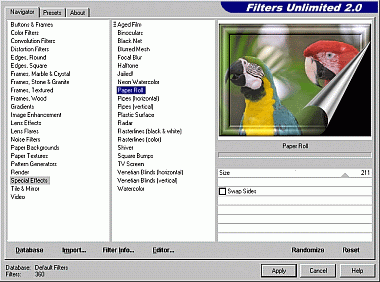



Boost Your Creativity
350 top-notch filter effects, combined in one single Photoshop compatible plug-in. We bet: this is probably the only
3rd party plug-in you ever need.
By utilizing an integerated filter database and an easy to use interface, Filters Unlimited reaches a new dimension
in the world of graphics plug-ins. Combined with Photoshop Actions you can get incredible, really unlimited effects.
Comes with more than 350 great built-in filters. And you can add more than 2,000 filters for free in just a few
minutes by following our links.
Filters Unlimited is also a complete filter development system. Build your own filter effects in minutes - it's as
easy as using a pocket calculator.
What's new in Filters Unlimited 2.0?
Filter Stacker
Holding down the ALT-key while pressing the Apply-button allows you to stack multiple filters within Filters
Unlimited.
Just add filter by filter and press Apply when finished.
Preview Toggle
Pressing the CTRL-key in Filters Unlimited lets you switch between original and filtered image.
350 Filters
We've added 200 new filters compared to version 1.0
More space
The user interface of Filters Unlimited 2.0 is much larger now providing a better preview and improved control using
the filter navigator
And many more...
Compatibility
The Filters Unlimited plug-in easily integrates into all the relevant graphics softwares:
* Adobe Photoshop since version 3.0 including Creative Suites
* Adobe Photoshop Elements since version 2
* Adobe Creative Suite Photoshop CS1, CS2, CS3
* Jasc Paint Shop Pro since version 5.0
* Corel Paint Shop Pro X since version 10
* CIEBV PhotoLine since version 5
* Micrografx Picture Publisher since version 7
* U-Lead Photo Impact since version 4.0
* ULead PhotoImpact
* Freeware image viewer IrfanView
* Freeware image viewer FuturixImager
OS : Windows 95, 98, 98SE, ME, NT4, 2000, XP, Vista
FILES : 1X3.37mb
COMPRESS: WinRar
LANGUAGE: English
Code:
http://www.icnet.de/filters_unlimited/index.html
Code:
Added Recovery Record and Tested -:
 http://rapidshare.com/files/106343668/Fltrs__Unlmtd203forPhtshp.rar
Code:
4shar1ng
MaD-DoC said:


Don't Wonder
This is an UNTOUCHED Windows XP Professional Corporate Edition SP2 And I had just added SP3 From MicroSoft WITHOUT ANY OTHER CHANGE Except The serial {Volume License Key [VLK]}
So you don't need to write it when you BOOT from this CD to setup Windows
This is GENUINE and Accept any Updates
This Is The PROOF


Microsoft Genuine Advantage Diagnostic Tool
Code: http://rapidshare.com/files/101168046/Microsoft_Genuine_Advantage_Diagnostic_Tool.rar
And Please For more Informations about Windows XP Service Pack 3 Release Candidate 2 Visit:
Code: http://www.microsoft.com/downloads/...99-12af-42b2-aab1-b969a62c68a7&DisplayLang=en
When you setup Windows from this CD you will saved more than 1 GB on C: COMPARE WITH if you setup XP SP2 then SP3
And You need only 20 Minutes to setup this GREAT VERSION
Most STABLE, No More ERROR MESSAGES, More RELIABILITY
Hope You Enjoy

Code: http://rapidshare.com/files/100485464/XP_SP3.part1.rar
http://rapidshare.com/files/100506993/XP_SP3.part2.rar
http://rapidshare.com/files/100530199/XP_SP3.part3.rar
http://rapidshare.com/files/100582317/XP_SP3.part4.rar
http://rapidshare.com/files/100608209/XP_SP3.part5.rar
http://rapidshare.com/files/100619559/XP_SP3.part6.rar


SP 2 EKA UDIN SP3 UPDATE KARANNA PULUWANDA.

GayanX said:eset smart security-links are not working
NOD 32 ESET Smart Security and Antivirus 3.0.657.0
+ ESET Smart Security 3.0.645.0 Business Edition
Xp and Vista, 32 bit and 64 bit (X86 and X64)
No crack, no fix, no patch.
This is FULL LICENSE UPDATEABLE VERSION!
I don`t like cracked antivirus programs, so I found this FULL version and I`m sharing with others.
Enjoy!
NOD 32 ESET Smart Security 3.0.657.0:


Download NOD 32 ESET Smart Security 3.0.657.0 (32 bit XP and Vista): Size: 19.8 Mb
Code:
http://rapidshare.com/files/116766779/NOD_32_ESS_32_bit_3.0.657.0.rar
Code:
http://rapidshare.com/files/116797579/NOD_32_ESS_64_bit_3.0.657.0.rarESET NOD 32 Antivirus 3.0.657.0:


Download NOD 32 ESET Antivirus 3.0.657.0 (32 bit XP and Vista): Size: 20.1 Mb
Code:
http://rapidshare.com/files/116773361/NOD_32_EAV_32_bit_3.0.657.0.rar
Code:
http://rapidshare.com/files/116782577/NOD_32_EAV_64_bit_3.0.657.0.rarNOD 32 ESET Smart Security 3.0.645.0 Business Edition


Download 3.0.645.0 Business Edition: Size: 18.9 Mb
Code:
http://rapidshare.com/files/101732354/NOD_32_3.0.645.0.rarRAR Password:
Code:
AdzaWindowBlinds 6.10.55 + 100 Themes
WindowBlinds 6.10.55 + 100 Themes


Download:
WindowBlinds 6.10.55 + 100 Themes

WindowBlinds is a one-of-a-kind utility that allows Windows users to completely change the look and feel of the Windows interface by applying a new skin. There are thousands of different skins to choose from that are freely downloadable from the WindowBlinds website.
A WindowBlinds skin can make Windows look like an alternative operating system, like their favorite sports or car brand, or something completely new. Because WindowBlinds uses the latest hardware acceleration features of modern video cards, WindowBlinds won't slow down your computer and uses very little memory.
WindowBlinds is safe and easy to use. It doesn't alter any system files and users can switch between the default Windows look and feel and a custom WindowBlinds skin with the click of a button. In addition, WindowBlinds has been tested to ensure it works with Windows Vista, so you know it is compatible, reliable,, and more secure.
Customize the look & feel of Windows
Tired of your computer having the same old look as every other computer? Want to give your Windows PC its own unique style? Stardock WindowBlinds will let you apply thousands of different skins (visual styles) to change the look and feel of your entire desktop. WindowBlinds is so flexible that users can create skins that mimic the look and feel of other operating systems.


Download:
Code:
http://rapidshare.com/files/116496118/WindowsBlinds_100thems_G0dOfWar.rarMicro xp pro Light Xp


Download:


The Most Light Version Of Windows XP Ever , Install In Just 5 Minutes!..
Features:
Cryptographic Services
DCOM Server Process Launcher
DHCP Client
Event Log
Logical Disk manager
Logical Disk Manager Administrative Service
Network Connections
Plug and play
Print Spooler
Remote Access Auto Connection Manager
Remote Access Connection Manager
Remote Procedure Call
TCP/IP NetBIOS Helper
Telephony
Windows Audio
Windows Installer
Wireless Zero Configuration
Desktop Icon Layout (Lets you save your desktop icon layout)
Keyboard Settings (Quick access to Regional and Language options)
Registry Backup (Make a complete backup of the registry in one click)
Services Config (Nine questions to help fine tune your system)
Web Browser (Instructions only, on how to download a web browser)
Windows Media Player 11 (This is just a read me file about WMP11)
NOTE: There are only two keyboard layouts left in this release, one is the United States keyboard that can never be removed and the other one is United Kingdom layout
What has been reduced:
This is a greatly reduced installation of Windows XP Professional.
Please read these notes BEFORE using this edition of Windows:
Standalone system only! - No local networking is possible. The “Network Connections” service has been kept in this edition of Windows to stop errors when installing Ethernet card or modem drivers. The “Network Connections” service is not there to support LAN networking. You can of course just try to plug another computer into your MicroXP computer, but networking in this way is not guaranteed to work, because the related services for this are removed (Computer Browser/Workstation)
Single user only! - You cannot add any additional users. Do not try to add more users, otherwise your main account that is used by default (Administrator) will become the new account and after logging in, you will not have any desktop theme (not even Classic) and the whole account will be ruined. You’ll probably have to install Windows again because if you make a new account it replaces “Administrator” and tries to log you in with “Default User” - the problem with this is - there is no “Default User”.
No Webcams, Scanners or Digital Cameras! - You cannot use these items in this version of Windows because the “Windows Image Acquisition” service is removed.
FTP Sites - There is no “built in” support for downloading from FTP sites - try using Filezilla or WS_FTP if you need to do that.
This functionality is gone because the “Application Layer Gateway” service is gone, along with ALG.EXE that normally runs in Task Manager, taking up about 6Mb RAM for what amounts to no reason.
No Visiting Windows Update! - You cannot visit Windows Update with this version of Windows because Internet Explorer is removed.
You can manually download updates from Microsoft and you can also use the alternative “Windiz” Update website through Opera or Firefox. Because so much has been removed from this edition of Windows, you are not likely to be any more “safe” installing updates for Windows. NOTE: Because this edition of Windows uses a patched “winlogon.exe” in order to remove the “oembios.bin” file, you really should not update Windows anyway, in case “winlogon.exe” gets replaced by an update. There are more details about this in the experience folder on the desktop once MicroXP is installed.
No Fast User Switching! - Apart from you only being able to have the one account anyway (Administrator) the ability to do Fast User Switching is also removed.
No Password Storage - Windows will not save stored passwords, however, this only really applied to Internet Explorer and Outlook Express, which are removed. You will be OK using Firefox or Opera web browsers and Thunderbird email client for emails.
Those are self contained programs and take care of storing your passwords by themselves.
No CD-ROM Autoplay - When you insert a CD that would bring up a screen to install the program contained on the CD, this does not happen in this version of Windows, you will have to explore the CD manually and run whatever file it is that runs the program’s setup, usually “setup.exe” on the root of the CD.
No Smart Card Detection!
No Scheduled Tasks! - You cannot set programs, like AntiVirus or Hard Disk Defrag programs to run in the future. If you are going to run those types of programs you will have to manually scan or defrag whenever it is convenient. Despite this, one program that will schedule its operations is Perfectdisk defrag, you do not need Task Scheduler for this program to run a scheduled defrag.
No Remote Desktop! - There is no Remote Desktop in this version of Windows - because the “Terminal Services” service is removed.
No Themes! - You cannot have the Luna (Blue/Olive/Silver) desktop themes in this version of Windows, the only theme you can choose is “Windows Classic” which it is already set to by default. You can however install “Windowblinds” if you want to and it will work fine - Windowblinds does not rely on the Themes service.
No “Uninterruptible Power Supply” service! - I always thought “UPS Service” delivered parcels but apparently not - if you have this type of device then it will not work on this version
of Windows. A UPS is only used for emergencies like if you have a power cut - thats if you even have such a device
What you can do:
- PROGRAMS -
You can still install and run just about all the programs and games that you can run on a normal installation of XP. There is a text file in the eXPerience folder on the desktop that has a list of programs that work and includes some that don’t work (not many). Even Office 2007 installs on this version of Windows!
- GAMES -
Up to now, there has not been one single report of any game not working on MicroXP. Gaming is what this edition of Windows is all about, it gives better benchmarks than just about any other version of Windows XP out there.
- DIAL-UP -
You can still use a Dial-Up connection (Broadband or old 56k modem). This is the one major flaw in other stripped out operating systems like this one, but in this edition, Dial-Up connectivity is OK.
- WEB BROWSER -
There is no web browser included in this release at all, but if you click the Internet Explorer icon near the start button, this will open a text file showing you how to access the internet using a normal Explorer window. All you need to do is type “opera.com” or “firefox.com” (without quotes) in your address bar on any Explorer window, this will open the Opera or Firefox web page, where you download the web browser you want.
- WMV STREAMS -
Once you have installed Opera, Firefox, Netscape or the browser of your choice, as long as you install Windows Media Player 11, you can stream Windows Media Videos from websites like the BBC’s News website, or anywhere that has WMV streams. This is possible because there are three DLL files added to the “Windows Media Player” folder in “Program Files”. Don’t worry, theres no Windows Media Player there, it only contains the vital DLL files for streaming compatibility.
- FLASH -
When you visit a website with any Flash animations on it (including YouTube and Google Video) in Firefox web browser, even on a full install of Windows XP, you always see that annoying green jigsaw puzzle piece and the “missing plugin” error. If you install Opera or Firefox browser in this special “MicroXP” edition of Windows, you can go visit YouTube or Google Video without even having to install Flash Player. You can just watch the videos right away
Download:
Code:
http://rapidshare.com/files/113458712/MicroXP_v0.6b_G0dOfW_r.rarStardock WindowBlinds 6.10 Build 55 Enhanced +51 Cool Themes
Stardock WindowBlinds 6.10 Build 55 Enhanced

Download :
51 Cool WindowBlinds Themes


Download :
Stardock WindowBlinds 6.10 Build 55 Enhanced

Desktop EnhancementsWindowBlinds is a one-of-a-kind utility that allows Windows users to completely change the look and feel of the Windows interface by applying a new skin. There are thousands of different skins to choose from that are freely downloadable from the WindowBlinds website. A WindowBlinds skin can change Windows to look like an alternative operating system, favorite sports car brands, favorite sports team, or virtually anything else. With modern video cards, WindowBlinds can do this without reducing performance. WindowBlinds 6 adds the ability to have “blurred glass” window borders on Windows XP which allows artists to make skins that could make Windows XP look virtually identical to Windows Vista.
Additionally, WindowBlinds 6 adds full support for customizing Microsoft’s new Windows Vista operating system. Everything from Internet Explorer 7 skinning, Sidebar skinning to explorer backgrounds, WindowBlinds 6 skins virtually every element of Windows Vista while making full use of the hardware acceleration features on Windows Vista for maximum performance.
The new version also adds a host of other features including advanced animation support in skins, user-creatable skin sub-styles, a new, easy to use configuration program, user customization options of fonts and colors in skins and much more.
WindowBlinds is safe and easy to use. It doesn't alter any system files and users can switch between the default Windows look and feel and a custom WindowBlinds skin with the click of a button. In addition, WindowBlinds has been tested to ensure it works with Windows Vista, so you know it is compatible, reliable, and more secure.
Stardock WindowBlinds will let you apply thousands of different skins (visual styles) to change the look and feel of your entire desktop. WindowBlinds is so flexible that users can create skins that mimic the look and feel of other operating systems. Even with thousands of different visual styles to choose from, you can customize those visual styles as well. WindowBlinds gives you total control over your graphical user interface. WindowBlinds will let you change the color of your Windows GUI, change your wallpaper, give different windows their own specific look, choose a new Windows taskbar and Start button.
WindowBlinds doesn't just make Windows look better, it can make it more functional. You can create your own skins that add additional buttons to the title bar that provide additional functionality such as roll-up buttons, link buttons, program short cuts, even media player controls. Moreover, because WindowBlinds uses the latest features of your graphics card, it can make Windows even faster than the default Windows XP or "Aero" style.
Features:
* New start menu animation support
* Category filtering on skins in wbconfig
* Tag filtering on wallpapers in wbconfig
* Random skin support
* The ability to save a re-coloring of a skin as a preset
* Advanced HSL re-coloring where you pick a single color and a range in a skin and you can just change that color instead of the entire skin
* Ability to edit the system colors from wbconfig
* Ability to change skin fonts from wbconfig
* Ability to control transparency and blur on start menu, menus, taskbar & window frames. Has some limitations on XP
* Ability to save such changes as a preset
* Vista-Ize me function which sets some defaults to have a more vista like look
* Ability to skin the sidebar
* Ability to edit a sidebar skin from within wbconfig
* Improved WB skin install when handling upgrades of skins
* Ability to alter the mouse over animation speed
* Ability to alter the default button pulsing speed
* Support for explorer background bitmaps
* Ability to use the Aero frames with the rest of the skin
* Blur support in title bars (and menus on vista)
* Lots of new sections for new Vista specific parts
* Including IE navigation arrows, IE tabs, start menu shutdown/lock buttons
* Skins virtually every aspect of the Windows GUI
* Clean and easy configuration dialog.
* Tons of configuration options for users
* Animation supported on titlebars, buttons, and many other elements.
* Change the color of any visual style on the fly
* Per-application visual styles
* Doesn't alter any system files
* Safe, reliable way to change the look and feel of Windows
Another methode use Patch :
1, Install Windows Blind till finish, if it ask activation, just close ... ussually 2 times, after that close windows blind
2. Go to Task Manager, find WBINST~1.exe (Xp) and VistaSrv.exe (Vista) all choose end .. close task Manager
3. Copy Patch to instalation folder {C:\Program Files\Stardock\Object Desktop\WindowBlinds}. Do Patch all instruction
4. Restart ur PC
5. Enjoy Windows Blind
Download :
Code:
http://rapidshare.com/files/114753460/Stardock_WindowBlinds_Enhanced_v6.1.rar51 Cool WindowBlinds Themes


Download :
Code:
http://rapidshare.com/files/114129690/WBThemes_May_2008_By_Bedorov.part1.rar
http://rapidshare.com/files/114130665/WBThemes_May_2008_By_Bedorov.part2.rar
http://rapidshare.com/files/114131507/WBThemes_May_2008_By_Bedorov.part3.rar
http://rapidshare.com/files/114132674/WBThemes_May_2008_By_Bedorov.part4.rar


Removed Application
-All Languages Except Arabic and English
-Old Messenger
-MSN Explorer
-Visual Search Assistant
Added Application
-Windows Live Messenger
-Winrar
-VistaDriveIndicator
-Total Copy
-K-Lite Codec Pack
-RocketDock
-CPU-Z
-ClearType
-RegTweaker
-6 Themes include Vista theme
- And many others...


Code:
http://rapidshare.com/files/116094730/WinRoyale.part01.rar
http://rapidshare.com/files/116095117/WinRoyale.part02.rar
http://rapidshare.com/files/116095570/WinRoyale.part03.rar
http://rapidshare.com/files/116095823/WinRoyale.part04.rar
http://rapidshare.com/files/116095907/WinRoyale.part05.rar
http://rapidshare.com/files/116096194/WinRoyale.part06.rar
http://rapidshare.com/files/116096281/WinRoyale.part07.rar
http://rapidshare.com/files/116096600/WinRoyale.part08.rar
http://rapidshare.com/files/116096694/WinRoyale.part09.rar
http://rapidshare.com/files/116096946/WinRoyale.part10.rar
http://rapidshare.com/files/116097170/WinRoyale.part11.rar
http://rapidshare.com/files/116097251/WinRoyale.part12.rarkaspersky blacklist to whitelist
kaspersky blacklist to whitelist Working


kaspersky blacklist to whitelist Working


This patch makes all the blocked kaspersky licenses to working , from blacklist to whitelist,and it also protects them from blacklisting, the "black.lst" file that is updated from kaspersky update will not be a problem anymore
Code:
http://rapidshare.com/files/116735080/No_black.zip

shelan said:do you have adobe ovation crack????
pls upload machan!!
Ovation
Enhance your PowerPoint presentations

Ovation™ turns lifeless PowerPoint® slides into a stunning visual experience in seconds. Sensational themes called PowerLooks™ add subtle motion, high-resolution text, and dynamic TV-style transitions to plain PowerPoint slides. Ovation also offers built-in presentation tools that help you deliver a superior message.
More info-
Code:
http://www.adobe.com/products/ovation/Download-
Code:
http://rapidshare.com/files/13496593/Serious_Magic_Ovation_v1.0.1472_Retail_Incl_Keymaker-Zwt.rar
Code:
http://rapidshare.com/files/31933536/Ovation.1.0.1472.part1.rar
http://rapidshare.com/files/31935140/Ovation.1.0.1472.part2.rar
Face Recognition Login 1.2.1 2008


Like the future? BananaScreen adds face recognition login to your webcam-enabled Windows computer. To use, just install BananaScreen and create a face model.
Then set up BananaScreen to lock after a predefined amount of inactivity (or hit Alt-L to lock at any time). Once locked, BananaScreen will keep an eye on faces coming and going in front of the camera. When it matches yours, it immediately unlocks your computer. Pretty Cool
Note: I have tested it on my own Laptop and it works perfectly 100% guaranteed! It will particularly recognize your eyes so don't bother wearing any eyeglasses when using this stuff!


Like the future? BananaScreen adds face recognition login to your webcam-enabled Windows computer. To use, just install BananaScreen and create a face model.
Then set up BananaScreen to lock after a predefined amount of inactivity (or hit Alt-L to lock at any time). Once locked, BananaScreen will keep an eye on faces coming and going in front of the camera. When it matches yours, it immediately unlocks your computer. Pretty Cool
Note: I have tested it on my own Laptop and it works perfectly 100% guaranteed! It will particularly recognize your eyes so don't bother wearing any eyeglasses when using this stuff!

Code:
http://rapidshare.com/files/110489142/Face_Recognition_Login_1.2.1.rarSimilar threads


- Replies
- 11
- Views
- 387

- Replies
- 0
- Views
- 147

