


CFosSpeed V4.25 Build 1448 - TESTED

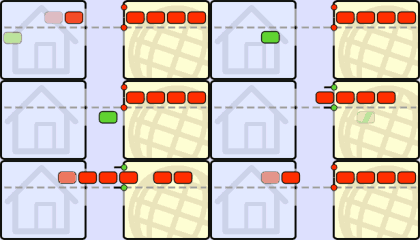
Normal data transfer:
Data reception needs to be confirmed (ACKnowledgment packets) before new data can be sent.
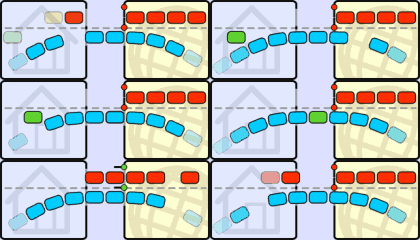
No Traffic Shaping:
ACK packets are stalled and delayed by a simultaneous upload. As a result, the download is slowed down as well.
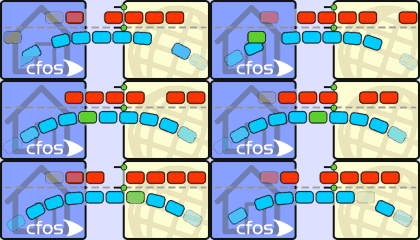
cFos Traffic Shaping:
ACK packets are prioritized in the upstream, allowing the download to continue at maximum speed.
cFos Traffic Shaping reduces delays during data transfer and allows you to surf the Internet up to three times faster. Finally, you can use the full bandwidth of your DSL connection! During TCP/IP transfer, a certain amount of data needs to be confirmed upon reception before more can be sent. Stalling data confirmation results in delays and transfer-rate slowdowns, thus forcing the ****** to wait. Especially for ADSL, it is possible to slow a download to a crawl by choking the upstream channel (which has the smaller bandwidth anyway) with an upload. This is because in such a scenario there is not enough upstream bandwidth left for data confirmation. The standard solution so far has been to try and compensate for this by increasing TCP window size, thereby allowing more data to be sent without immediate confirmation. The main problem here is that this also leads to high ping times (latency) and significant delays during Webpage rendering. Latency of up to 2 seconds is not uncommon for TCP windows with a size of 64k. In short, huge window sizes just won?t let you achieve full download speed. By contrast, cFos Traffic Shaping prioritizes data traffic in such a fashion that important packets zip
past regular packets. This way, receipts always arrive in time, and uploads won’t ever choke your broadband connection again! cFos Traffic-Shaping technology recognizes a number of important packet types and prioritizes them not only to keep Internet traffic running smoothly but also to ensure particularly low ping times. This not only accelerates surfing and download speeds significantly, but it is also a decisive advantage for online gaming.
You can now even set a more limited subnet mask override (see subnet_override). Thanks to Zyw for inspiration. Added "spd cperf" command to switch on or off class traffic dumping. By setting "spd cperf on" cFosSpeed will dump about once per second how many bytes were sent in what priority class. This can help in testing filter rules or finding performance problems. + When cFosSpeed is sending slow because of tx congestion and that congestion goes away, cFosSpeed will now return to its old tx speed quicker. + Historical maximum speeds can now fall as well, if your line gets slower (because its bandwidth isn't fixed or because your speed was switched down). x UDP program name detection was broken since build 4.01.1308. Fixed. - The "no pings" balloon will now appear later, i.e. the number of pings that must be missing for this balloon to appear is higher now. - FTPDATA protocol can now be set to high or higher priority, regardless of its packet sizes. - Removed tracing of minimal RTT ping packets.
With cFos Traffic Shaping, you will notice measurable improvements and benefits like:
* Full download rate during upload
* Consistently quick response time while surfing the Web or running other applications
* Improved VoIP speech quality
* Perfect for online gamers!
* Extended Traffic Shaping for DSL modems, cable modems & routers
* Highly responsive when used with online games and filesharing (P2P) like eMule, Kazaa or Bittorrent
* Minimal ping times for streaming audio & video, Voice over IP (VoIP), Internet Radio, etc.
* Individual program prioritization
Legend:
* New feature
+ Minor improvement
! Software change requires modification of your configuration
x Bugfix
- Information only
Download FuLL
Code:
http://kewlshare.com/dl/219cbae50744/cFosSpeed-v425-baturay.rar.html

Normal data transfer:
Data reception needs to be confirmed (ACKnowledgment packets) before new data can be sent.
No Traffic Shaping:
ACK packets are stalled and delayed by a simultaneous upload. As a result, the download is slowed down as well.
cFos Traffic Shaping:
ACK packets are prioritized in the upstream, allowing the download to continue at maximum speed.
cFos Traffic Shaping reduces delays during data transfer and allows you to surf the Internet up to three times faster. Finally, you can use the full bandwidth of your DSL connection! During TCP/IP transfer, a certain amount of data needs to be confirmed upon reception before more can be sent. Stalling data confirmation results in delays and transfer-rate slowdowns, thus forcing the ****** to wait. Especially for ADSL, it is possible to slow a download to a crawl by choking the upstream channel (which has the smaller bandwidth anyway) with an upload. This is because in such a scenario there is not enough upstream bandwidth left for data confirmation. The standard solution so far has been to try and compensate for this by increasing TCP window size, thereby allowing more data to be sent without immediate confirmation. The main problem here is that this also leads to high ping times (latency) and significant delays during Webpage rendering. Latency of up to 2 seconds is not uncommon for TCP windows with a size of 64k. In short, huge window sizes just won?t let you achieve full download speed. By contrast, cFos Traffic Shaping prioritizes data traffic in such a fashion that important packets zip
past regular packets. This way, receipts always arrive in time, and uploads won’t ever choke your broadband connection again! cFos Traffic-Shaping technology recognizes a number of important packet types and prioritizes them not only to keep Internet traffic running smoothly but also to ensure particularly low ping times. This not only accelerates surfing and download speeds significantly, but it is also a decisive advantage for online gaming.
You can now even set a more limited subnet mask override (see subnet_override). Thanks to Zyw for inspiration. Added "spd cperf" command to switch on or off class traffic dumping. By setting "spd cperf on" cFosSpeed will dump about once per second how many bytes were sent in what priority class. This can help in testing filter rules or finding performance problems. + When cFosSpeed is sending slow because of tx congestion and that congestion goes away, cFosSpeed will now return to its old tx speed quicker. + Historical maximum speeds can now fall as well, if your line gets slower (because its bandwidth isn't fixed or because your speed was switched down). x UDP program name detection was broken since build 4.01.1308. Fixed. - The "no pings" balloon will now appear later, i.e. the number of pings that must be missing for this balloon to appear is higher now. - FTPDATA protocol can now be set to high or higher priority, regardless of its packet sizes. - Removed tracing of minimal RTT ping packets.
With cFos Traffic Shaping, you will notice measurable improvements and benefits like:
* Full download rate during upload
* Consistently quick response time while surfing the Web or running other applications
* Improved VoIP speech quality
* Perfect for online gamers!
* Extended Traffic Shaping for DSL modems, cable modems & routers
* Highly responsive when used with online games and filesharing (P2P) like eMule, Kazaa or Bittorrent
* Minimal ping times for streaming audio & video, Voice over IP (VoIP), Internet Radio, etc.
* Individual program prioritization
Legend:
* New feature
+ Minor improvement
! Software change requires modification of your configuration
x Bugfix
- Information only
Download FuLL
Code:
http://kewlshare.com/dl/219cbae50744/cFosSpeed-v425-baturay.rar.html


 ela
ela


