Compare Anti Virus Products!

uguduwa

Active member
  • Jan 26, 2008
    1,868
    5
    38
    Machan also I must tell u about AVAST...have u guys used it? It has a cool feature...u can schedule a boot time scan with it. Say u have a computer badly infectd with viruses..u can schedule a boot time scan and the machine will restart. When it starts a BIOS-like screen will appear and the software will start scanning the system...once it detects virus u will be given option to delete, ignore etc.

    Avast is also free for personal use..u have to email them and they will send u a code valid for one year. After one year u will again request a new code.

    I use AVAST to restore badly infected systems such as ones in CAFEs...(CK ge wage ha ha).

    But it will also detect game install files as viruses...

    Just some useful info dudes!
     

    uguduwa

    Active member
  • Jan 26, 2008
    1,868
    5
    38
    Boot time Avast Antivirus Scanning

    pixel.gif
    Avast Antivirus offers a "boot time" virus scan of your PC. This allows the antivirus engine to scan all of the files on your hard drive before any other programs load - useful in cases where you have an infection which cannot be cleaned because the "file is in use" To schedule a boot-time scan using Avast:
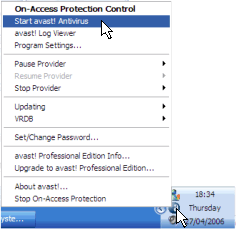
    1. Right click on the blue a logo at the bottom right of your taskbar and then select the "Start avast! Antivirus" option from the menu which appears
      01rightclick.png
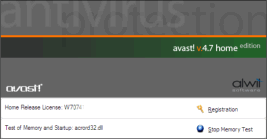
    2. Avast will run a memory scan on your PC and you'll see this screen while the scan completes and the control panel opens. Just wait for this screen to pass - it will take about 60-90 seconds:
      02loadtile.png
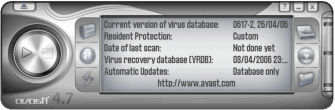
    3. Once Avast! loads, you'll see this strange looking control panel - don't worry, we don't need to decipher any of the buttons - we just want to click using the right mouse button anywhere in the grey area.
      03dash.png
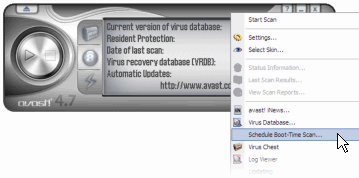
    4. When you right click on the control centre, you'll see a new menu. From this menu, select the "Schedule Boot-Time Scan..." option:
      04right.png
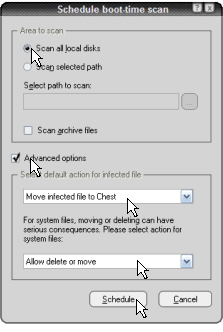
    5. You'll now get a new screen, as shown below. Select the option "Scan all local disks" and tick the "Advanced Options" box. Select the options "Move infected file to Chest" and "Allow delete or move" from the two menus in the bottom half of the window, before pressing Schedule:
      05schedule.png
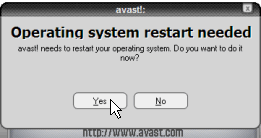
    6. Once you have presses OK, you will be given a prompt to reboot your PC. Check that you have no unsaved work open and then click "Yes". Your PC will reboot, and before Windows reloads, Avast will perform a virus scan.
      06restart.png


      The virus scan will take about 30-45 minutes on your PC, and should be completely automatic. The scan will be complete when your PC reloads Windows, and you need take no further action.
     

    uguduwa

    Active member
  • Jan 26, 2008
    1,868
    5
    38
    Advantages

    http://forums.cnet.com/community/ecnerd09/ Boot time scan is performed before the operating system is loaded. Some rootkit is a kernel-based so a boot scan is useful.

    Boot Time scanner can make the job of cleaning and deleting an infected file a lot easier.

    Disadvantage of Boot time scanning: Takes a little bit of time to load the OS. Depends on the scanning engine of an antivirus though.

    If I'm not mistaken, you can just set Avast to schedule a boot time scan when you want it to do so.


    Boot time screen


    By uguduwa
     

    uguduwa

    Active member
  • Jan 26, 2008
    1,868
    5
    38
    snoop_ug said:
    oya uguduwa kiyana ekata pissu ban. uuuuuuuuuuuuuuuuu kurunegala inna pissek huuuuuuuuuuuuuuuuuu

    oka kiyanna umba kaale waste karata man ubata anukampa karanawa..:P