Chat GPT:
Switching from DirectX 11.1 to DirectX 12 involves several steps, and whether you need to upgrade your graphics card depends on its compatibility with DirectX 12. Here's what you should do:
1. **Check Graphics Card Compatibility:** First, check if your graphics card is DirectX 12 compatible. DirectX 12 introduced significant changes and may require newer hardware. You can usually find this information on the manufacturer's website or in your graphics card's specifications.
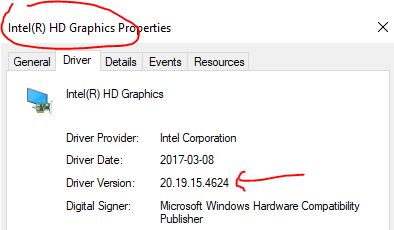
2. **Update Graphics Drivers:** If your graphics card is DirectX 12 compatible, make sure you have the latest graphics drivers installed. Visit the manufacturer's website to download and install the most recent drivers for your specific GPU model.
3. **Update Windows:** Ensure that you are running a Windows version that supports DirectX 12. DirectX 12 is available on Windows 10 and later. If you're using an older version of Windows, consider upgrading to a compatible version.
4. **Update DirectX:** DirectX updates are typically included with Windows updates. Ensure that your Windows operating system is up to date, as this will include any DirectX updates.
5. **Update Game/Software:** If you're using DirectX 11.1 for a specific game or application, check if there are updates or patches available that enable DirectX 12 support. Some games or software may offer DirectX 12 as an option in their settings.
6. **Adjust Graphics Settings:** In some cases, you may need to adjust graphics settings within the game or application to switch from DirectX 11.1 to DirectX 12. Look for graphics settings within the game's options menu.
7. **Consider Hardware Upgrade:** If your graphics card is not DirectX 12 compatible and you want to take advantage of DirectX 12 features, you may need to upgrade your graphics card to a DirectX 12 compatible model.
Remember that DirectX 12 offers improved performance and efficiency in many cases, but not all games or applications may support it. Always check the system requirements and settings options for individual games and software to make the most of DirectX 12 when available.