EK NEW SOFTWERE ZONE

rasma

Well-known member
  • Dec 11, 2007
    1,146
    37
    48
    Fake Webcam v4.0.5

    an3ks.jpg


    Stream/play videos and movies on Yahoo, MSN, AOL, Paltalk, ICQ, Skype, Camfrog, and on all messengers instead of actual Web cam. It streams videos and movies on your messenger just like Web cam. You don't need to have a Web cam for Webcamming.

    Quote:
    http://rapidshare.com/files/84111145...cam_v4.0.5.rar
     

    rasma

    Well-known member
  • Dec 11, 2007
    1,146
    37
    48
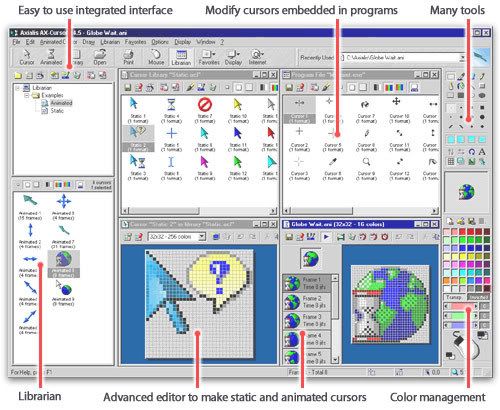
    Axialis AX Cursors 4.5

    0_image-9.jpg


    Info:
    Axialis AX-Cursors allows you to create all kind of static cursors (extension CUR - sizes from 16x16 to 72x72, custom sizes, black
    & white to 16,8 Million colors). When done, youll be able to customize the Windows default mouse pointers with your own cursors (Arrow, Wait, Move, Resize...). If youre a developper, what a nice touch to add your own cursors in your applications!

    Use the advanced editor to create animated cursors (extension ANI). Many features permits to make smooth animated pointers. You can edit each frame in a powerful editor (see features of the static editor above). You can also specify the display delay of each frame and see a live preview of your pointer.

    Axialis AX-Cursors features a powerful feature that permits you to create an animated ANI cursor from an Autodesk® FLI/FLC file. Autodesk® FLI is the standard animation format used by 3D modeler applications like 3DS Max® or Cinema 4D®. Just create your 3D object, animate it and save it as FLI. Creating your ANI file will be a childs play with Axialis AX-Cursors.

    Download:
    Quote:
    http://rapidshare.com/files/53401288...ursors_4.5.rar
     

    rasma

    Well-known member
  • Dec 11, 2007
    1,146
    37
    48
    Flash Particle Studio 1.0

    flash_particle_studio_1.jpg


    Flash Particle Studio is a tool with which to easily and quickly create stunning flash particle effects. Start by selecting a particle effect from a library. Load a bitmap containing a shape to be used as a particle effect source. Customize the particle effect by adjusting parameters such as speed, density, color, transparency, etc. Publish as an AVI video with/without transparency, SWF/FLV file, series of PNG images.


    download

    Quote:
    http://rapidshare.com/files/47424697..._john2born.rar
     

    rasma

    Well-known member
  • Dec 11, 2007
    1,146
    37
    48
    Real Player v.11.0.9.372 Gold Premium Multi-Media Full 2008

    rmnszq.jpg

    2lqnsx.gif


    2cpe4yg.jpg


    Real Player plays all major media formats including RealVideo, RealAudio, Windows Media and Quicktime. This makes it easier for end users to decide on the media they want to access, not the format or software. We take universality a step further by providing RealPlayers for Windows, Macintosh, Linux, Unix, mobile phones, portable devices, set top boxes, DVD players and gaming consoles.


    Fast Facts about the New Real Player:
    * Consumers can use the innovative, single-click process to quickly download and save videos for later enjoyment.
    * Consumers can download multiple videos simultaneously with RealPlayer, allowing people to save time and easily multitask. Users can also start downloading in the middle of watching a video, and the entire video will be captured.
    * Consumers don’t need to worry about video format compatibility issues — the new RealPlayer supports videos created in the most popular formats, including Flash, Windows Media, QuickTime, and Real.
    * Consumers can easily burn videos to CD (or to DVD, using RealPlayer Plus). The Video CD format used by RealPlayer can be played in most DVD players.
    * Consumers can send links of their favorite videos to their friends with a convenient “Share with a Friend” feature. The link that arrives in their friends’ email will direct them to the online source of the video content their friend downloaded.
    * RealPlayer supports both downloading and recording for popular streaming format (Windows Media, Real, and QuickTime)
    * RealPlayer will only download/record video that is not protected by DRM (Digital Rights Management) systems.
    * RealPlayer features an improved look and feel, a streamlined installation process and faster video playback.
    * RealPlayer will first be released for Windows, and will work with both Microsoft Internet Explorer and Mozilla Firefox. Real plans a version for the Mac to be released later in the year

    2dklurt.png


    Quote:
    http://rapidshare.com/files/16713080...mium_SO_SA.rar
    Quote:
    http://depositfiles.com/files/y40gw71ir
     

    rasma

    Well-known member
  • Dec 11, 2007
    1,146
    37
    48
    Super Email Sender 2.88 Full

    e340k8oojs07fkn9kd0v.png


    Super Email Sender offers you a professional high speed bulk email direct sender software. It is an ideal for newsletters, targeted marketing, and keeping in touch with clients.
    All you need is a connection to the Internet, the program has its own internal SMTP server and delivers mail messages directly to email recipients without your ISP SMTP server. The normal sending speed can be up to 50000 e-mails per hour. It also has a professional and simple user interface so that everyone can set it up in few minutes.

    Here are some key features of "Super Email Sender":

    • Very easy to send email to lots of recipients.
    • Powerful direct send ability. Bypass your ISP's mail server, automatically lookup receipt e-mail's mail exchange server and send e-mail directly to recipients.
    • Very fast email sender application by using multi-threaded delivery. The normal sending speed can up to 50000 emails per hour.
    • Automatically remove duplicate email addresses. Support attachments of any format
    • Easy to combine two mailing lists to a new mailing list.
    • Support multi-attachments. Both text and Html Format are supported
    • Professional user interface. Everyone can set it up in just few minutes.

    Download
    Quote:
    http://rapidshare.com/files/167136103/S ... r_2.88.rar
    http://depositfiles.com/files/u95yowncg
     

    rasma

    Well-known member
  • Dec 11, 2007
    1,146
    37
    48
    Nikon Capture NX v2.0.1 for Windows

    NXCapture.jpg


    Nikon Capture NX v2.0.1 for Windows | 45.10 MB

    Capture NX 2 easy-to-use software lets you make intuitive photo enhancements which are
    immediately visible on your monitor. Simply place the Control Point on the area that you
    want to edit and U Point Technology will analyze color elements such as hue, saturation
    and brightness, as well as recognize similar areas where an edit would best be applied.
    This technology powers the entire Capture NX 2 series of Control Points: Color Control
    Points, the all-new Selection Control Points, White/Black/Neutral Control Points and
    Red-Eye Control Points. With Capture NX 2, there's no need to deal with selection tools,
    layers or lengthy training.

    Main Features

    Color Control Point:
    Enhancements for hue, brightness and saturation are as simple as placing a Color Control
    Point on your image, then adjusting the length of the sliders. For example, Color Control
    Points are remarkably convenient for changing the color of flowers to better effect
    against green surrounding foliage.

    Selection Control Point:
    This new function enables you to apply enhancements such as Unsharp Mask or D-Lighting to
    a specific area with just a click of the mouse. There is no need for precision selection
    or masks - the Selection Control Point recognizes the areas you want to modify. The
    enhancement effect can easily be adjusted, allowing you to apply your chosen effect as you
    would with intuitive masking.

    Auto Retouch Brush:
    To simply achieve more natural-looking results, Auto Retouch Brush lets you remove dust
    spots on an image using a mouse click and stroke to match the surrounding color and tones.
    This can also be used to remove facial blemishes, imperfections on flowers, or other
    unwanted objects within the frame.

    Shadow/Highlight Adjustments:
    Using the slider at [Quick Fix], you can adjust shadows by [Shadow Adjust] and blown out
    highlights by [Highlight Adjust].
    Workspaces:
    Four workspaces are provided: Browser, Metadata, Multi-Purpose and Edit, and your window
    composition can be easily switched among them.
    Quick Fix:
    A combination of frequently used tools including [Level and Tone Curve], [Exposure
    Compensation], [Contrast], [Highlight Protection], [Shadow Protection] and [Saturation] in
    a single window.
    Simultaneous opening of multiple settings:
    You can open multiple image processing settings at the same time and make parallel process
    adjustments of multiple details.
    Label/Rating support (XMP):
    Supports nine kinds of labeling and five levels of ratings according to XMP, a metadata
    industry standard.
    Functions to help you realize your desired results:
    Straighten, Black/White Control Points, Neutral Control Points, Red-Eye Control Points,
    Selection Tools, Batch Processing, 16-bit Image Compatible, Vignette Control*, Auto Color
    Aberration Control*, Distortion Control Function*, Noise Reduction, Active D-Lighting (NEF
    only), D-Lighting, LCH Editor, Image Dust Off (NEF only), Fisheye Image Transformation,
    Color Booster Function, Color Management, Highlight/Shadow Display, Picture Control
    Compatibility (NEF only)Capture NX v2.0.1 Updater Software for Windows

    Modifications enabled with ver. 2.0.1:
    * An issue that caused images to be printed smaller than the paper, or only a portion of
    images to be printed, when paper orientation in the "Page Setup" dialog was set to
    Landscape with the following operations has been resolved:
    * Page Setup... selected from the "File" menu.
    * Print... selected from the "File" menu and the Page Setup... button in the "Print
    layout" dialog clicked.
    * The print button in the activity toolbar clicked and the Page Setup... button in the
    Print layout dialog clicked.
    * An issue that prevented display of the "Print layout" dialog with some systems when
    Print... was selected from the File menu has been resolved.
    Supported cameras
    Digital SLR Cameras: D1 / D1H / D1X / D100 / D2H / D2Hs / D2x / D2Xs / D200 / D3 / D700 /
    D300 / D40 / D40x / D50 / D60 / D70 / D70s / D80.
    COOLPIX: 5000 / 5400 / 5700 / 8400 / 8700 / 8800

    Requirements:
    · CPU: 1.0 GHz Pentium III or higher(2.0 GHz Pentium 4 or higher recommended).
    · OS: Windows XP Home Edition, Windows XP Professional, Windows 2000 Professional.
    · RAM: 256 MB minimum (1.0 GB or more recommended).
    · Hard disk: 200 MB required for installation.
    · Display: 800 x 600 pixels (1024 x 768 or more recommended) with 16-bit color (High

    Color/thousands of colors) or 24-bit color (True Color/millions of colors) recommended.
    · Others: .NET Framework 2.0, CD-ROM drive required for installation, Internet connection
    required for some options

    link:
    Quote:
    http://rapidshare.com/files/14310384...X_20v2.0.1.rar
     

    rasma

    Well-known member
  • Dec 11, 2007
    1,146
    37
    48
    NeuView Media Player Professional v6.0.8.0253


    315z8ti.jpg


    NeuView Media Player Professional v6.0.8.0253


    This image has been resized. Click this bar to view the full image. The original image is sized 932x554 and weights 37KB.


    Neuview Technologies:

    Neuview is different to any other media player, in that it has possibly the most leading edge technologies available in a software media player to date. Read about them here

    Pixelfusion - This is our unique image resampling algorithm, which is based around resolution enhancement to actually improve the perceived quality of video. This idea has been overlooked by media player developers in the past, but due to the consistent increase in computer processing power, it has become a reality at last..

    Advanced playback kernel - We have overcome the normal playback limitations that are set by DirectShow, by developing a kernel which abstracts the decoding part of DirectShow, allowing previously impossible effects such as reverse playback, and true seamless playback of multiple files, to be performed with ease..

    Codec crash recovery - Poorly implemented codecs can cause an access violation to occur when playing a corrupted or badly formed media file. We provide a mechanism for quickly recovering playback where the error occurred..

    'Ion' Media Presentation Layer - The standard subsystems used for displaying video and playing audio in DirectShow ('VMR' and 'Default DirectSound Device' filters) have been replaced with our own proprietary audio and video renderers, to overcome flaws such as video tearing, problems with multimonitor setups, and audio/video going out of sync..

    Pulldown stabilizer - In conjunction with our own vertical blank synchronization logic, this ensures the most solid video playback possible within a multitasking operating system, indistinguishable from that of dedicated hardware video players. The MS Windows operating system provides timers which are accurate to 1/1000 of a second at best, but at a standard monitor refresh rate of 72hz this limited accuracy can cause video to unnecessarily judder for a total of about 7% of playback time when the monitor beam approaches the top/bottom of the screen. We provide an automatic mechanism for counteracting this previously ignored problem.

    Quote:
    http://rapidshare.com/files/157029316/backup36.rar
     

    rasma

    Well-known member
  • Dec 11, 2007
    1,146
    37
    48
    Offline Explorer Enterprise 5.2.2878 SR1


    1216411430_obr_mpOeeV-1450x318.jpg


    Offline Explorer Pro - download whole sites, online image galleries, forums and media streams from the widest variety of supported Web sites. The best ever support for the modern Internet technologies, Flash, scripts and active contents. Combine this with the flexible filtering, instant download queue monitoring and detailed log to get the universal download tool that serves all your Web spidering and datamining requests.
    Other features include scheduling and sequencing of your downloads, templates for most typical download tasks, downloading your favorite sites onto autorun CDs and DVDs.online database of Project settings shared by other users, easy-to-user Wizard, full-text search inside whole downloaded sites with the found keywords highlight, internal browser and editor, integration with other software, E-mail notification about download completion and much more.

    Offline Explorer Pro also adds the following features:
    A separate download directory for Project folders
    Nested folders in Projects tree
    URL macros
    Multiple URLs in each Project
    “Always keep .primary files” setting in Project properties
    Ability to keep old copies of loaded files
    Downloading queue manager
    Ability to change the directory in which to keep Projects, templates and maps
    Improved Messages panel design
    HTTPS protocol support (for downloading from secured Web sites)
    MMS protocol support (Microsoft Media Player stream files)
    RTSP protocol support (Real Player stream files)
    Data Mining - post processing of downloaded Web site
    Ability to prohibit the Internal HTTP server from being accessed from other computers
    Other servers links levels feature
    Automatic Export of downloaded Projects
    Custom referrers, cookies and post requests
    Download or Export files directly to MS IE cache
    Export downloaded sites to a plain directory with no subdirectories
    Export downloaded sites to an MHT archive file
    Customize Contents.htm files before exporting Web sites
    Additional Project description window to supply multi-line comments
    Project Map works much faster
    Ability to print the whole Web site

    Quote:
    http://rapidshare.com/files/16764710...witch.com-.rar
    Code:
    Pass: www.warezwitch.com
     

    rasma

    Well-known member
  • Dec 11, 2007
    1,146
    37
    48
    Mightsoft Audio Editor Pro 2.94

    20kwq4w.jpg


    Audio Editor Pro is a visual multifunctional audio files editor for Microsoft Windows. It allows you to perform various operations with audio data such as displaying a waveform image of an audio file, filtering, applying various audio effects, format conversion and more. Supports all major audio formats. Provide more than 20 sound effects and 6 filters. Support mp3 VBR codec and Windows Media 9 format. Support ID3 tag and CDDB.
    Features
    Editing - Open, create and save audio files. Play an audio file or any part of it. Visually edit an audio file (Cut, Copy, Delete, Paste, Paste From File, Mix, Mix From File and Insert or Delete noise or silence in an audio file)
    Display - Display a waveform window of an audio file and apply zooming
    Recording - Record new audio file from a microphone or another input device
    Digital effects - Apply different effects (Amplify, Delay, Equalizer, Fade, Flanger, Invert, Normalize, Reverse, Multi Tap Delay, Silence, Stretch, Vibrato, Echo, Chorus)
    Audio filters - Apply different filters to the selected part of an audio file (Ban Pass Filter, High Pass Filter, High Shelf Filter, Low Pass Filter, Low Shelf Filter, Notch Filter)
    Support all major audio formats - Supports a wide range of audio formats
    ID3 tag & Media information - Insert and change information about an audio file (Album, Artist, Channels, Comments, Copyright, Genre, Title, Year)
    Markers - Use markers in your audio file to quickly select between different selections!
    Selection tool - Select a part of your audio file precisely with the selection tools of Audio Editor Pro
    Audio Editor Pro supports the following file formats
    Waveform audio (WAV)
    MPEG Audio (MP3 and MP2)
    Windows Media Audio (WMA)
    Audio CD Tracks
    OGG Vorbis Audio
    VOX Dialogic ADPCM
    RAW Audio
    Build-in Powerful Audio Tools
    Audio Converter - Converting one file type to another.
    CD Ripper - makes direct digital copies from audio CDs and saves them as MP3, WMA, WAV, and OGG.

    System Requirements

    Minimum
    Intel Pentium II class 400 MHz processor or better
    128 MB RAM
    50 MB Hard Drive space
    4x CD-ROM drive or better
    Sound Blaster-compatible sound card and speakers/headphones
    SVGA or higher color video display card (minimum resolution 800x600)
    Internet connection for CDDB access, ordering
    Support Windows95, 98, ME, NT, 2000, XP, 2003 or VISTA.
    Recommended
    Intel Pentium III class 800 MHz MMX or better
    256 MB RAM or more
    50 MB Hard Drive space
    12x CD-ROM drive
    Sound Blaster-compatible sound card and speakers/headphones
    16-bit color video card
    Internet connection for CDDB access, ordering
    Support Windows XP, 2003 or VISTA

    Quote:
    http://rapidshare.com/files/168001300/AEP.rar
     

    rasma

    Well-known member
  • Dec 11, 2007
    1,146
    37
    48
    Corel Painter Essentials v4.0.051


    corelpainteressentials4vq4.jpg


    Corel Painter Essentials 4 is the simple-to-use home art studio that makes it easy for you to sketch, paint and turn your photos into paintings.

    Two new workspaces put the tools you need at your fingertips, whether you’re turning a photo into a painting, or sketching and painting on a blank canvas. Based on the world’s most powerful painting and illustration software, Corel Painter, it’s the ideal way to get started with digital art!

    Quote:
    http://rapidshare.com/files/14841813...essentials.rar
     

    rasma

    Well-known member
  • Dec 11, 2007
    1,146
    37
    48
    Ulead PhotoImpact 12


    255qrg3.jpg


    New! Easy & Fast ExpressFix Mode
    Easily import, browse, edit, and share your images all from one simplified interface!

    ExpressFix mode is perfect for beginners to get started fast.
    One-click fixes and enhancements make it great for anyone!
    Powerful, High-end Image Editing
    PhotoImpact 12 includes a complete set of powerful tools to satisfy the demands of high-end users.

    New Auto White Balance Control makes colors look natural.
    Enhanced RAW file & 16-bit image support.
    Complete Creative Suite
    PhotoImpact's suite of powerful, easy-to-use image-editing tools offer limitless creative possibilities.

    New Create greeting cards and CD & DVD labels.
    Advanced painting, drawing, cloning and retouching tools.
    Exciting 2D & 3D text and graphics and dozens of professional filters.
    Web, DVD & Video Graphics
    Whether you need Web and video objects or even complete blog pages or DVD menus, PhotoImpact 12 has all the tools you need to get the job done.

    Create tailor-made DVD menu buttons, Web and video objects.
    DVD Menu Maker Plug-in lets you make custom DVD menus.
    Bonus Software
    PhotoImpact 12 also includes tools for managing and browsing your images, creating 360-degree panoramas and making animated GIFs. Plus, you get 1,398 royalty-free images, 2,221 Web elements, 3,270 customizable effects!

    Ulead Photo Explorer & PhotoImpact Album 12
    Ulead COOL 360™ photo panorama software
    Ulead GIF Animator™ 5

    System Requirements

    Windows (PC)

    Intel Pentium III compatible or above
    Microsoft Windows 2000 Service Pack 4, Windows XP Service Pack 2 Home Edition / Professional, Windows XP Media Center Edition, Windows XP Professional x64 Edition
    CD-ROM Drive
    256 MB RAM
    750 MB available hard drive space for program and content files
    True Colour or Hi-Color display adapter with 1024x768 resolutions or higher

    No Password
    Quote:
    http://rapidshare.com/files/147691530/ulpi1212.rar
     

    rasma

    Well-known member
  • Dec 11, 2007
    1,146
    37
    48
    Malwarebytes Anti-Malware 1.28


    mbam.png


    Malwarebytes' Anti-Malware is an anti-malware application that can thoroughly remove even the most advanced malware. It includes a number of features, including a built in protection monitor that blocks malicious processes before they even start.
    Malwarebytes' Anti-Malware monitors every process and stops malicious processes before they even start. The Realtime Protection Module uses our advanced heuristic scanning technology which monitors your system to keep it safe and secure. In addition, we have implemented a threats center which will allow you to keep up to date with the latest malware threats.

    Malwarebytes' Anti-Malware is considered to be the next step in the detection and removal of malware. We compiled a number of new technologies that are designed to quickly detect, destroy, and prevent malware. Malwarebytes' Anti-Malware can detect and remove malware that even the most well-known Anti-Virus and Anti-Malware applications on the market today cannot.


    Features

    * Support for Windows 2000, XP, and Vista.
    * Light speed quick scanning.
    * Ability to perform full scans for all drives.
    * Malwarebytes' Anti-Malware Protection Module. (requires registration)
    * Database updates released daily.
    * Quarantine to hold threats and restore them at your convenience.
    * Ignore list for both the scanner and Protection Module.
    * Settings to enhance your Malwarebytes' Anti-Malware performance.
    * A small list of extra utilities to help remove malware manually.
    * Multi-lingual support.
    * Works together with other anti-malware utilities.
    * Command line support for quick scanning.
    * Context menu integration to scan files on demand.

    Changes in Version 1.28 (September 10, 200:

    * (FIXED) Problem with heuristics on Windows 2000.
    * (ADDED) Better malware regeneration prevention on reboot
    Download

    Quote:
    http://rapidshare.com/files/14659074...8IncKeygen.rar
     

    rasma

    Well-known member
  • Dec 11, 2007
    1,146
    37
    48
    Windows Crystal XP v3.08.09 2008


    crystalfull.jpg


    Only install this edition of Windows onto a freshly formatted partition
    First of all there is {no languages or drivers has been removed}

    Removed:

    Help and support files
    Wallpapers and backgrunds {Replaced}
    Windows Sounds
    Old Windows Themes {Replaced}
    Wordpad
    Movie Maker
    Old Windows Cursures
    Old screen savers

    Integrated :
    hotfixes
    Internet Explorer 7
    Media Player 11
    Flash player 9
    Direct x9
    Control panel addons:
    1-Boot safe
    2-Boot Vis
    3-Clear Type Tuning
    4-Cpu-Z.CPL
    5-Dial-a-fix
    6-HD Tune
    7-HostXpert
    8-Mem Test
    9-MS Autoplay Repair Wizard
    10-MS Time Zone
    11-MS Virtual cd-Rom
    12-MS Config
    13-Msi Cleanup Utility
    14-Services and Devices
    15-Startup Control Panel
    16-Tweakui
    17-User Accounts 2
    18-Win Update List
    19-Xp-Antispy

    Programs:

    1-Foxit pdf reader
    2-K-Lite Mega codec pack
    3-Node23 Antiviruse
    4-Orbit Downloader
    5-Tuneup Utilities
    6-Winamp mp3 player
    7-Windows Live Messenger
    8-Winrar Corporat
    9-Yahoo Messenger

    Optional Programs:

    1-Firefox Web Browser
    2-Microsoft .NET Framework Version 2.0
    3-Microsoft Java
    4-Faststone Image Viewer
    5-Nero Micro v7.7.5.1
    6-UltraISO Premium Edition
    7-Powertoy Image Resizer
    8-Utorrent
    9-Paint .Net
    10-Flash Games

    Features:

    1-All latest hotfixes integrated till this moment
    2-More speed while browsing internet and network computers
    3-New programs has been added with the latest versions
    4-More useful registry tweaks
    5-Faster connection speed has been unlocked
    6-Annoying windows error message has been disabled
    7-windows file protection has been disabled
    8-New beautiful background wallpapers
    9-New style icons and themes
    10-Transparent glass aero
    11-New boot screen and logon screen
    and much more
    Note: because this version not create by english,so after install complete you need do :
    - Step 1: need Remove Egypt Keyboard : go to Control panel\Regional and language options\language\Detail , after Remove Egypt keyboard.
    - Step 2: if you install Office ,mouse will be right when you open Word program. You go to menu Format\Paragraph\Indents and Spacing Direction .Choose left-to-right, click OK.

    Quote:
    http://rapidshare.com/files/14827257...ive.part01.rar
    http://rapidshare.com/files/148272656/C ... part02.rar
    http://rapidshare.com/files/148272672/C ... part03.rar
    http://rapidshare.com/files/148274544/C ... part04.rar
    http://rapidshare.com/files/148272688/C ... part05.rar
    http://rapidshare.com/files/148273907/C ... part06.rar
    http://rapidshare.com/files/148273577/C ... part07.rar
    http://rapidshare.com/files/148272749/C ... part08.rar
     

    HASITHA DIMANTHA

    Well-known member
  • Mar 7, 2009
    7,709
    535
    113
    Kandy
    rasma said:
    Kaspersky Vol Lifetime Activation

    kis_09_eng_90_120.png


    Full lifetime Activation.

    - working on KIS and KAV
    - all type KIS or KAV
    - Windows platform only
    - Never expired
    - always whitelist
    - auto generate code for activation
    - 100% tested by the people all over the worlds
    - 100% free from spyware, virus, keyloger, ad aware, and trojan

    Download:
    Quote:
    http://rapidshare.com/files/16449470...Activation.rar


    link eka wada na machan....
     

    rasma

    Well-known member
  • Dec 11, 2007
    1,146
    37
    48
    Compress 1Gb Into 10Mb

    2q3ulb5.jpg


    KGB Archiver is the compression tool with an unbelievably high compression rate.
    Unfortunately, in spite of its powerful compression rate,
    it has high hardware requirements (I recommend processor with 1,5GHz clock and 256MB
    of RAM as an essential minimum). One of the advantages of KGB Archiver is also AES-256
    encryption which is used to encrypt the archives.
    This is one of the strongest encryptions known for human.
    New features
    Explorer shell extension
    Multilanguage support
    Up to 8% faster compression/decompression
    Now SFX archives run on any Windows or under WINE on Linux
    Lots of crashes fixed
    and more!

    Quote:
    http://rapidshare.com/files/166255293/C1gb-10mb.rar
     

    rasma

    Well-known member
  • Dec 11, 2007
    1,146
    37
    48
    RocketDock 1.3.5


    24eq6gl.jpg


    RocketDock is a smoothly animated, alpha-blended application launcher that is similar to ObjectDock. RocketDock renders quickly like MobyDock, has the visual sharpness of Y'z Dock, and the stability that neither seem to possess.

    It is compatible with every dock skin format we are aware of. In fact, if you have a skin that doesn't load properly, send it to us, along with a screenshot of what it should look like and we'll see what we can do about integrating the format...

    Quote:
    http://rapidshare.com/files/16636006...witch.com-.rar
    Code:
    Pass: www.warezwitch.com