
ahh ela elanEoN_wHitE said:got it got it sorry.. mata podak tapaluna. hehe h


ahh ela elanEoN_wHitE said:got it got it sorry.. mata podak tapaluna. hehe h

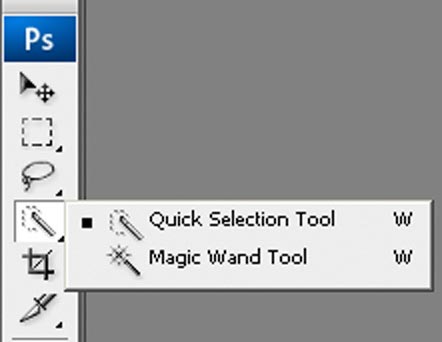
macho eeeta wada leesi ne Select > Colour Range giya nam?fazaal24 said:Ah puluwan machan..Photoshop wala thiyanawa Magic Wand Tool (shortcut - W) kiyala ekak..Eken wenne ekama paata thiyana than tika select wenawa click karama.
So eeka use karala sudu tika select karala delete karapan..!Wade poddak amaru wei because oya Crest eke podi podi kaeli thiyanawa ne

thawa nadda macho hoda awa?nabil said:ahh ela ela
ow oya darken, overlay, multiply okkoma sellam daala balanda. mamath ohoma thamai hungak honda effects allagatthe.nEoN_wHitE said:thawa nadda macho hoda awa?
mama nam asa ara darken effect eken ena ekata
kelinma cartoon look ekak enawa ne.. eka sira

nEoN_wHitE said:bt macho mage eke mechara na ne.. i have cs3...bt podai ne thiyene..
oya wena kohen hari add kara gatha awada oya thiyene?
 he he
he he
me brushes okoma eka paratama PS walata add kara gane kohomada danawada macho??nabil said:


icreations said:he he yaa oowain maara Sira dewal karanna puluwan...
brushes thiyena files [.abr files] tika copy karala preset wala brushes kiyana folder 1kata copy karannanEoN_wHitE said:me brushes okoma eka paratama PS walata add kara gane kohomada danawada macho??
agrmrs said:first of all get any size of canvas and make the foregrond colour to white and background colour to black
go to filter - render -clouds and apply it
go to filter -blur -radial blur and apply it [i used the value 10 ]
then again go to filter -sketch - bas relief and click ok to apply it
again go to filter -sketch-chrome and apply it
now it's mush more looks like a water than before
then we have to add a color
so go to image-adjustments-hue/saturation
in this window check the colorize box and change the hue level to get the
appropriate color like water [i used the value 195 ]
then we have to add a light
so go to filter -render -lighting effects and add a light.......................
so that is all
below is the picture that created by my self

try it your self
agrmrs said:first of all get any size of canvas and make the foregrond colour to white and background colour to black
go tofilter - render -clouds and apply it
go to filter -blur -radial blur and apply it [i used the value 10 ]
then again go to filter -sketch - bas relief and click ok to apply it
again go to filter -sketch-chrome and apply it
now it's mush more looks like a water than before
then we have to add a color
so go to image-adjustments-hue/saturation
in this window check the colorize box and change the hue level to get the
appropriate color like water [i used the value 195 ]
then we have to add a light
so go to filter -render -lighting effects and add a light.......................
so that is all
below is the picture that created by my self
try it your self

nEoN_wHitE said:ohh cool cool.. thanx 4 da info.. and also if u can put some pics fromdifferent sizes 2 compare
JPG Formats
Ctrl + S
JPG Format.. Size 61.2 Kb

Ctrl + Alt + Shift + S
Jpg format With 100% Quality Size 33.2 Kb

Ctrl + Alt + Shift + S
Jpg format With 50% Quality Size 10.8 Kb

GIF Formats
Ctrl + S
Gif Format.. Size 18.6 Kb

Ctrl + Alt + Shift + S
Gif format With 256 Colors Size 20.3 Kb

Ctrl + Alt + Shift + S
Gif format With 128 Colors Size 16.2 Kb

PNG Formats
Ctrl + S
Png Format.. Size 39.8 Kb

Ctrl + Alt + Shift + S
Png - 8 format With 256 Colors Size 15.4 Kb

Ctrl + Alt + Shift + S
Png - 24 format Size 37 Kb

agrmrs said:first of all get any size of canvas and make the foregrond colour to white and background colour to black
go tofilter - render -clouds and apply it
go to filter -blur -radial blur and apply it [i used the value 10 ]
then again go to filter -sketch - bas relief and click ok to apply it
again go to filter -sketch-chrome and apply it
now it's mush more looks like a water than before
then we have to add a color
so go to image-adjustments-hue/saturation
in this window check the colorize box and change the hue level to get the
appropriate color like water [i used the value 195 ]
then we have to add a light
so go to filter -render -lighting effects and add a light.......................
so that is all
below is the picture that created by my self
try it your self


icreations said:Ok Bro Here We Go
OK Now Here I have Given Samples Of the Use In Ctrl + S And Ctrl + Alt + Shift + S
You can Use this Methods For any use.. If its a Web Graphic Use the " Ctrl + Alt + Shift + S " System As its the Best way for Web graphics..
If You have 2 /3 Colors on Your Graphic... You can reduce the Size In to less than 10 Kb So.. It Loads Quick.. and Will Not SLOW DOWN the Web Site...
So Hope This Info Is Valuable For You.. as for me i have learned these by my self...
mama mehema ekak denagena hitiye ne ne..,
mama danuth karala baluwa ehema awulak na aye mula endala hariyata karan yanna bari wunoth kiyannaN@rUT0 said:matchan mee..!!!

Clerk_Kent said:wow...thx machan....
agrmrs said:mama danuth karala baluwa ehema awulak na aye mula endala hariyata karan yanna bari wunoth kiyanna


