


Windows Vista BootScreen is pointless.

Microsoft decided to hide a more visually appealing boot screen that can easily be enabled with very little trouble.
Here’s the hidden one, called “Aurora”

All you have to do is type msconfig into the start menu search box, and hit enter.

Click the Boot tab, and then check the “No GUI boot” checkbox.
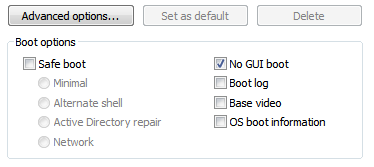
Hit OK and reboot the computer. You should see the new boot screen immediately.
http://www.winmatrix.com/forums/index.php?showtopic=11972

Microsoft decided to hide a more visually appealing boot screen that can easily be enabled with very little trouble.
Here’s the hidden one, called “Aurora”

All you have to do is type msconfig into the start menu search box, and hit enter.

Click the Boot tab, and then check the “No GUI boot” checkbox.
Hit OK and reboot the computer. You should see the new boot screen immediately.
http://www.winmatrix.com/forums/index.php?showtopic=11972
Last edited:


