


Free Internet කොන්ඩම් ඕන ද?
Kaspersky Internet Security 2011 Activation Key
100% sure ,100% Working ,Tested
As conducted every year, it is a Chinese Promotional Giveaway. Go to Promotional Page , http://song.kaba365.com/ and enter Email Address as shown in screenshot.

Now Enter the Captcha code as shown on right side in the text box.
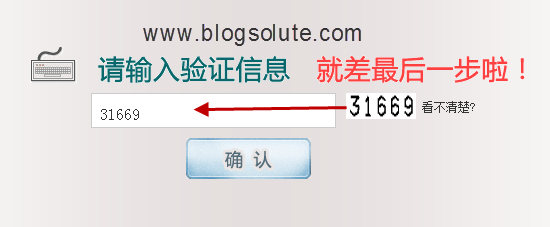
Activation code will now be send to your email address( Now-Go to your E-mail account & check) ,
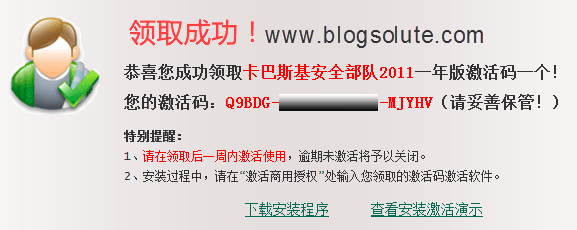
If you are chinese, use it directly on your PC but It is impossible to use this key for English installer. For English program, follow the steps below:
1. Download the chinese installer:
Download: http://www.mediafire.com/?bdpbyk43f72c1d8
Password: vinaghost.com
As the installer language is Chinese, follow the steps as per screenshots


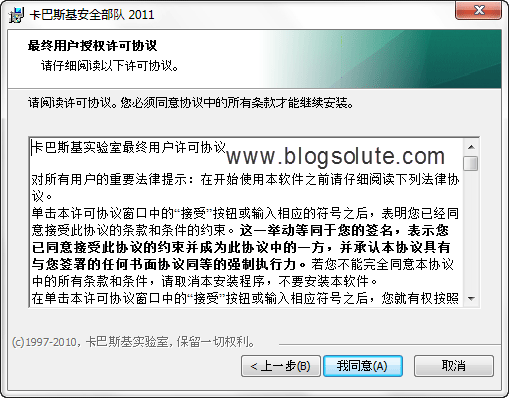
Enter the Kaspersky Internet Security 2011 Activation Key you received.

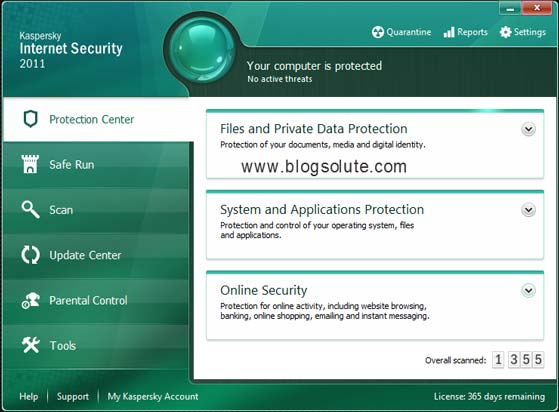
Here you have activated successfully Kaspersky Internet Security 2011 for 365 days.

KIS 2011


Open the Program, it is in chinese. Now Disable Self Defense of KIS 2011.
1 – Open the Program, it is in chinese. Now Disable Self Defense
2 – Go to Registry Editor. [ Start > Run > regedit.exe ] and navigate to HKEY_LOCAL_MACHINE\SOFTWARE\KasperskyLab\protected\AVP11\environment
then chang ( Localization ) value to ( en)
3 – don’t don’t don’t Restart the Computer
4 – Open the Program and Press [ Shift + F12 ] or [ Shift + F5 ] to switch English Language interface
5 – then you must update kaspersky
6 – Now enable Self Defense
7 – Restart the Computer
8 – Enjoy


1 – Open the Program, it is in chinese. Now Disable Self Defense
2 – Go to Registry Editor. [ Start > Run > regedit.exe ] and navigate to HKEY_LOCAL_MACHINE\SOFTWARE\KasperskyLab\protected\AVP11\environment
then chang ( Localization ) value to ( en)
3 – don’t don’t don’t Restart the Computer
4 – Open the Program and Press [ Shift + F12 ] or [ Shift + F5 ] to switch English Language interface
5 – then you must update kaspersky
6 – Now enable Self Defense
7 – Restart the Computer
8 – Enjoy

Kaspersky Internet Security 2011 Activation Key
100% sure ,100% Working ,Tested
As conducted every year, it is a Chinese Promotional Giveaway. Go to Promotional Page , http://song.kaba365.com/ and enter Email Address as shown in screenshot.

Now Enter the Captcha code as shown on right side in the text box.
Activation code will now be send to your email address( Now-Go to your E-mail account & check) ,
If you are chinese, use it directly on your PC but It is impossible to use this key for English installer. For English program, follow the steps below:
1. Download the chinese installer:
Download: http://www.mediafire.com/?bdpbyk43f72c1d8
Password: vinaghost.com
As the installer language is Chinese, follow the steps as per screenshots


Enter the Kaspersky Internet Security 2011 Activation Key you received.

Here you have activated successfully Kaspersky Internet Security 2011 for 365 days.

KIS 2011


Open the Program, it is in chinese. Now Disable Self Defense of KIS 2011.
1 – Open the Program, it is in chinese. Now Disable Self Defense
2 – Go to Registry Editor. [ Start > Run > regedit.exe ] and navigate to HKEY_LOCAL_MACHINE\SOFTWARE\KasperskyLab\protected\AVP11\environment
then chang ( Localization ) value to ( en)
3 – don’t don’t don’t Restart the Computer
4 – Open the Program and Press [ Shift + F12 ] or [ Shift + F5 ] to switch English Language interface
5 – then you must update kaspersky
6 – Now enable Self Defense
7 – Restart the Computer
8 – Enjoy


1 – Open the Program, it is in chinese. Now Disable Self Defense
2 – Go to Registry Editor. [ Start > Run > regedit.exe ] and navigate to HKEY_LOCAL_MACHINE\SOFTWARE\KasperskyLab\protected\AVP11\environment
then chang ( Localization ) value to ( en)
3 – don’t don’t don’t Restart the Computer
4 – Open the Program and Press [ Shift + F12 ] or [ Shift + F5 ] to switch English Language interface
5 – then you must update kaspersky
6 – Now enable Self Defense
7 – Restart the Computer
8 – Enjoy
Last edited:


