


Full guide:How to use MTS/M2TS/TS Converter
Part 1:The introduction
In the multimedia field, mts is a new high-definition video formats. Most of the recording video by sony high-definition DV is the mts format.The video coding usually is H264,The audio coding is AC-3,The resolution can up to full hd standard about 1920*1080,which means high quality.So we can see that mts is a product to meet the high definition era.
What are MTS files?
MTS Files is the AVCHD video file format, created by newer digital video cameras, such as Sony, Panasonic ,cannon and other HD camcorders. It bases on the MPEG-2 transport stream and supports 720p and 1080i HD video formats, can only be 2 GB in length
What are M2TS files?
M2TS files are used primarily with Sony hardware. Camcorders make use of M2TS in the form of AVCHD, a recording format made specifically for camcorders. Some camcorder models from Canon also use M2TS files. These files are also present on Blu-ray disc compilations, therefore they are capable of storing quite a large amount of information and data tracks.
What are TS files?
Transport stream is a standard format for transmission and storage of audio, video.and date.Transport Stream is specified in MPEG-2Part 1, Systems (formally known as ISO/IEC standard 13818-1 or ITU-T Rec. H.222.0)
In order to solve many puzzled from digital camcorders, I want to show three professional tools to you. If you want to convert MTS, TS, M2TS video to AVI, WMV, MP4, 3GP, 3G2, MOV, FLV, MKV, SWF, MPG, etc. You can read this article.
The three professional tools that I want to introduce are Tipard MTS Converter, Tipard TS Converter, Tipard M2TS Converter, which can help you convert AVCHD MTS to AVI, MPEG and MP4 etc, convert HD video to general format video, convert between all popular formats videos, Output HD videos for Sony PS3, Xbox 360, iRiver and suchlike PMPS.
Part 2:The Guide
1.How to convert .mts files with powerful MTS Converter?
2.How to convert .m2ts files with best M2TS Converter?
3.How to convert . ts files using this professional TS Converter?
Let's take to convert mts for example.(The steps to handle TS Converter and M2TS converter is similar to the below)
How to convert .mts files with best MTS Converter?
Step 0: Install and run Tipard MTS Converter.
Step 1: Click "Add File" button, it would pop up one window, and select the file you want to convert on this window.
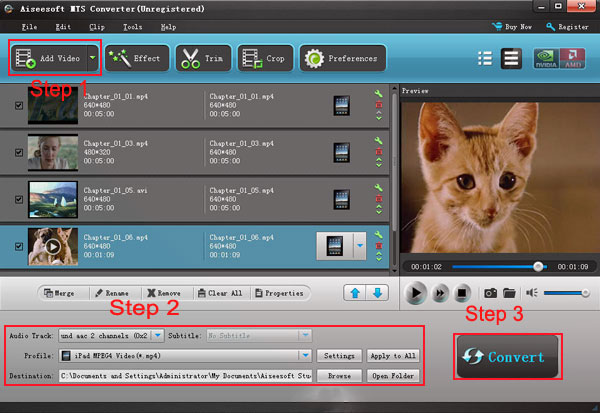
Step 2: Choose output format
Select output format you want from the “Profile” drop down list.
Note: Click "Settings"button, you can set your video and audio parameters, click "ok" after seted video and audio parameters.
Step 3: Click the
 button to start your conversion.
Just wait a moment, then your conversion will be finished.
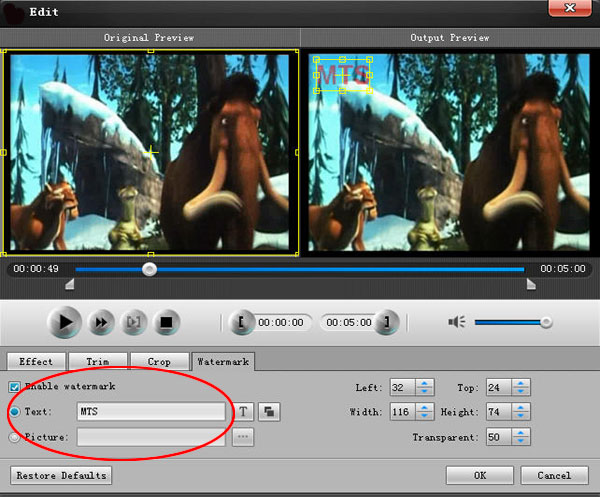
Some powerful functions such as "Merge", "Trim", "Effect", "Snapshot", "Crop" are all available.
Tips
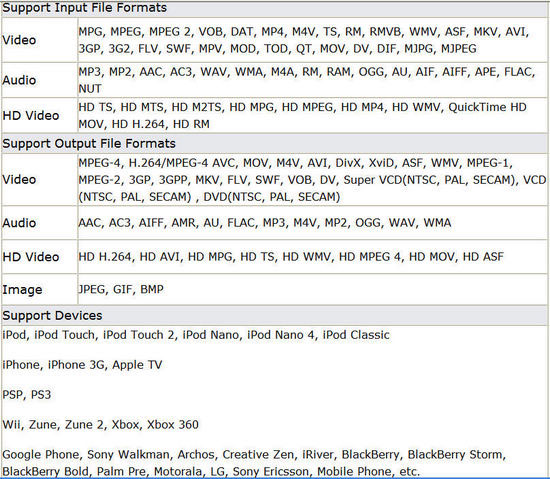
This MTS converter supports input, output video formats and devices are as following:
Support input video formats:
HD TS, HD MTS, HD M2TS, MPG, MPEG, MPEG 2, VOB, DAT, MP4, M4V, TS, RM, RMVB, WMV, ASF, MKV, AVI, 3GP, 3G2, FLV, SWF, MPV, MOD, TOD, QT, MOV, DV, DIF, MJPG, MJPEG, HD MPG, HD MPEG,HD MP4, HD WMV, QuickTime HD MOV, HD H.264, HD RM.
Supporting profile formats:
MPEG-4, H.264/MPEG-4 AVC, MOV, M4V, AVI, DivX, XviD, ASF, WMV, MPEG-1, MPEG-2, 3GP, 3GPP, MKV, FLV, SWF, VOB, DV, Super VCD(NTSC, PAL, SECAM), VCD(NTSC, PAL, SECAM) , DVD(NTSC, PAL, SECAM) and HD videos.
More reliable video to audio or audio to audio conversion
Support all popular players:
The converted video or audio files are high compatible with iPod, iPhone, iPhone 3G, Apple TV, PSP, PS3, Wii, Zune, Xbox, Xbox 360, Google Phone, Sony Walkman, Archos, Creative Zen, iRiver, BlackBerry, Palm Pre, Motorola, LG, Sony Ericsson, Mobile Phone, etc.
See it is very easy to operate,just need few step,then you can get you want.
Part 1:The introduction
In the multimedia field, mts is a new high-definition video formats. Most of the recording video by sony high-definition DV is the mts format.The video coding usually is H264,The audio coding is AC-3,The resolution can up to full hd standard about 1920*1080,which means high quality.So we can see that mts is a product to meet the high definition era.
What are MTS files?
MTS Files is the AVCHD video file format, created by newer digital video cameras, such as Sony, Panasonic ,cannon and other HD camcorders. It bases on the MPEG-2 transport stream and supports 720p and 1080i HD video formats, can only be 2 GB in length
What are M2TS files?
M2TS files are used primarily with Sony hardware. Camcorders make use of M2TS in the form of AVCHD, a recording format made specifically for camcorders. Some camcorder models from Canon also use M2TS files. These files are also present on Blu-ray disc compilations, therefore they are capable of storing quite a large amount of information and data tracks.
What are TS files?
Transport stream is a standard format for transmission and storage of audio, video.and date.Transport Stream is specified in MPEG-2Part 1, Systems (formally known as ISO/IEC standard 13818-1 or ITU-T Rec. H.222.0)
In order to solve many puzzled from digital camcorders, I want to show three professional tools to you. If you want to convert MTS, TS, M2TS video to AVI, WMV, MP4, 3GP, 3G2, MOV, FLV, MKV, SWF, MPG, etc. You can read this article.
The three professional tools that I want to introduce are Tipard MTS Converter, Tipard TS Converter, Tipard M2TS Converter, which can help you convert AVCHD MTS to AVI, MPEG and MP4 etc, convert HD video to general format video, convert between all popular formats videos, Output HD videos for Sony PS3, Xbox 360, iRiver and suchlike PMPS.
Part 2:The Guide
1.How to convert .mts files with powerful MTS Converter?
2.How to convert .m2ts files with best M2TS Converter?
3.How to convert . ts files using this professional TS Converter?
Let's take to convert mts for example.(The steps to handle TS Converter and M2TS converter is similar to the below)
How to convert .mts files with best MTS Converter?
Step 0: Install and run Tipard MTS Converter.
Step 1: Click "Add File" button, it would pop up one window, and select the file you want to convert on this window.
Step 2: Choose output format
Select output format you want from the “Profile” drop down list.
Note: Click "Settings"button, you can set your video and audio parameters, click "ok" after seted video and audio parameters.
Step 3: Click the

Just wait a moment, then your conversion will be finished.
Some powerful functions such as "Merge", "Trim", "Effect", "Snapshot", "Crop" are all available.
Tips
This MTS converter supports input, output video formats and devices are as following:
Support input video formats:
HD TS, HD MTS, HD M2TS, MPG, MPEG, MPEG 2, VOB, DAT, MP4, M4V, TS, RM, RMVB, WMV, ASF, MKV, AVI, 3GP, 3G2, FLV, SWF, MPV, MOD, TOD, QT, MOV, DV, DIF, MJPG, MJPEG, HD MPG, HD MPEG,HD MP4, HD WMV, QuickTime HD MOV, HD H.264, HD RM.
Supporting profile formats:
MPEG-4, H.264/MPEG-4 AVC, MOV, M4V, AVI, DivX, XviD, ASF, WMV, MPEG-1, MPEG-2, 3GP, 3GPP, MKV, FLV, SWF, VOB, DV, Super VCD(NTSC, PAL, SECAM), VCD(NTSC, PAL, SECAM) , DVD(NTSC, PAL, SECAM) and HD videos.
More reliable video to audio or audio to audio conversion
Support all popular players:
The converted video or audio files are high compatible with iPod, iPhone, iPhone 3G, Apple TV, PSP, PS3, Wii, Zune, Xbox, Xbox 360, Google Phone, Sony Walkman, Archos, Creative Zen, iRiver, BlackBerry, Palm Pre, Motorola, LG, Sony Ericsson, Mobile Phone, etc.
See it is very easy to operate,just need few step,then you can get you want.


