


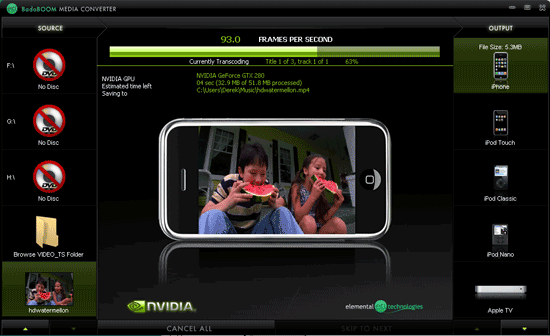
I found this new app on nVidia Site when uses CUDA API to encode Video Super fast.

It takes about 50s to encode a 5 min Video and 19 mins to RIP a DVD

I tested this By myself!
 100% Working!
Badaboom eliminates the frustration of video conversion by providing users with speed, efficiency, quality, and a sleek interface. In a practice that used to take several hours, Badaboom converts feature-length movies in a matter of minutes while keeping the videos looking crisp and clear.
By harnessing the power of NVIDIA CUDA-enabled GPUs, Badaboom offloads the CPU to allow users to continue browsing the Internet or checking email without decreased system performance, making transcoding high-quality video fast, easy, and painless.
Badaboom was designed with a few key benefits in mind. Other media converters may show strength in one or two of these traits, but Badaboom goes above and beyond by striving to excel in each area. The application's versatility is unmatched, whether it's transcoding at hundreds of frames per second or converting a video to a resolution of 1080p.
The four cornerstones of Badaboom:
• Transcoding Speed – Badaboom is fast! Instead of taking hours to convert a movie to play on your iPod, it can now be done in a matter of minutes.
• Efficient Use of Your System Resources – Badaboom converts video using the GPU, which offloads the CPU so you can continue to browse the Internet or check email without slowing down your system.
• Uncompromised Video Quality – The algorithms used to develop the Elemental H.264 encoder ensure that videos transcoded using Badaboom maintain the highest possible quality.
• Ease of Use and Flexibility – The Badaboom user interface lets you easily drag and drop your video, select a device and go! Alternatively, Badaboom's flexibility lets you easily customize your settings.
Badaboom 1.2 Specifications
Input Video Formats
MPEG-2 | H.264/AVC | AVCHD | HDV | RAW* | MPEG-1 | WMV | VC-1 | DivX | Xvid | FRAPS
Input Audio Formats
AC-3 | MP2 | PCM | AAC
Input File Types
M2V | MPG | VOB| AVI* | TRP | TS | M2T| M2TS | MPEG| MTS | MOV | MP4 | MKV | WMV**
Input Resolutions Supported
1920x1080 and below
Output Video Formats
H.264 (MP4) Baseline Profile, H.264 (MP4) Main Profile
Output Audio Formats
AAC-LC (2 channel)
Languages Supported
English, French, German, Italian, Spanish, Japanese, Simplified Chinese, Korean
*RAW 4:2:0 only
**WMV Pro Audio not supported
System Requirements
Minimum System Requirements
1.6 GHz Intel or AMD dual core CPU
NVIDIA GeForce 8 series or later CUDA enabled GPU
Windows XP 32-bit or 64-bit
Windows Vista 32 or 64-bit
Windows 7 32 or 64-bit
Recommended System Requirements
2.4 GHz Intel or AMD dual core CPU
NVIDIA 8800 GT or later CUDA enabled GPU
Windows XP 32-bit or 64-bit
Windows Vista 32 or 64-bit
Windows 7 32 or 64-bit
Badaboom 1.2.1 Update Released
Badaboom 1.2.1 is now available! For this minor update, we fixed a few glitches that we found in the 1.2 release, including making sure that the application saves your most recent settings for ease of use!
Download:
http://download.nvidia.com/downloads/nZone/demos/Badaboom_Setup_1.2.1.7_Trial_Public.exe
Crack:
http://rapidshare.com/files/329454151/Badaboom.exe
If this App was able to save you're time on video encoding pls add Me REP+

Last edited:


