

Latest ads
-
BlackWall V2ray servers
- hu KANNA
- Updated:
-
 Peppa Pig Family Plush Toy Set – 5 Characters
- anil1961
- Updated:
-
Express VPN PC - 1 Year Rs. 600.00
- Sanathbh
- Updated:
-
Capcut Pro 7 Days Team Plan - Rs. 3️⃣0️⃣0️⃣
- Sanathbh
- Updated:
-
 Singapore V2ray VPN for Tunneling
- hu KANNA
- Updated:
You are using an out of date browser. It may not display this or other websites correctly.
You should upgrade or use an alternative browser.
You should upgrade or use an alternative browser.

thathsara.sl said:partition hidden karanna widiyak thiyenawada......????? pls kawru hari kiyala denna....
Download, Install, and Run this. Follow on-screen instructions! Hope this will help, if it does please post your comments so that others may benefit


Machan there is a way of doing it by editing some Registry editing... or else using a software like TweakUI (It had the option AFAIK)
Or else the best way to do it use TrueCrypt! You can create a hidden partition + Hidden Operating System + you get military grade encryption
http://www.truecrypt.org/
T r u e C r y p t Free open-source disk encryption software for Windows Vista/XP, Mac OS X, and Linux
Main Features:
Or else the best way to do it use TrueCrypt! You can create a hidden partition + Hidden Operating System + you get military grade encryption
http://www.truecrypt.org/
T r u e C r y p t Free open-source disk encryption software for Windows Vista/XP, Mac OS X, and Linux
Main Features:
- Creates a virtual encrypted disk within a file and mounts it as a real disk.
- Encrypts an entire partition or storage device such as USB flash drive or hard drive.
- Encrypts a partition or drive where Windows is installed (pre-boot authentication).
- Encryption is automatic, real-time (on-the-fly) and transparent.
- Provides two levels of plausible deniability, in case an adversary forces you to reveal the password:
1) Hidden volume (steganography) and hidden operating system.
2) No TrueCrypt volume can be identified (volumes cannot be distinguished from random data). - Encryption algorithms: AES-256, Serpent, and Twofish. Mode of operation: XTS. Further information regarding features of the software may be found in the documentation.
Last edited:
Ranhiru said:Machan there is a way of doing it by editing some Registry editing... or else using a software like TweakUI (It had the option AFAIK)
Or else the best way to do it use TrueCrypt! You can create a hidden partition + Hidden Operating System + you get military grade encryption
http://www.truecrypt.org/
T r u e C r y p t Free open-source disk encryption software for Windows Vista/XP, Mac OS X, and Linux
Main Features:
- Creates a virtual encrypted disk within a file and mounts it as a real disk.
- Encrypts an entire partition or storage device such as USB flash drive or hard drive.
- Encrypts a partition or drive where Windows is installed (pre-boot authentication).
- Encryption is automatic, real-time (on-the-fly) and transparent.
- Provides two levels of plausible deniability, in case an adversary forces you to reveal the password:
1) Hidden volume (steganography) and hidden operating system.
2) No TrueCrypt volume can be identified (volumes cannot be distinguished from random data).- Encryption algorithms: AES-256, Serpent, and Twofish. Mode of operation: XTS. Further information regarding features of the software may be found in the documentation.
kick ම තමා ඔය තියෙන්නෙ

Here is a link for TweakUI!
http://download.microsoft.com/downl...a6-b352-839afb2a2679/TweakUiPowertoySetup.exe
http://download.microsoft.com/downl...a6-b352-839afb2a2679/TweakUiPowertoySetup.exe

folder guard eken haki neda? ?? ? ? elakiri wage ekanam wada:: bt man use karanne ne dan :: try ekki dala balanna machan


1.Using TweakUI - this method is easier for inexperienced users and requires the installation of Tweak UI, a tweak utility created and delivered for free by Microsoft.
2. The hard way - editing the registry.
Using TweakUI Tool
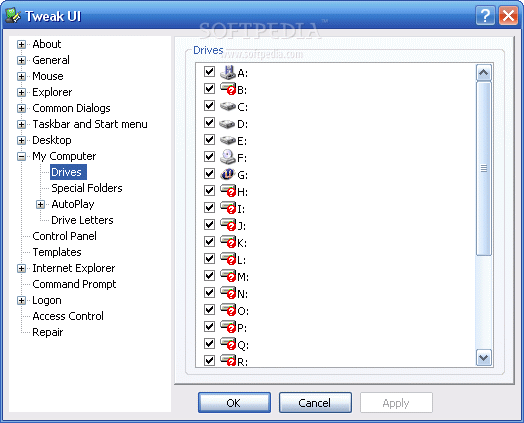
Download the utility and install it on your computer. Launch the application and in the left, go to My Computer -> Drives.
A list with all the drives will be displayed in the right. Every drive/partition has a checked sign in front. This means the drive/partition is visible under the Windows Explorer. To hide the desired drive, just uncheck its letter, click Apply and that's all. The drive will become hidden.
Even so, you will still have access to it by typing its letter in the explorer address bar. This is not a high security tweak but it offers protection against the curious eyes.
Editing the registry
In order to hide a drive/partition inside Windows, you can always edit the Registry. Although is not as comfortable as the method presented above, you can do it in a matter of minutes.
Go to Start -> Run and type Regedit to start the registry editor. Now you need to follow a specific key which must be edited:
HKEY_CURRENT_USER / Software / Microsoft / Windows / CurrentVersion / Policies / Explorer
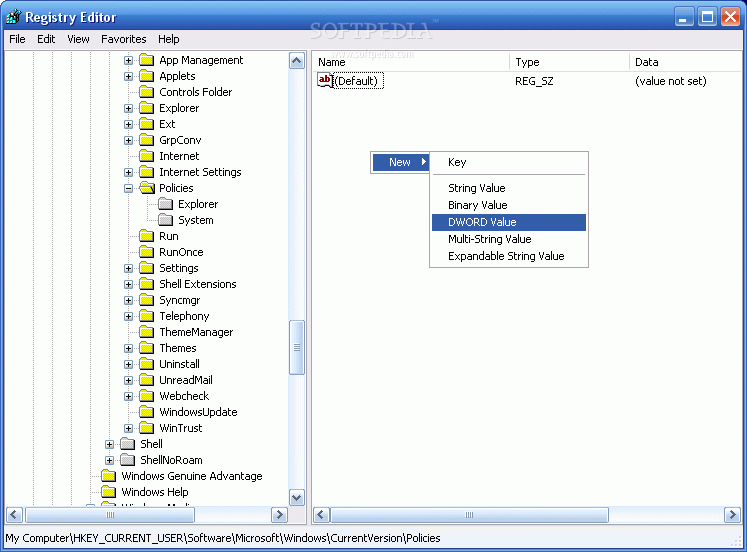
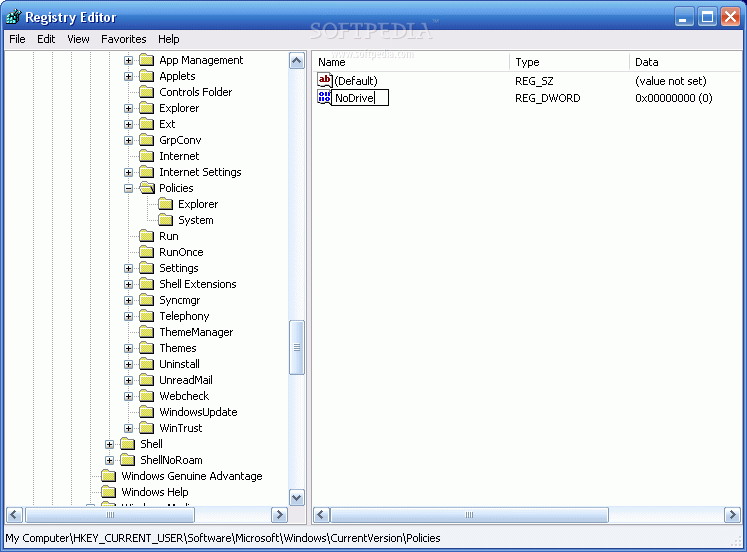
Right click in the right panel and select New->DWORD value. Name it NoDrives. You will immediately observe that this new DWORD value got its data something like this: 0x00000000. The 0x in the front of the value means the number is stored hexadecimal (base 16). There are four sets of double 0. This means that every set has its representations as follows (from right to left):
- first set: drive letters from A to H
- second set: I to P
- third set: Q to X
- fourth set: Y to Z
The value number for the each drive is:
1 for A I Q Y, 2 for B J R Z, 4 for K C S, 8 for D L T, 16 for E M U, 32 for F N V, 64 for G O V and 80 for H P X.
Now focus on the information I provided you with above. If you want to hide partition E:, you should edit the NoDrives value as follows: E: corresponds to the first set of double 00 and the value for E is 16. Therefore, replace the first (rightmost) double 00 with 10 (the hexadecimal representation of the number 16).
2. The hard way - editing the registry.
Using TweakUI Tool
Download the utility and install it on your computer. Launch the application and in the left, go to My Computer -> Drives.
A list with all the drives will be displayed in the right. Every drive/partition has a checked sign in front. This means the drive/partition is visible under the Windows Explorer. To hide the desired drive, just uncheck its letter, click Apply and that's all. The drive will become hidden.
Even so, you will still have access to it by typing its letter in the explorer address bar. This is not a high security tweak but it offers protection against the curious eyes.
Editing the registry
In order to hide a drive/partition inside Windows, you can always edit the Registry. Although is not as comfortable as the method presented above, you can do it in a matter of minutes.
Go to Start -> Run and type Regedit to start the registry editor. Now you need to follow a specific key which must be edited:
HKEY_CURRENT_USER / Software / Microsoft / Windows / CurrentVersion / Policies / Explorer
Right click in the right panel and select New->DWORD value. Name it NoDrives. You will immediately observe that this new DWORD value got its data something like this: 0x00000000. The 0x in the front of the value means the number is stored hexadecimal (base 16). There are four sets of double 0. This means that every set has its representations as follows (from right to left):
- first set: drive letters from A to H
- second set: I to P
- third set: Q to X
- fourth set: Y to Z
The value number for the each drive is:
1 for A I Q Y, 2 for B J R Z, 4 for K C S, 8 for D L T, 16 for E M U, 32 for F N V, 64 for G O V and 80 for H P X.
Now focus on the information I provided you with above. If you want to hide partition E:, you should edit the NoDrives value as follows: E: corresponds to the first set of double 00 and the value for E is 16. Therefore, replace the first (rightmost) double 00 with 10 (the hexadecimal representation of the number 16).
1.Using TweakUI - this method is easier for inexperienced users and requires the installation of Tweak UI, a tweak utility created and delivered for free by Microsoft.
2. The hard way - editing the registry........
If you just want to hind the drive letterthen you don’t need to do any of those, Just go to Computer Management > Storage > Disk management > Select the partition > Right Click > Change Drive Letter and Paths > Remove.


