


1.Go the Start menu and click Run.
2.In the Run dialog box ,type"gpedit.msc" wihout quotes and press enter.Local Group Policy Editor will open.

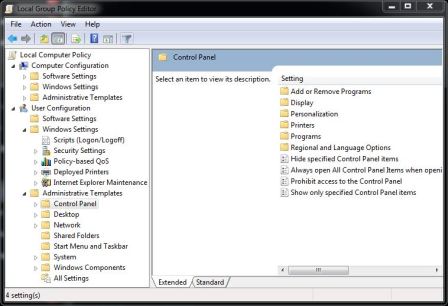
3.In the group policy editor expand "Administrative Templates" and click "Windows Components".

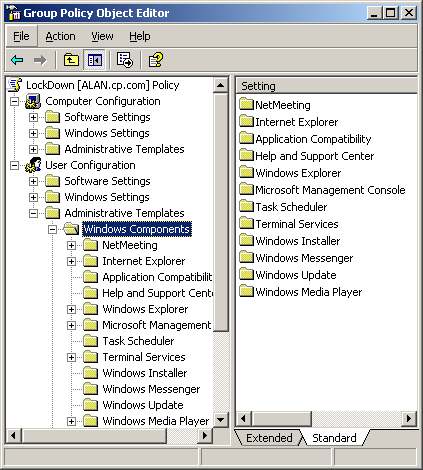
4.In the Windows Components select Windows Explorer.
5.In the Windows Explorer select "Hide these specified drives in my computer".

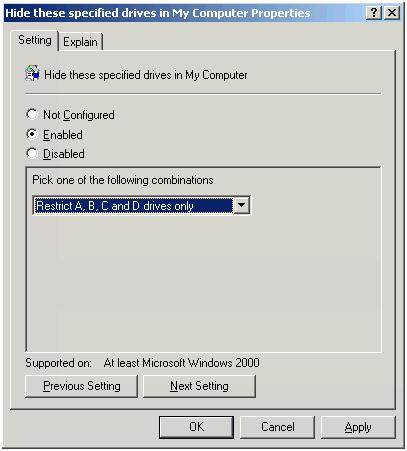
6.In the "Hide these specified drives in my computer" dialog box click enable and select the drives you want to hide.
2.In the Run dialog box ,type"gpedit.msc" wihout quotes and press enter.Local Group Policy Editor will open.

3.In the group policy editor expand "Administrative Templates" and click "Windows Components".

4.In the Windows Components select Windows Explorer.
5.In the Windows Explorer select "Hide these specified drives in my computer".
6.In the "Hide these specified drives in my computer" dialog box click enable and select the drives you want to hide.
Last edited:


