How to Add a Picture to a Folder Background in WinXP

hul2000

Member
Oct 17, 2006
5,050
2
0
39
Gallifrey
Do you want to add a picture to your folder background.
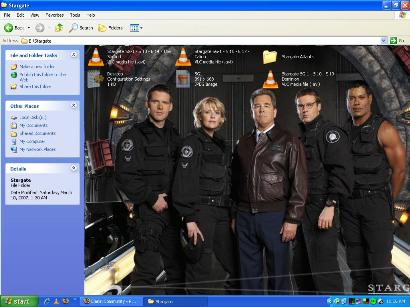
attachment.php


copy the following to notepad

[{BE098140-A513-11D0-A3A4-00C04FD706EC}]
iconarea_image="image file path and name "
iconarea_text=0x00000000

insert the path of your image after the iconarea_image (with the quotations)

eg:-
[{BE098140-A513-11D0-A3A4-00C04FD706EC}]
iconarea_image="E:\Pictures\SG1.jpg "
iconarea_text=0x00000000

if the picture is in the same folder only the image name will do.

the 'iconarea_text=0x00000000' will set the text colour of the icons.
the last six numbers are the colour in hex

eg:- 000000 = black
FFFFFF = White
0000FF = blue

iconarea_text=0x00000000 this will set the text colour to black

iconarea_text=0x00000000 this will set the text colour to white

save the file as "Desktop.ini"

then close the folder and go to Start-Run

type
Attrib +s "Your folder path and name"

eg:- Attrib +s "E\Stargate"

Then go to your folder and check it out.

 

Attachments

  • image.JPG
    image.JPG
    29.2 KB · Views: 208

snoop_ug

Well-known member
  • Oct 2, 2006
    7,953
    663
    113
    @ Lankawe oi
    hul2000 said:
    Do you want to add a picture to your folder background.
    attachment.php


    copy the following to notepad

    [{BE098140-A513-11D0-A3A4-00C04FD706EC}]
    iconarea_image="image file path and name "
    iconarea_text=0x00000000

    insert the path of your image after the iconarea_image (with the quotations)

    eg:-
    [{BE098140-A513-11D0-A3A4-00C04FD706EC}]
    iconarea_image="E:\Pictures\SG1.jpg "
    iconarea_text=0x00000000

    if the picture is in the same folder only the image name will do.

    the 'iconarea_text=0x00000000' will set the text colour of the icons.
    the last six numbers are the colour in hex

    eg:- 000000 = black
    FFFFFF = White
    0000FF = blue

    iconarea_text=0x00000000 this will set the text colour to black

    iconarea_text=0x00000000 this will set the text colour to white

    save the file as "Desktop.ini"

    then close the folder and go to Start-Run

    type
    Attrib +s "Your folder path and name"

    eg:- Attrib +s "E\Stargate"

    Then go to your folder and check it out.

    Not Working Bro
     

    hul2000

    Member
    Oct 17, 2006
    5,050
    2
    0
    39
    Gallifrey
    This worked fine for me. you should save the 'desktop.ini' in the folder you want to add the background picture. then close the folder and set the attributes by typing Attrib +s "Folder path and name". then go back to the folder and check.
     

    thusithagh

    Active member
  • Aug 31, 2006
    1,616
    1
    38
    42
    Behind da Enemy Lines
    u can do this using a small software.
    but unfortunately i dnt hav it right now.

    :( :( :(
    :( :( :(

    ah i found it.

    ur pic will be saved in a hidden folder called Folder Settings.
     

    Attachments

    • ieshwiz.zip
      21.1 KB · Views: 174
    Last edited:

    peeda

    Member
    Sep 13, 2006
    365
    0
    0
    Colombo
    hul2000 said:
    Do you want to add a picture to your folder background.
    attachment.php


    copy the following to notepad

    [{BE098140-A513-11D0-A3A4-00C04FD706EC}]
    iconarea_image="image file path and name "
    iconarea_text=0x00000000

    insert the path of your image after the iconarea_image (with the quotations)

    eg:-
    [{BE098140-A513-11D0-A3A4-00C04FD706EC}]
    iconarea_image="E:\Pictures\SG1.jpg "
    iconarea_text=0x00000000

    if the picture is in the same folder only the image name will do.

    the 'iconarea_text=0x00000000' will set the text colour of the icons.
    the last six numbers are the colour in hex

    eg:- 000000 = black
    FFFFFF = White
    0000FF = blue

    iconarea_text=0x00000000 this will set the text colour to black

    iconarea_text=0x00000000 this will set the text colour to white

    save the file as "Desktop.ini"

    then close the folder and go to Start-Run

    type
    Attrib +s "Your folder path and name"

    eg:- Attrib +s "E\Stargate"

    Then go to your folder and check it out.


    Ela Ela Siraaa:D :D :D :D :D :D :D :D :D :D :D :D
     

    nEoN_wHitE

    Active member
  • May 4, 2006
    46,638
    20
    38
    Inside a neon light
    hul2000 said:
    This worked fine for me. you should save the 'desktop.ini' in the folder you want to add the background picture. then close the folder and set the attributes by typing Attrib +s "Folder path and name". then go back to the folder and check.
    do we have to put dis line as wel??
    [{BE098140-A513-11D0-A3A4-00C04FD706EC}]