


Moyea SWF to Video Converter Pro can easily and perfectly convert SWF to video in any popular formats, including converting SWF to AVI with alpha channel, and 100% keep the original effects. Below, I will take the example about converting SWF to AVIwith alpha, to show you how to convert SWF to Video with Moyea SWF to Video Converter Pro:
Tutorial about how to convert SWF to AVI with alpha channel:
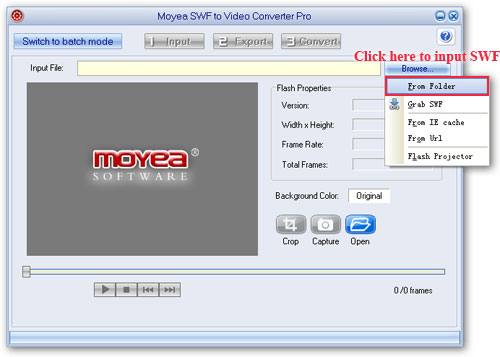
Step 1: Open Moyea SWF to Video Converter Pro, click "Browse" and then choose “From Folder” from the drop-down menu to input SWF files.
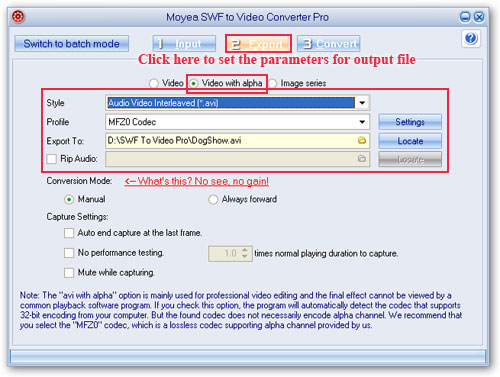
Step 2: Click "Export" tab, and then choose to generate “video with alpha” file.
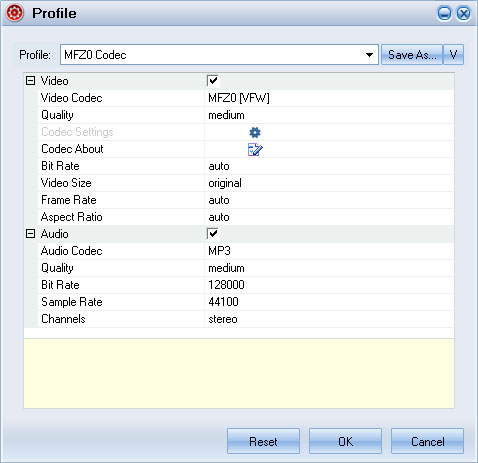
Advanced settings for Video with alpha
Step 3: Click “Convert” to start the SWF to AVI with alpha conversion.
Tutorial about how to convert SWF to AVI with alpha channel:
Step 1: Open Moyea SWF to Video Converter Pro, click "Browse" and then choose “From Folder” from the drop-down menu to input SWF files.
Step 2: Click "Export" tab, and then choose to generate “video with alpha” file.
Advanced settings for Video with alpha
Step 3: Click “Convert” to start the SWF to AVI with alpha conversion.


