


How to create Tables inside Tables using Nested Data Structure in Google BigQuery
In this article, I’ll guide you through the steps of creating a table inside a table using the Columnar Storage feature with Nested Data Structures in Google Big Query.
The first thing to keep in mind is, In order to create a nested table, the two source tables must contain a defined relationship so that the items in one table can be related to the other table.A structure field can contain another structure or even an array of structures. Once you have created a structure, you can use the STRUCT function (Explained at the end of the article) or direct assignment statements to nest structures within existing structure fields.

Google BigQuery
Columnar Format AKA the Capacitor in BigQuery
Many databases store their data by rows, which look similar to a spreadsheet. All the data about a record is stored in one row. By contrast, a columnar database stores its data by columns, with the data for each column stored together.
Take this data for example:“Columnar database stores its data by columns.”
In a SQL or standard flat file database the data would be stored like this:

In a columnar database, the data would be stored like this:

Let’s use some real time example with some dummy values for the below scenario:
I want to store client ID, Name, Address and Mobile Number in a table called Clients. Take these data for an instance:
100, Dylan Jay, 137 Cairns Street, 555-1212
112, Tara Jay, 137 Dairns Road, 444-2222
In a columnar database, those data will store like this:
ID Number: {100,112}
Name: {Dylan Jay,Tara Jay}
Address: {137 Cairns Street, 137 Dairns Road}
Mobile: {555-1212,444-2222}
The main idea behind using columnar storage is to handle large amount of data for analysis, Such as business Intelligence Systems. By storing all the records for one field together, columnar databases can query and perform analysis on that similar data far quicker than row-based databases.
In BigQuery, We called this columnar format as Capacitor.As an example, if you want to know the mean order total for all of your customers, a columnar database would only need to look at the order total column to pull the data, and can quickly calculate the mean. Performing the same operation in a row-based database might require scanning millions or billions of rows to gather all the values.
To store in a columnar format we first need to describe the data structures using a schema.There is no need for any other complex types like Maps, List or Sets as they all can be mapped to a combination of repeated fields and groups.
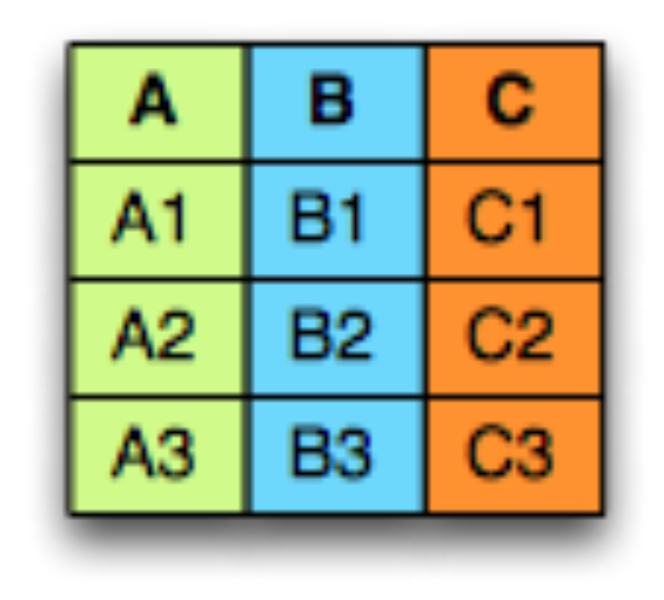
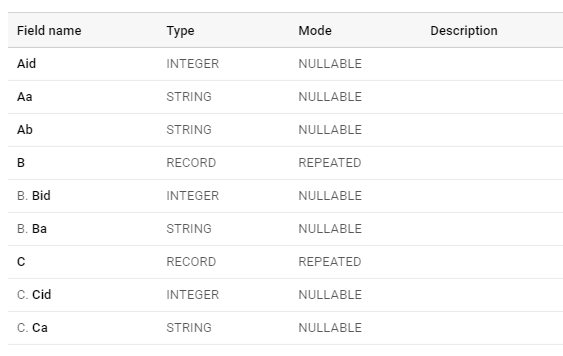
Let’s say we have three tables as A,B and C
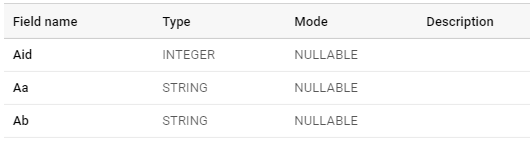
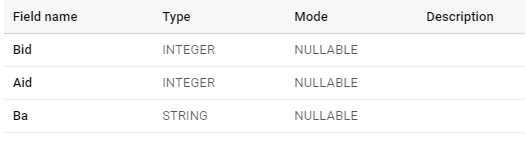
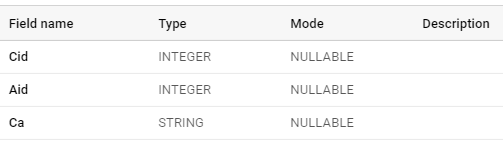
OK, so both these kid tables want to be grouped with the parent A, And the combination of the table should look like this:
Read full article here


