


step 1
From the Start menu, click Run
To access a command prompt, in the Open box, enter cmd (or command, if you wish). Click OK.
At the prompt, enter ping followed by your domain name.
In this example, tamilnet.com is used.
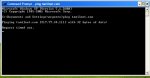
after that visit http://www.ip-adress.com/ & check the ip address
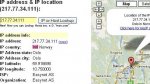
P address & IP location (217.77.34.111):
IP address info:
IP address: 217.77.34.111 (copy)
IP country: Norway
IP Address state: Oslo
IP Address city: Oslo
IP latitude: 59.916698
IP longitude: 10.750000
ISP: Easynet AS
Organization: Easynet AS
From the Start menu, click Run
To access a command prompt, in the Open box, enter cmd (or command, if you wish). Click OK.
At the prompt, enter ping followed by your domain name.
In this example, tamilnet.com is used.
after that visit http://www.ip-adress.com/ & check the ip address
P address & IP location (217.77.34.111):
IP address info:
IP address: 217.77.34.111 (copy)
IP country: Norway
IP Address state: Oslo
IP Address city: Oslo
IP latitude: 59.916698
IP longitude: 10.750000
ISP: Easynet AS
Organization: Easynet AS
Last edited:


 keep them coming.


