


How to Remove Metadata in Pictures
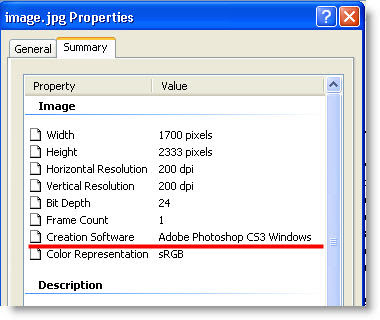
When you edit your images Adobe Photoshop (and other programs) adds a line in picture properties revealing that it was modified, for example Creation Software Adobe Photoshop CS3 Windows is added in image properties. The same goes with digital cameras, they also add lots of metadata in image properties (like Camera model, Shutter speed, Date picture taken and so on). More experienced users can quickly right click on the image and say that it was altered with some software. You can't remove this metadata info on the image with plain windows but there are few tricks that might help.
1. Remove picture metadata with Paint.
This tip is faster and suitable for small images, those which fit on the screen. Open image whose metadata you want to delete and just make a screenshot of it. Then open paint and paste it. Save and see that all metadata is gone. Don't be afraid of loosing image's quality because in theory screenshot making is lossless operation Read my previous post about "How to Make Screenshots"
2. Delete image metadata with JHEAD.
Previous tip isn't very practical when you need to remove metadata from many pictures. And here JHEAD comes into play. This program doesn't have graphic user interface but I'll show you how to use it.
a) At first create folder named pictures in your C disk
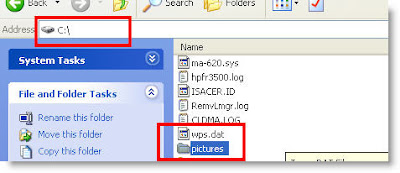
b) Then copy all photos whose metadata you want to remove to this folder (C:\pictures) c) Download a small program JHEAD and save it to that folder
d) Press Start -> Run or Windows key + R to open Run menu, type cmd.exe and press OK
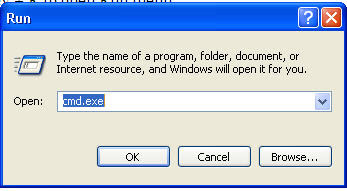
e) A cmd command line window open. Now be careful and type exactly what is written:
type cd\ and press Enter
type cd images and press Enter
type jhead -purejpg * and press Enter
now you should see a list of images whose metadata was removed. Your cmd window will look similar to this
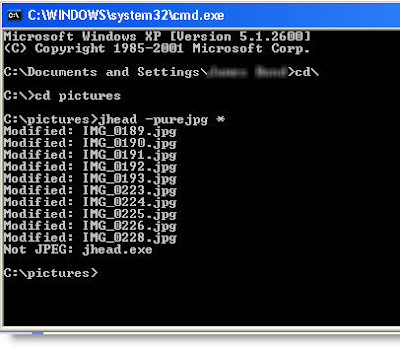
Check your images' properties and see that all metadata is removed. Now you will be sure that noone will see any additional information except image itself.
කොපි පේස්ට් කිරීමකි........( re-post නම් sorry වෙන්න ඕන)
When you edit your images Adobe Photoshop (and other programs) adds a line in picture properties revealing that it was modified, for example Creation Software Adobe Photoshop CS3 Windows is added in image properties. The same goes with digital cameras, they also add lots of metadata in image properties (like Camera model, Shutter speed, Date picture taken and so on). More experienced users can quickly right click on the image and say that it was altered with some software. You can't remove this metadata info on the image with plain windows but there are few tricks that might help.
1. Remove picture metadata with Paint.
This tip is faster and suitable for small images, those which fit on the screen. Open image whose metadata you want to delete and just make a screenshot of it. Then open paint and paste it. Save and see that all metadata is gone. Don't be afraid of loosing image's quality because in theory screenshot making is lossless operation Read my previous post about "How to Make Screenshots"
2. Delete image metadata with JHEAD.
Previous tip isn't very practical when you need to remove metadata from many pictures. And here JHEAD comes into play. This program doesn't have graphic user interface but I'll show you how to use it.
a) At first create folder named pictures in your C disk
b) Then copy all photos whose metadata you want to remove to this folder (C:\pictures) c) Download a small program JHEAD and save it to that folder
d) Press Start -> Run or Windows key + R to open Run menu, type cmd.exe and press OK
e) A cmd command line window open. Now be careful and type exactly what is written:
type cd\ and press Enter
type cd images and press Enter
type jhead -purejpg * and press Enter
now you should see a list of images whose metadata was removed. Your cmd window will look similar to this
Check your images' properties and see that all metadata is removed. Now you will be sure that noone will see any additional information except image itself.
කොපි පේස්ට් කිරීමකි........( re-post නම් sorry වෙන්න ඕන)

 thanks


