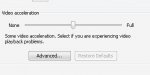
In Media Player go to tools, select options and then click on the performance tab. On the performance page there will be a slider labled video acceleration. Reduce the acceleration to none, click ok and then close down media player. Next open the file you want to take a still from, press ALT and the PrintScrn key to copy an image of media player to the clipboard. Next open M*cro$oft Paint program (Start > All Programs > Accessories > Paint) or another image editing program, once the program has started goto Edit and Select Paste..