K8s nexus jenkins

devops

Well-known member
  • Apr 3, 2023
    612
    464
    63
    colombo
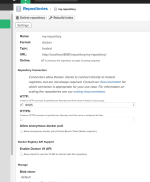
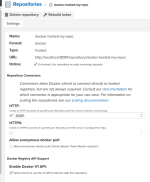
    K3s cluster එකක jenkins and nexus repository එක deploy කරලා තියෙන්නේ. Nexus repository එකේ privet docker registry එකක් තියනවා. Port 8085. මට මේ docker registry එකට jenkins වල ඉදලා log වෙන්න ඕන.

    Any help?

    Full dns name එකෙන් නේද access කරන්නඕන?

    Error response from daemon: Get "http://localhost:8085/v2/": dial tcp [::1]:8085: connect: connection refused
     

    Attachments

    • Screenshot from 2025-02-13 19-52-23.png
      Screenshot from 2025-02-13 19-52-23.png
      97.1 KB · Views: 89
    • Like
    Reactions: MemoryHacker

    devops

    Well-known member
  • Apr 3, 2023
    612
    464
    63
    colombo
    K8S service ekak hadala eken expose karanna.
    :love:

    මම මේ උඩ අහලා තියන issue එක @jithendra කියලා තියන විදියට K8S service ekak hadala eken expose kara ල + Insecure registry configure කරලා fix කරගත්තා.

    මට දැන් bitnami/kubectl agent ගෙ ඉඳලත් අර nexus ඇතුලෙ ඉන්න private docker hosted repository එක access කරගන්න ඕන.

    Issue :
    ------ Post added on Feb 16, 2025 at 4:13 PM

    Failed to pull image "nexus-service-for-docker-hosted-registry.nexus-ns.svc.cluster.local:8085/docker-hosted-my-repo/my-new-ai-assistant:latest": failed to pull and unpack image "nexus-service-for-docker-hosted-registry.nexus-ns.svc.cluster.local:8085/docker-hosted-my-repo/my-new-ai-assistant:latest": failed to resolve reference "nexus-service-for-docker-hosted-registry.nexus-ns.svc.cluster.local:8085/docker-hosted-my-repo/my-new-ai-assistant:latest": failed to do request: Head "https://nexus-service-for-docker-ho...-my-repo/my-new-ai-assistant/manifests/latest": dial tcp: lookup nexus-service-for-docker-hosted-registry.nexus-ns.svc.cluster.local: Try again

    Code:
    kubectl create secret docker-registry nexus-docker-secret \
      --docker-server=http://nexus-service-for-docker-hosted-registry.nexus-ns.svc.cluster.local:8085 \
      --docker-username=admin \
      --docker-password=Devops@1252429 \
      --namespace ai-ns

    YAML:
    apiVersion: apps/v1
    kind: Deployment
    metadata:
      name: ai-assistant-deployment
      namespace: ai-ns
    spec:
      replicas: 1
      selector:
        matchLabels:
          app: ai-assistant
      template:
        metadata:
          labels:
            app: ai-assistant
        spec:
          imagePullSecrets:
            - name: nexus-docker-secret  # Reference the created secret
          containers:
          - name: ai-assistant
            image: nexus-service-for-docker-hosted-registry.nexus-ns.svc.cluster.local:8085/docker-hosted-my-repo/my-new-ai-assistant:latest
            ports:
            - containerPort: 8501
    ---
    apiVersion: v1
    kind: Service
    metadata:
      name: ai-assistant-service
      namespace: ai-ns
    spec:
      selector:
        app: ai-assistant
      ports:
        - protocol: TCP
          port: 80  # Service port
          targetPort: 8501  # Container port
      type: ClusterIP
    ------ Post added on Feb 16, 2025 at 4:17 PM
     

    devops

    Well-known member
  • Apr 3, 2023
    612
    464
    63
    colombo
    oya haduwe http registry ekak da? image eka pull karanna try karanne https walin. Ekai pena hetiyata aula
    ow http ekak

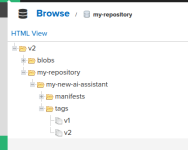
    Currnt issue : Failed to pull image "nexus-service-for-docker-hosted-registry.nexus-ns.svc.cluster.local:8085/my-repository/my-new-ai-assistant:v2": failed to pull and unpack image "nexus-service-for-docker-hosted-registry.nexus-ns.svc.cluster.local:8085/my-repository/my-new-ai-assistant:v2": failed to resolve reference "nexus-service-for-docker-hosted-registry.nexus-ns.svc.cluster.local:8085/my-repository/my-new-ai-assistant:v2": failed to do request: Head "http://nexus-service-for-docker-hos...y-repository/my-new-ai-assistant/manifests/v2": dial tcp: lookup nexus-service-for-docker-hosted-registry.nexus-ns.svc.cluster.local: Try again

    YAML:
    apiVersion: apps/v1
    kind: Deployment
    metadata:
      name: my-ai-app
    spec:
      replicas: 1
      selector:
        matchLabels:
          app: my-ai-app
      template:
        metadata:
          labels:
            app: my-ai-app
        spec:
          imagePullSecrets:
            - name: nexus-secret
          containers:
            - name: my-ai-app
              image: nexus-service-for-docker-hosted-registry.nexus-ns.svc.cluster.local:8085/my-repository/my-new-ai-assistant:v2
              ports:
                - containerPort: 8080
    ---
    apiVersion: v1
    kind: Service
    metadata:
      name: my-ai-app
    spec:
      selector:
        app: my-ai-app
      ports:
        - protocol: TCP
          port: 80
          targetPort: 8080
      type: ClusterIP


    /etc/rancher/k3s/registries.yaml

    Code:
    mirrors:
      nexus-service-for-docker-hosted-registry.nexus-ns.svc.cluster.local:8085:
        endpoint:
          - "http://nexus-service-for-docker-hosted-registry.nexus-ns.svc.cluster.local:8085"


    dockerconfigjson

    Code:
    {
            "auths": {
                    "nexus-service-for-docker-hosted-registry.nexus-ns.svc.cluster.local:8085": {
                            "auth": "YWRtaW46RGV2b3BzQDEyNTI0xxxx"
                    }
            }
    }

    Code:
    / # docker login nexus-service-for-docker-hosted-registry.nexus-ns.svc.cluster.local:8085 -u admin -p Devops@1252429
    WARNING! Using --password via the CLI is insecure. Use --password-stdin.
    WARNING! Your password will be stored unencrypted in /root/.docker/config.json.
    Configure a credential helper to remove this warning. See
    https://docs.docker.com/engine/reference/commandline/login/#credential-stores
    
    Login Succeeded
    / # docker push nexus-service-for-docker-hosted-registry.nexus-ns.svc.cluster.local:8085/my-repository/my-new-ai-assistant:v2
    The push refers to repository [nexus-service-for-docker-hosted-registry.nexus-ns.svc.cluster.local:8085/my-repository/my-new-ai-assistant]
    3f26cfdaf332: Layer already exists
    aa9f1841ff4a: Layer already exists
    e4cd1968f64f: Layer already exists
    7e5a568cf7de: Layer already exists
    801032f67a6a: Layer already exists
    06ee09f93f63: Layer already exists
    d0cd4b68ea68: Layer already exists
    287621c00364: Layer already exists
    369a4df49155: Layer already exists
    7914c8f600f5: Layer already exists
    v2: digest: sha256:843b9baeb9dde534e5dd5a2c39dc8682e274e5e8d569fc42a2041fb2f947f2c6 size: 2409
     

    Attachments

    • Screenshot from 2025-02-18 01-47-39.png
      Screenshot from 2025-02-18 01-47-39.png
      101.4 KB · Views: 51
    • Screenshot from 2025-02-18 01-53-51.png
      Screenshot from 2025-02-18 01-53-51.png
      21.2 KB · Views: 56
    Last edited:

    Djice

    Well-known member
  • Jan 17, 2011
    4,409
    3,778
    113
    out of fucked up land
    the container runtime does not have access to the image registry inside k8s. you will have to expose the registry with an ingress or a nodeport service and then use it. container runtime lives outside k8s and it cannot query codedns inside k8s. expose the container registry with a nodeport service and use localhost as the hostname
     
    Last edited:
    • Love
    Reactions: devops

    devops

    Well-known member
  • Apr 3, 2023
    612
    464
    63
    colombo
    the container runtime does not have access to the image registry inside k8s. you will have to expose the registry with an ingress or a nodeport service and then use it. container runtime lives outside k8s and it cannot query codedns inside k8s. expose the container registry with a nodeport service and use localhost as the hostname
    Brother, I copied and pasted this message into ChatGPT to get some ideas. Then I solved the problem. Thank you very much! ❤️❤️
    But I realize that I need to learn more about Kubernetes.
    If you have any advice for me, I really appreciate it!
     

    Djice

    Well-known member
  • Jan 17, 2011
    4,409
    3,778
    113
    out of fucked up land
    Brother, I copied and pasted this message into ChatGPT to get some ideas. Then I solved the problem. Thank you very much! ❤️❤️
    But I realize that I need to learn more about Kubernetes.
    If you have any advice for me, I really appreciate it!
    you're welcome!
    I would suggest not using chatgpt to figure out what to do, rather use it only to ask how to do something that you figured out by looking into things. you will have to think about things like networking and how the operating system works this way, and learn things and gain experience. this will help you to advance in your career. also, reading helps.

    you can try kubernetes the hard way if you want to dive more into k8s - https://github.com/kelseyhightower/kubernetes-the-hard-way
     
    • Love
    Reactions: devops