


Download
Publisher's Description
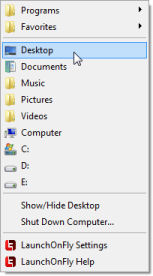
LaunchOnFly is a Start Menu alternative. It lets you launch applications, open files, folders, web links, send e-mail, and do even more much faster and easier!
Benefits you get by using LaunchOnFly:
* You can open a program, file, folder, or anything else with only one click of a mouse button
* LaunchOnFly is a perfect choice for you, if you frequently need to open different programs
* For those who frequently reinstall Windows it´s easy to preserve the menu
LaunchOnFly features:
* LaunchOnFly menu doesn´t use any screen space until you need it
* It´s simple to use
* It works flawlessly even when your computer is heavily loaded
* It´s easy to populate your menu with new items using ´Send To´ command
With LaunchOnFly menu you can:
* Launch program file
* Open file
* Open folder
* Open special folder (Control Panel, Desktop, My Computer, Network Neighborhood, My Documents, Printers, Recycle Bin)
* Open website (URL)
* Send E-mail
* Perform special action (About LaunchOnFly, Add/Remove Programs, Cascade Windows, Close LaunchOnFly, Configure LaunchOnFly, Date/Time Properties, Display Properties, Empty Recycle Bin, Find Computer, Find Files, Game Controllers Properties, Hibernate, Hangup Dial-Up Connection, Internet Properties, LaunchOnFly Help, Log Off User, Minimize All Windows, Modems Properties, Mouse Properties, Multimedia Properties, Power Management Properties, Recycle Bin Properties, Regional Settings Properties, Restart Computer, Run, Show ´Shut Down Windows´ Dialog, Show/Hide Desktop, Show/Hide Desktop Icons, Show/Hide Taskbar, Shut Down Computer, System Properties, Taskbar Properties, Telephony Properties, Tile Windows Horizontally, Tile Windows Vertically, Undo ´Minimize All Windows´)


