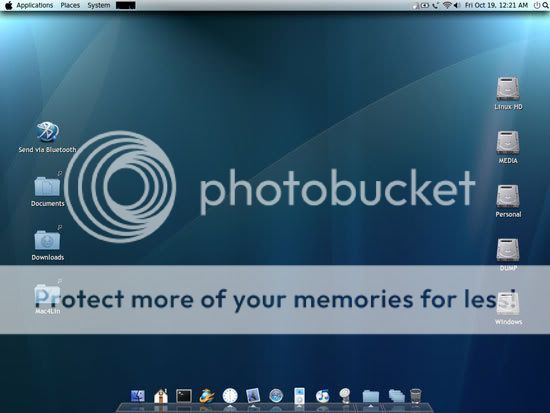
DISK IS PREPATCHED this is ISO Format so burn image to a disk and your ready to install simply.
.
1. Optional but Highly recommend: install Tiger first. This can be done by inserting Tiger DVD on your computer and make sure you boot from it. Usually that’s done if you press F8 or F12 or whatever key combination to give you the option to choose what disk/cd drive you want to boot from. Or you can always change boot device in BIOS setup. Select your CD/DVD drive. And
Select your language and when the welcome screen shows up
1. Select Utilities -> Disk Utility
2. Select your partition that you want to be OSX and go to the Erase tab
3. For Volume Format, select Mac OS Extended (Journaled), set volume name as “Leopard“(no quotes, case sensitive)
4. Click Erase. Now the partition should not be grey, it should be black to indicate that it is active.
5. Close out of the Disk Utility and move onwards with installation.
Use “Customize” option and unselect all packages there. Just install base system. By installing Tiger first, the partition would be properly formatted and activated, which eliminate any potential problem. Now reboot and remove the Tiger DVD.
2. Install Leopard.
Insert Leopard DVD, and make sure to select booting from DVD. The installer will load(it will take a while, be patient). If you have Tiger installed, don’t format the partition, just install it over the Tiger partition. Otherwise, same approach as Tiger installation, use Disk Utility to setup the partition.
Important: Use Customize… button and unselect all packages there. Then proceed to installation. When it’s done, reboot. And make sure that your USB/Pen Drive is connected to your PC.
Patch Leopard Installation
After the reboot, also make sure you do the same step above: Press whatever key combination to give you the option to choose your boot device: Now Select your CD/DVD drive.
Once the setup is loaded(again, long wait, be patient), select your language. When the welcome screens shows up, select UTILITIES-TERMINAL. The terminal will now open. We will now browse to our Thumb Drive;
In the command line, type:
cd /Volumes/123/files
Lets now run the script. This will patch the installation so it will boot properly:
./9a581PostPatch.sh
Let it run. You can answer yes when removing the ACPUPowerManagement.kext
Reboot.
The Bootfix patch
After reboot, if the system boots into
Leopard fine, ignore this part and head to next section to setup multi boot. Otherwise, you might encounter blinking cursor or “HFS+ Error”, follow the steps below then
If you install
Leopard without Tiger first, the system might still boot into Windows instead or leave a system unbootable at all. Even the tboot loader trick(see below) wouldn’t work. In this case, you need to repair the installation and setup boot property for it.
1. Reboot using the Leopard DVD, make sure the USB pen drive is connected.
2. Open a terminal after everything finally loads.
3. Find out what disk your leopard was installed on by issuing this command (my machine was rdisk0s2, will use rdiskXsY below, substitute accordingly)
diskutil list
4. Active the partition
fdisk -e /dev/rdiskX
fdisk: 0>update
fdisk:*0> f Y
“Partition 2 marked active”
fdisk:*0> w
Device could not be accessed exclusively.
A reboot will be needed for changes to take effect. OK? [n]y
Writing MBR at offset 0.
fdisk: 0> q
5.
Now goto bootfix directory by typing:
cd /Volumes/123/files/bootfix
and do the following
./dd if=/usr/standalone/i386/boot1h of=/dev/rdiskXsY bs=512 count=1
umount /Volumes/Leopard
./startupfiletool -v /dev/rdiskXsY /usr/standalone/i386/boot
./bless -device /dev/diskXsY -setBoot -verbose
reboot
Post Installation: setup multi-boot
2. Now you’re already in the exciting Leopard! After initial setup, load up Terminal(Applications/Utilities) within OSX and type
sudo nano /Library/Preferences/SystemConfiguration/com.apple.Boot.plist
edit the Darwin time-out flag accordingly:
<key>Timeout</key>
<string>10</string>
reboot and now you can choose Mac OSX/XP/Vista using Leopard’s boot loader.
3. Optional: you can also setup Windows as default OS and use windows’ OS selector to launch OSX.
So reboot and select Windows partition, load Windows. Open a command prompt(if you’re using Vista, make sure it’s running as administrator). Use diskpart to mark the Windows partition active.
1. Type diskpart
2. If you have more than one disk, at the DISKPART prompt, type:
list disk
3. At the DISKPART prompt, type:
select disk x
Select the disk, x, where the partition you want to mark as active in
4. At the DISKPART prompt, type:
list partition
5. At the DISKPART prompt, type:
select partition y
Select the partition, y, you want to mark as active.
6. At the DISKPART prompt, type:
active
to active the selected partition and system will boot from it next time.
7. At the DISKPART prompt, type:
exit
to quit the diskpart program
This will mark Windows partition as active, and the system will boot off it next time. If the PC has Windows XP installed, get this tboot(512 bytes only, a revised version of chain0 loader, support multi HDD as well as loading OSX on extended partition) file and put it to the same directory as ntldr(usually C:\), adding the following line to boot.ini
c:\tboot="
Mac OSX
Leopard"
If the PC is Vista only, put ntldr(get one from your XP installation CD), tboot and a boot.ini file to your Vista boot partition, for example
[boot loader]
timeout=0
default=c:\tboot
[operating systems]
c:\tboot="Mac OSX Leopard
Vista will automatically detect and add the
Leopard entry on next boot.
Also, for Vista users, you may use bcdedit to add tboot, but the ntldr way is much much more easier. Anway, if you prefer the native Vista bootloader, here is how:
1.put tboot on Vista boot partition, usually C:\
2. Open a command prompt and make sure it’s running as administrator and type:
bcdedit /create /d "Mac OSX Leopard" /application bootsector
This will retrun a {ID}
3. Use the command line below to add the tboot, replace the {ID} accordingly:
bcdedit /set {ID} device boot
bcdedit /set {ID} path \tboot
bcdedit /displayorder {ID} /addlast
Code:
Links are interchangeable between RS & MU

Rapidshare
Folder     http://rapidshare.com/users/ITFJ5X

http://rapidshare.com/files/117890968/AMD_Pard_death1246.part01.rar
http://rapidshare.com/files/117890927/AMD_Pard_death1246.part02.rar
http://rapidshare.com/files/117890941/AMD_Pard_death1246.part03.rar
http://rapidshare.com/files/117890954/AMD_Pard_death1246.part04.rar
http://rapidshare.com/files/117890923/AMD_Pard_death1246.part05.rar
http://rapidshare.com/files/117891379/AMD_Pard_death1246.part06.rar
http://rapidshare.com/files/117891377/AMD_Pard_death1246.part07.rar
http://rapidshare.com/files/117891387/AMD_Pard_death1246.part08.rar
http://rapidshare.com/files/117891384/AMD_Pard_death1246.part09.rar
http://rapidshare.com/files/117891382/AMD_Pard_death1246.part10.rar
http://rapidshare.com/files/117891888/AMD_Pard_death1246.part11.rar
http://rapidshare.com/files/117891916/AMD_Pard_death1246.part12.rar
http://rapidshare.com/files/117891891/AMD_Pard_death1246.part13.rar
http://rapidshare.com/files/117891886/AMD_Pard_death1246.part14.rar
http://rapidshare.com/files/117891921/AMD_Pard_death1246.part15.rar
http://rapidshare.com/files/117892707/AMD_Pard_death1246.part16.rar
http://rapidshare.com/files/117892656/AMD_Pard_death1246.part17.rar
http://rapidshare.com/files/117892675/AMD_Pard_death1246.part18.rar
http://rapidshare.com/files/117892701/AMD_Pard_death1246.part19.rar
http://rapidshare.com/files/117892660/AMD_Pard_death1246.part20.rar
http://rapidshare.com/files/117892972/AMD_Pard_death1246.part21.rar
http://rapidshare.com/files/117892956/AMD_Pard_death1246.part22.rar
http://rapidshare.com/files/117892992/AMD_Pard_death1246.part23.rar
http://rapidshare.com/files/117892980/AMD_Pard_death1246.part24.rar
http://rapidshare.com/files/117892994/AMD_Pard_death1246.part25.rar
http://rapidshare.com/files/117892977/AMD_Pard_death1246.part26.rar
http://rapidshare.com/files/117892968/AMD_Pard_death1246.part27.rar
http://rapidshare.com/files/117892960/AMD_Pard_death1246.part28.rar
http://rapidshare.com/files/117892973/AMD_Pard_death1246.part29.rar
http://rapidshare.com/files/117892986/AMD_Pard_death1246.part30.rar
http://rapidshare.com/files/117892969/AMD_Pard_death1246.part31.rar
http://rapidshare.com/files/117893668/AMD_Pard_death1246.part32.rar
http://rapidshare.com/files/117893690/AMD_Pard_death1246.part33.rar
http://rapidshare.com/files/117893673/AMD_Pard_death1246.part34.rar
http://rapidshare.com/files/117893264/AMD_Pard_death1246.part35.rar

Megaupload
Folder  http://www.megaupload.com/?f=TMOC5U4C

http://www.megaupload.com/?d=YZH681CH
http://www.megaupload.com/?d=9H494776
http://www.megaupload.com/?d=AZN1JYJ9
http://www.megaupload.com/?d=6TWSU4HE
http://www.megaupload.com/?d=71XIOA2V
http://www.megaupload.com/?d=F6GI688Z
http://www.megaupload.com/?d=7DZBOHOF
http://www.megaupload.com/?d=PNGXSG65
http://www.megaupload.com/?d=POMTZCO1
http://www.megaupload.com/?d=2Q3K4O01
http://www.megaupload.com/?d=CRYOW41D
http://www.megaupload.com/?d=TZDYWNO4
http://www.megaupload.com/?d=7S0RJTM0
http://www.megaupload.com/?d=YN5664G1
http://www.megaupload.com/?d=51C8HBPB
http://www.megaupload.com/?d=PKRQGVSM
http://www.megaupload.com/?d=D4VKRTMR
http://www.megaupload.com/?d=T4036HM0
http://www.megaupload.com/?d=KOL5J2KA
http://www.megaupload.com/?d=P0405465
http://www.megaupload.com/?d=8ZPL5BLN
http://www.megaupload.com/?d=WFWA8WZ0
http://www.megaupload.com/?d=URVBNDX1
http://www.megaupload.com/?d=L5SVTB6X
http://www.megaupload.com/?d=H05MJY49
http://www.megaupload.com/?d=UPRTO4SO
http://www.megaupload.com/?d=UJ9DR970
http://www.megaupload.com/?d=2P86ZESW
http://www.megaupload.com/?d=KQLNKOFK
http://www.megaupload.com/?d=SOLSFTZR
http://www.megaupload.com/?d=4ZVEMQF3
http://www.megaupload.com/?d=67H35QUX
http://www.megaupload.com/?d=680AHFZG
http://www.megaupload.com/?d=KKHFFLCV
http://www.megaupload.com/?d=I624E9Y1