Windows 7 Ultimate Genuine *ACTIVATED* (December.2011) *SINGLE MULTI Links*
Nothing has been removed from the original ISO files. It's completely untouched and genuine. No serial and no activation needed. With Service Pack 1.
32/64-bit | English and MULTILANGUAGE SUPPORT | DVD ISO | Bootable | Untouched |Simple use!
No Serial & No Activation Needed | Size: 4.22GB | FULLY UPDATABLE with Windows Update. | Instructions and Installation notes included


How to change language?
*Look at this official site from Microsoft, it's a tutorial.*
Code:
*Or this one ( it provides pictures )*
Code:
You can download the Windows 7 MUI language packs here :
Code:
Easy tool to change languages
Code:
Credits go to W4r3zh4ck for suggestion

Windows 7 Ultimate Genuine *ACTIVATED* (December.2011) *SINGLE MULTI Links*
Nothing has been removed from the original ISO files. It's completely untouched and genuine. No serial and no activation needed. With Service Pack 1.
32/64-bit | English and MULTILANGUAGE SUPPORT | DVD ISO | Bootable | Untouched |Simple use!
No Serial & No Activation Needed | Size: 4.22GB | FULLY UPDATABLE with Windows Update. | Instructions and Installation notes included
Quote:
Service Pack 1
Microsoft released the first official service pack for Windows 7 on February 22, 2011. This is an important update that includes previously released security, performance, and stability updates for Windows 7. SP1 also includes new improvements to features and services in Windows 7, such as improved reliability when connecting to HDMI audio devices, printing using the XPS Viewer, and restoring previous folders in Windows Explorer after restarting.
Windows 7 Service Pack 1 is an update that does the following :
- Helps keep PCs supported.
- Provides ongoing improvement to the operating system, by including previous updates delivered over Windows Update as well as continuing incremental updates to the Windows 7 platform based on customer and partner feedback.
- Makes it easy for organizations to deploy a single set of updates.
Changes specific to Windows 7
Additional support for communication with third-party federation services
Additional support has been added to allow Windows 7 clients to effectively communicate with third-party identity federation services (those supporting the WS-Federation passive profile protocol). This change enhances platform interoperability, and improves the ability to communicate identity and authentication information between organizations.
Improved HDMI audio device performance
A small percentage of users have reported issues in which the connection between computers running Windows 7 and HDMI audio devices can be lost after system reboots. Updates have been incorporated into SP1 to ensure that connections between Windows 7 computers and HDMI audio devices are consistently maintained.
Corrected behavior when printing mixed-orientation XPS documents
Prior to the release of SP1, some customers have reported difficulty when printing mixed-orientation XPS documents (documents containing pages in both portrait and landscape orientation) using the XPS Viewer, resulting in all pages being printed entirely in either portrait or landscape mode. This issue has been addressed in SP1, allowing users to correctly print mixed-orientation documents using the XPS Viewer.
Quote:
Installation is in English but you can change language afterwards to any of this list via Windows Multilingual User Interface (MUI)
* Arabic
* Brazilian Portuguese
* Bulgarian
* Chinese Simplified
* Chinese Traditional - Hong Kong
* Croatian
* Czech
* Danish
* Dutch
* English
* Estonian
* Finnish
* French
* German
* Greek
* Hebrew
* Hindi
* Hungarian
* Italian
* Japanese
* Korean
* Lithuanian
* Norwegian
* Polish
* Portuguese
* Romanian
* Russian
* Serbian Latin
* Slovak
* Slovenian
* Spanish
* Swedish
* Thai
* Turkish
* Ukrainian
How to change language?
*Look at this official site from Microsoft, it's a tutorial.*
Code:
http://support.microsoft.com/kb/972813
*Or this one ( it provides pictures )*
Code:
http://windows7center.com/tutorials...tall-windows-7-beta-language-packs-mui-packs/
You can download the Windows 7 MUI language packs here :
Code:
http://keznews.com/6149_Download_Wi...icial_32-bit_and_64-bit_Direct_Download_Links
Easy tool to change languages
Code:
http://www.froggie.sk/index.html
Credits go to W4r3zh4ck for suggestion
INSTRUCTIONS :
Quote:
--> Remember when Windows is finalizing its installation, a black screen will appear (cmd), it will stay like this for about 2 to 10 mins Depending on the system you are using Then It Will say ***-***-***-***-**** Key installed successfully. Then it will restart automatically. After this, you can go to My computer's Properties, Windows is NOW activated!
--> FOR DELL and HP machines
80% : the activators will work meanwhile the other 20% depends on how old your laptop/computer, If you did an upgrade you will have to use an external activator because this version was made for a clean installation.
--> If you do not want to be forced to use an activator. I would do a custom install but you don't really have to format your driver due to the fact that Windows 7 will just overwrite your current windows and put the old windows in a folder called "Windows.old" where your previous windows installion files are kept. And it is optional if you choose to delete the old folder because the drivers are there after installation. Make sure you are connected to the internet before and after the installation.
Go for the fresh Installation if you dont really have important programs you can easily re-install at a later time. ( I RECOMMEND THIS )
screen shot

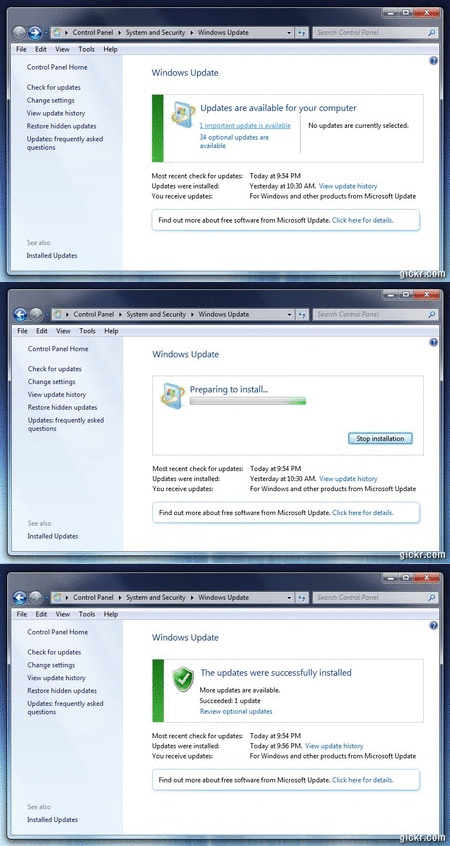
info
I prefer to download it. Because-
1. Nothing has been removed from the original ISO files.
2. It's completely untouched and genuine.
3. No serial and no activation needed.
4. No chance of corrupted download.
5. 100% virus free.Back up ready.
6. Download at unlimited speed.
7. User's most favourite choice and rare collection.
8. Downloaded & TESTED by many users.
link download
Nothing has been removed from the original ISO files. It's completely untouched and genuine. No serial and no activation needed. With Service Pack 1.
32/64-bit | English and MULTILANGUAGE SUPPORT | DVD ISO | Bootable | Untouched |Simple use!
No Serial & No Activation Needed | Size: 4.22GB | FULLY UPDATABLE with Windows Update. | Instructions and Installation notes included


Service Pack 1
Microsoft released the first official service pack for Windows 7 on February 22, 2011. This is an important update that includes previously released security, performance, and stability updates for Windows 7. SP1 also includes new improvements to features and services in Windows 7, such as improved reliability when connecting to HDMI audio devices, printing using the XPS Viewer, and restoring previous folders in Windows Explorer after restarting.
Windows 7 Service Pack 1 is an update that does the following :
- Helps keep PCs supported.
- Provides ongoing improvement to the operating system, by including previous updates delivered over Windows Update as well as continuing incremental updates to the Windows 7 platform based on customer and partner feedback.
- Makes it easy for organizations to deploy a single set of updates.
Changes specific to Windows 7
Additional support for communication with third-party federation services
Additional support has been added to allow Windows 7 clients to effectively communicate with third-party identity federation services (those supporting the WS-Federation passive profile protocol). This change enhances platform interoperability, and improves the ability to communicate identity and authentication information between organizations.
Improved HDMI audio device performance
A small percentage of users have reported issues in which the connection between computers running Windows 7 and HDMI audio devices can be lost after system reboots. Updates have been incorporated into SP1 to ensure that connections between Windows 7 computers and HDMI audio devices are consistently maintained.
Corrected behavior when printing mixed-orientation XPS documents
Prior to the release of SP1, some customers have reported difficulty when printing mixed-orientation XPS documents (documents containing pages in both portrait and landscape orientation) using the XPS Viewer, resulting in all pages being printed entirely in either portrait or landscape mode. This issue has been addressed in SP1, allowing users to correctly print mixed-orientation documents using the XPS Viewer.
Installation is in English but you can change language afterwards to any of this list via Windows Multilingual User Interface (MUI)
* Arabic
* Brazilian Portuguese
* Bulgarian
* Chinese Simplified
* Chinese Traditional - Hong Kong
* Croatian
* Czech
* Danish
* Dutch
* English
* Estonian
* Finnish
* French
* German
* Greek
* Hebrew
* Hindi
* Hungarian
* Italian
* Japanese
* Korean
* Lithuanian
* Norwegian
* Polish
* Portuguese
* Romanian
* Russian
* Serbian Latin
* Slovak
* Slovenian
* Spanish
* Swedish
* Thai
* Turkish
* Ukrainian

How to change language?
*Look at this official site from Microsoft, it's a tutorial.*
Code:
Code:
http://support.microsoft.com/kb/972813*Or this one ( it provides pictures )*
Code:
Code:
http://windows7center.com/tutorials/how-to-download-and-install-windows-7-beta-language-packs-mui-packs/Code:
Code:
http://keznews.com/6149_Download_Windows_7_MUI_Language_Packs_-_Official_32-bit_and_64-bit_Direct_Download_LinksEasy tool to change languages
Code:
Code:
http://www.froggie.sk/index.html
Windows 7 Ultimate Genuine *ACTIVATED* (December.2011) *SINGLE MULTI Links*
Nothing has been removed from the original ISO files. It's completely untouched and genuine. No serial and no activation needed. With Service Pack 1.
32/64-bit | English and MULTILANGUAGE SUPPORT | DVD ISO | Bootable | Untouched |Simple use!
No Serial & No Activation Needed | Size: 4.22GB | FULLY UPDATABLE with Windows Update. | Instructions and Installation notes included
Quote:
Service Pack 1
Microsoft released the first official service pack for Windows 7 on February 22, 2011. This is an important update that includes previously released security, performance, and stability updates for Windows 7. SP1 also includes new improvements to features and services in Windows 7, such as improved reliability when connecting to HDMI audio devices, printing using the XPS Viewer, and restoring previous folders in Windows Explorer after restarting.
Windows 7 Service Pack 1 is an update that does the following :
- Helps keep PCs supported.
- Provides ongoing improvement to the operating system, by including previous updates delivered over Windows Update as well as continuing incremental updates to the Windows 7 platform based on customer and partner feedback.
- Makes it easy for organizations to deploy a single set of updates.
Changes specific to Windows 7
Additional support for communication with third-party federation services
Additional support has been added to allow Windows 7 clients to effectively communicate with third-party identity federation services (those supporting the WS-Federation passive profile protocol). This change enhances platform interoperability, and improves the ability to communicate identity and authentication information between organizations.
Improved HDMI audio device performance
A small percentage of users have reported issues in which the connection between computers running Windows 7 and HDMI audio devices can be lost after system reboots. Updates have been incorporated into SP1 to ensure that connections between Windows 7 computers and HDMI audio devices are consistently maintained.
Corrected behavior when printing mixed-orientation XPS documents
Prior to the release of SP1, some customers have reported difficulty when printing mixed-orientation XPS documents (documents containing pages in both portrait and landscape orientation) using the XPS Viewer, resulting in all pages being printed entirely in either portrait or landscape mode. This issue has been addressed in SP1, allowing users to correctly print mixed-orientation documents using the XPS Viewer.
Quote:
Installation is in English but you can change language afterwards to any of this list via Windows Multilingual User Interface (MUI)
* Arabic
* Brazilian Portuguese
* Bulgarian
* Chinese Simplified
* Chinese Traditional - Hong Kong
* Croatian
* Czech
* Danish
* Dutch
* English
* Estonian
* Finnish
* French
* German
* Greek
* Hebrew
* Hindi
* Hungarian
* Italian
* Japanese
* Korean
* Lithuanian
* Norwegian
* Polish
* Portuguese
* Romanian
* Russian
* Serbian Latin
* Slovak
* Slovenian
* Spanish
* Swedish
* Thai
* Turkish
* Ukrainian
How to change language?
*Look at this official site from Microsoft, it's a tutorial.*
Code:
http://support.microsoft.com/kb/972813
*Or this one ( it provides pictures )*
Code:
http://windows7center.com/tutorials...tall-windows-7-beta-language-packs-mui-packs/
You can download the Windows 7 MUI language packs here :
Code:
http://keznews.com/6149_Download_Wi...icial_32-bit_and_64-bit_Direct_Download_Links
Easy tool to change languages
Code:
http://www.froggie.sk/index.html
Credits go to W4r3zh4ck for suggestion
INSTRUCTIONS :
INSTALLATION NOTES :Install:
- Download and extract using WinRAR.
- Use Nero or other burning app to burn the ISO image
- Burning speed should not be faster than 4x. Otherwise, it might not work.
- Restart your computer.
- Make sure you have selected your DVD-ROM/RW drive as a first boot device.
* Enter the BIOS pressing the DEL button, set the option, insert your Windows 7 installation and restart computer.
- The black screen will appear (image 01).
- Press any key to boot from CD or DVD.... (by pressing the key you are entering the setup)
- Select your language, time and currency and keyboard input (optionaly)
- Click install now
- Choose your edition (x86 is 32-bit, x64 is 64-bit) depending of CPU type you have.
*Choose x64 if you have 64-bit processor.
- Click "I accept".
- Click "Custom" (advanced).
- Choose your partition/hdd drive where Win7 should be installed and click format.
*You might get some error if you have two or more hard disks with different connectors (ATA and SATA).
If you get an error, turn off one of your hard disks and repeat the whole proces.
- After formatting, setup will continue automaticly and it will finish after 15-30 min.
- Next step would be username
- Type your password (if you want).
- When you get the screen for CD-KEY just ignore it leaving blank.
*Uncheck the box for automaticly activation and click next.
- Choose the third option for next step.
- Select your time zone.
- Select your current location (Home is recommended).
- The black CMD windows will appear. Wait a few seconds until computers restares once again.
- And that would be all about installation. You are in Windows now.
Activation:
It is not required, because it is OEM. Windows will be premanently activated.
However, it is well known that there is some problems with DELL and HP machines.
So if you have issues with pre-activation you will be forced to some activator to activate Windows 7.
Quote:
--> Remember when Windows is finalizing its installation, a black screen will appear (cmd), it will stay like this for about 2 to 10 mins Depending on the system you are using Then It Will say ***-***-***-***-**** Key installed successfully. Then it will restart automatically. After this, you can go to My computer's Properties, Windows is NOW activated!
--> FOR DELL and HP machines
80% : the activators will work meanwhile the other 20% depends on how old your laptop/computer, If you did an upgrade you will have to use an external activator because this version was made for a clean installation.
--> If you do not want to be forced to use an activator. I would do a custom install but you don't really have to format your driver due to the fact that Windows 7 will just overwrite your current windows and put the old windows in a folder called "Windows.old" where your previous windows installion files are kept. And it is optional if you choose to delete the old folder because the drivers are there after installation. Make sure you are connected to the internet before and after the installation.
Go for the fresh Installation if you dont really have important programs you can easily re-install at a later time. ( I RECOMMEND THIS )
screen shot

info
Exclusive Single ISO LiNK (no chance of corruption !!!!!!):Build : 7601.17514.101119-1850
File : Windows.7.Ulitimate.SP1.Activated.x86.x64.ISO
Size : 3.80 GB (4,091,412,480 bytes)
CRC32 : 989FFA20
MD5 : 595ECE7BF041515C2F5505B216859E91
SHA-1 : 74DD77533ECE1BBE7166D472909BCD637E06D61E
I prefer to download it. Because-
1. Nothing has been removed from the original ISO files.
2. It's completely untouched and genuine.
3. No serial and no activation needed.
4. No chance of corrupted download.
5. 100% virus free.Back up ready.
6. Download at unlimited speed.
7. User's most favourite choice and rare collection.
8. Downloaded & TESTED by many users.
link download
Code:
http://www.filesonic.com/file/RvbvYQD/W7SP1eng.x86-x64.activated_December_2011.iso