Need VGA Drivers For Ubuntu! Ple Help!

nismok

Well-known member
  • Jun 27, 2008
    9,391
    673
    113
    1. Goto System > Administration > Hardware Drivers
    2.
    You'll then see that Nvidia drivers are not in use. Check (or tick) the box underneath Enabled to enable the drivers
    3. You'll then be asked if you want to enable the driver. Click Enable Driver.
    4. Wait for the installer file to download and finishing its installation
    5. You'll then see that the drivers are enabled and will be available for use upon a reboot.

    (Ubuntu 7.04 Later)
     

    JananRush

    Well-known member
  • May 17, 2006
    1,796
    213
    63
    Nittambuwa
    www.facebook.com
    nismok said:
    1. Goto System > Administration > Hardware Drivers
    2.
    You'll then see that Nvidia drivers are not in use. Check (or tick) the box underneath Enabled to enable the drivers
    3. You'll then be asked if you want to enable the driver. Click Enable Driver.
    4. Wait for the installer file to download and finishing its installation
    5. You'll then see that the drivers are enabled and will be available for use upon a reboot.

    (Ubuntu 7.04 Later)


    Already Enabled da Driver..But Resolution is Too Low...
    Only Can Change in to 800x600
    ?????? Why is That?

    :( :( :( :( :( :( :(
     

    dacoolest

    Member
    Dec 16, 2007
    1,665
    0
    0
    compiling is a difficult thing. and the recommended way is to get the driver from ubuntu repositories. what is the model of the VGA card? if your vga card is not yet installed, you need to install it by enabling "
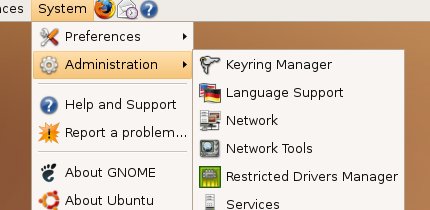
    restricted-0.jpg


    thats where you can find the Restricted Drivers Manager.

    check this :

    http://www.michaellarabel.com/index.php?k=blog&i=114


    And again, if no success, tell us your VGA card model and the ubuntu version you are using
     

    dacoolest

    Member
    Dec 16, 2007
    1,665
    0
    0
    ok if you have got the Restricted Drivers installed, then you will have to enable your needed resolution in ubuntu. and i want to say, this is a RISKY job. I warned u rit?

    theres two method of doing this,

    u need to edit the /etc/x11/xorg.conf it is the file that keeps ur graphics related settings. u need to add ur needed resolution to this file. first give a try by this method:

    http://www.simplehelp.net/2007/04/3...o-ubuntu-while-running-in-parallels-for-os-x/


    select needed settings and complete the wizard, but dont go crazy with high res listed in the wizard, if you put a higher res that will no supported by ur VGA, the ur prob will get multiplied, with no graphics!!!!!
     

    JananRush

    Well-known member
  • May 17, 2006
    1,796
    213
    63
    Nittambuwa
    www.facebook.com
    dacoolest said:
    compiling is a difficult thing. and the recommended way is to get the driver from ubuntu repositories. what is the model of the VGA card? if your vga card is not yet installed, you need to install it by enabling "

    restricted-0.jpg


    thats where you can find the Restricted Drivers Manager.

    check this :

    http://www.michaellarabel.com/index.php?k=blog&i=114


    And again, if no success, tell us your VGA card model and the ubuntu version you are using


    Thanks a Lot Bro! I'll check!