
Latest ads
-
Jobreceive.com for sale
- Blogerwiki
- Updated:
-
 Post Your Vehicle for Sale — FREE! - https://libro.lk
- Kalu_Puth
- Updated:
-
 ඔයාගෙ Assignment හෝ Thesis එක හරියට හදාගමු
- ErMurazor
- Updated:
-
BlackWall V2ray servers
- hu KANNA
- Updated:
-
 Peppa Pig Family Plush Toy Set – 5 Characters
- anil1961
- Updated:
You are using an out of date browser. It may not display this or other websites correctly.
You should upgrade or use an alternative browser.
You should upgrade or use an alternative browser.


Ita Passe Heard Eka select karanna Enawa Ne Ethakota Mokada Karanneeeeeeeeeee
C: eka denna...eka install wei Software ekak widiyata...

inna mamath dalama balannam...wait...

Akkkeee Meka Balanne ... Meke Karana Hatii Okkoma Thiyenava ...
http://www.psychocats.net/ubuntu/installing

http://www.psychocats.net/ubuntu/installing
C: eka denna...eka install wei Software ekak widiyata...
inna mamath dalama balannam...wait...
Hari THankz
Eth Me Mangawa Thiyena ADSL weda Karaida Ubuntu walata

How to install ubuntu on windows XP/vista using Wubi
How to install ubuntu on windows XP/vista using Wubi
*. Free download the latest Wubi installer (ubuntu Installer for Intrepid Ibex 8.10 is available now)
*. Run the installer
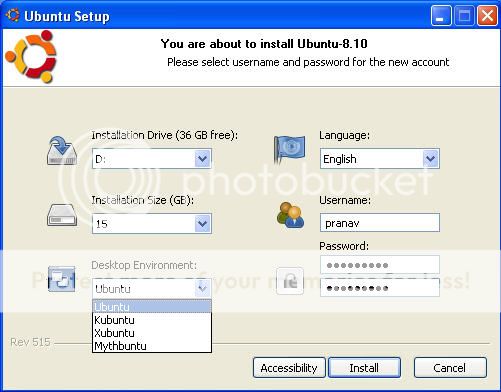
*. Set up the installation drive, where you want to install ubuntu
*. choose your preferred language for ubuntu install
*. Set up the desired installation size.If you have enough disk space, then you can even set it up higher.However a minimum drive space of 8GB need to be made available.
*. You can even choose to install other ubuntu flavours like kubuntu, Xubuntu and Mythbuntu
*. Specify an username and a password for the new account, and click “install”
*. The installation files will be downloaded and prepared
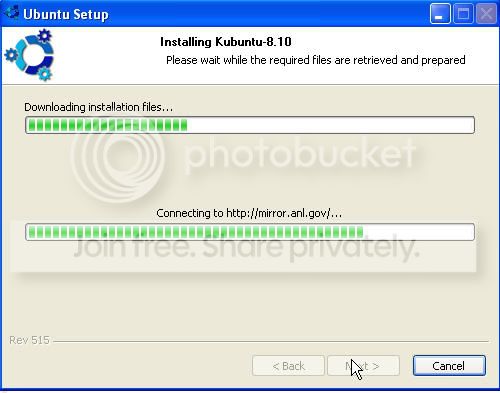
*. Once the download is complete, you will be asked to reboot
*. After reboot, select ubuntu at the boot screen
The ubuntu installation will continue for 10-15 minutes and the machine will reboot again.Now you can choose an operating system to start on your windows boot manager.Here you can choose ubuntu and start using it.
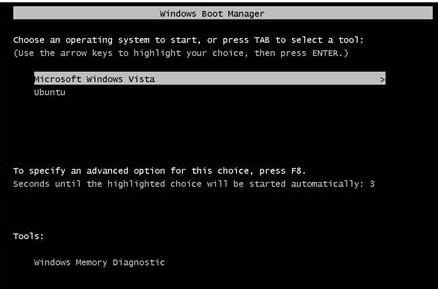
That is all folks.You ubuntu installation is complete and you can both windows (vista/XP) and ubuntu on the same PC, without any hassles or phusical partitions.In case you want to uninstall ubuntu, go to the control panel and select “Add or Remove Programs“, then select Wubi/Ubuntu and uninstall it. You can also use the uninstaller that you find in the installation folder.
When you choose ubuntu as the OS, you can access all the windows files via the Windows partitions available within the directories /host and /media.Note that this is a real installation of ubuntu, within a file (c:\ubuntu\disks\root.disk) as opposed to being installed within its own partition. This file is seen by Linux as a real hard disk.
How to install ubuntu on windows XP/vista using Wubi
*. Free download the latest Wubi installer (ubuntu Installer for Intrepid Ibex 8.10 is available now)
*. Run the installer
*. Set up the installation drive, where you want to install ubuntu
*. choose your preferred language for ubuntu install
*. Set up the desired installation size.If you have enough disk space, then you can even set it up higher.However a minimum drive space of 8GB need to be made available.
*. You can even choose to install other ubuntu flavours like kubuntu, Xubuntu and Mythbuntu
*. Specify an username and a password for the new account, and click “install”
*. The installation files will be downloaded and prepared
*. Once the download is complete, you will be asked to reboot
*. After reboot, select ubuntu at the boot screen
The ubuntu installation will continue for 10-15 minutes and the machine will reboot again.Now you can choose an operating system to start on your windows boot manager.Here you can choose ubuntu and start using it.
That is all folks.You ubuntu installation is complete and you can both windows (vista/XP) and ubuntu on the same PC, without any hassles or phusical partitions.In case you want to uninstall ubuntu, go to the control panel and select “Add or Remove Programs“, then select Wubi/Ubuntu and uninstall it. You can also use the uninstaller that you find in the installation folder.
When you choose ubuntu as the OS, you can access all the windows files via the Windows partitions available within the directories /host and /media.Note that this is a real installation of ubuntu, within a file (c:\ubuntu\disks\root.disk) as opposed to being installed within its own partition. This file is seen by Linux as a real hard disk.

උබුන්ටු මහ මගුලක් බ්ං ... Windows වල තියෙන ඇප්ලිකෙශන් run කරන්නෙ බැහැනෙ .... Wine තිබ්බට වැඩක් නැහැ... හරියටම වැඩ නැහැ..කෙහෙල්මල ඕක හරියට දාන්නෙ නැතුව මගෙ හාඩ් එක ඔක්කොම එක පාටිශන් එකකට ෆෝමැට් උනා
මැක්සා ෆන්
Hari THankz
Eth Me Mangawa Thiyena ADSL weda Karaida Ubuntu walata
Drivers danna oni...

කෙහෙල්මල ඕක හරියට දාන්නෙ නැතුව මගෙ හාඩ් එක ඔක්කොම එක පාටිශන් එකකට ෆෝමැට් උනා
මැක්සා ෆන්
ea umba Boot wenakota CD eken Boot wenna dala Install karanna ethi...
උබුන්ටු මහ මගුලක් බ්ං ... Windows වල තියෙන ඇප්ලිකෙශන් run කරන්නෙ බැහැනෙ .... Wine තිබ්බට වැඩක් නැහැ... හරියටම වැඩ නැහැ..
මම ෆෙඩෝරා වලට මාරු උනා ඒක හොදයි ඊට වඩා
කෙහෙල්මල ඕක හරියට දාන්නෙ නැතුව මගෙ හාඩ් එක ඔක්කොම එක පාටිශන් එකකට ෆෝමැට් උනා
මැක්සා ෆන්
ane baye be eth daganna oneeeeeeeeeee

Hari THankz
Eth Me Mangawa Thiyena ADSL weda Karaida Ubuntu walata
oyaage thiyenne modem ekak da? ehemanum drivers danna venava. habai eeta kalin balanna e modem eke model no ekata Linux drivers thiyanava da kiyala or vena install karanna vidiyak thiyanava da kiyala.
ea umba Boot wenakota CD eken Boot wenna dala Install karanna ethi...
ඔව් ඉතිං ගොනා මෙතඩ් තමා
නැත්තං ඔහොම වෙනවයැ


