How to Block a Website
There are many reason why you need to know how to block a website. Some of the most common reasons are you have been targeted by spammers who use adware and popups to attack your PC. Other reasons may be to prevent your children from having access to certain site content such as porn and gambling.
Depending on the level of security you wish, learning how to block a website may require a adjustments of your web browser, the use of internet filtering software or editing of your
host file. At any rate you can try all methods to see which works best for you.
How to block a Website using Internet Explorer
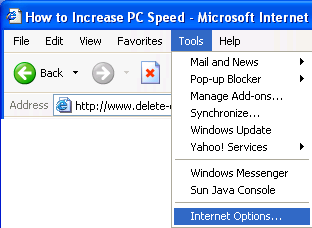
Internet Explorer version 5 and later offer the ability for heighten security and privacy. You can block a site by following the directions below:
1. Load your
Internet explorer
2. Click
Tools
3. Click
Internet Options
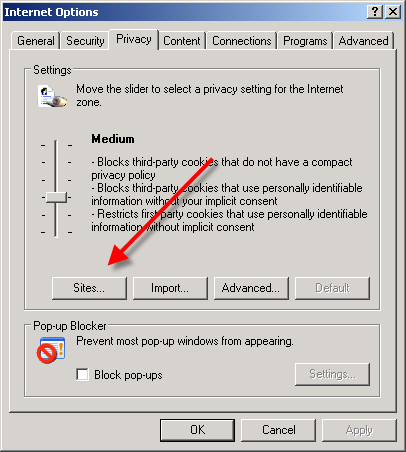
4. Click the
Privacy tab
5. Under the Privacy window, Click
Sites
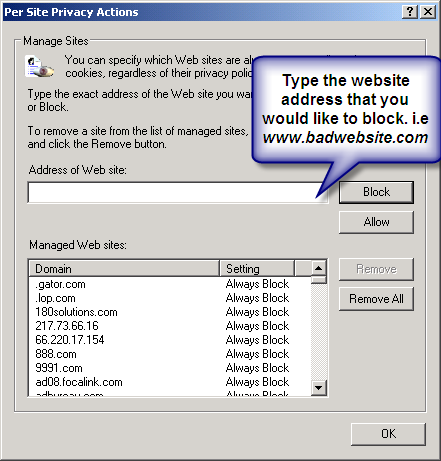
6. Type in the site
address that you want to
Block and Click OK. Remember this technique only blocks on one site at a time. Parental control software will allow you to block multiple sites and categories.
Here are alternate instructions to block a website using Internet Explorer.
Tools ->
Internet Options->
Security->
Restricted sites->
Sites->
Type in the site address and Click ADD then click OK
How to Block A Website in All Web Browsers
This action will require you to edit your Host file. Your host file is a computer file used to store information on where to find a node on a computer network. For more a more detailed description. Check out this link
Host File Description Link
In Windows XP
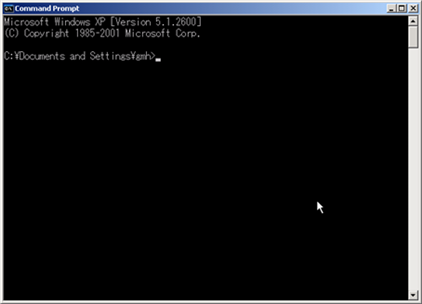
1. Click Start->All Programs->Accessories->Command Prompt.
2. Click
Command Prompt This will open a DOS command window.
3. Type:
notepad C:/Windows/System32/drivers/etc/hosts
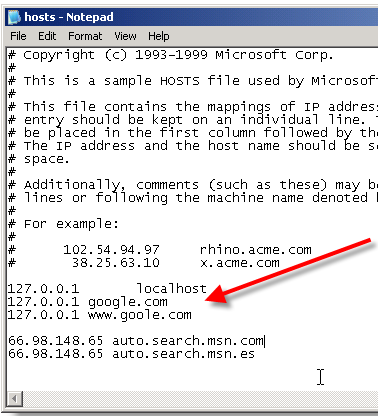
4. Locate the line
127.0.0.1 localhost
5. To block the website google.com for example, just add this text under 127.0.0.1 localhost:
127.0.0.1 google.com
127.0.0.1
www.google.com
You can add as many sites any site, However you will need to prefix it with "127.0.0.1".
6.
Save the file
Google will now be blocked in all web browser. This is an advanced but easy method on how to blow a website.

 land for sale
 AMD AM 5 Ryzen setup
 Gampaha ACER OKW223 Wired RGB Keyboard
 Gampaha FANTECH R1 V2 RACING WHEEL
 plz help