
Latest ads
-
BlackWall V2ray servers
- hu KANNA
- Updated:
-
 Peppa Pig Family Plush Toy Set – 5 Characters
- anil1961
- Updated:
-
Express VPN PC - 1 Year Rs. 600.00
- Sanathbh
- Updated:
-
Capcut Pro 7 Days Team Plan - Rs. 3️⃣0️⃣0️⃣
- Sanathbh
- Updated:
-
 Singapore V2ray VPN for Tunneling
- hu KANNA
- Updated:
You are using an out of date browser. It may not display this or other websites correctly.
You should upgrade or use an alternative browser.
You should upgrade or use an alternative browser.


Machan IDM eka start up ekadi launch wena one ..put it 2 launch @ startup den it wil come lyk dat...
Machan IDM eka start up ekadi launch wena one ..put it 2 launch @ startup den it wil come lyk dat...
K macho thnx... kohomada machan startup ekata danne???

++ rep if u like my post.. __________________
[FONT=Geneva, Arial, Helvetica, sans-serif][SIZE=+1][/SIZE][/FONT]
[FONT=Geneva, Arial, Helvetica, sans-serif][SIZE=+1]Downloading FLV video files from YouTube, MySpaceTV, and Google Video with Internet Download Manager [/SIZE][/FONT]
The best way of downloading videos from the Internet is here. You can download all the flash embedded videos from almost any site with a click of a button. Yea, the flash videos are literally a click away.
After installing IDM, a "Download This Video" button pops up whenever you are watching a video anywhere in cyberspace (shown in the picture below). Just click on the button to start downloading clips. It's as simple as that; you do not have to separately launch Internet Download Manager. What's more, you can choose to download a clip at any point during the video, and the scene will be captured from the start. The download will proceed in the background even if you pause or stop watching. And you can download more than one video at the same time.
 You can also use context menu in Firefox or IE based browsers to download FLV videos from popular sites like YouTube, MySpaceTV, Google Video, etc. When your browser starts playing a video file, IDM grabs its download link. If you like the video, and you would like to save it on your computer, you should open IE context menu by right clicking on the web page that plays the video, and select "Download FLV video content with IDM" menu item. The context menu appears when you right click on a web page (but not on an flv player) in your browser or by using context menu key on the keyboard.
If you don't have this menu item in Firefox or other Mozilla based browsers, you will need to reinstall idmmzcc.xpi extension. Pick "File->Open File..." menu item in the main menu of your browser and open idmmzcc.xpi file from IDM root folder ("C:\Program Files\Internet Download Manager\" by default).
Internet Explorer (right click page context menu)Mozilla based (Firefox) (right click page context menu)
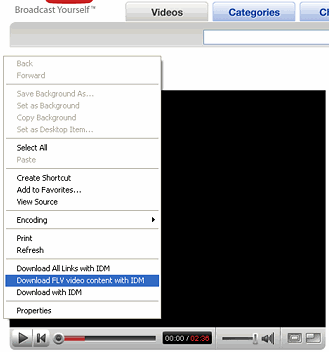
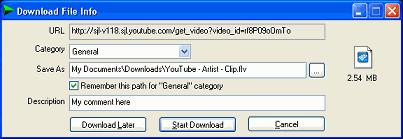
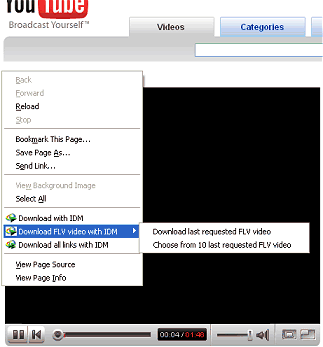 IDM will start downloading the video and show its standard download dialog. If the server has not specified the file name explicitly, IDM will name the file based on the web page title. You can also edit the filename, add a description, and change its path or category on this dialog.
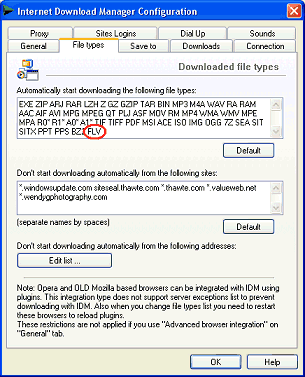
 It's also possible to add FLV extension to IDM list of downloadable file types in IDM Options -> "File Types" tab to take over the download of all FLV videos. In this case videos won't be played in your browser. The videos will be downloaded by IDM, saved to your local disk, and can be played if you have an FLV player.
 As we stated you can download videos from YouTube, Tv-links.co.uk, MetaCafe.com, etc.. almost any website. Following are the sites Internet Download Manager is known to work with: Youtube, MySpaceTV, Google Videos, video.xanga.com, www.break.com, www.dailymotion.com, www.esnips.com, and many others
You should have an FLV player (or codec or video converter) installed to play FLV videos. You can get more information about FLV player here.
++ rep if u like my post..
__________________
[FONT=Geneva, Arial, Helvetica, sans-serif][SIZE=+1][/SIZE][/FONT]
[FONT=Geneva, Arial, Helvetica, sans-serif][SIZE=+1]Downloading FLV video files from YouTube, MySpaceTV, and Google Video with Internet Download Manager [/SIZE][/FONT]
The best way of downloading videos from the Internet is here. You can download all the flash embedded videos from almost any site with a click of a button. Yea, the flash videos are literally a click away.
After installing IDM, a "Download This Video" button pops up whenever you are watching a video anywhere in cyberspace (shown in the picture below). Just click on the button to start downloading clips. It's as simple as that; you do not have to separately launch Internet Download Manager. What's more, you can choose to download a clip at any point during the video, and the scene will be captured from the start. The download will proceed in the background even if you pause or stop watching. And you can download more than one video at the same time.

If you don't have this menu item in Firefox or other Mozilla based browsers, you will need to reinstall idmmzcc.xpi extension. Pick "File->Open File..." menu item in the main menu of your browser and open idmmzcc.xpi file from IDM root folder ("C:\Program Files\Internet Download Manager\" by default).
Internet Explorer (right click page context menu)Mozilla based (Firefox) (right click page context menu)
You should have an FLV player (or codec or video converter) installed to play FLV videos. You can get more information about FLV player here.
++ rep if u like my post..
__________________

try re install
idmmzcc.xpi
++ rep if u like my post..
Man re install kara machan eth ehemai...


K macho thnx... kohomada machan startup ekata danne???
startup eke load vennanum me vidiyata karanna.
Tools> Options> General
Launch Internet Download Manager on Startup oya tik eka danna.
General Tab ekema thiyana IDM Download Panel for web player in browsers option eken oyaata oona vidiyata edit karaganna. ethakota panai ara download button eka.
startup eke load vennanum me vidiyata karanna.
Tools> Options> General
Launch Internet Download Manager on Startup oya tik eka danna.
General Tab ekema thiyana IDM Download Panel for web player in browsers option eken oyaata oona vidiyata edit karaganna. ethakota panai ara download button eka.
Man ehema kara machan eth hari yanne na... Inna man aye restart karala balanna com eka...


++ rep if u like my post.. __________________
[FONT=Geneva, Arial, Helvetica, sans-serif][SIZE=+1][/SIZE][/FONT]
[FONT=Geneva, Arial, Helvetica, sans-serif][SIZE=+1]Downloading FLV video files from YouTube, MySpaceTV, and Google Video with Internet Download Manager [/SIZE][/FONT]
The best way of downloading videos from the Internet is here. You can download all the flash embedded videos from almost any site with a click of a button. Yea, the flash videos are literally a click away.
After installing IDM, a "Download This Video" button pops up whenever you are watching a video anywhere in cyberspace (shown in the picture below). Just click on the button to start downloading clips. It's as simple as that; you do not have to separately launch Internet Download Manager. What's more, you can choose to download a clip at any point during the video, and the scene will be captured from the start. The download will proceed in the background even if you pause or stop watching. And you can download more than one video at the same time.
You can also use context menu in Firefox or IE based browsers to download FLV videos from popular sites like YouTube, MySpaceTV, Google Video, etc. When your browser starts playing a video file, IDM grabs its download link. If you like the video, and you would like to save it on your computer, you should open IE context menu by right clicking on the web page that plays the video, and select "Download FLV video content with IDM" menu item. The context menu appears when you right click on a web page (but not on an flv player) in your browser or by using context menu key on the keyboard.
If you don't have this menu item in Firefox or other Mozilla based browsers, you will need to reinstall idmmzcc.xpi extension. Pick "File->Open File..." menu item in the main menu of your browser and open idmmzcc.xpi file from IDM root folder ("C:\Program Files\Internet Download Manager\" by default).
Internet Explorer (right click page context menu)Mozilla based (Firefox) (right click page context menu)IDM will start downloading the video and show its standard download dialog. If the server has not specified the file name explicitly, IDM will name the file based on the web page title. You can also edit the filename, add a description, and change its path or category on this dialog.
It's also possible to add FLV extension to IDM list of downloadable file types in IDM Options -> "File Types" tab to take over the download of all FLV videos. In this case videos won't be played in your browser. The videos will be downloaded by IDM, saved to your local disk, and can be played if you have an FLV player.
As we stated you can download videos from YouTube, Tv-links.co.uk, MetaCafe.com, etc.. almost any website. Following are the sites Internet Download Manager is known to work with: Youtube, MySpaceTV, Google Videos, video.xanga.com, www.break.com, www.dailymotion.com, www.esnips.com, and many others
You should have an FLV player (or codec or video converter) installed to play FLV videos. You can get more information about FLV player here.
++ rep if u like my post..
__________________
Thanks 4 d info bro..

rep added!
mokakda browser eka ?? and IDM eka crack karaaada ?
Firefox machan... ow ban man crack kara... ane manda mokak hari awlak eeye idan... man uninstall karala ayeth install kara ban eth hari na ne....

Open IDM. (make sure you have installed latest IDM, if you use FF you must install IDM addon)
Downloads > Options > General
[√] Launch IDM on Startup
[√] Run Module for .......
[√] Use advanced browser ... (not necessory.. check only if you have problem)
Intergrate IDM into ....
(check browsers you have installed)
Customize IDM menu items .... [Edit...]
(make sure all boxes are checked)
IDM panel ..... [Edit...]
(make sure all file types are checked)
Downloads > Options > General
[√] Launch IDM on Startup
[√] Run Module for .......
[√] Use advanced browser ... (not necessory.. check only if you have problem)
Intergrate IDM into ....
(check browsers you have installed)
Customize IDM menu items .... [Edit...]
(make sure all boxes are checked)
IDM panel ..... [Edit...]
(make sure all file types are checked)
Firefox machan... ow ban man crack kara... ane manda mokak hari awlak eeye idan... man uninstall karala ayeth install kara ban eth hari na ne....
IDM install karala Firefox restart karanna ona . ethakota firefox eka pennanawa IDM gaththa kiyala addon ekak widiyata . ehema ekak aawada ??

IDM -> Option -> General -> Integrate IDM into Browsers -> tick to firefox & select FF exe in ur program file..
Open IDM. (make sure you have installed latest IDM, if you use FF you must install IDM addon)
Downloads > Options > General
[√] Launch IDM on Startup
[√] Run Module for .......
[√] Use advanced browser ... (not necessory.. check only if you have problem)
Intergrate IDM into ....
(check browsers you have installed)
Customize IDM menu items .... [Edit...]
(make sure all boxes are checked)
IDM panel ..... [Edit...]
(make sure all file types are checked)
Hari machan dan thama scene eka therune mata... Mage firefox eke awlak.... IE eken DL wenawa machan... thnx...
IDM install karala Firefox restart karanna ona . ethakota firefox eka pennanawa IDM gaththa kiyala addon ekak widiyata . ehema ekak aawada ??
Hari machan ehema awe na, e kiyanne mage firefox eke awlak neda? ela ela man firefox ayeth install karala balannam... Thnx macho...
IDM -> Option -> General -> Integrate IDM into Browsers -> tick to firefox & select FF exe in ur program file..
ok.. thnx machan...
Similar threads


- Replies
- 0
- Views
- 202
