Proxy Server එක කියන්නේ මොකද්ද ?

SL MULTIMEDIA TUTORIAL

Well-known member
  • Jul 27, 2020
    1,648
    6,958
    113
    United States
    1-2.jpg

    අද නෙට්වර්ක් පාඩමෙන් කියල දෙන්නේ කොහොමද Proxy Server එකක් වැඩ කරන්නේ කියලා. ඔය සමහර සමාගම් වල විශ්ව විද්යාල වල එහෙම Proxy server එකක් දකින්න පුලුවන්. මුලින්ම බලමු මොකද්ද Server එකක් කියන්නේ කියලා.

    Server එකක් කියන්නේ යම්කිසි පරිගනක ජාලයක මධ්යයගත පරිගනකයකට. Server එකකට මෙහෙමයි කියලා නිර්වචනයක් දෙන්න අමාරුයි. මං ඒකට උදාහරනයක් දෙන්නම්. අපි හිතමු අපි මොකක්හරි වෙබ් පිටුවක නමක් Web Browser එකේ Address බාර් එකේ ටයිප් කරල Enter බට්න් එක ක්ලික් කලා කියලා. ඊට පස්සේ අපේ Request එක දත්ත පැකැට්ටුවක් (Data Packet) විදිහට යනවානේ.


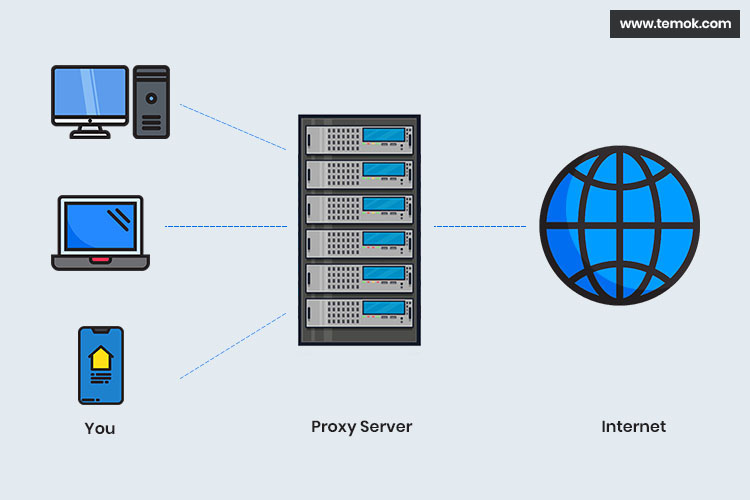
    එහෙම යන දත්ත ටික යන්නේ අර ටයිප් කරපු Address එක අදාල කම්පියුටර් එකට. අන්න ඒකට තමයි Server එකක් කියලා කියන්නේ. හරි දැන් අපි Proxy Server එකට එමු. අන්න ඒ විදිහමයි එකත්. Proxy server ඒකත් අපි සම්බන්ධ පරිගනක ජාලයේ මධ්යගත පරිගනකයක්.
    2-2.jpg


    අපි හිතමු අපි මොකක් හරි Web Address එකක් ටයිප් කරලා Enter බට්න් එක ක්ලික් කරා කියලා. එතකොට අපේ Request එක මුලින්ම Proxy Server එක කියන කම්පියුටර් එකට යනවා. එකෙන් පරික්ෂා කරලා බලනවා අපි ඉල්ලපු Request එක වලංගු එකක් ද කියලා. Proxy Server එක මුලින්ම කරන්නේ ඉල්ලන ලද Request එක , Cache එකේ තියෙන එකක් ද කියලා බලන එකයි .එහෙම Cache එකේ තියෙන එකක් නම් කෙලින්ම Cache එකෙන් අරන් අපේ කම්පියුටර් එකට ලබා දෙනවා.

    හරි අපි මෙහෙම හිතමු. Cache එකේ නැති Request එකක් Proxy Server එකට ආවා කියලා. ඊට පස්සේ Proxy Server එක පරික්ෂා කරනවා ලබා දිය නොහැකි Request අතරේ අපි ඉල්ලපු Request එක තියෙනවද කියලා. එහෙම තියෙනවා නම් ඒ ඉල්ලීම අපට ලබා දිය නොහැක කියලා පනිවිඩයක් ලබා දෙනවා.

    හරි අපි මෙහෙමත් හිතමු. Cache එකෙත් නැති Ban කරලත් නැති Request එකක් ආවා කියලා. එතකොට Proxy Server එක කරන්නේ අපි ඉල්ලපු Request එකට අදාල සර්වර් එකට ගිහින් ඊට අදාල දත්ත ටික අරගෙන අපිට ලබා දෙන එකයි. එහෙම අරගෙන එද්දි ඒ දත්ත ටිකෙන් කොපියක් තමන්ගේ Cache එකේ තියා ගන්නවා මතුවට ප්රයෝජනයට ගන්න කියලා.

    ඔන්න ඕකයි Proxy Server එකෙන් කරන කාර්ය සරලව කියනවනම්. . නමුත් මේ Proxy Server එක බයිපාස් කරන්න පුලුවන් වෙබ් අඩවිත් තියෙනවා.

    හැමෝටම සුභ දවසක්...😗 :love2:🤗

    Credit : http://madurangacreations.blogspot.com
     

    tharakaf

    Well-known member
  • Oct 19, 2020
    36,270
    74,693
    113
    1-2.jpg

    අද නෙට්වර්ක් පාඩමෙන් කියල දෙන්නේ කොහොමද Proxy Server එකක් වැඩ කරන්නේ කියලා. ඔය සමහර සමාගම් වල විශ්ව විද්යාල වල එහෙම Proxy server එකක් දකින්න පුලුවන්. මුලින්ම බලමු මොකද්ද Server එකක් කියන්නේ කියලා.

    Server එකක් කියන්නේ යම්කිසි පරිගනක ජාලයක මධ්යයගත පරිගනකයකට. Server එකකට මෙහෙමයි කියලා නිර්වචනයක් දෙන්න අමාරුයි. මං ඒකට උදාහරනයක් දෙන්නම්. අපි හිතමු අපි මොකක්හරි වෙබ් පිටුවක නමක් Web Browser එකේ Address බාර් එකේ ටයිප් කරල Enter බට්න් එක ක්ලික් කලා කියලා. ඊට පස්සේ අපේ Request එක දත්ත පැකැට්ටුවක් (Data Packet) විදිහට යනවානේ.


    එහෙම යන දත්ත ටික යන්නේ අර ටයිප් කරපු Address එක අදාල කම්පියුටර් එකට. අන්න ඒකට තමයි Server එකක් කියලා කියන්නේ. හරි දැන් අපි Proxy Server එකට එමු. අන්න ඒ විදිහමයි එකත්. Proxy server ඒකත් අපි සම්බන්ධ පරිගනක ජාලයේ මධ්යගත පරිගනකයක්.
    2-2.jpg


    අපි හිතමු අපි මොකක් හරි Web Address එකක් ටයිප් කරලා Enter බට්න් එක ක්ලික් කරා කියලා. එතකොට අපේ Request එක මුලින්ම Proxy Server එක කියන කම්පියුටර් එකට යනවා. එකෙන් පරික්ෂා කරලා බලනවා අපි ඉල්ලපු Request එක වලංගු එකක් ද කියලා. Proxy Server එක මුලින්ම කරන්නේ ඉල්ලන ලද Request එක , Cache එකේ තියෙන එකක් ද කියලා බලන එකයි .එහෙම Cache එකේ තියෙන එකක් නම් කෙලින්ම Cache එකෙන් අරන් අපේ කම්පියුටර් එකට ලබා දෙනවා.

    හරි අපි මෙහෙම හිතමු. Cache එකේ නැති Request එකක් Proxy Server එකට ආවා කියලා. ඊට පස්සේ Proxy Server එක පරික්ෂා කරනවා ලබා දිය නොහැකි Request අතරේ අපි ඉල්ලපු Request එක තියෙනවද කියලා. එහෙම තියෙනවා නම් ඒ ඉල්ලීම අපට ලබා දිය නොහැක කියලා පනිවිඩයක් ලබා දෙනවා.

    හරි අපි මෙහෙමත් හිතමු. Cache එකෙත් නැති Ban කරලත් නැති Request එකක් ආවා කියලා. එතකොට Proxy Server එක කරන්නේ අපි ඉල්ලපු Request එකට අදාල සර්වර් එකට ගිහින් ඊට අදාල දත්ත ටික අරගෙන අපිට ලබා දෙන එකයි. එහෙම අරගෙන එද්දි ඒ දත්ත ටිකෙන් කොපියක් තමන්ගේ Cache එකේ තියා ගන්නවා මතුවට ප්රයෝජනයට ගන්න කියලා.

    ඔන්න ඕකයි Proxy Server එකෙන් කරන කාර්ය සරලව කියනවනම්. . නමුත් මේ Proxy Server එක බයිපාස් කරන්න පුලුවන් වෙබ් අඩවිත් තියෙනවා.

    හැමෝටම සුභ දවසක්...😗 :love2:🤗

    Credit : http://madurangacreations.blogspot.com
    Machan just a suggestion. Mey huthawal English walin liyapan. Simple English is more than enough to write articles like this. It will be much easier for people to understand rather than trying to understand all these stupid sinhala terms.
     

    Sonique

    Well-known member
  • Oct 22, 2007
    25,185
    11,206
    113
    Forest
    Isn’t that a cache server + dns filter?
    proxy server is a wall between client and server. When you have a proxy server the web server doesn’t know to which computer data is going. Web server only knows about the proxy server and knows nothing after the proxy server. It is a security measure. Article is misleading.
     

    tharakaf

    Well-known member
  • Oct 19, 2020
    36,270
    74,693
    113
    Isn’t that a cache server + dns filter?
    proxy server is a wall between client and server. When you have a proxy server the web server doesn’t know to which computer data is going. Web server only knows about the proxy server and knows nothing after the proxy server. It is a security measure. Article is misleading.
    The proxy server sits in between the user (browser) and webserver. The requests the user sends is sent to the proxy server and then the proxy creates a separate connection to the server behalf of the user. So like you say the server doesn't have have an idea about who the client is and they will only see the proxy IP as the source IP. You can use the proxy to either control what sites the user goes or to have a cache to speed up the experience to the user.

    Squid proxies are very popular open source proxies used by many.

    You can have proxies in explicit or transparent mode. Explicit proxies are where you have to put your proxy details in the internet options. i.e. the user is aware of the proxy. But if you use a transparent proxy the user doesn't need to make any changes and the user isn't aware of the proxy.

    Another fun fact for you guys is that it is now quite difficult to use proxies to allow/block websites. the reason for this is unlike in the past a single site might talk to other websites to load images and stuff. So if you want to specifically allow a site and block the rest you will have a very difficult time doing so.
     
    Last edited: