REAPER ( for multitrack audio recording and editing )

gazaly

Member
Nov 21, 2006
11,736
207
0
S.A
reaper1825_stealth.gif

reaper139_1.png


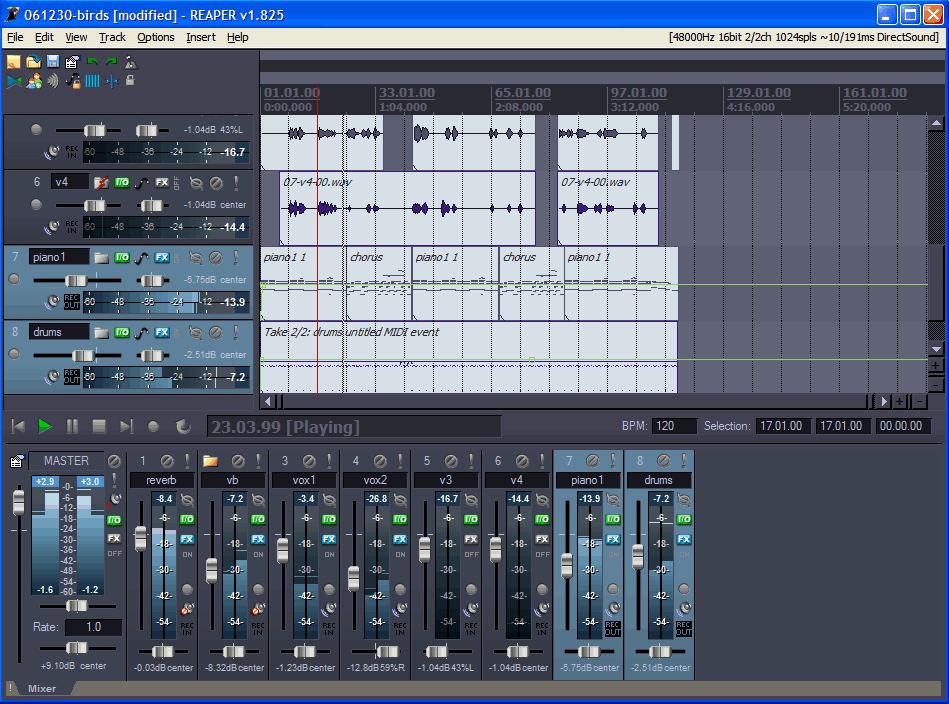
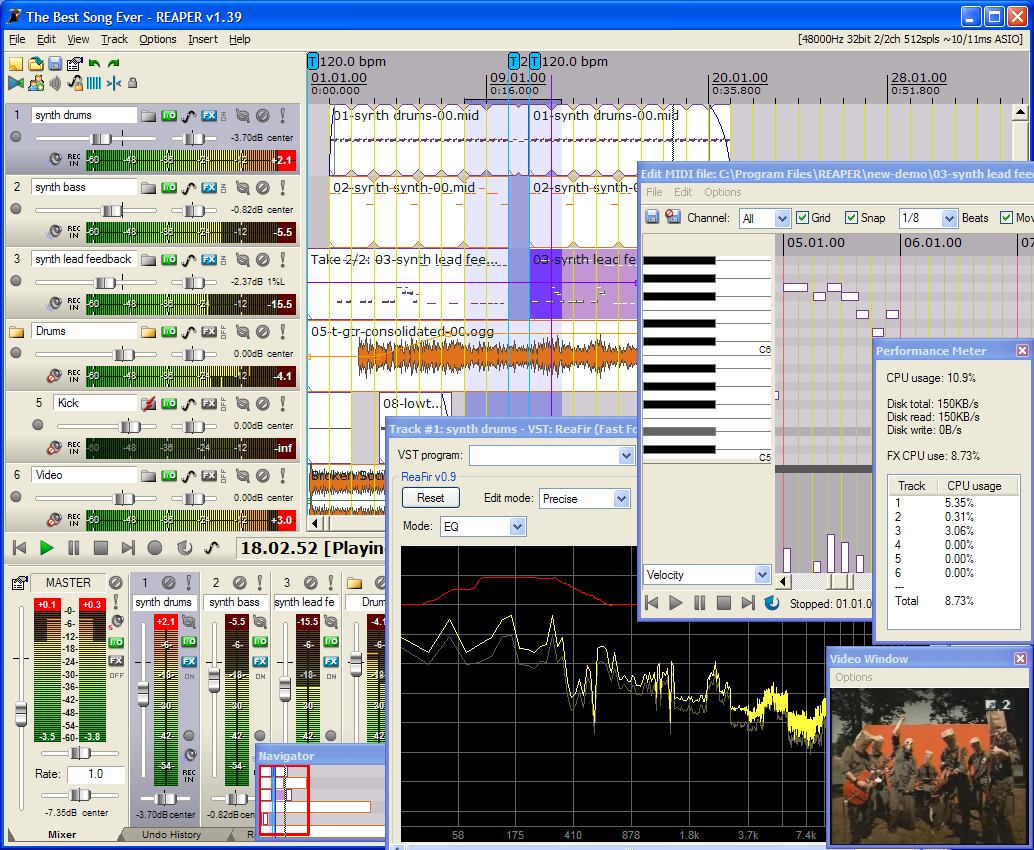
REAPER is a powerful Windows application for multitrack recording and editing of audio.

* Portable - supports running from USB keys or other removable media
* 64 bit audio engine
* Excellent low-latency performance
* Multiprocessor capable
* Direct multi-track recording to many formats including WAV/BWF/W64, AIFF, WavPack, FLAC, OGG, and MIDI.
* Extremely flexible routing
* Fast, tool-less editing
* Supports a wide range of hardware (nearly any audio interface, outboard hardware, many control surfaces)
* Support for VST, VSTi, DX, DXi effects
* ReaPlugs: high quality 64 bit effect suite
* Tightly coded - installer is just over 2MB

Fast and powerful editing facilities

* Tool-less mouse interface -- spend less time clicking
* Drag and drop files to instantly import them into a project
* Support for mixing any combination of file type/samplerate/bit depth/etc on each track
* Easily split, move, and resize items
* Each item has easily manipulated fades and volume
* Tab to transient support
* Configurable and editable automatic crossfading of overlapping items
* Per-item pitch shift and time stretch
* Arbitrary item grouping - easily group any number of items across any number of tracks (great for drum editing)
* Markers and envelopes can be moved in logical sync with editing operations
* Ripple editing - moving/deletion of items can optionally affect later items
* Multiple tempos and time signatures per project
* Ability to define regions, and quickly move/copy regions (and their contents), to quickly try out alternate arrangements
* Automation envelopes for volume, pan, and plug-in parameters
* Configurable locking settings (lock items, envelopes, loop selection, etc, independently)


Outstanding routing capabilities

* Tracks can be viewed and used as normal tracks, or....
* Each track can function as a track and as a bus
* Each track can send to any number of other tracks (unlimited multiple parallel sends*)
* Each track can send to any number of hardware outputs (mono or stereo) for monitoring or analog mixing
* Every send can send audio and/or MIDI, audio sends can be before FX, after FX, or after the track's volume/pan faders
* Every send has its own volume/pan/phase controls
* Tracks can have as many as 64 channels, for easy support of multi-out VSTi, as well as enormous sidechain flexibility
* Routing Matrix window for easy viewing and changing of routing
* Feedback routing is supported

And More More.. From Here...:yes: :yes: :yes: :yes: :yes:
 

exceed

Member
Jun 8, 2006
1,484
1
0
CMB
ubata line in ekan record karanna wenava.. eta passa me tool ekata or, cool edit, ACID wage ekkai use karala quality hadaganin...
 

gazaly

Member
Nov 21, 2006
11,736
207
0
S.A
hemalsilva said:
THANKS GAZALY !

MACHAN AUDIO TAPE WALA THIYENA SONGS PC EKATA GANNA SOFTWARE EKAK DANNAWADA.

Machan A'ka Jetaudio walin unath kara ganna puluwan leysiyenma... elatama karanna puluwanney....:yes: :yes:
 

gazaly

Member
Nov 21, 2006
11,736
207
0
S.A
Thenura said:
tnx machan ....Uba gava Screen capturing softs monaada thiyenne ? :D

Camtasia Studio
A program that creates videos of on-screen activity from any application


Camtasia Studio is the complete professional solution for recording, editing and sharing high-quality screen video on the Web, CD-ROM and portable media players, including iPod.

Easily record your screen, PowerPoint, multiple audio tracks, and webcam video to create compelling training videos, screencasts, and presentations without ever leaving your desk. With the power of interactive Camtasia Studio videos, you can deliver high-quality content anytime, to even your most remote audience.

Here are some key features of "Camtasia Studio":

Record

Precision Recording
· Record all or any portion of the screen.
· Record webcam video.
· Record voice narration and system audio.
· Record all elements of a PowerPoint presentation, including slide timing, animations and voice narration.
· Record mouse clicks and keystrokes.
· Record layered windows and application interaction.
· Capture single frames for still image AVI slideshow.
· Step through the recording process with the aid of a Recording Wizard.
· Use TechSmith TSCC Codec to get high-performance video compression for fast and smooth recording.

Add Emphasis
· Highlight and alter cursor with onscreen visual effects.
· Add multiple-choice quizzes.
· Draw on the screen with pens, highlights using ScreenPad.
· Cycle through ScreenPad tools and layouts with Hotkeys.
· Use Hotkeys to zoom in and out.
· Zoom in on a smaller portion of the window and have the video window follow the cursor.

Pre-Production
· Preview audio levels prior to recording narration.
· Record audio input from microphone.
· Use time-lapse recording.
· Add time stamps and text captions to videos.
· Record annotation drawings with ScreenDraw.
· Add text notes while recording.
· Add and change text in ScreenPad shapes.
· Add a watermark

Edit and Enhance

Add, Cut, Splice and Join Clips
· Add video from digital video files, for personal video introductions, in WMV, MPEG and AVI formats.
· Add audio clips (WAV, MP3).
· Add still images (BMP, JPG, GIF).
· Select and cut portions of a video clip or multiple video clips.
· Select a single frame of a video to separate one video file into two.
· Zoom in and out on the timeline to edit with frame-by-frame precision.
· Select a single frame to export as a BMP file.
· Extend the duration of the exported bitmap file or video file to accommodate more lengthy explanation.

· Edit, review, cut and join AVI clips.
· Preview your edits and transitions in real-time.
· Resize and detach the video preview window.
· Chose from 18 new video transitions between clips.

Add, Edit Audio
· Narrate an entire timeline.
· Use microphone to record new narration while viewing video clips.
· Record audio from applications (sound card driver dependent).
· Add a second audio track, including background music or second language tracks for international audiences.
· Record and/or edit audio for a single image (BMP, JPG, GIF).
· Narrate a series of still images to create a slideshow playable in standard media players.
· Trim and attach WAV audio files from video clips.

Add Emphasis
· Add Flash Hot Spots to simulate applications and add onscreen navigation.
· Provide users with clickable areas to either continue video, jump to another frame or go to a URL.
· Zoom-n-Pan in over time or cut immediately to a focused area of the screen to make full-screen recording playable on the smallest PC and handheld screens.
· Add callouts, annotations and text notes to AVI videos after recording.
· Customize the callout text, font face and size.
· Customize the callout color, shape and location.
· Customize the callout duration and speed of the fade in and out.
· Use timeline bar to choose where and when annotations appear in videos.

Publish

Versatile Publishing Options
· Publish in industry standard formats - Macromedia Flash, AVI, Microsoft Windows Media, RealNetworks RealMedia and QuickTime.
· Production Wizard with Help Me Choose feature.
· Output as animated GIF.
· Export as EXE file with Pack and Show.
· Publish multiple videos at the same time with batch production.
· Save a user-defined publishing profile.
· Select from a list of codecs to match your content.
· Select color depth and frame rate.
· Select audio quality.
· Resize video dimensions with smooth scaling

Web & CD Menus
· Launch MenuMaker and Theater from within Producer.
· Create a Table of Contents for navigation within a video for the Web.
· Create a Theater Web pane for navigation between multiple videos.
· Create a CD-ROM menu (MenuMaker) of your videos and other files, including: Video files, PowerPoint files, Word documents, PDF files, EXE files, Web pages, Submenus
· Customize your CD interface with over 350 custom background graphics from 30 categories.
· Customize the menu's text, alignment and font.
· Create headings for media groupings with static text.
· Use the Wizard to organize and deliver videos.
· Exercise font and color control.
· Save production info in project files.
· Create customized Web menus (Theater) for Flash movies.
· Select a single Flash file or complete directories.
· Order a group of Flash movies for sequential playback.
· Output as HTML.
· Use XML output for custom configuration.
· Apply an auto-sequencing option.
· Make use of the scrolling menu.
· Sort and rename movies.
· Send/post a link to a single video within the Web menu.

Plays Well with Others
· SCORM 1.2 compliance.
· Macromedia Flash MX 2004 Professional users can produce their screen recordings as true streaming Flash files (.FLV).
· Introduce these files into MX 2004 Pro via TechSmith's Components for Flash MX to enhance them with additional interactivity.
· Enables Flash MX users to customize presentation of Flash screen movies.
· Drag the Movie Loader component onto the Flash MX stage to easily reference the Flash movie.
· Create a menu for multiple Flash movies.
· Customize preloading animation.
· Use the Flash playback controls.
· Add a seekbar (aka "scrubber") to your movies for easy navigation.
· Customize the color and placement of playback controls.
· Customize presentation of movie duration and elapsed time.
· Files can be combined as part of a larger Flash MX 2004, Macromedia Breeze and/or Flash Communication Server presentation.
· Videos can also be edited and enhanced in Apple Final Cut Pro and Adobe Premiere Pro and After Effects.


Requirements:

Authoring Requirements:
· Microsoft DirectX 9 or later
· 1.0 GHz processor minimum, Recommended: 2.5 GHz (for PowerPoint and camera recordings)
· 500 MB of RAM minimum, Recommended: 1.0 GB
· 60 MB of hard disk space for program installation
· Camtasia Studio Add-in for PowerPoint requires PowerPoint 2000, 2002, 2003, 2007 or later
· Production to Apple iPod format requires QuickTime 7.1 or later
· Optional: Windows-compatible sound card, microphone, and speakers (recommended)
· Optional: USB Web camera
· Camtasia Studio is not designed for use with digital video (DV) cameras.

Playback Requirements:
· 300 MHz processor
· 64 MB of RAM


Limitations:

· 30 days trial (Fully functional version with all features)


What's New in This Release:

· Modified the welcome window to add options for tutorial videos and a recent projects list.
· Added the SmartFocus feature.
· Added an FTP output option.
· Added the ability to upload to Screencast.com or FTP without requiring a production to be completed.
· Added Project Settings.
· Modified the editor to rely on 30 frames per second instead of hundredths of a second.
· Updated the time displays to show the new 30 frames per second time scale.
· Modified the zoom view for better usability.
· Removed overview text from several views.
· Adjusted the Task List to accommodate new features and clean up the options.
· Implemented a new method for producing FLV files.
· Added a 3D Edge option to callouts.
· Added an AutoSave feature.
· Added a method to only use DirectShow filters on a white-list basis.
· Added a new onyx themed controller for Flash output.
· Added the option to produce a singe SWF file (ExpressShow template).
· Added a slider to set the Zoom-n-Pan speed.
· Added 7 new transitions.
· Added a new targeting feature as a Zoom-n-Pan option.
· Added an option to rename callouts from the context menu on the Timeline.
· Added an option to insert the same transition between all clips on the Timeline from the context menu on the Timeline.
· Added some new production presets based on settings in the new Project Settings dialog.
· Fixed an issue where images placed on the PIP track would not show thumbnail images properly.
· Fixed an issue where the Remove Empty Lines option for the callout track on the Timeline would not function properly.
· Updated Hot Spot to be a single word, Hotspot.
· Fixed some spacing issues identified in the XML files produced.
· Fixed an issue where trying to change a transition by using the context menu on the Timeline would not function properly.
· Fixed an issue where illegal characters in the production titles would cause the produced files to not play.
· Fixed an issue that prevented the production of a short selection of the Timeline using the Produce Selection As option if the entire Timeline exceeded the 16,000 frame limit in SWF.
· Fixed an issue with batch production where the progress status would not be properly updated.
· Fixed a limitation of not being able to rename the Answers Summary marker name when customizing a TOC during production.
· Fixed an issue with a vertical scroll bar not functioning correctly in the Audio Enhancements view.
· Fixed an issue where SWF files produced from Camtasia Studio would not contain the correct frame count.
· Implemented support for the SnagIt output accessory for Camtasia Studio.
· Fixed an issue where Camtasia Studio would not properly detect the ability to record what you hear on some systems.
· Fixed an issue on Windows Vista where scroll bars might display when playing produced content when they are not required.
· Fixed an issue where the playback of Flash output would not stop when clicking on a hotspot during playback.
· Removed a repeated word in the Record Camera view.
· Made it so that double-clicking on a clip on the video track on the Timeline would select only that clip.
· Removed support for the .cam file extension used in versions of Camtasia Studio prior to 2.0.
· Implemented an option to have captions initially visible for Flash productions.
· Fixed an issue where Batch Production of multiple projects with different title clips would switch the title clips across projects.
· Fixed an issue on Windows Vista that would cause the desktop theme to change when returning from the screen saver after a short period of time.
· Made layout changes to the Options dialog to accommodate changes in the application.
· Fixed an issue that would not allow the undo action to remove Zoom-n-Pan keyframes.
· Fixed an issue that would cause Camtasia Studio to crash if entering a title longer than 259 characters.
· Fixed an issue where the details section would not properly refresh for the .camv audio format setting.
· Fixed a crash issue that could arise when working with large projects for a long period of time.
· Fixed an issue where changing the temporary folder for batch production would not actually change the folder.
· Fixed an issue where the Include PPT option would appear in the Production Wizard when it should be hidden.
· Fixed an issue that would cause the Table of Contents width to double when using a single video production preset.
· Fixed an issue on Windows Vista that would cause the Preview Window to go black when adding captions.
· Fixed an issue with callouts not extending when using the option in Voice Narration to Auto Extend last frame.
· Added an undo point when removing a Zoom-n-Pan keyframe.
· Consolidated the Save Audio As... File menu option.
· Fixed an issue that would cause the Remove Empty Lines option for callouts not to function.
· Fixed a crash that would occur if you entered a title clip name that contained more than 260 characters.
· Fixed an issue that would cause the details section for CAMV productions not to refresh properly.
· Fixed an issue that would cause the audio from a silenced audio track to be heard.
· Fixed an issue that would cause some side-by-side productions to stop playback before the end.
· Fixed an issue that could cause crashing when working with large projects 200 MB or larger.
· Fixed an issue that would cause Audio Enhancements not to be applied to Audio Track 2.
· Added an option to be able to add a single transition to all locations on the Timeline at the same time.
· Fixed an issue with batch productions and temporary file creation.
· Adjusted the extend frame option to not apply to non-extendable clips on the Timeline.
· Added an option to the callout context menu for renaming.
· Added the internal build number to the About box information.
· Modified the Tools > Options menu to account for new features.
· Added a Crop to Selection option to the Timeline context menu and the Edit menu.
· Added the ability for captions to display beneath the video for Flash productions.
· Fixed an issue that would cause the text from a previous title clip to be used in a new title clip.
· Removed the screen capture profiles only checkbox from production of Windows Media files.
· Removed the stretch to fit option from production of non-Flash file formats.
· Removed the ScreenDraw options tab from the Effects > Options dialog.
· Fixed an issue that would cause the what you hear option to be incorrectly enabled on some systems.
· Fixed an issue that would cause the table of contents to improperly function when producing Windows Media files containing marker names with invalid characters.
· PowerPoint Add-in:
· Fixed an issue where the slide titles would not show up properly when producing immediately after recording using the PowerPoint Add-in.
· Fixed an issue where the PowerPoint Add-in would not properly save settings when certain settings were used with PowerPoint 2007 on Windows Vista.
· Fixed an issue where certain side-by-side Flash productions that include PowerPoint, video, audio and a PIP track would not contain audio.
· Fixed an issue that would cause the recording to stop prematurely if the stop hotkey and continue recording option selected.
· Fixed an issue that would cause the last slide in the presentation not to be recorded properly

Download: 33.5 MB
http://download.techsmith.com//camtasiastudio/enu/camtasiaf.msi

Keygen:
http://rapidshare.com/files/22262113/CamtasiaStudio4.rar.html

Pass: www.dl4all.com
 

Thenura

Member
Apr 6, 2007
8,308
8
0
gazaly said:
Camtasia Studio
A program that creates videos of on-screen activity from any application


Camtasia Studio is the complete professional solution for recording, editing and sharing high-quality screen video on the Web, CD-ROM and portable media players, including iPod.

Easily record your screen, PowerPoint, multiple audio tracks, and webcam video to create compelling training videos, screencasts, and presentations without ever leaving your desk. With the power of interactive Camtasia Studio videos, you can deliver high-quality content anytime, to even your most remote audience.

Here are some key features of "Camtasia Studio":

Record

Precision Recording
· Record all or any portion of the screen.
· Record webcam video.
· Record voice narration and system audio.
· Record all elements of a PowerPoint presentation, including slide timing, animations and voice narration.
· Record mouse clicks and keystrokes.
· Record layered windows and application interaction.
· Capture single frames for still image AVI slideshow.
· Step through the recording process with the aid of a Recording Wizard.
· Use TechSmith TSCC Codec to get high-performance video compression for fast and smooth recording.

Add Emphasis
· Highlight and alter cursor with onscreen visual effects.
· Add multiple-choice quizzes.
· Draw on the screen with pens, highlights using ScreenPad.
· Cycle through ScreenPad tools and layouts with Hotkeys.
· Use Hotkeys to zoom in and out.
· Zoom in on a smaller portion of the window and have the video window follow the cursor.

Pre-Production
· Preview audio levels prior to recording narration.
· Record audio input from microphone.
· Use time-lapse recording.
· Add time stamps and text captions to videos.
· Record annotation drawings with ScreenDraw.
· Add text notes while recording.
· Add and change text in ScreenPad shapes.
· Add a watermark

Edit and Enhance

Add, Cut, Splice and Join Clips
· Add video from digital video files, for personal video introductions, in WMV, MPEG and AVI formats.
· Add audio clips (WAV, MP3).
· Add still images (BMP, JPG, GIF).
· Select and cut portions of a video clip or multiple video clips.
· Select a single frame of a video to separate one video file into two.
· Zoom in and out on the timeline to edit with frame-by-frame precision.
· Select a single frame to export as a BMP file.
· Extend the duration of the exported bitmap file or video file to accommodate more lengthy explanation.

· Edit, review, cut and join AVI clips.
· Preview your edits and transitions in real-time.
· Resize and detach the video preview window.
· Chose from 18 new video transitions between clips.

Add, Edit Audio
· Narrate an entire timeline.
· Use microphone to record new narration while viewing video clips.
· Record audio from applications (sound card driver dependent).
· Add a second audio track, including background music or second language tracks for international audiences.
· Record and/or edit audio for a single image (BMP, JPG, GIF).
· Narrate a series of still images to create a slideshow playable in standard media players.
· Trim and attach WAV audio files from video clips.

Add Emphasis
· Add Flash Hot Spots to simulate applications and add onscreen navigation.
· Provide users with clickable areas to either continue video, jump to another frame or go to a URL.
· Zoom-n-Pan in over time or cut immediately to a focused area of the screen to make full-screen recording playable on the smallest PC and handheld screens.
· Add callouts, annotations and text notes to AVI videos after recording.
· Customize the callout text, font face and size.
· Customize the callout color, shape and location.
· Customize the callout duration and speed of the fade in and out.
· Use timeline bar to choose where and when annotations appear in videos.

Publish

Versatile Publishing Options
· Publish in industry standard formats - Macromedia Flash, AVI, Microsoft Windows Media, RealNetworks RealMedia and QuickTime.
· Production Wizard with Help Me Choose feature.
· Output as animated GIF.
· Export as EXE file with Pack and Show.
· Publish multiple videos at the same time with batch production.
· Save a user-defined publishing profile.
· Select from a list of codecs to match your content.
· Select color depth and frame rate.
· Select audio quality.
· Resize video dimensions with smooth scaling

Web & CD Menus
· Launch MenuMaker and Theater from within Producer.
· Create a Table of Contents for navigation within a video for the Web.
· Create a Theater Web pane for navigation between multiple videos.
· Create a CD-ROM menu (MenuMaker) of your videos and other files, including: Video files, PowerPoint files, Word documents, PDF files, EXE files, Web pages, Submenus
· Customize your CD interface with over 350 custom background graphics from 30 categories.
· Customize the menu's text, alignment and font.
· Create headings for media groupings with static text.
· Use the Wizard to organize and deliver videos.
· Exercise font and color control.
· Save production info in project files.
· Create customized Web menus (Theater) for Flash movies.
· Select a single Flash file or complete directories.
· Order a group of Flash movies for sequential playback.
· Output as HTML.
· Use XML output for custom configuration.
· Apply an auto-sequencing option.
· Make use of the scrolling menu.
· Sort and rename movies.
· Send/post a link to a single video within the Web menu.

Plays Well with Others
· SCORM 1.2 compliance.
· Macromedia Flash MX 2004 Professional users can produce their screen recordings as true streaming Flash files (.FLV).
· Introduce these files into MX 2004 Pro via TechSmith's Components for Flash MX to enhance them with additional interactivity.
· Enables Flash MX users to customize presentation of Flash screen movies.
· Drag the Movie Loader component onto the Flash MX stage to easily reference the Flash movie.
· Create a menu for multiple Flash movies.
· Customize preloading animation.
· Use the Flash playback controls.
· Add a seekbar (aka "scrubber") to your movies for easy navigation.
· Customize the color and placement of playback controls.
· Customize presentation of movie duration and elapsed time.
· Files can be combined as part of a larger Flash MX 2004, Macromedia Breeze and/or Flash Communication Server presentation.
· Videos can also be edited and enhanced in Apple Final Cut Pro and Adobe Premiere Pro and After Effects.


Requirements:

Authoring Requirements:
· Microsoft DirectX 9 or later
· 1.0 GHz processor minimum, Recommended: 2.5 GHz (for PowerPoint and camera recordings)
· 500 MB of RAM minimum, Recommended: 1.0 GB
· 60 MB of hard disk space for program installation
· Camtasia Studio Add-in for PowerPoint requires PowerPoint 2000, 2002, 2003, 2007 or later
· Production to Apple iPod format requires QuickTime 7.1 or later
· Optional: Windows-compatible sound card, microphone, and speakers (recommended)
· Optional: USB Web camera
· Camtasia Studio is not designed for use with digital video (DV) cameras.

Playback Requirements:
· 300 MHz processor
· 64 MB of RAM


Limitations:

· 30 days trial (Fully functional version with all features)


What's New in This Release:

· Modified the welcome window to add options for tutorial videos and a recent projects list.
· Added the SmartFocus feature.
· Added an FTP output option.
· Added the ability to upload to Screencast.com or FTP without requiring a production to be completed.
· Added Project Settings.
· Modified the editor to rely on 30 frames per second instead of hundredths of a second.
· Updated the time displays to show the new 30 frames per second time scale.
· Modified the zoom view for better usability.
· Removed overview text from several views.
· Adjusted the Task List to accommodate new features and clean up the options.
· Implemented a new method for producing FLV files.
· Added a 3D Edge option to callouts.
· Added an AutoSave feature.
· Added a method to only use DirectShow filters on a white-list basis.
· Added a new onyx themed controller for Flash output.
· Added the option to produce a singe SWF file (ExpressShow template).
· Added a slider to set the Zoom-n-Pan speed.
· Added 7 new transitions.
· Added a new targeting feature as a Zoom-n-Pan option.
· Added an option to rename callouts from the context menu on the Timeline.
· Added an option to insert the same transition between all clips on the Timeline from the context menu on the Timeline.
· Added some new production presets based on settings in the new Project Settings dialog.
· Fixed an issue where images placed on the PIP track would not show thumbnail images properly.
· Fixed an issue where the Remove Empty Lines option for the callout track on the Timeline would not function properly.
· Updated Hot Spot to be a single word, Hotspot.
· Fixed some spacing issues identified in the XML files produced.
· Fixed an issue where trying to change a transition by using the context menu on the Timeline would not function properly.
· Fixed an issue where illegal characters in the production titles would cause the produced files to not play.
· Fixed an issue that prevented the production of a short selection of the Timeline using the Produce Selection As option if the entire Timeline exceeded the 16,000 frame limit in SWF.
· Fixed an issue with batch production where the progress status would not be properly updated.
· Fixed a limitation of not being able to rename the Answers Summary marker name when customizing a TOC during production.
· Fixed an issue with a vertical scroll bar not functioning correctly in the Audio Enhancements view.
· Fixed an issue where SWF files produced from Camtasia Studio would not contain the correct frame count.
· Implemented support for the SnagIt output accessory for Camtasia Studio.
· Fixed an issue where Camtasia Studio would not properly detect the ability to record what you hear on some systems.
· Fixed an issue on Windows Vista where scroll bars might display when playing produced content when they are not required.
· Fixed an issue where the playback of Flash output would not stop when clicking on a hotspot during playback.
· Removed a repeated word in the Record Camera view.
· Made it so that double-clicking on a clip on the video track on the Timeline would select only that clip.
· Removed support for the .cam file extension used in versions of Camtasia Studio prior to 2.0.
· Implemented an option to have captions initially visible for Flash productions.
· Fixed an issue where Batch Production of multiple projects with different title clips would switch the title clips across projects.
· Fixed an issue on Windows Vista that would cause the desktop theme to change when returning from the screen saver after a short period of time.
· Made layout changes to the Options dialog to accommodate changes in the application.
· Fixed an issue that would not allow the undo action to remove Zoom-n-Pan keyframes.
· Fixed an issue that would cause Camtasia Studio to crash if entering a title longer than 259 characters.
· Fixed an issue where the details section would not properly refresh for the .camv audio format setting.
· Fixed a crash issue that could arise when working with large projects for a long period of time.
· Fixed an issue where changing the temporary folder for batch production would not actually change the folder.
· Fixed an issue where the Include PPT option would appear in the Production Wizard when it should be hidden.
· Fixed an issue that would cause the Table of Contents width to double when using a single video production preset.
· Fixed an issue on Windows Vista that would cause the Preview Window to go black when adding captions.
· Fixed an issue with callouts not extending when using the option in Voice Narration to Auto Extend last frame.
· Added an undo point when removing a Zoom-n-Pan keyframe.
· Consolidated the Save Audio As... File menu option.
· Fixed an issue that would cause the Remove Empty Lines option for callouts not to function.
· Fixed a crash that would occur if you entered a title clip name that contained more than 260 characters.
· Fixed an issue that would cause the details section for CAMV productions not to refresh properly.
· Fixed an issue that would cause the audio from a silenced audio track to be heard.
· Fixed an issue that would cause some side-by-side productions to stop playback before the end.
· Fixed an issue that could cause crashing when working with large projects 200 MB or larger.
· Fixed an issue that would cause Audio Enhancements not to be applied to Audio Track 2.
· Added an option to be able to add a single transition to all locations on the Timeline at the same time.
· Fixed an issue with batch productions and temporary file creation.
· Adjusted the extend frame option to not apply to non-extendable clips on the Timeline.
· Added an option to the callout context menu for renaming.
· Added the internal build number to the About box information.
· Modified the Tools > Options menu to account for new features.
· Added a Crop to Selection option to the Timeline context menu and the Edit menu.
· Added the ability for captions to display beneath the video for Flash productions.
· Fixed an issue that would cause the text from a previous title clip to be used in a new title clip.
· Removed the screen capture profiles only checkbox from production of Windows Media files.
· Removed the stretch to fit option from production of non-Flash file formats.
· Removed the ScreenDraw options tab from the Effects > Options dialog.
· Fixed an issue that would cause the what you hear option to be incorrectly enabled on some systems.
· Fixed an issue that would cause the table of contents to improperly function when producing Windows Media files containing marker names with invalid characters.
· PowerPoint Add-in:
· Fixed an issue where the slide titles would not show up properly when producing immediately after recording using the PowerPoint Add-in.
· Fixed an issue where the PowerPoint Add-in would not properly save settings when certain settings were used with PowerPoint 2007 on Windows Vista.
· Fixed an issue where certain side-by-side Flash productions that include PowerPoint, video, audio and a PIP track would not contain audio.
· Fixed an issue that would cause the recording to stop prematurely if the stop hotkey and continue recording option selected.
· Fixed an issue that would cause the last slide in the presentation not to be recorded properly

Download: 33.5 MB
http://download.techsmith.com//camtasiastudio/enu/camtasiaf.msi

Keygen:
http://rapidshare.com/files/22262113/CamtasiaStudio4.rar.html

Pass: www.dl4all.com

tnx again
 

gazaly

Member
Nov 21, 2006
11,736
207
0
S.A
Thenura said:
not working wage ,,,FRAPS nedda


vsgi2t.jpg

Fraps 2.9.2
Fraps is a universal Windows application that can be used with games using DirectX or OpenGL graphic technology. In its current form Fraps performs many tasks and can best be described as:​
Benchmarking Software
- Show how many Frames Per Second (FPS) you are getting in a corner of your screen.

Screen Capture Software
- Take a screenshot with the press of a key! There's no need to paste into a paint program every time you want a new shot.

Realtime Video Capture Software
- Have you ever wanted to record video while playing your favourite game? Come join the Machinima revolution! Throw away the VCR, forget about using a DV cam, game recording has never been this easy.

Download

http://www.aliveupload.com/file/1059/Fraps-2-9-2-rar.html