
Latest ads
-
 Pure VPN - Up to 27 Months
- vgp
- Updated:
-
 Gemini AI PRO 18 months Offer
- Hawaka
- Updated:
-
koko account
- DasunEranga
- Updated:

Recomend me some good memory timings...
- Thread starter chanster
- Start date
You are using an out of date browser. It may not display this or other websites correctly.
You should upgrade or use an alternative browser.
You should upgrade or use an alternative browser.


I run them at 800MHz with 5/5/4/12 timings with 1.9Vchanster said:Im using 2x kingston value 667.Currently its @ 4.5.5.15
It didn't really make a difference compared to 5/5/5/18. Maybe 0.1% faster.
you should be able to lower it to AT LEAST 4-4-4-12chanster said:This crap board only supports 533....although the ram is 667 it runs @ 266....Im running them @ 309 now with 5-6-6-15 stable but cant see a difference.......
check the CPU memory tab. it says the SPD values for 266. for mine, it is a 4-4-4-12. even at 309, they should work. that can't be said without testing of course.

hmm.....mine runs @ 5.5.5.16 (2.2v)
But how can we recommend? I think you need to test what's best for your system!
But how can we recommend? I think you need to test what's best for your system!
At what speed?sri_lion said:hmm.....mine runs @ 5.5.5.16 (2.2v)
But how can we recommend? I think you need to test what's best for your system!
Do those by any chance have Micron D9 chips? Some people have found Micron D9's on KVR
 They do 2.4V easily and huge overclocks!

can't you go lower?chanster said:Are these settings good? 4-5-4-12 ? @309 1.8v
3-3-3-8chanster said:Like 4-4-4-12?
OK tell me the best possible......Ill try it.....
3-4-4-8
3-4-4-10 likewise...
Because latencies are clock dependent.
latencies of 3-3-3-9 @ 400MHz = 4-4-4-12 @ 533MHz = 5-5-5-15 @ 667MHz = 6-6-6-18 @ 800MHz
Anusha said:At what speed?
Do those by any chance have Micron D9 chips? Some people have found Micron D9's on KVR
Those runs @ 950MHz..
I have my old KVR still, I checked and the chips are not Micron I can't really make out what brand is that.. and the new pair I'm using covered by the heat sink is there any way to find out without removing them?
Nope. You have to check them manually.sri_lion said:Those runs @ 950MHz..
I have my old KVR still, I checked and the chips are not Micron I can't really make out what brand is that.. and the new pair I'm using covered by the heat sink is there any way to find out without removing them?
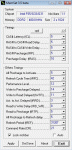
Can you tell me the exact timing settings for your RAM? Not just the main ones, but the addition timing settings you have in BIOS as well?
Anusha said:Nope. You have to check them manually.
Can you tell me the exact timing settings for your RAM? Not just the main ones, but the addition timing settings you have in BIOS as well?
Sorry for late reply.. will this be enough?
Similar threads

- Replies
- 24
- Views
- 2K

- Replies
- 1
- Views
- 134


- Replies
- 0
- Views
- 159

- Replies
- 10
- Views
- 322

