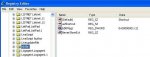
1.type regedit in "RUN" and click ok
2.Expand HKEY_CLASSES_ROOT
3.Find lnkfile and click on it ( Don't expand it)
4.Rename the first letter of lsShortcut with any letter otherthan l (such as asShortcut etc.)
5.Logoff
6.logon
Warnings
If you don't know about registry then don't do this.
Do it at your own risk.
If you are not sure about what are you doing then back up your registry first.
2.Expand HKEY_CLASSES_ROOT
3.Find lnkfile and click on it ( Don't expand it)
4.Rename the first letter of lsShortcut with any letter otherthan l (such as asShortcut etc.)
5.Logoff
6.logon
Warnings
If you don't know about registry then don't do this.
Do it at your own risk.
If you are not sure about what are you doing then back up your registry first.