


Galaxy SHW-M110S වැරදි firmware දාලා අප්සෙට් උනාම ඇන්රෝඉඩ් 2.1 වල
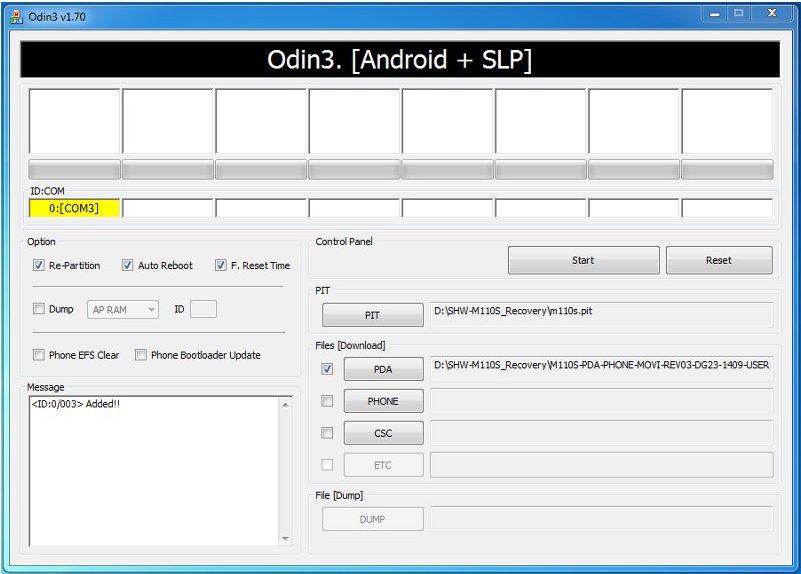
2. Press PIT
3. Browse to m110s.pit
4. Re-Partition MUST be checked.
5. Press PDA
6. Browse to M110S-PDA-PHONE-MOVI-REV03-DG23-1409-USER.tar.md5
7. Put phone in Download Mode (Home + Power)
8. Connect phone to PC via USB
9. You should see ID:COM turn yellow and a port number.
10. Press Start
11. Wait 2-3 minutes for the flash to complete and the phone to reboot.
12. Open or Reset Odin3
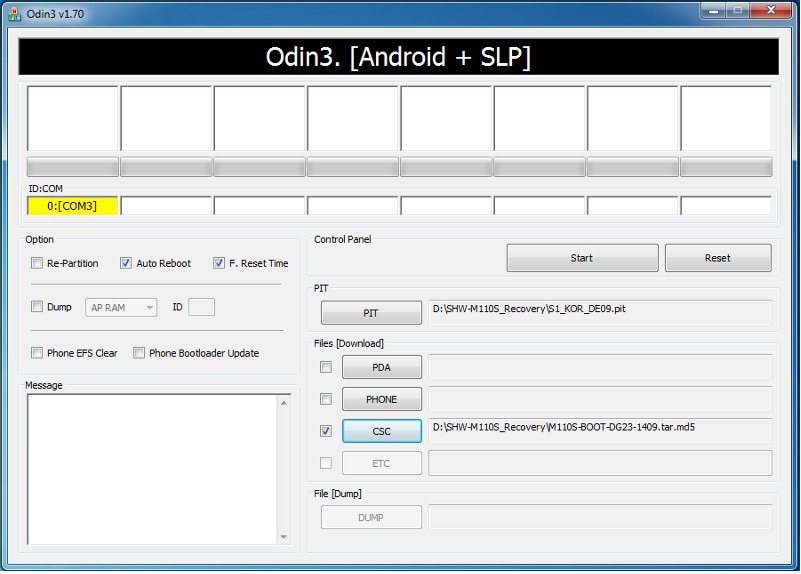
13. Press PIT
14. Re-Partition MUST NOT be checked.
15. Browse to S1_KOR_DE09.pit
16. Press CSC
17. Browse to M110S-BOOT-DG23-1409.tar.md5
18. Put phone in Download Mode (Home + Power)
19. Connect phone to PC via USB
20. You should see ID:COM turn yellow and a port number.
21. Press Start
22. Wait 30-60 seconds for the flash to complete and the phone to reboot.
23. Open or Reset Odin3
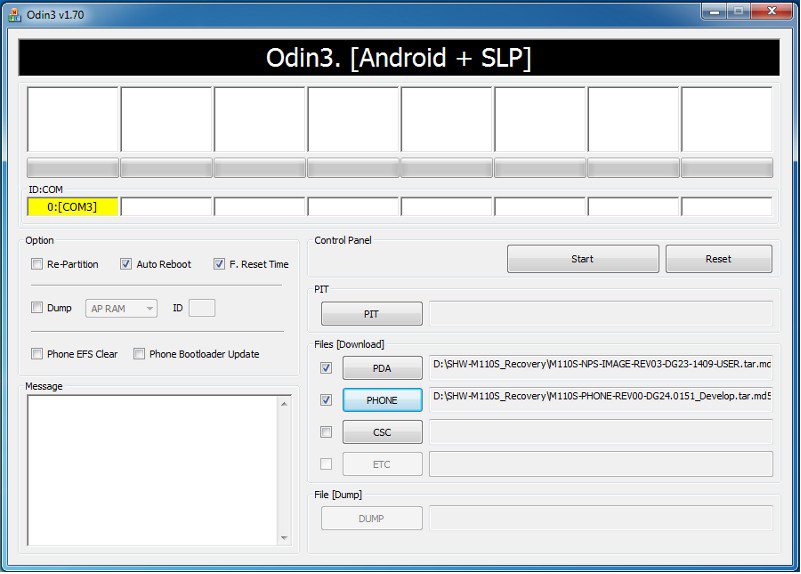
24. Press PDA
25. Browse to M110S-NPS-IMAGE-REV03-DG23-1409-USER.tar.md5
26. Re-Partition MUST NOT be checked.
27. Press PHONE
28. Browse to M110S-PHONE-REV00-DG24.0151_Develop.tar.md5
29. Put phone in Download Mode (Home + Power)
30. Connect phone to PC via USB
31. You should see ID:COM turn yellow and a port number.
32. Press Start
33. Wait 2-3 minutes for the flash to complete and the phone to reboot.
34. You should now be able to do a complete boot.
more details and download links available in my blog
http://gadgetboylk.blogspot.com/2012/11/how-to-recover-shw-m110s-recovery-to-be.html
http://www.4shared.com/zip/In6R5gmA/repair.html
NOTICE: Use with SHW-M110S Only
Use @ your Own risk
1. Open Odin3Use @ your Own risk
2. Press PIT
3. Browse to m110s.pit
4. Re-Partition MUST be checked.
5. Press PDA
6. Browse to M110S-PDA-PHONE-MOVI-REV03-DG23-1409-USER.tar.md5
7. Put phone in Download Mode (Home + Power)
8. Connect phone to PC via USB
9. You should see ID:COM turn yellow and a port number.
10. Press Start
11. Wait 2-3 minutes for the flash to complete and the phone to reboot.
12. Open or Reset Odin3
13. Press PIT
14. Re-Partition MUST NOT be checked.
15. Browse to S1_KOR_DE09.pit
16. Press CSC
17. Browse to M110S-BOOT-DG23-1409.tar.md5
18. Put phone in Download Mode (Home + Power)
19. Connect phone to PC via USB
20. You should see ID:COM turn yellow and a port number.
21. Press Start
22. Wait 30-60 seconds for the flash to complete and the phone to reboot.
23. Open or Reset Odin3
24. Press PDA
25. Browse to M110S-NPS-IMAGE-REV03-DG23-1409-USER.tar.md5
26. Re-Partition MUST NOT be checked.
27. Press PHONE
28. Browse to M110S-PHONE-REV00-DG24.0151_Develop.tar.md5
29. Put phone in Download Mode (Home + Power)
30. Connect phone to PC via USB
31. You should see ID:COM turn yellow and a port number.
32. Press Start
33. Wait 2-3 minutes for the flash to complete and the phone to reboot.
34. You should now be able to do a complete boot.
more details and download links available in my blog
http://gadgetboylk.blogspot.com/2012/11/how-to-recover-shw-m110s-recovery-to-be.html
http://www.4shared.com/zip/In6R5gmA/repair.html
Last edited:


