


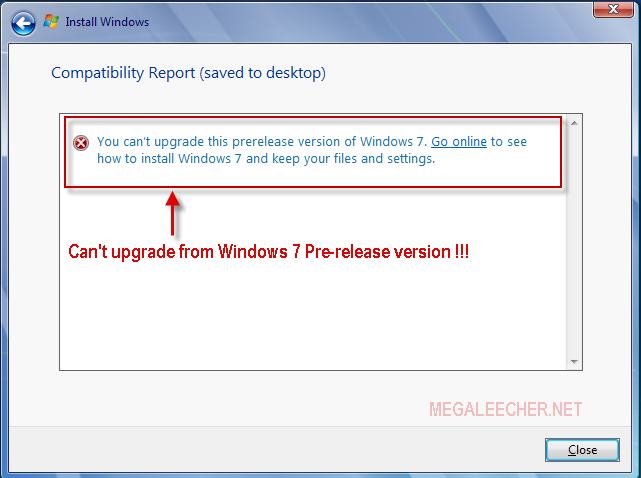
If you jumped onto Microsoft Windows 7 pre-release version (Beta or RC) you can't upgrade to the final RTM version and need to do an clean install loosing all your settings and installed application as Windows 7 setup won't let you upgrade from a pre-release version to final build displaying error as below.
Luckily there is a simple config-file hack which allows you to do an in-place upgrade from Windows 7 pre-release to final version keeping your files, settings and applications intact.
Bypassing Windows 7 RTM setup pre-release check and update :
1.Download the Windows 7 RTM ISO and extract the contents to a folder.
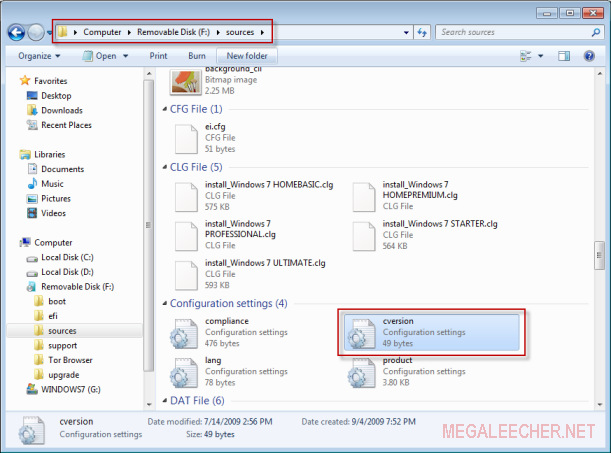
2.Now navigate to sources directory in extracted folder and open cversion.ini in notepad for editing, also don't forget to remove the read-only flag from the file.
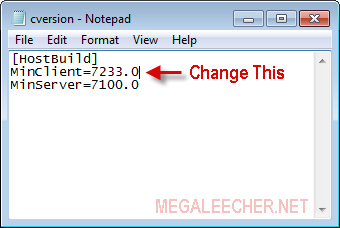
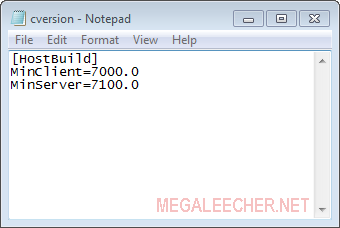
3.Now change MinClient value in this file to 7000 or lower and save it as shown below.
4.Launch the setup and if will allow you to upgrade.
Luckily there is a simple config-file hack which allows you to do an in-place upgrade from Windows 7 pre-release to final version keeping your files, settings and applications intact.
Bypassing Windows 7 RTM setup pre-release check and update :
1.Download the Windows 7 RTM ISO and extract the contents to a folder.
2.Now navigate to sources directory in extracted folder and open cversion.ini in notepad for editing, also don't forget to remove the read-only flag from the file.
3.Now change MinClient value in this file to 7000 or lower and save it as shown below.
4.Launch the setup and if will allow you to upgrade.


