ashan.shanthirathne said:
mchn mage lptp ekata mama avg try karala baluwa
eeeta passe eka ain karala viruz guard natuwa 2weekz run kala
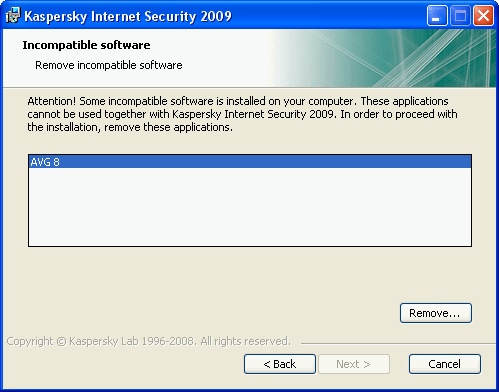
dan mama kazpersky danakota "incompetible s/w has to be removed kiyala AVG identify karanawa"
e unata mage system eke add or remove programz wala AVG pennanne naha
wut shld i do 2 inztl kaz agn
Sos
In case you have installed any AVG product (AVG Anti Virus version 7 or 8), Kaspersky will not install showing incompatible software installed error even if you have uninstalled AVG using the control panel. This happens because the AVG has made registry entries while installing and this has not been removed even after uninstall. Kaspersky will not install and will give out incompatible software installed error as long as the registry values are not deleted.
To remove the AVG registry entries, open Registry Editor (Start-> Run-> Regedit). In the registry editor, navigate to the entries mentioned below,
HKEY_LOCAL_MACHINE\SOFTWARE\Microsoft\Windows\CurrentVersion\Uninstall\AVG7Uninstall
HKEY_LOCAL_MACHINE\SOFTWARE\Microsoft\Windows\CurrentVersion\Uninstall\AVG6INSTALL
HKEY_LOCAL_MACHINE\SOFTWARE\Microsoft\Windows\CurrentVersion\Uninstall\AVG8Uninstall
HKEY_LOCAL_MACHINE\SOFTWARE\AVG\Avg8
Right click on these entries and then delete them. If you are not comfortable about deleting registry entries, you can use a free registry cleaner. If you are using a 64 bit machine, then these are the entries to be removed.
HKEY_LOCAL_MACHINE\SOFTWARE\Wow6432Node\Microsoft\Windows\CurrentVersion\Uninstall\AVG7Uninstall
HKEY_LOCAL_MACHINE\SOFTWARE\Wow6432Node\Microsoft\Windows\CurrentVersion\Uninstall\AVG6INSTALL
HKEY_LOCAL_MACHINE\SOFTWARE\Wow6432Node\Microsoft\Windows\CurrentVersion\Uninstall\AVG8Uninstall
HKEY_LOCAL_MACHINE\SOFTWARE\Wow6432Node\AVG\Avg8
Once these entries are removed, Kaspersky installation will be completed normally. Alternatively you can also use the AVG cleaner or Kaspersky removal tool for AVG8.