VS Code help

Rukaef

Well-known member
  • Jul 17, 2014
    7,634
    846
    113
    ●● මාරවිල ●●
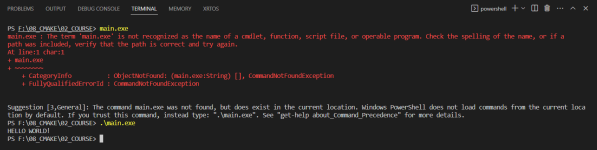
    Ai machanla path eka mehema dunnama witharak ganne.
    Meka normal widihata hadaganne kohomada kiyanna danna kenek?


    1678430458154.png

    ------ Post added on Mar 10, 2023 at 12:11 PM

    Bump
    ------ Post added on Mar 10, 2023 at 12:18 PM
     

    Attachments
    • 1678430051306.png
      1678430051306.png
      39.2 KB · Views: 93
    Last edited:

    Aurelion Sol

    Member
    Sep 11, 2022
    14
    19
    3
    philippines
    ughhhh same thing happened to me 😩
    but the reason why using "." before "main.exe" works is that it specifies the current directory as the starting point for the path. without specifying the current directory, the system would look for "main.exe" in the system's PATH environment variable, which contains a list of directories where executable files can be found.

    by using ".", u are telling the system to look for "main.exe" in the current directory (the directory where u are running the command)

    so, in short, adding "." before "main.exe" explicitly specifies the location of the executable file, whereas without it, the system searches for the file in the directories specified by the PATH environment variable
     

    Rukaef

    Well-known member
  • Jul 17, 2014
    7,634
    846
    113
    ●● මාරවිල ●●
    ughhhh same thing happened to me 😩
    but the reason why using "." before "main.exe" works is that it specifies the current directory as the starting point for the path. without specifying the current directory, the system would look for "main.exe" in the system's PATH environment variable, which contains a list of directories where executable files can be found.

    by using ".", u are telling the system to look for "main.exe" in the current directory (the directory where u are running the command)

    so, in short, adding "." before "main.exe" explicitly specifies the location of the executable file, whereas without it, the system searches for the file in the directories specified by the PATH environment variable
    Ok then,
    Is there a way to change this behavior?

    My goal is to experiment with CMake and Makefile.
    Define file paths in those file types sometimes throw errors about file paths.😕
     

    ndilshan1989

    Well-known member
  • Dec 6, 2022
    1,975
    3,590
    113
    Use linux/unix for C/C++ development.

    System/User path ekata ube program eka danna epa ban

    ./main.exe thama harima widiya.. . kiyanne current directory..

    Path ekata watennna hadanna program eka install karanna hadanawanm...
     

    Aurelion Sol

    Member
    Sep 11, 2022
    14
    19
    3
    philippines
    Ok then,
    Is there a way to change this behavior?

    My goal is to experiment with CMake and Makefile.
    Define file paths in those file types sometimes throw errors about file paths.😕
    ofc by modifying the system's PATH environment variable to include the directory containing the executable file. to modify the PATH variable, first of all open the start menu and search for "Environment Variables" and click on "Edit the system environment variables after that the system properties window that opens, click on the "Environment Variables" button. so under "System Variables," find the "Path" variable and click "Edit." in the "Edit environment variable" window, click "New" and add the path to the directory containing the executable file and click "OK" on all windows to save the changes.
    now, when u type the executable file name without the "." prefix, the system will search for the file in the directories specified by the PATH variable, including the directory u added 😃

    alternatively, u can also specify the full path to the executable file when running it, regardless of the current directory or the PATH variable. this can be done by typing the entire path to the executable, such as "F:\08_CMAKE\02 COURSE\main.exe"